



Connecting Telegram
Set up delivery to Telegram: create a bot via BotFather, link it to the agent, and get your digests right on your phone.

ASCN Team
11 June 2026
Email and calendar are connected. Now you need a delivery channel — a place where the agent will send your digest.
We're choosing Telegram for a simple reason: notifications arrive on your phone instantly. No need to open a browser, log into ASCN, or check your email — the message appears right where you already chat with colleagues.
How it works
In Telegram, the agent communicates through a bot. You create a bot using a special service — BotFather — and receive a token. You paste that token into ASCN, and the agent gains the ability to send you messages.
Step 1. Create a bot in Telegram
- Open Telegram and find @BotFather
- Send it the command:
/newbot - BotFather will ask for a bot name — enter something like:
Morning Assistant - Then it will ask for a username (must end with
_bot) — enter something like:andres_morning_bot - BotFather will send you a token — a long string like
7412365890:AAF...
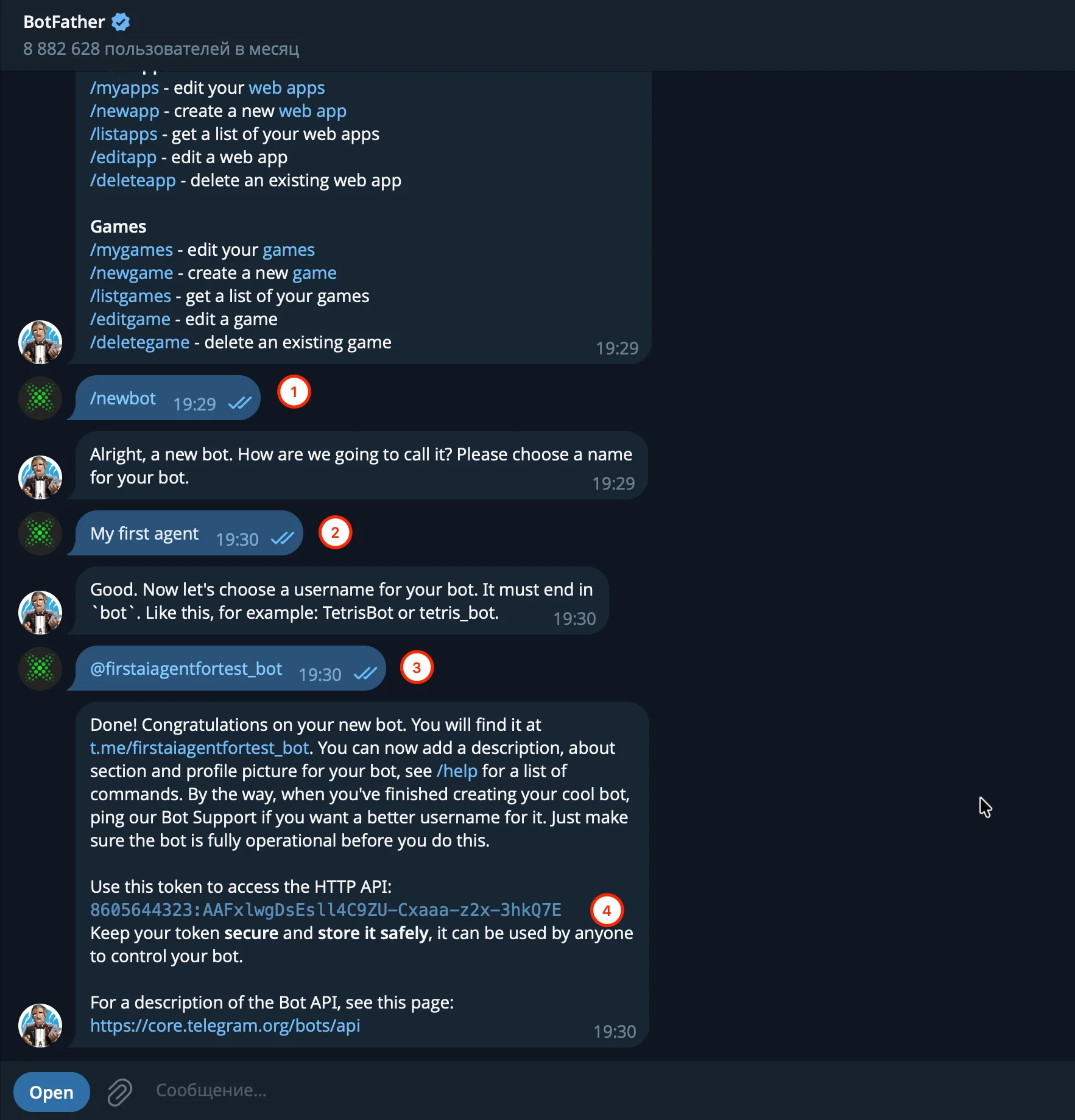
BotFather
Copy the token — you'll need it in the next step.
Step 2. Connect the bot in ASCN
The full version of this lesson is available only with the Personal / VIP (365 day's) / Gold (180 day's) / Start / Business plan. Click the button and subscribe to access all lessons.
Choose a plan