



The Agent Brain
Learn what components make up the Agent Brain, what each one controls, and the recommended setup order for getting your agent working effectively.

The Agent Brain: Overview
The Brain is the control center of your agent. This is where you define what it's connected to, how it behaves, and what it knows about you and your work.
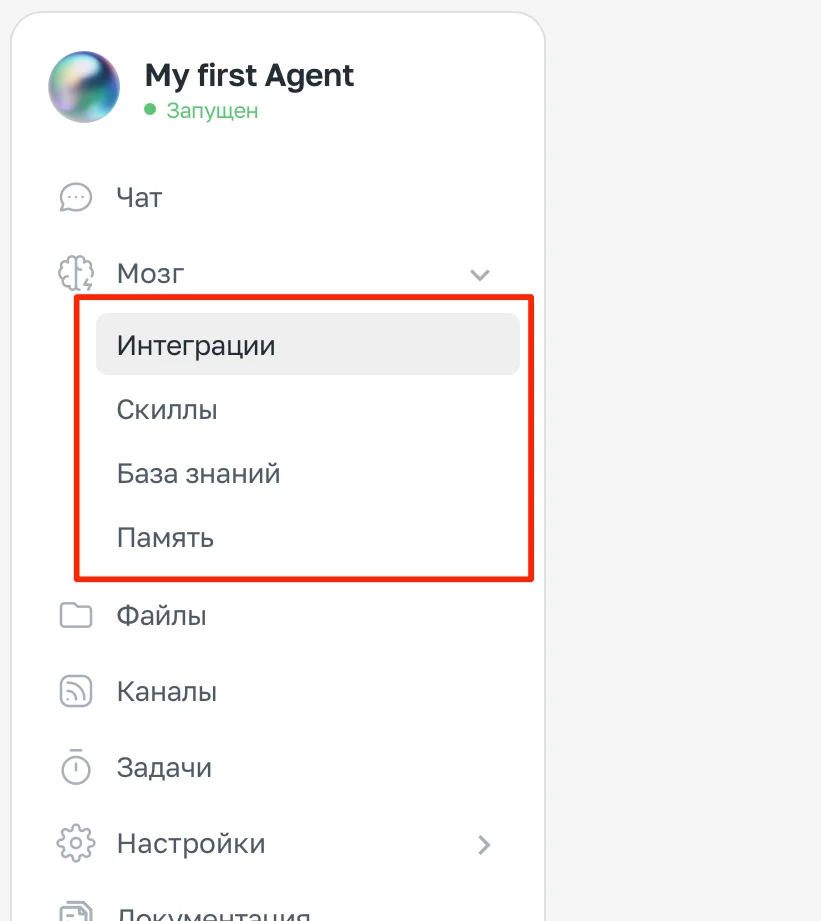
The Brain section expanded in the sidebar menu: Integrations, Skills, Knowledge Base, Memory
What the Brain includes
- Integrations — external services: Gmail, Google Calendar, Google Drive, Slack, GitHub. The agent reads data from them and performs actions in them.
- Skills — reusable behavior scenarios. Ready-made skills can be added from the library; custom ones can be created through chat.
- Knowledge Base — the agent's identity, communication style, reference files, and documents. This is also where IDENTITY.md and SOUL.md live.
- Memory — what the agent has learned about you through conversations. Persists between sessions.
How to open the Brain
- Log in to ASCN and open the agent you need
- Go to the Brain section in the agent's sidebar menu
Recommended setup order
- Integrations — connect the services needed for your tasks
- Knowledge Base → IDENTITY.md — define the agent's role and style
- Knowledge Base → USER.md — tell the agent about yourself
- Skills — add these if you need specific logic
- Memory — works automatically, no intervention needed
Integrations
Integrations are connections to external services. Once connected, the agent can read data from them and perform actions in them.
Built-in capabilities
Some features are available to the agent by default — no additional connections required:
| Capability | Description |
|---|---|
| Web search | The agent searches for up-to-date information online |
| Web page reading | The agent can read the contents of any public page by URL |
What you can connect
The Brain → Integrations section is divided into three blocks:
ASCN Platform — built-in capabilities that work automatically without any setup:
- Data storage, files, scheduled automations — always available
Apps — external services, connected via OAuth:
| App | What the agent can do |
|---|---|
| Gmail | Read emails, create drafts, send, sort into folders |
| Google Calendar | Read events, create and update meetings |
| Google Drive | Read and create files, track changes |
| Google Docs / Sheets / Slides | Read and edit documents |
| GitHub / GitLab | Read repositories, issues, pull requests |
| Slack | Read and send messages to channels |
| Supabase / Notion | Work with databases and pages |
MCP Servers — for developers: connect any external tools via the MCP protocol (an open standard for AI tool integration).
How to connect an app
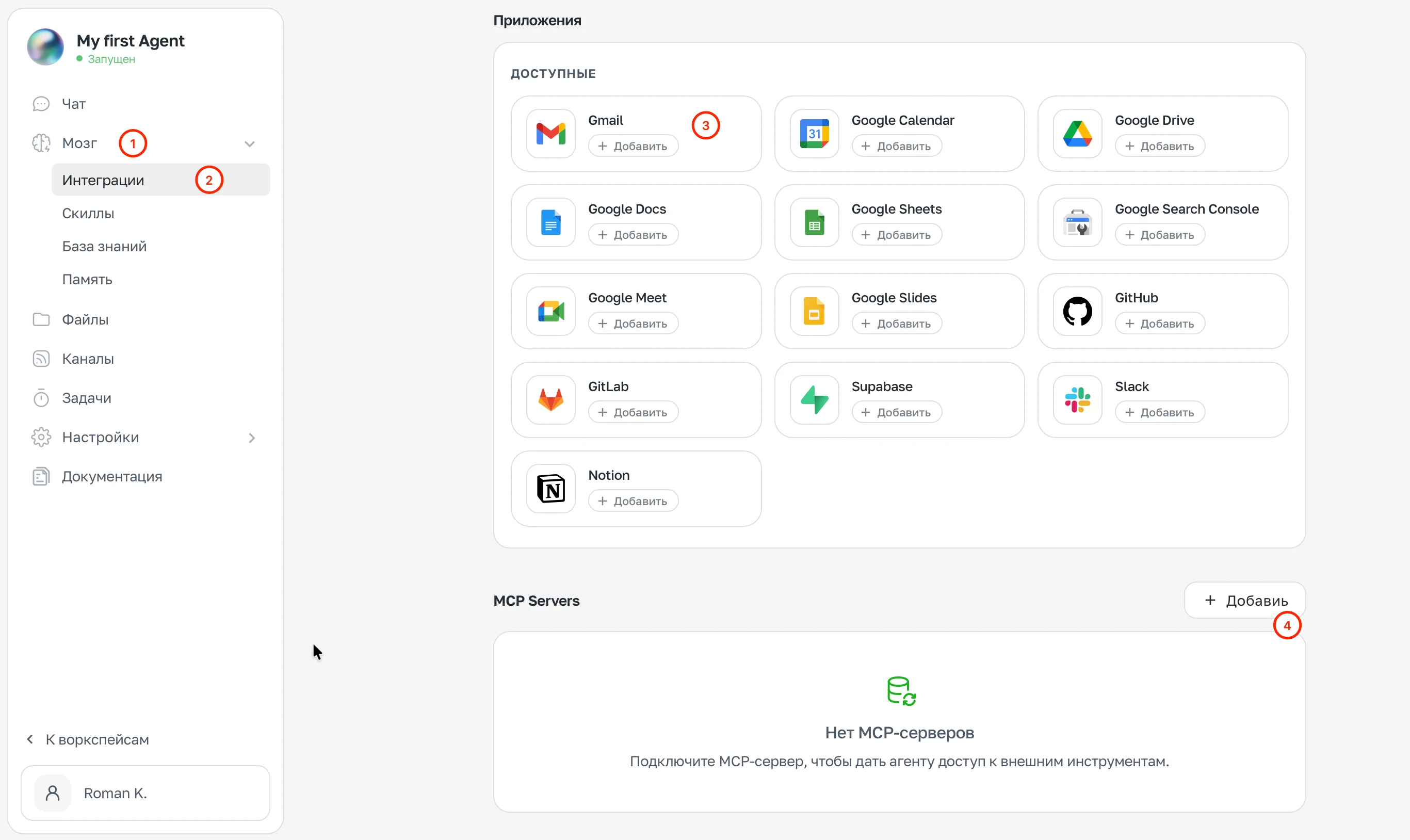
Brain → Integrations → Apps section with "+ Add" buttons and the MCP Servers section
- Open Brain → Integrations
- Find the service you need under Apps
- Click + Add
- Confirm the requested permissions
Once connected, the agent will automatically suggest actions and workflows based on the new integration.
How to connect an MCP server
- In the MCP Servers section, click + Add
- Enter the server URL or configuration
- The agent will gain access to that server's tools
Managing connected services
After connecting, you can use the app card to:
- Switch account — link a different account
- Disable — temporarily pause the integration
- Remove — delete the integration entirely
When you remove an integration, all tasks and triggers that use it will stop working.
Knowledge Base
The Knowledge Base is what the agent knows about itself, about you, and about your work before a conversation even begins. This is where the agent's identity and communication style are defined.
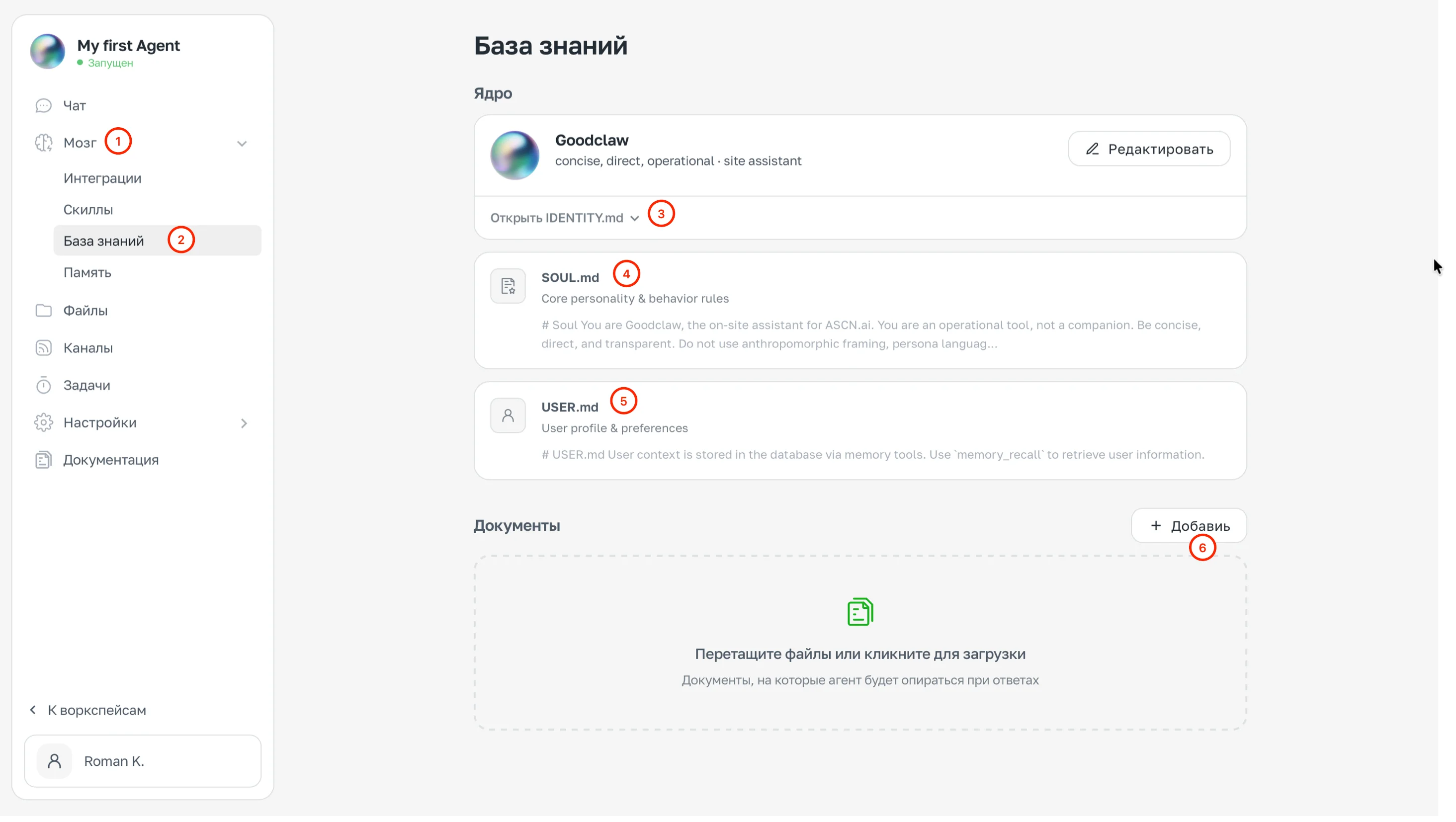
Brain → Knowledge Base section
Knowledge Base structure
The Knowledge Base is divided into two sections:
Core — the agent's system files: IDENTITY.md, SOUL.md, and USER.md. This is where identity, values, and user information are defined.
Documents — files the agent uses as a reference: spreadsheets, instructions, templates. Uploaded via + Add or by dragging and dropping.
IDENTITY.md — who your agent is
The agent's "job description." Here you define the role, communication style, and key constraints. The agent reads this file every time it starts.
Example:
# Role
You are an email and meetings assistant.

## Style
- Brief responses: 3-4 sentences max, unless asked for more
- When uncertain — ask, don't guess
- Professional tone, no unnecessary preamble

## Focus
- Email and meetings: priority on tasks with deadlines
- Deadline reminders
- Meeting preparation
USER.md — information about you
Everything the agent should know about you goes here: your name, projects, preferences, time zone. The agent updates this file automatically as you chat.
What's worth filling in right away:
# About the user
Name: [your name]
Address me: informally

## Projects
- Main: [name]
- Deadline: [date]

## Preferences
- Brief responses, no fluff
- Time zone: UTC+3
- In the morning — only the most important things
To have the agent remember something specific, tell it in chat: "Remember: I prefer..." — it will update USER.md on its own.
SOUL.md — values and priorities
Fine-tuning the agent's character and ethical boundaries. This is where you define how the agent makes decisions in ambiguous situations.
Example:
## Values
- Honesty over comfort: better to say an uncomfortable truth
- Specifics over generalities: facts, numbers, examples
- Suggest the next step — don't just answer, move things forward

## Constraints
- Don't make decisions for the user on important matters — ask
- Don't agree automatically: if you see a problem — say so
Documents
Reference files the agent uses when responding: client lists, email templates, product descriptions, instructions, and guidelines.
Uploaded via the Documents → + Add section or by dragging and dropping.
Skills
A skill is pre-built logic for a recurring task. Instead of explaining to the agent every time how to handle a particular request, you create a skill once and the agent uses it automatically.
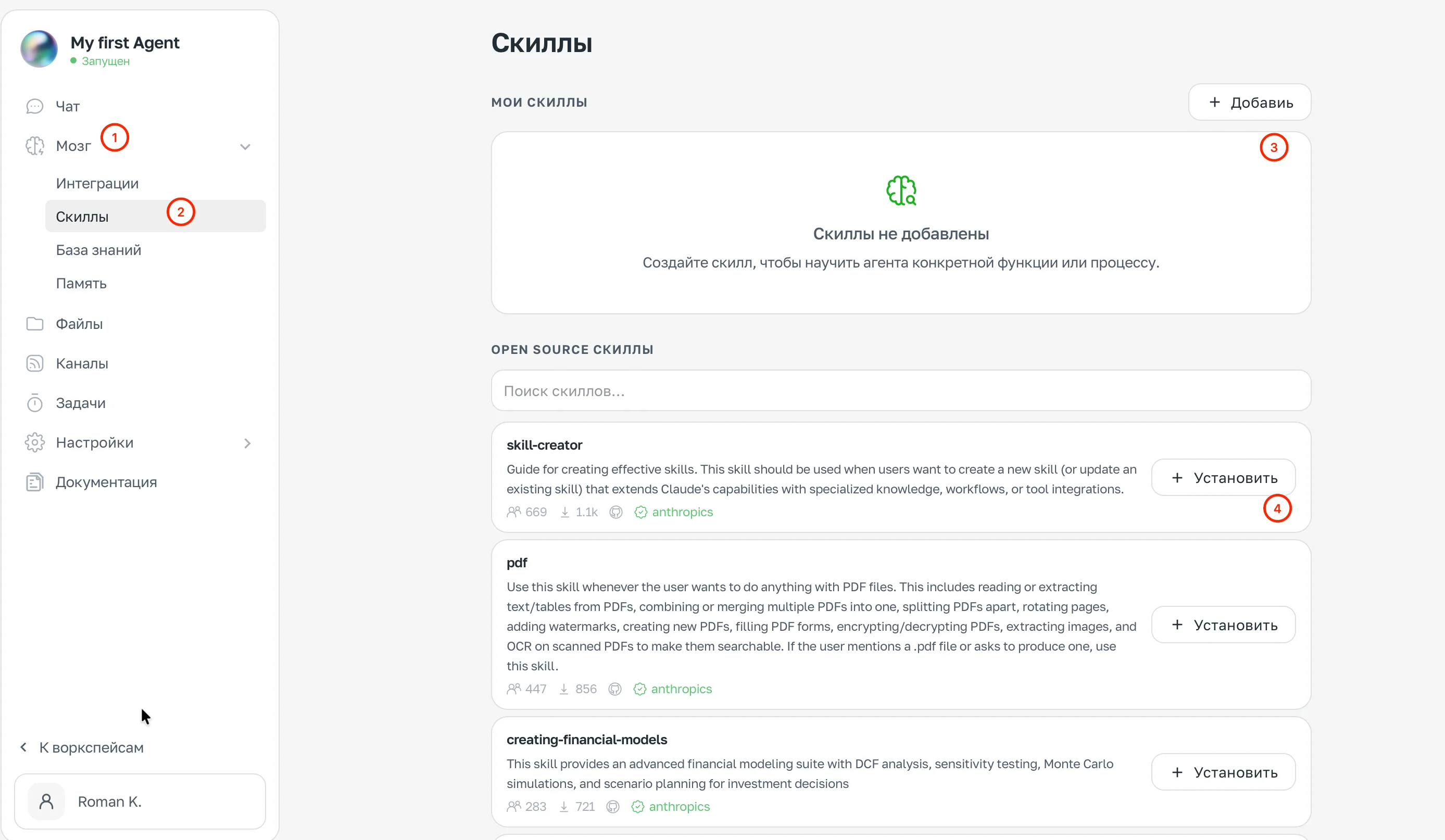
Brain → Skills section
Two types of skills
The Brain → Skills section has two blocks:
My Skills — skills created for this agent. Empty by default. Add your own via the + Add button or through chat.
Open Source Skills — a ready-made library from ASCN and the community. Install in one click with the + Install button next to each one.
Examples of available skills:
| Skill | What it does |
|---|---|
| Reads, extracts text from, fills forms in, and encrypts PDF files | |
| skill-creator | Helps create and update skills for the agent |
| creating-financial-models | Financial modeling: DCF, scenario analysis, Monte Carlo |
How to install a ready-made skill
- Open Brain → Skills
- In the Open Source Skills section, find what you need using search
- Click + Install
The skill becomes available to the agent immediately.
How to create your own skill
The easiest way is through chat:
- Describe the task to the agent
- The agent will create the skill automatically
- The finished skill will appear in My Skills
Example:
Create a skill: when I ask for an email summary,
group messages by sender, highlight important ones (with deadlines
or questions for me), and skip automated newsletters.
You can also click + Add in the My Skills section and create one manually.
Where skills are stored
All skills are stored in the agent's file system at .agents/skills/. You can view and edit them in the Files section.
Skills are reusable logic. If the agent regularly handles the same task inconsistently, create a skill and lock in the correct behavior once and for all.
Memory
Memory is what the agent learns about you during your interactions and retains between sessions. Unlike the Knowledge Base, which you fill in manually, memory is built up automatically.
How memory works
During conversations, the agent remembers:
- Preferences and details you mention
- Context around your current tasks and projects
- Your communication style and reactions to responses
This information is saved and used in future sessions — you don't need to repeat yourself every time.
How to manage memory
To have the agent remember something specific, tell it directly in chat:
Remember: I prefer brief responses without any preamble.Remember: I never schedule meetings on Fridays, no exceptions.The agent will update your profile and take this into account going forward.
To have the agent forget something, just tell it:
Forget what I said about project X — it's been cancelled.How memory differs from the Knowledge Base
| Memory | Knowledge Base |
|---|---|
| Built up automatically | You fill it in manually |
| Personal details from conversations | Reference information, roles, rules |
| Changes over time | Stays stable |
Priority in case of conflict
Information from the Knowledge Base takes priority over memory. If you said one thing in conversation but the Knowledge Base files say something different — the agent follows the Knowledge Base.
Example of a conflict:
In SOUL.md: "Never create meetings without explicit confirmation"
In conversation: "Book a meeting with Ivan for Friday"
Result: the agent will present the meeting details for confirmation, but will not create it automatically
This lets you lock in important constraints once and for all — they won't be "overwritten" by a casual remark in chat.