



- Русский
- English
- Português
AI Assistant: What It Is and How to Use It at Work

Key takeaways
An AI assistant is a program built on a large language model that takes tasks in plain language: shorten a document, reply to an email, make sense of a spreadsheet, pull together a market summary. The assistant prepares the result, and the decision and the action stay with you. If you need the steps to run on their own — the email goes out to the client, the task lands in your tracker — that is a job for an AI agent.
A familiar morning: twenty new emails in your inbox. A client is waiting for a proposal, a colleague sent a contract for sign-off, and there is a meeting in an hour nobody has prepared for. Not every step here needs you. Below: what to hand to an assistant, how to pick a tool, and when it is time to move on to automation.
Contents:
- What an AI assistant is, in plain terms
- What tasks you can give an AI assistant
- Types of AI assistants
- How companies use AI assistants: three examples
- How to choose an AI assistant
- How to start using an AI assistant
- Why ASCN.ai: from AI assistant to process automation
- FAQ
What an AI assistant is, in plain terms
In plain terms, an AI assistant is a helper you can hand a document and say: "Cut this down to one page, keep the main conclusions, and list separately the questions the author didn't answer." No three-page instruction needed. The assistant parses the request, works with what you gave it, and returns the result in the format you asked for.
It is useful in almost any role. A business owner gets through a report faster, a marketer gets several versions of an ad, a sales rep gets a draft email to a client.
Here is where people trip up most often: what a language model can do and what a specific assistant has access to are two different things. The model can write an email, but that doesn't mean the assistant will send it from your inbox. The model can analyze documents, but it has no access to your company's files until you grant it.
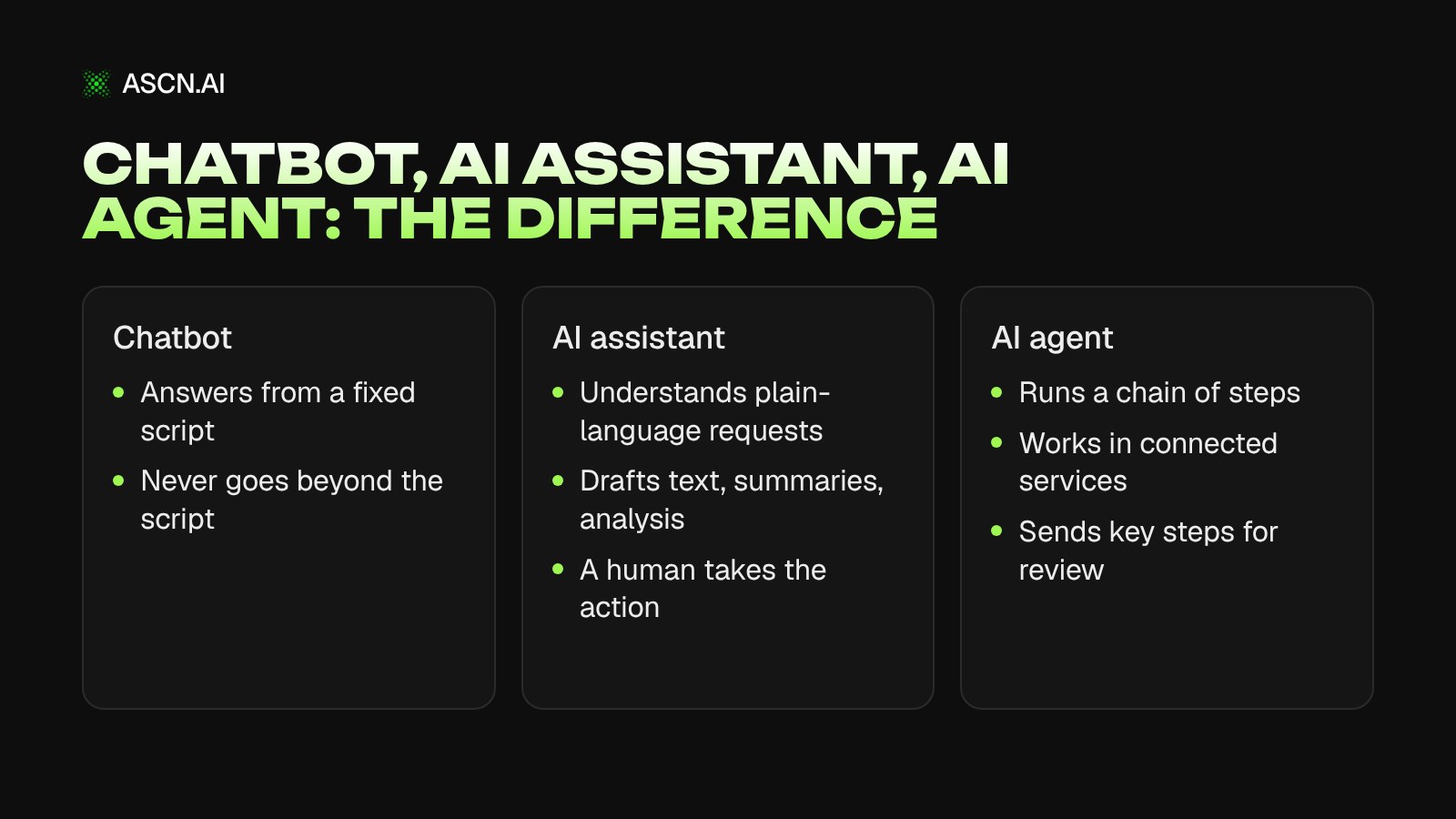
To get beyond the chat window, you need integrations with your work tools and permission to act. That is exactly where the line runs between three levels: a chatbot answers from a script, an assistant helps with a task, an agent takes the actions itself.
What tasks you can give an AI assistant
An AI assistant at work pays off most on tasks that repeat and follow the same pattern: emails, documents, summaries, first-pass analysis. Here are five scenarios that are the easiest place to start.
Emails and documents
After a sales call, the rep has a few notes: the client wants a product demo, the budget is still being approved, they expect an answer by Friday. The assistant turns these into three things — a short meeting summary, a list of agreements, and a draft follow-up email with next steps.
Long documents work the same way: shorten, edit, translate, or put together the first version of a proposal.
When you get a lot of email every day, pasting each one into a chat gets old fast. A workflow built around your email service makes more sense: for example, the Gmail Assistant in ASCN handles email sends and contact tracking and works directly in Gmail.
Research and competitor analysis
Before a product launch, a marketer studies the market: who already sells something similar, how pricing differs, which audience competitors target. Done by hand, that means dozens of open tabs and a spreadsheet filled in by copy-paste.
The assistant gathers the available information, sorts it into your categories, and suggests questions for the next round of research. The limitation is serious: without access to current sources, it will give you outdated data or get details wrong.
The rule is simple — ask for links to sources and double-check anything you base a decision on. The assistant is great for getting up to speed on a topic quickly. Draw conclusions about the market from real data, not from the model's answer.
Planning your day and meetings
Before a call with a prospect, you need to recall the email history and past agreements. The assistant will put that into a short brief — if it has access to your emails and notes.
After the meeting, it writes up the outcome: who owns what, which deadlines were agreed, what happens next. For teams whose agreements get lost between email, notes, and the calendar, ASCN has a Meeting minutes with tasks template: the minutes are built from the transcript, and tasks are created automatically.
One setting is a must. If nobody named an owner or a deadline in the meeting, the assistant shouldn't make them up — have it flag those items as open.
Marketing copy
A company needs to run a blog and a newsletter. The assistant suggests topics, builds a monthly content plan, writes drafts, and adapts one piece for different channels.
At low volume, that's enough. Once you need content every week, research, review, and approvals pile on, and launching each step by hand eats up time. The next step is a workflow that links the stages together, such as Content Factory built on ASCN AI agents.
Automation doesn't replace the editor. A human still reads the copy, and campaign decisions are made on data about your audience, demand, and results.
Spreadsheets and reports
Spreadsheets are a different job: not writing text, but making sense of the numbers and explaining what changed.
Example: an online store's revenue dropped over the month. The spreadsheet has sales, product categories, and orders. The assistant compares the periods, shows where the dip is sharpest, and offers a few possible explanations.
It won't pin down the actual cause. The drop could come from seasonality, price changes, items being out of stock, or lower demand, and each hypothesis has to be checked against more data. What you do get is a faster sense of where to look — especially when there are many spreadsheets and little time.
Types of AI assistants
There is no single AI assistant that handles every task equally well. Tools fall into four types, and you pick one based on the job.
| Type | Where it works | Best for | Setup needed |
|---|---|---|---|
| General-purpose | Standalone chat | Text, documents, ideas | None |
| Built-in | Work apps | Email, documents, meetings | Minimal |
| Specialized | One process | Email, sales, marketing | Per process |
| AI agent | Connected services | Chains of actions | Integrations and access |
General-purpose assistants — ChatGPT, Claude, Google Gemini — fit when your tasks keep changing and you don't want to configure anything. A built-in assistant works where you already spend your day: Microsoft 365 Copilot, for example, is integrated with Microsoft 365 apps and helps with documents, email, and meetings. Specialized assistants are built around a specific process, and they are more convenient when people repeat the same actions day after day.
AI agents are the next level. An agent runs a sequence of actions through connected tools: it gathers information about a prospect, drafts an email, and hands it to a team member for review. For more on how agents work, see our guide to personal AI agents.
In practice, the lines are blurry: some assistants have agent features, and agents can hold a normal conversation. Look at which actions the tool actually performs — the product name tells you little. We compared specific services, with pricing and strengths, in our ranking of the best AI assistants for business in 2026.
How companies use AI assistants: three examples
Large companies roll out assistants for one reason — to take a load of everyday routine off their employees. Below are three public examples with numbers published by the companies themselves and by the vendor.
Vodafone: time saved for employees
Vodafone tested Microsoft 365 Copilot in an early access program with 300 employees. According to Microsoft's case study, participants reported saving about four hours per person per week. They used the assistant for working with documents and analyzing contracts.
You can't carry that number over to your business directly. The result depends on the nature of the work, on how processes were set up before the rollout, and on how often people actually open the tool.
Capita: 9,000 work hours in a month
Capita provides business services and builds technology solutions. The company rolled out Microsoft 365 Copilot, and according to Microsoft's official case study, this saved 9,000 work hours in a month.
The assistant handled routine tasks: preparing documents, transcribing meetings, writing short meeting recaps. The effect added up from many small operations people do every day — no single big project behind it.
Klarna: handling customer inquiries
Fintech company Klarna launched an AI assistant powered by OpenAI in its customer service. Klarna's official announcement gives data for the first month of operation (2024): 2.3 million conversations, about two-thirds of support chats. Average resolution time fell from about 11 minutes to under two, and repeat inquiries dropped by 25%.
Unlike Vodafone and Capita, here the AI talked to customers directly. A small company doesn't need to start at that scale: a sensible first step is answering common questions or routing inquiries to the right people.
None of these three examples guarantees the same result for you. Everyone starts from different conditions, so test the effect on your own tasks.
How to choose an AI assistant
Task first, tool second. Until you know what work you're handing to the assistant, comparing plans and features is pointless.
Writing, translation, getting your head around a complex topic — a general-purpose assistant will do. If the problem is in email, meetings, or internal documents, you need an assistant that connects to those services. For recurring multi-step tasks, look at specialized tools and AI agents.
Before you buy, run through six points:
- Quality. How often the tool makes mistakes and how much time fixing them takes.
- Integrations. Whether it works with the apps your team already uses.
- Data. Whether it sees current information and company documents.
- Security. What data goes to the service and who controls access to it.
- Cost. What it will cost at your real usage volume, not during a trial.
- Control. Whether you can check the result before an email goes out, data changes, or another important action happens.
Don't chase feature count. If your team edits text now and then, they don't need a complex platform. If the same work repeats dozens of times a week, automating several steps starts to make sense.
How to start using an AI assistant
Roll out an AI assistant one task at a time, not across a whole department at once. A working plan for the first few weeks:
- Pick a task you do regularly: replying to emails, going through documents, meeting recaps.
- Give it to the assistant for a week. Write the request the way you'd brief a new hire, and save the prompts that worked.
- Compare with the old way: how long it took, how many errors you found, how much you had to rework the result.
- If it helps, expand to related tasks. If it doesn't, change the task or the tool.
- See which steps can be linked. Someone reads an email, identifies the topic, drafts a reply, creates a task in the system — if this follows the same rules every time, the chain can become a single workflow.
A sample prompt for step two: "Here's a client email. Draft a reply in 5–7 sentences: confirm the timeline, offer two time slots for a call, keep the tone professional and plain. If the email has a question I don't have an answer to, list it separately."
Step five needs a tool that works with external services, not just one that writes text. Keep important actions with a person at the start: the agent prepares, a human approves.
Why ASCN.ai: from AI assistant to process automation
An assistant handles individual requests. In a company, the goal is usually bigger: stop people from repeating the same chain of actions every day.
An email to a client is often several steps: gather the client's data, check it, draft the message, send it to a manager for approval. A meeting means a transcript, agreements, and a task list. ASCN.AI, a platform of AI agents for business processes, automates chains like these.
What the platform gives you:
- An agent from a description. You describe the task in chat in plain language — the agent builds the workflow and offers to connect the services it needs.
- Your work tools. Gmail, Google Calendar, Google Sheets, Notion, and Slack connect in one click; anything else via API and MCP.
- Control. The agent only sees what you allow, and risky actions run only after you confirm.
- Choice of models. Claude, GPT, Gemini, DeepSeek, Qwen, and others in one subscription; switch the model in one click.
You don't need to build an agent from scratch. Take a ready-made template and adapt it to your process:
- Gmail Assistant — email sends and contact tracking through Gmail;
- Personal Assistant — triages your inbox, drafts replies, adds tasks and deadlines to your tracker, and sends a morning briefing to Telegram.
More workflows are in the template catalog, and you can build your own agent in ASCN Agent. For a step-by-step walkthrough of building an assistant for your business, see our guide to creating an AI assistant for business. You can start for free: the Free plan gives you 500 credits a week and 1 active agent, and paid plans start at $29/month. Running 24/7 and on a schedule, such as the morning briefing, starts with the Start plan.
Our advice: pick one process that eats up your team's hours every week, run an agent on it, and judge the quality. If it works, expand. Automation for the sake of technology doesn't make money.
FAQ
What is an AI assistant in simple terms?
An AI assistant is a digital helper built on a language model. You describe a task in plain words, and it writes text, shortens a document, looks up information, analyzes a spreadsheet, or drafts an email. A person checks the result. The assistant takes actions in your work tools only if it is connected to them and has permission.
How is an AI assistant different from a chatbot?
A traditional chatbot follows a predefined script and answers expected questions. An AI assistant runs on a language model: it understands free-form requests and helps with different tasks, from an email to a report analysis. How far its abilities go depends on the specific product: data access, integrations, and settings.
Can a small business use an AI assistant?
Yes, and the easiest start is with small tasks: email drafts, going through documents, marketing copy, answers to common customer questions. Pick one recurring task and test the assistant on it for a week. Once actions start repeating by the same rules, bring in tools that automate the whole chain.
Can an AI assistant work on its own?
Partly. Some assistants take actions through connected services: they send emails, create tasks, update spreadsheets. What exactly they can do depends on settings, integrations, and the permissions you grant. For important operations — sending something to a client, changing data — keep a human check in place, especially in the first weeks.
Do I need to code to use an AI assistant?
No. You talk to general-purpose assistants in plain language, no code required. Programming may be needed for custom solutions and complex integrations. But many processes can be automated without code: on no-code platforms such as ASCN, you build an agent from a ready-made template and tune it to your task.
How do I know an AI assistant is actually useful?
Compare the same task with and without the assistant. Count not just time but the quality of the result, the number of fixes, and the cost of use. If the assistant speeds up the work and quality holds, the tool pays off. If fixes take more time than you save, change the task or the tool.
AI Agent Desktop: Your Personal AI Assistant for Computer Management
Personal AI Agent Assistant: Complete Guide to Architecture, Tools, and Implementation

From Chatbot to AI Agent: How Businesses Save up to 50,000 ₽ Monthly and Avoid Hallucination Risks
The Best AI Assistants: Top Rankings for 2026
Creating an AI assistant for business: a complete guide