



- Русский
- English
- Português
Meeting minutes with tasks automatically
The ASCN Agent tool allows you to automate meeting minutes and task generation from transcripts, saving hours of manual documentation. By integrating with platforms like Notion, Jira, and Slack, it streamlines team collaboration and ensures every action item is accurately tracked and assigned.

With the ASCN Agent tool, you can automate your minutes and task generation for meetings. Soon, you'll be saving time and improving collaboration with your team.
General Description
With this template, you will automatically create the minutes from your meeting transcript and automatically create task assignments from the transcript using the ASCN Agent. This template integrates with Gmail, Notion and HubSpot, making it easy to automate this process with little to no manual effort. The agent itself has no real-time trigger and only operates on a defined schedule, allowing you to automate your minutes and task creation process effortlessly.
By using the ASCN Agent you will save hours of time that would typically be spent manually documenting and assigning tasks from meetings. The ASCN Agent will automatically extract all of the important decisions, discussion points, and tasks (including who is responsible for completing each task and when they are due) from the transcript and create the associated entries into Jira, Linear, Todoist or Notion. Additionally, it will create a summary of the meeting and post it to Slack or Discord, keeping everyone in the team updated regarding the decisions made and tasks assigned during the meeting.
How the Automation Works
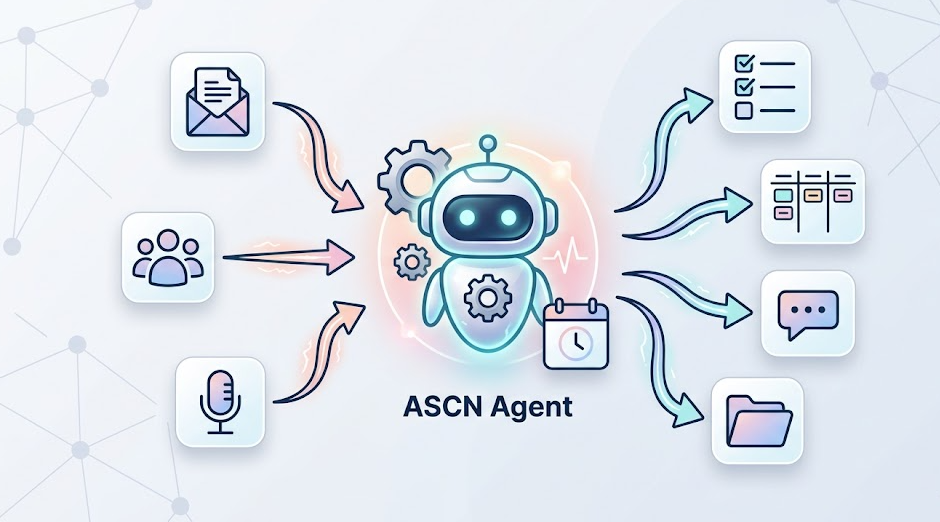
The ASCN Agent will automate your minutes and task generation process, making the entire process much easier. The following illustrates how this occurs:
- The ASCN Agent monitors for new transcripts from any of your preferred sources (e.g., Gmail, Google Meet, Otter.ai) of meetings that you had with your team.
- Key decisions, discussion points, and tasks (including who is responsible for completing the task and what is the deadline for completion of the task) will be extracted from those transcripts.
- The ASCN Agent will then create the tasks in the project management tool that is utilized by the team (e.g., Jira, Linear, Todoist or Notion) associated with the appropriate team member (who is responsible for completing the task).
Why It Is More Efficient Than Manual Work
The productivity of individuals attending meetings is significantly improved by using automation to generate meeting minutes and create or track assigned tasks (with the use of ASCN Agent). Specifically, there are three significant advantages:
- Time Savings: Automating the generation of meeting minutes will result in significant time savings for the time spent producing minutes (20 minutes per meeting) because the generation of minutes will no longer require the person of the meeting to take or transcribe notes and distribute tasks.
- Task Tracking: When members perform their assigned work using ASCN Agent to create and assign tasks, the tasks are tracked and automatically assigned to whoever has been assigned to complete them, virtually eliminating the risk that the task will be missed or that the individual will not remember who assigned them.
- Centralized Information Storage: All information related to the meetings and all associated tasks is stored in a centralized location that is available for use by all members. This results in increased transparency and coordination of responsibilities between members of the team.
With these advantages, teams can focus on their overall objectives, and thereby achieve higher levels of productivity and teamwork. The use of automation also provides a streamlined process and a very high level of accuracy and reliability, which is essential for the operations managers and company owners to be successful in their organizations.
Results Users Achieve
The users of ASCN Agent have reported a dramatic reduction in the amount of time required to prepare meeting minutes as well as increased productivity levels within their teams. According to users of ASCN Agent, they are saving up to 20 minutes of time per meeting; this averages a total savings of 15 hours per month for users to spend on more productive activities such as engaging in future planning or addressing their current operational issues.
Automating the creation and tracking of tasks will greatly reduce the chances of failing to meet deadlines and additionally improve overall productivity. The entire teams project and task information have been saved in one place so that all users have access to view them as needed. This creates a transparency and coordination tool for everyone in the organization. This is especially important to founders and operations managers who have to maintain a high level of organization and control. The following examples demonstrate how the use of ASCN Agent has enabled companies to achieve these benefits, saving time and increasing productivity.
Implementation Examples
A construction company's operations manager used this template to automate their meeting minutes. This enabled them to save an average of 20 minutes per meeting, giving them more time to plan strategically and resolve urgent issues.
A startup's founder also utilized this template as a means to improve interdepartmental coordination. Through the automation of task creation and tracking, he was able to prevent missed deadlines and improve overall productivity.
Setup Instructions
The team used this template by following these instructions:
- Select 'meeting minutes' and 'tasks' as the transcript sources (there is simple way – just paste transcript);
- Run ASCN Agent with a prompt to generate meeting minutes and tasks, including: identify all key decisions and topics and responsible party assignments;
- Set up folder monitoring or API integration to enable autoprocessing;
- Ensure output format meets my expectations (e.g.: meeting summary to be published to Slack/Discord);
- Set up API integrators according to documentation for each service (e.g.: REST with Jira and Slack).
By completing the above steps correctly, your company will successfully be able to build an automated system for creating meeting minutes and tasks, allowing your team to work more efficiently.
