



- Русский
- English
- Português
Content Factory: idea → text → image
Content Factory is an automated system powered by ASCN Agent that independently researches trends, writes texts, and creates images. Learn how to delegate routine tasks to neural network agents in Telegram and free up time for strategic business tasks.

Using ASCN Agents, automate your content generation process in an instant! Research and write content plus create pictures all automatically!
General Description
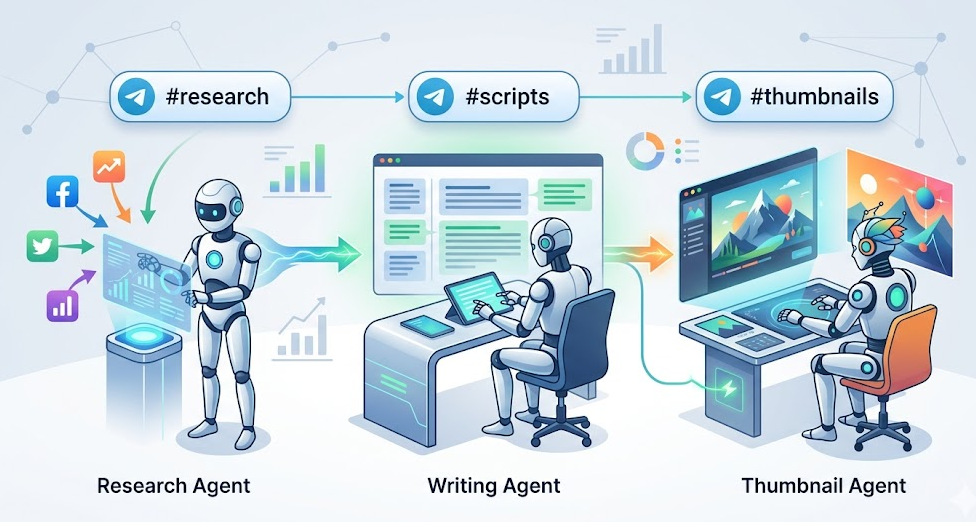
The Content Factory automates content generation by using multiple ASCN Agents to create content. The system includes a Research Agent, a Writing Agent, and a Thumbnail-Image Agent - and each has its own dedicated Telegram channel. ASCN Agents perform their tasks on a schedule (e.g. 8 AM every day).
This system allows marketers and solopreneurs to automate the entire content generation process from researching trends to creating visuals for their content. The research, writing, and visual creation are done completely automatically without you having to lift a finger, allowing you more time to do the things that are more important.
Automating Content Production
When you use the Content Factory, each stage of content production happens automatically. Here's how:
- Research Agent searches for trending topics, competitor content, and viral content across social media platforms every morning at 8:00 AM (EST); identifies top five content opportunities; and posts the list of sources in its dedicated Telegram Channel (
#research). This provides you with an up-to-date list of relevant topics and trends every day of the week. - Writing Agent utilizes the best idea from the (
#research) channel to write a complete script or text for that idea — regardless of whether it is a script, thread or newsletter draft — and publishes the complete text in the#scriptschannel. In writing the text, the Writing Agent also includes all of the required information, so you will receive high-quality written material. - Thumbnail/Image Agent generates images/graphics (i.e. thumbnails) for the completed content through a combination of either a local model and/or by using the Image Generation API. You will find the images available on the
#thumbnailschannel, where you can access them as pre-made visual assets ready for publishing.
All agents run based on a schedule and start automatically on the same day which guarantees that your content will be consistently updated and ready to go live. This automated system allows you to minimize the time spent on daily routine tasks and enables you to invest your energy in other important things while providing you with a high-quality finished product that is current and relevant.
Why is It More Efficient Than Manual Work?
The use of ASCN Agent to automate the content creation process saves significant amounts of time while also improving the overall quality of the products being produced. Here are our top reasons for this:
- Time Savings: Many of the existing repetitive tasks in the system have been automated allowing you to focus your attention towards creating a greater strategic plan around your company and taking your business development to the next level by allocating more time towards those efforts.
- Autonomous Operations: Researching, writing, and creating images all take place without your involvement. These processes are fully automated producing finished content ready to publish immediately requiring no additional time spent on mundane processes.
The Content Factory provides users with the means to reduce the overall time frame to create an output of content, as well as improve the quality of that output which results in greater levels of audience engagement and marketing success.
What Results Do Users Get?
Users report significant improvement in creating and publishing content as a result of using the Content Factory. Below are quotes from our users:
«I cannot believe the amount of time I've been able to free up since starting to use the Content Factory. I now have so much more time available to focus on developing my business. There is a lot of valuable, pertinent content produced that has a positive impact on audience interaction.»
The Content Factory allows you to:
- Saving Time: Making the content creation process automated saves you a lot of time that you could be using for important tasks such as developing your business or planning strategic projects.
- Improving Content Quality: Because each agent is responsible for its own task, all content created will be highly accurate and professional. For example, trend research, writing text and generating images with the most professional quality is done.
- Increasing Audience Engagement: The Content Factory creates high-quality, relevant content that generates more interest and therefore increases audience engagement, which, in turn, has a positive effect on your marketing campaigns and the growth of your business.
The Content Factory makes the content creation process easier, but it also dramatically increases the efficiency of the content created.
Implementation Examples
Marketers and solo entrepreneurs report back with improved quality of content created, and reduced amount of time creating that content as a result of implementation. Below are a few specific examples of how the Content Factory has made an impact:
One owner of the Content Factory started creating Twitter "threads" using the Content Factory. As a result, he can consistently publish relevant, interesting posts, and it has increased his audience engagement immensely. Because of this he is now able to develop his strategic plan and work on his brand without having to create routine content on a regular basis.
Another marketer utilized the Content Factory to create newsletters. Because trend research, writing text and generating images were done automatically, he was able to save a considerable amount of time. He focused on optimizing marketing campaigns and analyzing data, which resulted in an increase in conversions and the number of subscribers.
Eric Garrett, another entrepreneur who started a single-person company creating LinkedIn posts, has also benefited from the Content Factory's automation of his content creation. As he created and published high-quality and relevant posts on a regular basis, he improved his presence within the professional community, attracting new clients to his business.
The examples above illustrate that the Content Factory simplifies and speeds up the entire content creation process while improving its overall quality and effectiveness.
What You'll Receive
By using the Content Factory as an ASCN Agent, you gain access to a fully automated content creation system that simplifies and speeds up the entire content creation process. Here are just some of the additional benefits that you will receive:
- Automated Content Creation System: The Content Factory contains a Research Agent (for finding what trends are, writing/researching about them), a Writing Agent (for writing content), and a Thumbnail Agent (for creating images), allowing you to automate every step of the content creation process, from researching trends to creation of images.
- Telegram Channels for Organization and Control: Each agent will perform their tasks in their own separate Telegram channel, making it easy to manage the content creation process by monitoring the work of each agent and making any required changes.
- Scheduling of Agents: You'll be able to configure the scheduling of agents in order to best suit your needs. The Content Factory will automatically create content starting at 8:00 a.m. every day, ensuring that it is ready for publishing.
The Content Factory is a content creation automation system that saves time, increases quality, and simplifies management.
Launch Steps
To start using the Content Factory in Telegram, perform these 4 simple tasks:
- Create your own server in Telegram: You can do this yourself or ask the ASCN Agent to create one for you. Simply send the command: “Create a Telegram server for us.”
- Create channels for each Agent: Set up the
#research,#scripts, and#thumbnailschannels. These will be the channels that you will use to organize each Agent’s work. - Configure the ASCN Agent: Use the following prompt to set up the agents:
“I want you to create a content factory inside Telegram. Set up channels for different agents: 1. Research Agent (
#research): every day at 8 AM, research the top 5 trending topics, competitor content, and popular social media posts. Publish the results in#research. 2. Writing Agent (#scripts): take the best idea from#researchand write a full text. Publish it in#scripts. 3. Thumbnail Agent (#thumbnails): generate images for the content and publish them in#thumbnails. Run this pipeline automatically every day.”
After completing the steps above you will have set up the Content Factory and will be able to generate newly created content for your business every day.
The Content Factory has all of the features included in ASCN such as web search/generate, Discord/Telegram web-hooks.
To ensure data protection and privacy, ASCN implements secure communications when transmitting data and all data is stored using high-quality security methods. This ensures that you can feel safe that your data is protected.
For additional information regarding limitations and pricing contact ASCN support.
Not only does the Content Factory automate content creation, but it also provides assurance of high quality and data security. ASCN Agent has more operational flexibility and capability compared to other content automation providers, thereby making it the best content creation automation solution available for marketers and solopreneurs.
