



- Русский
- English
- Português
AI Agents for Small Business: 5 Agents to Launch in One Week (2026 Playbook)

Key takeaways
AI agents for small business are programs that finish one repeatable job inside your tools, like answering customers, replying to leads, sorting the inbox, chasing late invoices or building the weekly report, and ask for your OK before anything risky. Start with your most frequent manual task, add one agent per day and measure hours before and after.
In ASCN Agent, the agent platform from ASCN.ai, you can build and test one agent for free. Five active agents running 24/7 and on a schedule cost $29/month on the Start plan.
Between a quarter and more than half of US small businesses already use AI agents, depending on what counts as an agent: 24% use agentic AI tools (U.S. Chamber of Commerce, October 2026), while 58% of small employers say they use "AI agents and assistants" at least occasionally (SBE Council, October 2026).
Contents:
- What an AI agent does for a small business (and what it doesn't)
- How many small businesses use AI agents in 2026
- The 5 AI agents for small business to launch first, one per day
- Approval rules: what an agent does alone and what waits for your OK
- What 5 AI agents cost and what they can save: a worked example
- How to launch your first AI agent on ASCN in 30 minutes
- 5 mistakes that waste the first month
- Why ASCN.ai
- FAQ: AI agents for small business
- Bottom line: one agent today, five by Friday
What an AI agent does for a small business (and what it doesn't)
An AI agent for a small business is a program that carries out a task on its own, on a trigger or a schedule, inside the services you already use. A chatbot answers when someone asks. An agent also acts: it adds the row to your sheet, drafts the reply, sends the reminder and tells you what it did.
The mechanics fit in one line: trigger → your data → decision → action, with your approval where the stakes are high. An example: at 9:40 p.m. a customer asks if you have a slot on Saturday. The agent checks your calendar, offers two times, books the one they pick and sends you a note. Without it, the question waits until morning.
An agent won't make owner decisions for you. It doesn't know your prices, hours or refund policy until you write them down, and without those facts it guesses. For the basics, see what an AI agent is in plain terms.
How many small businesses use AI agents in 2026
In 2026, between 24% and 58% of US small businesses use AI agents, and the spread comes from how each survey defines an agent (U.S. Chamber of Commerce and SBE Council, October 2026). Three surveys published in the past two weeks give three numbers, each useful once you know what it measures.
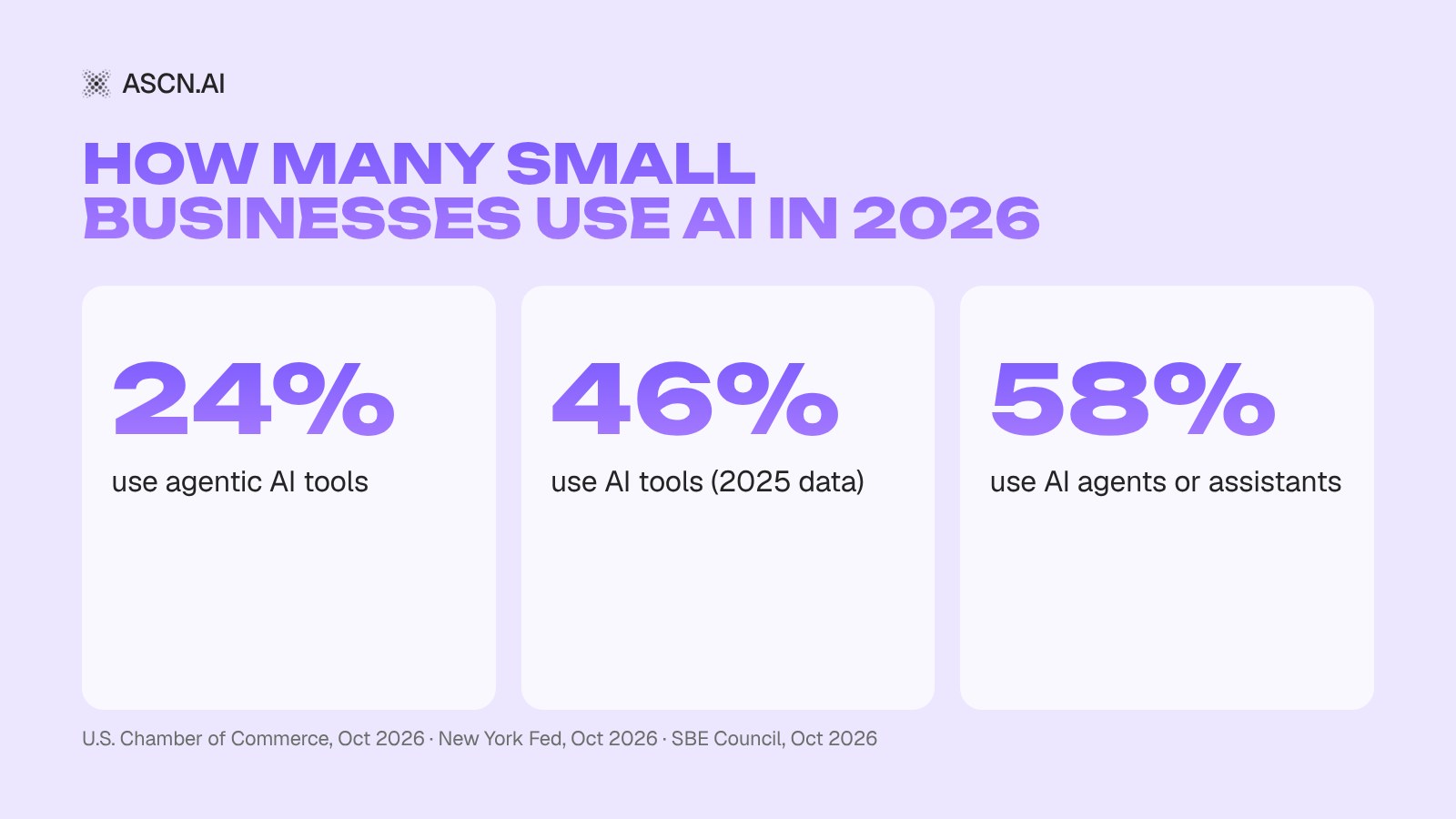
- U.S. Chamber of Commerce (Teneo, 3,732 businesses under 250 employees, July 23 – August 6, 2026): 66% use AI, 24% use agentic AI tools and 34% plan to. Top uses: marketing 41%, customer experience 35%, customer relationships 31%, accounting 31%.
- SBE Council (TechnoMetrica, 516 owners of firms with 2–99 employees, September 11–19, 2026, ±4.4 points): 58% use AI agents regularly or occasionally, 14% more are considering it. The release speaks of "AI agents and assistants," so ordinary assistants are likely counted; SBE Council is an advocacy group.
- New York Fed (October 8, 2026; survey fielded September–November 2025, 5,248 employer firms): 46% use AI tools. Of them, 77% saw no change in labor costs and 31% reported higher sales.
The Chamber's top uses map onto the five agents below. The New York Fed figure is the warning: savings show up only when you pick a specific task and measure it.
Big platforms are entering the segment too: on September 29, 2026, Meta expanded its agent Muse to small businesses, free with usage limits (TechCrunch).
The 5 AI agents for small business to launch first, one per day
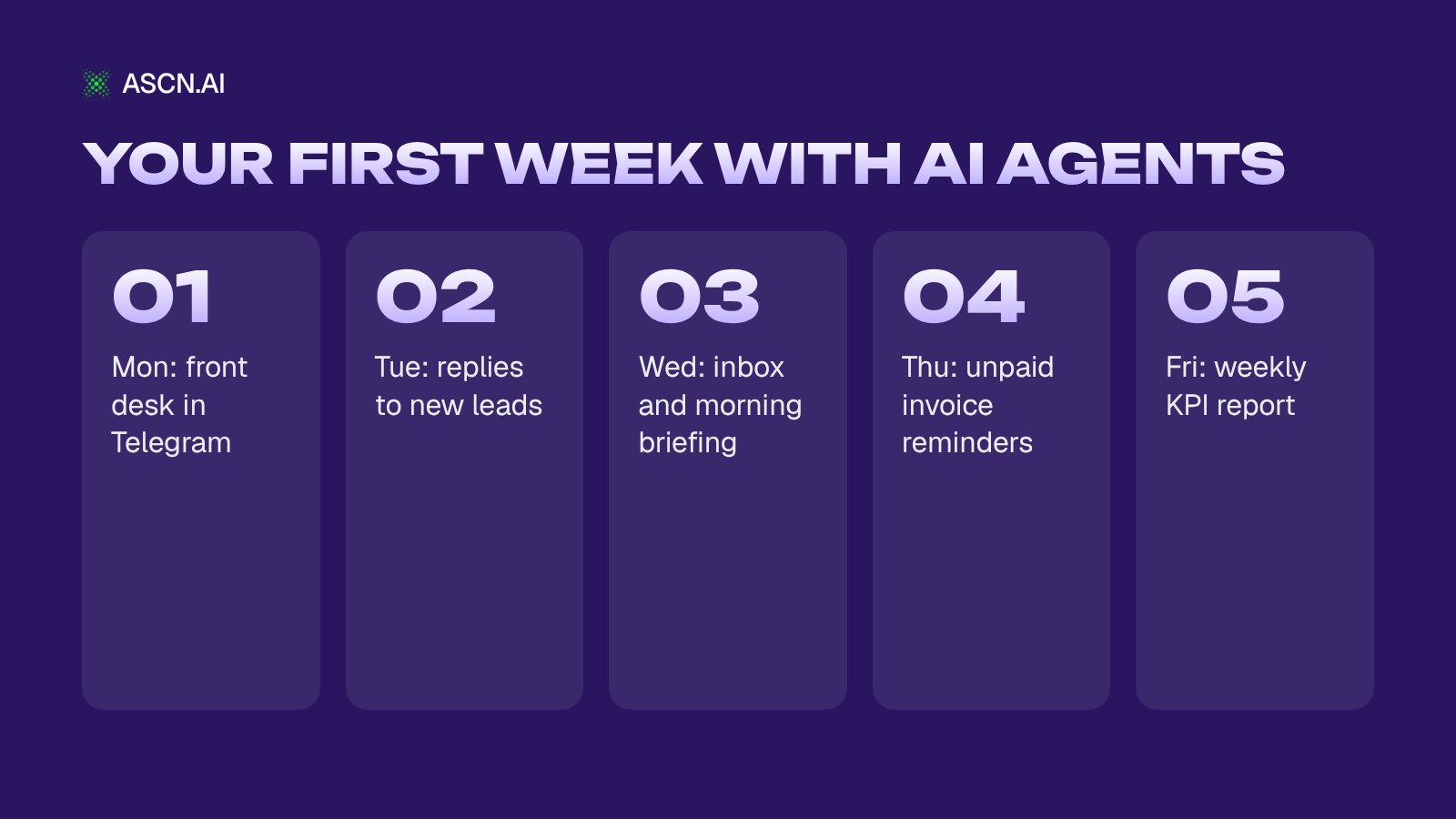
The five agents a small business should launch first are a front desk agent, an inbound lead agent, an inbox assistant, an invoice reminder agent and a weekly KPI report agent, one per day. Launch in this order: money coming in (customers, leads), then your time (email), then money owed to you (invoices), and control last (the weekly report). Each agent is small and gives you one number to check on Friday.
| Day | Agent | Task | Channel | Setup time | Plan |
|---|---|---|---|---|---|
| 1 | Front desk | Answer customers, bookings | Telegram / WhatsApp* | ~30–60 min | Start (24/7) |
| 2 | Inbound leads | Reply, qualify, follow up | Telegram, email | ~30–60 min | Start (24/7) |
| 3 | Inbox assistant | Drafts, morning briefing | Gmail → Telegram | ~30 min | Start (schedule) |
| 4 | Invoice reminders | Chase unpaid invoices | ~30–60 min | Start (schedule) | |
| 5 | KPI report | Weekly numbers | Telegram / Slack | ~30 min | Start (schedule) |
| All 5 | — | — | — | ~1 week | $29/mo |
*WhatsApp is a paid add-on in the Messenger Concierge agent. "Setup time" is our estimate, including writing down your facts and rules; the agent itself is created in minutes (3–15 minutes for a simple scenario, according to ascn.ai). On Free you can build and test one agent; 24/7 operation and schedules come with Start.
Day 1: a front desk agent that answers customers in Telegram or WhatsApp
What it does. Answers the questions you hear ten times a day (hours, prices, address, stock) from your facts, takes orders and bookings, sends reminders and tells you about each new one.
Answer customer questions in Telegram using my price list and opening hours. Take bookings into my Google Calendar, send a reminder the day before and message me about every new booking. Discounts and refunds go to me.
Connect: a Telegram bot (created through BotFather) or WhatsApp as a paid add-on, plus Google Sheets or Calendar for orders. Put your price list and schedule into the knowledge base. Approval rule: discounts, refunds and unusual requests go to you.
Measure: time to first reply, after-hours questions, your hours in the chat per week. Ready agent: Messenger Concierge. More on the AI support agent.
Day 2: an inbound lead agent that replies in seconds and follows up
What it does. Replies to a new lead right away, asks two or three qualifying questions, logs the answers in a sheet and follows up if the lead goes quiet. One setup shown on ascn.ai follows up after 10 minutes and again after 3 days; treat it as an example cadence.
When a new lead writes, reply within a minute, ask about budget, timeline and needs, and add a row to my Leads sheet. If they go quiet, follow up after 10 minutes and again after 3 days. Offer qualified leads a call slot from my calendar.
Connect: Telegram, Gmail, Google Sheets as a simple CRM, Google Calendar for calls. Approval rule: proposals and any price outside your list wait for your OK.
Measure: time to first reply, share of leads unanswered for over an hour, booked calls. The value here is speed, not hours saved. Ready agent: Inbound Sales Pro. If your pipeline lives in a CRM, see AI agents for CRM.
Day 3: an inbox agent that drafts replies and sends a morning briefing
What it does. Sorts Gmail, prepares draft replies, pulls out deadlines and sends a summary to Telegram before your day starts. Mail from a few VIP senders goes through a trigger on new email; the rest waits for the scheduled run. ASCN documentation recommends this split because it saves credits.
Every day at 8:30, check unread email from the last 12 hours, summarize it, add today's meetings and send it to me in Telegram.
Connect: Gmail, Google Calendar, Telegram. Approval rule: by default the agent writes a draft and asks before sending. Keep it that way.
Measure: minutes a day in your inbox, emails unanswered for over 24 hours. Ready agent: Personal Assistant. More scenarios in our guide to the AI agent for email.
Day 4: an invoice agent that chases unpaid bills politely
What it does. Keeps an invoice register in Google Sheets, reminds late payers in stages from friendly to firm, reads their replies and remembers every promised payment date.
Track invoices in my Invoices sheet. Three days after the due date, send a friendly reminder from my template. Log every reply and promised date. Show me the draft before any firm second reminder.
Connect: Gmail, Google Sheets, Google Drive for invoice files. Approval rule: the first reminder goes out automatically from your template; the firm stage and any late fee or discount happen only after your OK.
Measure: days to payment (DSO), overdue total at month end, hours on reminders. Ready agent: AR Collector Pro. To track income and expenses too, add the AI Financial Assistant for Small Business later.
Day 5: a reporting agent that sends your weekly numbers to Telegram or Slack
What it does. On Friday it collects KPIs from your sheets (and Search Console, if you have a website), writes a short report explaining what moved and posts it to Telegram or Slack. You see what days 1–4 changed.
Every Friday at 4 p.m., pull this week's numbers from my Sales and Leads sheets, compare them with last week, explain the three biggest changes in plain words and send the report to Slack.
Approval rule: read-only; the agent sends nothing outside your team. Measure: hours on the report, and whether it arrives on time. Ready agent: AI Agent for KPI Reports.
If marketing is your bigger bottleneck (the top use in the U.S. Chamber survey, at 41%), swap day 5 for SMM Content Factory. It writes a week of posts with an image for each and publishes only after you approve.
Approval rules: what an agent does alone and what waits for your OK
Before an agent gets access to anything, write three lists: what it does alone, what it does after your OK, and what it never does. This fall's discussions around agents from big platforms show the real fear: not a clumsy reply, but an agent that does too much with your access and customer data. According to Upwork Research (June 2026), data privacy and security is the top barrier for small businesses, named by 49%.
- On its own: read, sort, summarize, prepare drafts, answer from your written facts.
- After your OK: a message to a customer, a published post, a price outside your list, a firm debt reminder.
- Never: payments and refunds, sharing personal data, promises that aren't in your knowledge base.
How to set this up in ASCN Agent: hard rules go into the knowledge base files SOUL.md or IDENTITY.md, which win over memory and chat messages when they conflict. If an agent only reads and answers, leave the "modify files" and "delete files" toggles off. Emails stay drafts with confirmation by default.
Each agent is isolated from the others, keys and integration tokens are stored encrypted, and your data isn't used to train models. Our advice: run every agent in draft mode for the first week, then expand its autonomy one rule at a time.
What 5 AI agents cost and what they can save: a worked example
On ASCN, five active agents fit into one Start plan at $29/month, and the first one can be built and tested for $0. In the worked example below, about 47 hours a month of routine work is worth roughly $940 at BLS median pay (May 2025).
- Free: $0, 1 active agent, 500 credits per week. Enough to build and check your first agent.
- Start: $29/month ($18.85/month billed annually), 5 active agents, 10,000 credits per month, 24/7 operation and schedules.
- Personal at $99/month (10 agents) and Business at $299/month (20 agents). Details on the pricing page.
Credit use per conversation can't be predicted: it depends on the model and conversation length, so heavy traffic may need a bigger plan. The documentation suggests checking once an hour instead of every 15 minutes and keeping triggers for urgent events only.
Example, not a result: your hours and rates will differ.
| Task | Assumption | Hours/month | Rate (BLS) | Time value |
|---|---|---|---|---|
| Customer questions | 1 h/day | 22 h | $18.27/h | ~$402 |
| Email triage | 30 min/day | 11 h | $21.53/h | ~$237 |
| Invoice reminders | 8 h/month | 8 h | $21.53/h | ~$172 |
| Weekly report | 6 h/month | 6 h | $21.53/h | ~$129 |
| Lead follow-up | Speed, not hours | — | — | Not counted |
| Total | — | ~47 h | — | ~$940 vs $29 |
Assumptions: BLS median pay for May 2025, receptionists at $18.27/hour and customer service representatives at $21.53/hour (the second stands in for office time on email, invoices and reporting). Hours are assumed for a business of 5–20 people with 22 working days a month. This is the value of time, not cash saved or a rollout result, and credits beyond the plan aren't included. A longer example is in the ASCN lesson on how much an agent saves per month.
Now the sober part: the New York Fed (October 2026) found that 77% of small businesses using AI saw no change in labor costs. Write down your hours before launch, compare after 30 days, and switch off any agent whose number didn't move.
On replacing people, the U.S. Chamber's October 2 release says 25% of small businesses report AI is creating permanent jobs, while 6% are reducing staff. Plan to take repeatable tasks off your team, not to cut a role.
How to launch your first AI agent on ASCN in 30 minutes
To launch your first agent in ASCN Agent, sign up for free, take a ready agent or describe the task in chat, connect your tools and a channel, write down your rules and run a week in draft mode. Creating a simple agent takes minutes (ASCN puts simple scenarios at 3 to 15); the rest of the half hour goes into your facts and rules. Treat 30 minutes as a guide, not a promise.
- Sign up for a free account.
- Take a ready agent from templates, or click + Create new and describe the task in the chat in your own words.
- Connect the services the agent suggests: Gmail, Google Calendar, Sheets, Drive, Notion and Slack connect in one click, anything else through API or MCP.
- Connect a channel: a Telegram bot through BotFather, or Slack.
- Write your facts (prices, hours, tone) and hard rules into the knowledge base.
- Run a week in draft mode, then widen permissions one at a time.
The best starting rule comes from the ASCN docs: begin with the task you already do by hand every day. The quickstart walks through it.
5 mistakes that waste the first month
The five mistakes that waste the first month with agents are too many tasks at once, a trigger on every incoming message, automating work you can't measure, sending or payment rights without approval, and marketing posts without your voice.
- Fifteen tasks on day one. Owners on Reddit report that agents pay off on narrow workflows; fifteen jobs at once usually means none work. One agent, one task, one metric.
- A trigger on every email. Each trigger run spends credits. With a busy inbox, use a schedule and keep the trigger for VIP senders.
- Automating what doesn't hurt. If you can't name the "before" number, you won't see the "after."
- Payment or sending rights without approval. One wrong guess on a refund or a message to a customer costs real money or a client.
- Fully automatic marketing without your voice. Posts with no input from you read as generic and bring little back. Give the agent your examples and approve each batch.
Why ASCN.ai
ASCN.ai fits a small business that wants all five agents from this guide without hiring a developer or paying per agent: they run side by side on one Start plan at $29/month, and you set each one up by describing the job in a chat. Here is what that means in practice.
- One plan for the whole week. Start includes 5 active agents: the front desk, leads, inbox, invoices and KPI report from the plan above.
- A free test before you pay. Free gives you 500 credits a week and one active agent, enough to check the first one on real customer questions.
- Ready agents instead of a blank page. Every day of the plan has a ready agent in the ASCN marketplace, so you add your facts and rules rather than build the logic yourself.
- The job in your own words. No flowcharts: write "remind late payers three days after the due date," and the agent suggests which services to connect.
- People on support, 24/7. If a setup gets stuck, ASCN's live support team answers around the clock.
Start with Day 1: Messenger Concierge answers customers and takes bookings from your facts, and Inbound Sales Pro replies to new leads in seconds and qualifies them. Both are available on any plan, including Free. The rest of the ready agents are on ascn.ai/templates.
FAQ: AI agents for small business
What are AI agents for small business?
AI agents for small business are programs that complete a repeatable task on their own, on a trigger or schedule, inside tools like Gmail, Google Sheets or Telegram. For example, an agent can answer customers from your price list, book appointments in your calendar and notify you, asking for approval before risky steps like refunds.
How much do AI agents cost for a small business?
On ASCN, a small business can start with agents for $0: the Free plan includes one active agent and 500 credits per week, enough to build and test it. Start costs $29/month for five active agents, 10,000 credits and 24/7 or scheduled runs. Credit use depends on the model and conversation length, so heavy traffic may need a bigger plan.
What is the best AI agent for a small business?
The best AI agent for a small business is the one that takes over your most frequent manual task. For most owners that means answering customers or replying to new leads, because both lose money while they wait. Pick one task, measure it for 30 days, then add the next. To weigh platforms, compare AI employee platforms.
Can an AI agent replace an employee?
An AI agent takes over repeatable tasks, not a whole role. The New York Fed (October 2026) found 77% of small businesses using AI saw no change in labor costs, and a U.S. Chamber release (October 2026) reports 25% say AI creates permanent jobs while 6% are reducing staff. Expect your team to spend fewer hours on routine work.
What is the difference between an AI chatbot and an AI agent?
A chatbot answers when someone asks, then waits for the next message. An AI agent works toward a goal: it runs on a schedule or trigger, uses your connected tools and takes actions such as booking a slot, updating a sheet or drafting an email, then reports back and asks for approval on risky steps.
How long does it take to set up an AI agent, and do I need to code?
No code is needed: you describe the task in your own words in a chat, and the agent suggests which services to connect. ASCN says simple scenarios take 3 to 15 minutes. By our estimate, plan 30 to 60 minutes per agent, including your prices, hours, tone and the rules for what needs your approval.
Is my customer data safe with an AI agent?
Customer data safety with an agent depends on the platform, so check its rules before connecting anything. On ASCN each agent is isolated, keys and integration tokens are stored encrypted, and your data isn't used to train models. Without permission the agent doesn't send emails or share data with other users, and you can disconnect any integration to revoke access.
Bottom line: one agent today, five by Friday
Pick the task that costs you the most hours or customers this week, write down the "before" number and launch one agent today. Add one per day, keep each in draft mode for the first week, and let Friday's report show which ones earned their place.
Plans and current limits are on ascn.ai/pricing.
Best AI Employees in 2026: 8 Platforms Ranked by Price, Channels and Roles
Best AI Chatbots for Business in 2026: 9 Platforms Ranked by Actions and Real Cost
AI Support Agent: Automating Support and Service Desk Operations
AI Agents for Business and Training: The No-BS Guide to Building and Deploying
AI Agent for Email: The Complete Guide to Email Automation
AI Agents for CRM: What They Are and How They Automate Your Business