



- Русский
- English
- Português
AI for Sales Managers: 8 Weekly Tasks to Hand Off and Where AI Gets It Wrong

Key takeaways
A sales manager sees the team's work mostly through CRM numbers: according to McKinsey, manual review of sales conversations usually covers less than 5% of calls. Meanwhile, Monday goes to stitching a report together from exports and chat threads. AI for sales managers earns its keep in exactly this gap: it reads everything the manager only has time to sample.
AI for sales managers takes over data collection and spotting deviations: the morning pipeline summary, call transcript reviews, the list of stalled deals, a draft of the report for the owner. Decisions about people, bonuses and the forecast number stay with the manager. The agent brings a short "look at this" list, not a verdict.
This works under one condition: the CRM is kept up to date and calls are recorded. If deals get logged after the fact and there is no script, AI will show you the same mess faster and in a confident tone.
This article is about running the team: summaries, call reviews, stalled deals, reporting to the owner. If you need AI that finds customers and replies to them, that is a different job, covered in how AI works with customers: prospecting, personalization, inbound.
Contents:
- AI for sales managers: what it does and what it doesn't
- A sales manager's week: 8 tasks you can hand off to AI
- How many hours it frees up: run your own numbers
- When a sales team doesn't need AI
- How to introduce AI so the team doesn't see it as a punishment tool
- How to set this up in ASCN without code
- Why ASCN.ai
- FAQ
- Where to start this week
AI for sales managers: what it does and what it doesn't
AI for sales managers is an agent that reads the CRM, call transcripts and team spreadsheets on a schedule and sends the manager a list of deviations: overdue follow-ups, skipped script steps, deals that slipped. Managing with data takes three steps: collect the numbers, find the deviations, decide what to do about a specific rep or deal. The agent handles the first two better than a person in terms of volume. Not the third.
The reason is how much each of them can read. The agent goes through every transcript of the week and every row of the CRM export; the manager gets through a sample. But the agent doesn't know that the client's CEO just changed, that a rep has been covering someone else's territory for two weeks, or that a pause on a deal was agreed on a call nobody logged in the CRM. So its output is a reason to ask a question, not grounds for a decision.
That defines the rollout order. At first the agent only gets read access and makes recommendations. Writing to the CRM and messaging reps come later, once you have checked its conclusions against a manual review. This is also not about replacing salespeople: AI agents that qualify leads instead of reps solve a different class of problems.
| Task | Data | What AI does | What stays with you | In ASCN |
|---|---|---|---|---|
| Morning summary | CRM / Sheets | summary, overdue items | day's priorities | ready-made agent |
| Weekly team meeting | CRM export | actual vs plan, risks | talk with the team | ready-made agent |
| Call reviews | transcripts | checklist, objections | listen, decide | ready-made agent* |
| Stalled deals | CRM | inactivity flags | next step | built in chat |
| Lost deals | deal history | win rate, reasons | conclusions, ICP | ready-made agent |
| 1:1s and new hires | transcripts, playbooks | agenda, answers | feedback | agent / knowledge base |
| Owner report | Sheets | draft, deviations | commentary, decisions | ready-made agent |
| Quota forecast | CRM | deal risks | forecast number | custom build (example) |
* Call Analyst works in Slack and takes transcripts from meeting recorders or as files; it does not connect to phone systems directly. "Built in chat" means there is no ready-made agent: you set up the workflow by describing the task (marked as an example below).
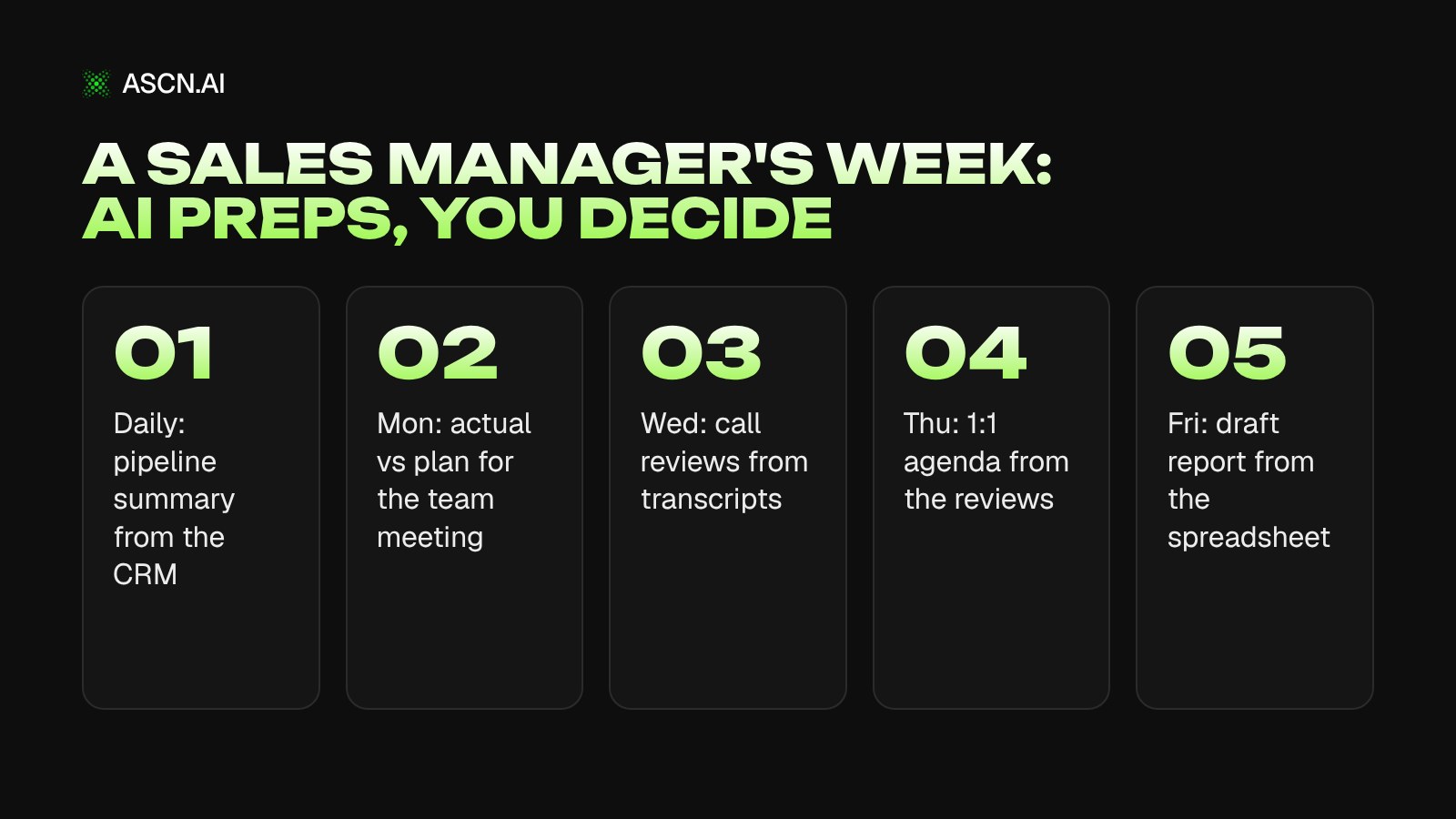
A sales manager's week: 8 tasks you can hand off to AI
A sales manager can hand AI the prep work for eight tasks of the week: the morning summary, the team meeting, call reviews, finding stalled deals, lost-deal analysis, 1:1s with reps, the owner report and the quota forecast. They follow the order of a working week. Calls and the CRM get more space because that is where AI wins the most on volume and where its mistakes cost the most.
Morning pipeline summary
The summary is the easiest place to start: one source, a clear format, and errors are visible right away. The agent reads the CRM or its export in Google Sheets and sends to Telegram or Slack yesterday's new deals, totals by stage, and deals whose next follow-up date has already passed. You set the task once, in plain language:
Example task: "Every weekday at 9:00, open the 'Deals' sheet. Count yesterday's new deals and the total for each stage. List deals where the next follow-up date is before today, with the rep's name. Send it to Telegram, 15 lines max."
Your part is setting the day's priorities. The agent's weak spot: it only counts what has been logged. A call the rep didn't record in the CRM doesn't exist for it, so a growing "overdue" list sometimes signals not failing deals but a team that stopped updating records.
Prep for the weekly team meeting
By Monday the agent pulls together actual, plan and the gap for each rep, and adds a data-based comment to every notable deviation: which deals slipped, where stage conversion dropped. Separately, it prepares the agenda and the items left open from the previous meeting.
The agent will flag a rep who missed the month and a rep whose large deal moved to next quarter at the client's request in exactly the same way. Telling these cases apart and deciding what to discuss in front of the team and what to keep for a 1:1 is the manager's job.
Call and message reviews
This is where AI gives the biggest jump in coverage: instead of a sample, the manager gets a review of every transcript.
- You turn the script into a checklist of verifiable items: did the rep find out budget and timeline, name a next step with a date, handle the price objection.
- The agent goes through each transcript against the checklist and marks missed items. Ask it to quote the conversation for every flag, so you can verify the conclusion in a minute instead of re-listening.
- At the end of the week the agent collects recurring objections and the stages where conversations break off.
- You get a short list of calls worth listening to yourself.
The author of a write-up on Habr, a Russian tech community, ran three real calls through a "call → transcript → summary" pipeline. He would not have sent any of the six summaries to a rep without edits.
The model reported a 3:16 call as 45 minutes long, mixed up the roles of client and agent, and its coaching scores (75–80) and quality scores (85–90) barely moved across very different conversations. This is an observation on three calls, not statistics, but the takeaway is direct: an AI score is a reason to listen to the call, not a rating of the rep.
The second problem is recording quality. Speech recognition is worse on noisy and phone recordings, and errors in names, amounts and product names carry over into the analysis. Before launch, read five transcripts while listening to the audio: if key words are garbled, the checklist will catch the wrong things.
ASCN has a ready-made agent for this task, Call Analyst. It reads transcripts and answers questions about them in Slack: which objections came up again and again, where deals get stuck, how won conversations differ from lost ones, how a call looks through BANT, MEDDICC or SPIN. It takes transcripts from meeting recorders or as files and does not connect to phone systems directly.
Bots that call customers themselves are a different job, covered in AI voice agents for calls.
Stalled deals and CRM hygiene
A stalled deal rarely looks like a problem: it just sits in a stage and counts toward the pipeline. The agent finds such deals by formal criteria that you define:
- no scheduled next step;
- more than N days without contact (N depends on your sales cycle length);
- a deal with no activities or notes;
- duplicate contacts and empty required fields.
The last item matters more than it seems. In a Validity survey (2025; the company sells data cleansing), 76% of CRM users said less than half of the data in their system is accurate and complete. Any pipeline analysis you build later inherits those gaps.
What to do with the flags is the manager's call. An automatic reminder to everyone is easy to close with a token "call back" task, and the flag disappears while the deal stays put. A conversation with a rep about three specific deals works differently. ASCN has no dedicated CRM connectors: you connect a CRM through its API or an MCP server, or work from a Google Sheets export. The options are covered in AI agents for CRM.
Lost-deal analysis
According to a Salesloft and Censuswide survey (2026, 500 US sales leaders, vendor data), 89% of leaders are confident that the ratings reps get from their direct managers are objective, but only about 32% can say right away why a deal stalled. Lost-deal analysis answers exactly that second question.
The agent calculates win rate by segment (source, customer segment, rep) and builds an anti-profile: the kinds of customers you consistently lose. Before the analysis it checks the deal history for gaps and duplicates; otherwise the "reasons for losing" turn out to be an artifact of an empty field.
The main mistake here is sample size. On 20–30 deals any "pattern" can be random, and the model will state it just as confidently as on a thousand. The Call Analyst template handles this with a rule: no trend is reported if the sample has fewer than 10 calls. Write the same limit into the instructions of any agent that slices data. Conclusions for your ICP and the decision where to stop spending budget remain yours.
1:1s and onboarding new reps
In the Salesforce State of Sales survey (2026), 46% of Gen Z sellers said they rarely get feedback on their conversations, and named lack of manager time as the main barrier to training. AI saves exactly that time: before a 1:1 the agent prepares three calls from the week with quotes, plus the checklist item the rep misses most often.
It doesn't replace the conversation itself. In a MySalesCoach survey (2026; the company sells coaching), 48% of respondents called live coaching "very useful", 39% said so about a human-plus-AI mix, and only 13% about AI alone.
For new hires, the agent answers questions about playbooks, pricing and scripts from an uploaded knowledge base, in Telegram or Slack, so the manager isn't pulled in for every "what discount do we give for annual prepayment?". ASCN's catalog has no ready-made role-play trainer where AI plays the customer.
Report for the owner
The agent builds the weekly report from a KPI spreadsheet, comments on deviations and updates an HTML dashboard. Explaining the causes and what you are doing about them is on you: that is what the owner will ask about, not the numbers already visible in the report. The mechanics of report automation are covered in how to automate reporting.
Quota forecast
AI is more useful as a risk auditor for each deal than as the author of the final number. In B2B, with long deals that look nothing alike, there is too little data for a statistical forecast; CRM vendors admit as much, for example Bitrix24 in its industry guide (2026). On top of that, in a Gartner survey (2026, 210 chief sales officers), 60% said revenue depends mostly on factors outside their control. The model can't see those factors either.
ASCN has no ready-made forecasting template. An example setup: every Friday the agent goes through the month's open deals and notes for each one the stage, days in stage, next step date and last contact date, then lists deals with risk signals separately. The manager sets the forecast number, already knowing which deals are in doubt.
How many hours it frees up: run your own numbers
How many hours AI frees up for a sales manager depends on which tasks you hand off and how long it takes to check the output, so run your own numbers instead of borrowing someone else's estimate.
We subtract review time because AI summaries and reports have to be read and corrected: in the same Habr write-up, none of the summaries would have gone to a rep without edits. In the first two weeks, review takes almost as long as doing the work by hand, because you check every conclusion.
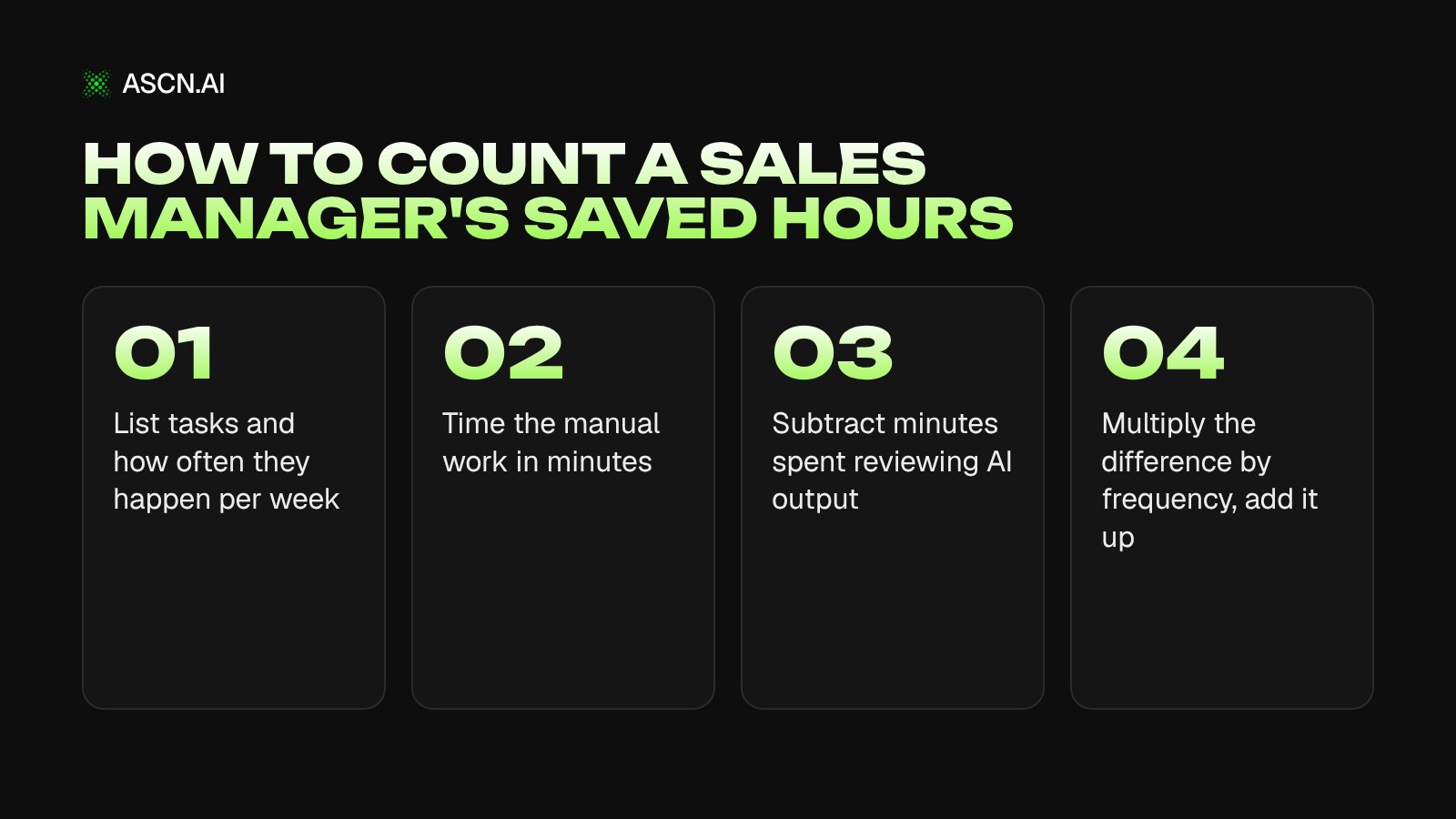
Here is an example; plug in your own values.
| Task | Times a week | Manual, min | Review, min | Saved, min |
|---|---|---|---|---|
| Morning summary | 5 | 20 | 5 | 75 |
| Team meeting prep | 1 | 60 | 15 | 45 |
| Review of 10 calls | 1 | 120 | 40 | 80 |
| Owner report | 1 | 90 | 30 | 60 |
| Total | — | — | — | 260 (≈4.3 h) |
The calls row has a catch: with AI you usually don't listen to the same 10 calls faster, you get a review of every call of the week. The hours may not shrink, but coverage grows. That is a different result, and it is worth measuring separately.
For context, these figures are about sellers, not sales managers. According to Salesforce (2026), sellers spend about 40% of their time actually selling; Bain (2025) puts it at about 25%. These numbers don't carry over directly to a manager's hours.
When a sales team doesn't need AI
AI for a sales team doesn't pay back the setup and review time if the team has two or three reps, the CRM isn't maintained, call recordings are poor, there is no script, or someone wants to tie bonuses to AI scores. Any one of these conditions is enough.
- Two or three reps and a few dozen calls a week. The manager already hears a good share of the conversations. A checklist and discipline cost less than a "recording → transcript → review" pipeline.
- The CRM isn't maintained or is filled in after the fact. Analysis on that data will be confidently wrong. Gartner (2026) predicts that by 2028 AI agents will outnumber sellers 10 to 1, yet fewer than 40% of sellers will say agents improved their productivity. By the same estimate, the winners are companies that rebuilt their data and processes.
- Someone wants to base bonuses on AI scores. The near-identical scores on very different calls show why this is a bad idea.
- Poor recordings: noise, people talking over each other, a lossy connection.
- No script and no rules. A columnist on Sostav, a Russian marketing outlet (2026), calls this "AI-powered chaos": AI on top of a mess gives you the same mess, only faster.
An example is described on TenChat: an AI quality-control pilot in a team of three reps. The manager didn't trust the system's conclusions and re-listened to the calls himself, so the automation saved nothing. The author's conclusion: before you automate a process, it has to work manually.
How to introduce AI so the team doesn't see it as a punishment tool
AI becomes a punishment tool when it is introduced for control and nobody explains how its scores affect pay: reps start hiding problem calls and disputing every rating. A sales software vendor described this scenario in 2026 in a blog post on Sostav.
So set the rules before launch:
- announce in advance and in writing whether AI scores affect bonuses; the sensible answer is no, at least for the first months;
- show reps their review before the manager sees it, so they can spot the mistake themselves;
- start with what helps reps (answers on playbooks, meeting prep), not with what checks them;
- treat a disputed review as a reason to listen to the recording together, not as grounds for penalties.
In a Gartner survey (2026) of 227 chief sales officers, teams that train sellers to work with AI were 2.4x more likely to grow revenue. That is a correlation, not proof of cause.
How to set this up in ASCN without code
In ASCN.ai, a sales manager's tasks are set up without code: you take a ready-made agent from the catalog for each one, feed deals through Google Sheets, and get results on schedule in Telegram or Slack. Add one task at a time, not the whole team at once:
- Data. Export deals from the CRM to Google Sheets or keep them in a spreadsheet. Other CRMs connect through an API or MCP; there are no dedicated CRM connectors. The agent receives call recordings as files, for example from a Google Drive folder; there is no phone system integration.
- One task, one ready-made agent. Pipeline summary: AI CRM in Google Sheets. Team meeting and owner report: AI Agent for KPI Reports. Calls: Call Analyst. Lost deals: ICP Engineer: win-loss analysis. Agendas for team meetings and 1:1s: Pre-Meeting Prepper.
- Schedule and delivery. You set a scheduled task with a chat message, and results arrive in Telegram or Slack.
- Permissions. Read-only and recommendations first. Writing to the CRM comes after review; the agent performs risky actions only after confirmation, and hard restrictions are better written into the agent's knowledge base than requested in chat.
- Check after two weeks. Compare AI reviews with a manual sample of calls and deals, and only then add the next task.
If you have audio but no transcripts, you can build the pipeline from documented parts. An example build: a "new file in Google Drive" trigger → transcription through an external API, with the key stored under "Secrets and keys" → scoring against a checklist from the knowledge base → summary in Telegram. This is a combination of features, not a ready-made agent, so test it on a dozen recordings before rolling it out to the whole team.
Credit usage depends on the model and transcript length, so the cost of reviewing one call can't be stated in advance. The Free plan gives you 500 credits a week and 1 active agent; scheduled runs and the Telegram and Slack connection start with the Start plan at $29/month.
Why ASCN.ai
ASCN Agent is ASCN.ai's cloud platform for AI agents, where you set up an agent by describing the task in chat instead of writing code: it runs on a schedule, connects to spreadsheets and services, and delivers results to Telegram or Slack.
- Skills for a sales manager's tasks. A skill is "memory for behavior": you explain once how to build the summary or report, and the agent repeats it the same way after that. Skills like weekly-report or daily-brief are created with a chat message.
- Schedules and edits in plain text. You set and change tasks with a chat message ("Move the morning summary to 9:30"), and results arrive in Telegram or Slack.
- No-code connections. Google Sheets, Gmail, Calendar, Drive, Slack and Notion connect with a click; everything else through APIs and MCP.
Start with a ready-made agent for a single task: Call Analyst for transcript reviews or the AI Agent for KPI Reports for the owner report. To see how the agent works, visit the ASCN Agent page.
FAQ
Can AI replace a sales manager?
No. AI covers data collection and spotting deviations: pipeline summaries, transcript reviews, stalled-deal flags, a draft report. Decisions about people, bonuses, hiring and the forecast number need context that isn't in the CRM or the transcripts. A sensible goal for the rollout is that collecting numbers stops eating the time you need for conversations with the team.
Which sales management task should you hand to AI first?
One where errors show up immediately: the morning pipeline summary from the CRM or a spreadsheet. If calls are already recorded and transcribed, the second candidate is reviewing the last 20 conversations against a checklist, with a manual check of some of them. Don't start with the quota forecast: errors there only surface at the end of the month.
Should you pay rep bonuses based on AI call scores?
We don't recommend it, at least for the first months. In the Habr review of three calls, the model's scores barely changed across very different calls, and it mixed up who was speaking. When a score affects pay, reps start hiding problem calls and disputing reviews. Use the score as a reason to listen to the recording and leave the decision to a person.
Do you need a CRM and phone system integration to get started?
No. To start, a Google Sheets export of deals from your CRM and transcripts or audio files in a folder are enough. ASCN has no direct phone system integration and no dedicated CRM connectors; CRMs connect through an API or MCP. To test the idea the agent needs data, and a live connection can come later.
How accurate is an AI sales forecast?
It depends on how many similar deals you have. In B2B with long, one-of-a-kind deals there is too little data for a statistical forecast, and the model will be confidently wrong. It's more practical to use AI as an auditor: it checks every open deal for risk signals, and the manager sets the final forecast number with that list in hand.
How much does AI for a sales team cost in ASCN?
The free ASCN Agent plan gives you 500 credits a week and one active agent, which means one task to start with. Scheduled runs and the Telegram and Slack connection start with the Start plan at $29 a month. Credit usage depends on the model and transcript length, so the cost of reviewing one call can't be calculated in advance; test it on your own volume. Full plan details are on the ASCN pricing page.
Where to start this week
If your calls are recorded and the team works in Slack, take the last 20 transcripts and ask Call Analyst three questions: which objections came up repeatedly, where conversations broke off, which script items get skipped most often. Listen to five of those calls yourself. The agent works in Slack and gets transcripts from a meeting recorder or as files.
If you don't have recordings, start with the morning pipeline summary from a CRM export in Google Sheets.
After two weeks, check three things. Do the checklist misses in your review match the AI's? Did the agent find at least one problem you hadn't seen? How many minutes does reviewing its report take? If it takes as long as the manual work, change the setup instead of expanding it. You can build the next agent for your own task in ASCN Agent.
AI Implementation in Business: How Leaders Save Time, Grow Sales and Cut Costs
AI for Sales: How to Use Artificial Intelligence in Your Business
AI Agents for CRM: What They Are and How They Automate Your Business
AI Agents for Sales Teams: A Practical Guide to Automation
AI Agent for Calls: What It Is and How It Works
How to Automate Reporting: The Practical Guide with No Fluff