



- Русский
- English
- Português
AI for Sales: How to Use Artificial Intelligence in Your Business

Key takeaways
AI for sales takes over the routine part of a sales rep's day: finding and qualifying prospects, drafting emails and proposals, sorting inbound requests and analyzing CRM data. Negotiations and decisions stay with people.
Selling is more than talking to customers and closing deals. Reps also have to find prospects, research companies, put together proposals, answer inbound requests and keep the CRM up to date. All of that eats a lot of time, and a good part of it can be automated.
For example, AI can pull together information about a prospect, draft a first-touch email or sort incoming requests by category. The rep only has to review the result and decide on the next step.
This kind of automation isn't just for large companies. Even in a small business, it can free up a few hours a week that reps can spend on customers and deals.
Below: which tasks to hand over to AI, how other companies already do it, and where to start.
Contents:
- What is AI for sales
- Who AI for sales is for
- How to use AI for sales: 5 practical use cases
- Real-world examples: how companies use AI and automation
- How to bring AI into your sales process
- Why ASCN.ai: AI agents for sales
- Frequently asked questions
What is AI for sales
AI for sales is a set of tools that help you find customers, handle inbound requests, prepare documents and analyze deal data.
Say a rep needs to reach out to 50 companies. Before writing to each one, it makes sense to look into what the company does and figure out how your product could help that specific business. Done by hand, that prep takes a long time.
AI can collect publicly available information about these companies and draft first versions of the emails. The rep then checks the facts, edits the wording and decides who to contact first.
AI agents deserve a separate mention. A regular chatbot mostly answers questions, while an agent can carry out several steps in a row. For example, it can find companies in a target industry, check them against your criteria and build a list of prospects.
That said, a lot depends on the tool itself. If the agent can't reach the data sources or integrations it needs, part of the work will still be manual. And rolling out AI doesn't automatically mean sales will grow. What matters is which task the tool solves and how well it handles it.
Who AI for sales is for
Automation helps most where people repeat the same actions every day. But every company has its own tasks.
Small businesses. In a small team, one person may be prospecting, talking to customers and handling paperwork all at once. AI helps cut the time spent on proposals, contact research and lead handling. To get started, you don't need to hire an automation specialist or rebuild how the whole company works.
Mid-sized businesses. As the team grows, sales get harder to keep under control. Reps run conversations differently, store customer data in different systems and forget about follow-ups. Automating individual stages helps bring processes to one standard and cut down on manual work.
B2B companies and SaaS. Here you often need to study a prospect's business in advance, find the decision-makers and prepare for several rounds of negotiation. AI can speed up research and call prep.
Start with a specific problem. If reps spend too much time researching companies or sorting inbound requests, check first whether those exact tasks can be automated.
How to use AI for sales: 5 practical use cases
1. Finding prospects
Before reaching out to a company, you need to know whether it fits your ideal customer profile. So the rep studies the website, checks the industry, looks for contacts and logs everything in a spreadsheet.
When there are dozens or hundreds of such companies, this quickly turns into busywork. AI can take on part of the research: search for companies by your parameters, analyze what's publicly available and put the results into one list.
ASCN.AI has a ready-made agent for this — the AI agent for B2B lead generation. It's useful for companies that need to keep their prospect base growing or are entering new markets.
Still, don't drop auto-found contacts straight into an email sequence. The data may be outdated, and a company that matches your criteria doesn't necessarily need your product. Review the results before you start outreach.
2. Personalizing messages and proposals
Identical emails are easy to send in bulk, but they rarely reflect the specifics of a business. As a result, the message can feel generic and fail to explain why the prospect should reply at all.
AI lets you write a message based on what you know about the company. For one prospect, you can focus on cutting manual work; for another, on faster lead response. The same approach works for drafting proposals from your approved prices, services and terms.
The model shouldn't invent product benefits or promise things your company can't deliver. Always review the final text before you hit send.
Read more about this approach in "Neural Networks for Sales Proposals: How AI Automates Sales and Drives Conversions".
3. Handling inbound requests
When request volume grows, reps spend time not only on replies but also on sorting messages. They need to figure out what the customer wants, how urgent it is and who should handle it.
AI can read incoming requests, sort them into categories and suggest replies. If the tool is connected to your CRM (HubSpot, Pipedrive or another) and other services, you can automate the next steps too, such as creating tasks or routing the lead to the right rep.
Say one person requests a product demo and another asks a question about a service they already use. These need different handling, so the first goes to sales and the second to support right away.
Don't hand every message over to AI. Edge cases, complaints and deal terms usually need a person.
4. Preparing for sales calls
Before meeting a B2B prospect, it pays to understand their business. What does the company do, what does it sell, what problems might it face? The answers help you prepare and avoid spending the first ten minutes of the call on basics.
An AI agent can gather available information about the company and the contact, write a short brief and suggest questions for the call. This is especially handy when a rep has several meetings a day and almost no time for research.
For this use case, ASCN.AI offers Sales Researcher, an AI agent that researches the company and the contact before a B2B call.
Use the brief as a starting point. Before the call, the rep still checks the key facts, picks the right questions and decides which of the prospect's problems to bring up.
5. Analyzing sales and the customer base
Over time, your CRM fills up with data on deals, calls, emails and lost-deal reasons. The problem is that this data alone doesn't always show where exactly you're losing customers.
AI can summarize conversation history, group lost-deal reasons and spot recurring issues at different stages of the funnel. Based on that, a rep or sales manager can form hypotheses and test them.
For example, if many prospects go silent after receiving a proposal, find out why. Maybe the proposal doesn't explain the product's value clearly enough, or the terms don't match what the audience expects.
With the right integrations, AI can also draft follow-up emails and help reps stay on top of next steps in their deals.
A lot depends on data quality. If reps update the CRM irregularly or log call outcomes in different ways, the system can draw the wrong conclusions. So check AI recommendations before you change your sales process.
The five use cases at a glance:
| Use case | What AI does | What the rep keeps |
|---|---|---|
| Finding prospects | Finds companies by criteria | Verifying contacts |
| Emails and proposals | Drafts a tailored message | Checking claims and terms |
| Inbound requests | Sorts and suggests replies | Complaints and edge cases |
| Call prep | Brief and call questions | Checking key facts |
| Sales analysis | Groups lost-deal reasons | Testing hypotheses |
Real-world examples: how companies use AI and automation
Here are three companies that have shared results from automation. Their experience shows that the technology works at different stages of the customer journey, from running a sales team to handling support requests.
Grubhub: 25% more sales activity
Grubhub is a US food delivery platform that works with a large number of partner restaurants.
As the business grew, the company needed a better way to manage sales, marketing and partner data. Grubhub brought these processes together in Salesforce and used the platform's tools to automate the work.
In the official Salesforce customer story, the company reports these results:
- sales activity grew by 25%;
- sales rep productivity increased by more than 20%;
- tech spend savings exceeded $1M thanks to consolidating tools.
This example shows that generative AI isn't the only way to improve a sales team. Sometimes the biggest effect comes from organizing data and automating processes that used to be manual.
Still, Grubhub's results don't automatically carry over to other companies. The impact depends on the size of the business, its starting processes and which changes were actually made.
Crexi: up to five hours a day saved on admin work
Crexi is a commercial real estate marketplace. Its reps had to research potential buyers, write emails and log notes after calls.
The company rolled out Salesforce tools with generative AI to cut down on admin work.
According to the official Salesforce customer story, reps save up to five hours a day on these tasks.
For smaller companies, the principle is what matters. You don't have to automate negotiations or decision-making right away. Often it's enough to speed up research, document prep and logging the results of customer conversations.
Reps can then spend the freed-up time where a human is really needed: negotiating, handling objections and building relationships with customers.
Klarna: automating customer requests
Klarna is a global fintech company that launched an AI assistant built on OpenAI technology for its customer service team.
This example is about customer service rather than finding new buyers. Still, it shows well how AI handles a large flow of repetitive requests.
In an official Klarna announcement, the company said that in its first month the assistant:
- handled 2.3 million conversations;
- took on about two-thirds of customer service chats;
- cut average resolution time from about 11 minutes to under two;
- helped reduce repeat inquiries by 25%.
Klarna later also reported savings of about $39 million for 2024 from the AI assistant and related changes in customer service.
Keep in mind that Klarna operates at a completely different scale than a small business. It has more data, more resources and more room to integrate new technology. So you're unlikely to match these numbers one for one.
But the approach itself carries over: identify your typical requests, check which of them AI can take on, then compare speed and quality before and after.
What do these three examples have in common? The companies automated specific processes instead of adopting AI just for the sake of new technology. That's a good rule for any business: first find a task with a measurable outcome, then pick the tool.
How to bring AI into your sales process
To try AI in your sales team, you don't have to change how everyone works on day one. Start with one task and expand automation step by step if the first results prove useful.
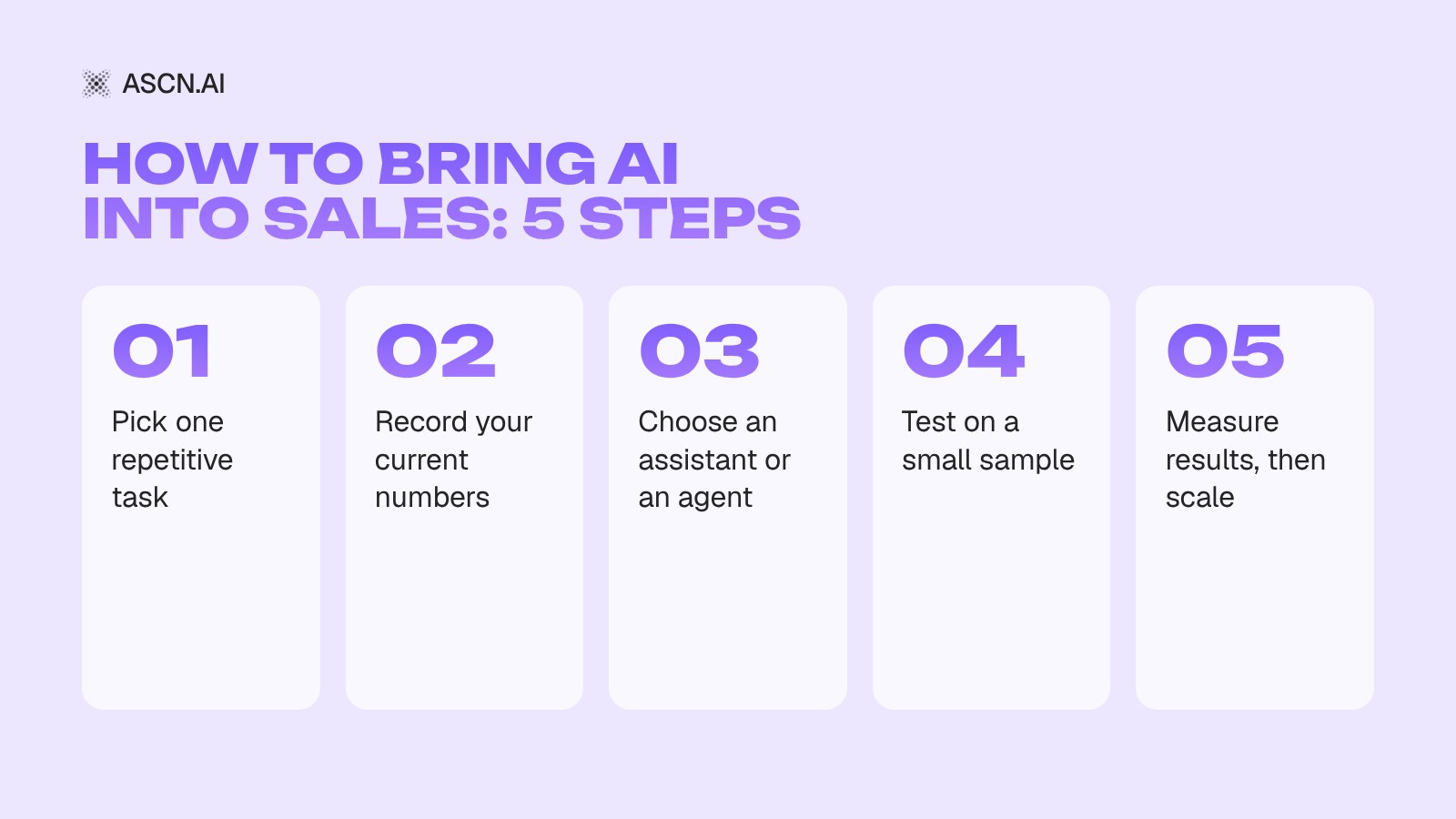
1. Pick a task.
Look at where your reps spend the most time. Maybe they search for prospects by hand, take ages to put proposals together or keep sorting inbound requests.
It's best to start with a repetitive process where you can define the expected result upfront.
2. Decide what you want to improve.
Before rollout, record your current numbers. For example, how long it takes to prepare a prospect brief or how many requests reps handle per day.
Then set a goal. Say you want to cut prospect brief prep from 30 minutes to 10. That makes it easy to see whether automation actually helped.
3. Choose a tool.
For writing and analyzing information, a regular AI assistant may be enough. If you need several actions in a row, such as finding companies, checking them against criteria and building a list, consider an AI agent.
If you plan to automate more complex processes, it helps to understand what AI agents can do for a business and how to choose the right use case.
4. Test it in practice.
Start with a small sample of real tasks. Compare the AI's output with how your team did the same work before.
Look not only at how fast the answer is generated but also at how long the rep spends reviewing and fixing mistakes. If checking takes as long as the whole task used to, automation won't add much.
5. Measure results and decide what's next.
Depending on the task, track request handling time, cost per operation, lead quality and conversion between funnel stages.
If the solution handles the task reliably, move on to the next process. If the results fall short, adjust the setup or try a different approach rather than scaling automation that doesn't work.
Why ASCN.ai: AI agents for sales
With ASCN.AI, you can use ready-made AI agents for specific tasks and set up automation around your own processes. That lets you start with one small use case instead of rebuilding the whole sales team at once.
1. B2B call prep
Before a call, a rep has to study the prospect's website, understand their business and prepare questions.
Sales Researcher, an agent for call prep, gathers information about the company and the contact, analyzes what's available and writes a brief before the B2B call.
It's especially useful when reps talk to new companies all the time. Instead of starting research from scratch for every call, they work from a ready brief and focus on the conversation itself.
2. Inbound requests and follow-ups
With a lot of prospects in the pipeline, it's easy to miss a message or forget to follow up on time. Yet part of this work is predictable: sort incoming requests, draft a reply or remind the rep about the next touch.
With ASCN Agent, you can automate these processes. For example, set up request classification, reply drafts and reminders about prospects you haven't contacted in a while.
What exactly the agent can do depends on its setup and available integrations. Before launch, decide which actions it can take on its own and which need a team member's approval.
3. Prospecting and personalized outreach
When entering a new market, a list of companies isn't enough. You also need to figure out which ones actually fit your ideal customer profile and tailor the message to each.
An AI agent can analyze available company data, match it against your criteria and help write personalized messages.
Start with one industry or a small group of prospects and check the quality of the results. If the agent finds good-fit companies and speeds up email prep, expand the use case step by step.
To build an agent for your own task, follow this step-by-step guide to training and setting up an AI agent.
What you get with the platform:
- Ready-made sales agents. Sales Researcher, the B2B lead generation agent and others come from the marketplace and launch in a couple of minutes.
- Agents built from a description. Describe the task in plain words in the chat, and the agent assembles the workflow and suggests which services to connect.
- Your tools. Gmail, Google Sheets, HubSpot, Notion and Slack connect in one click; anything else via API and MCP.
- Control. The agent only sees what you allow, and risky actions run only after your approval.
Start with a ready-made agent: the AI agent for B2B lead generation finds companies that match your ICP, collects emails, writes personalized messages and keeps your lead base in Google Sheets. The Free plan includes 500 credits a week and 1 active agent; paid plans start at $29/month, and 24/7 and scheduled runs come with the Start plan.
Frequently asked questions
What is the best AI for sales?
It depends on the task. For writing, processing information and drafting emails, an AI assistant will do. If you need several actions in a row, look at an AI agent with the right tools and integrations.
Can a small business use AI for sales?
Yes. Start with finding prospects, drafting proposals or handling inbound requests. You don't need to build a complex automation system right away.
Can AI fully replace a sales rep?
In some standardized tasks, AI can replace part of the manual work. But complex negotiations, unusual requests and commercial decisions usually need a human.
How do I know if AI pays off?
Compare what you spend on the tool and on reviewing its output with the time and money it saves. If the goal is to grow sales, also track lead quality, deal conversion and other metrics the automation is supposed to move.
Where should I start with AI agents?
Pick one repetitive task, define what a good result looks like and test the agent on a small volume of work. Once the quality checks out, add new processes step by step.
AI Agents for CRM: What They Are and How They Automate Your Business

AI Agents for Sales Teams: A Practical Guide to Automation

Neural Networks for Sales Proposals: How AI Automates Sales and Drives Conversions

Lead Generation with Neural Networks: How AI is a Real Game Changer
Artificial intelligence in sales — AI assistants and agents for the sales department