



- Русский
- English
- Português
AI for Email: How to Automate the Work in Your Inbox

Key takeaways
AI for email reads your incoming mail for you. It sorts messages by priority, drafts replies, summarizes long threads and pulls out tasks with deadlines. Connect an AI agent to your inbox and this work runs on its own: on a schedule or every time a new email arrives. Sending important emails is still best left to a human.
Sber, the Russian bank, estimates that a mid-level manager gets 80 to 120 emails a day. Sounds familiar: you open your inbox in the morning and there are forty new messages. A customer request, a supplier invoice, a contract waiting for approval and a dozen newsletters. By the time you get through them, an hour is gone. Below: which part of that work you can hand to AI and where to start.
Contents:
- What is AI for email
- What you can automate with AI
- How companies use AI for email
- How to set up AI for email in ASCN.ai
- Where to start
- Is it safe to give AI access to your email?
- Why ASCN.ai
- FAQ
What is AI for email
AI for email is a neural network that works with your messages. It understands what an email is about, who sent it and what the sender wants from you. Based on that, it sorts your mail, writes replies and prepares summaries.
These tools come in three types. The difference is whether they can access your inbox and whether they can act on their own.
| Type | Inbox access | What it does | Best for |
|---|---|---|---|
| AI chat | None, you paste emails | Writes and edits replies | A few emails a day |
| Built-in email AI | Its own inbox only | Summaries, suggestions, digests | Personal email |
| AI agent | Permissions you grant | Sorts, replies, passes data on | Dozens of emails a day |
The simplest option is to paste an email into an AI chat and ask for a reply. For a couple of emails a day, that's enough. Built-in features of email services are more convenient. Gmail, for example, can summarize a long thread and help you write a message. Other services can bundle the week's important emails into a short digest.
You need an agent when the volume is high and the same email work repeats every day. It checks the inbox itself, decides what to do with each message and passes data on: to your CRM, a spreadsheet, your calendar, Telegram or Slack. But only within the limits you've set.
For a deeper look at how such an agent works, read our guide to AI agents for email.
What you can automate with AI
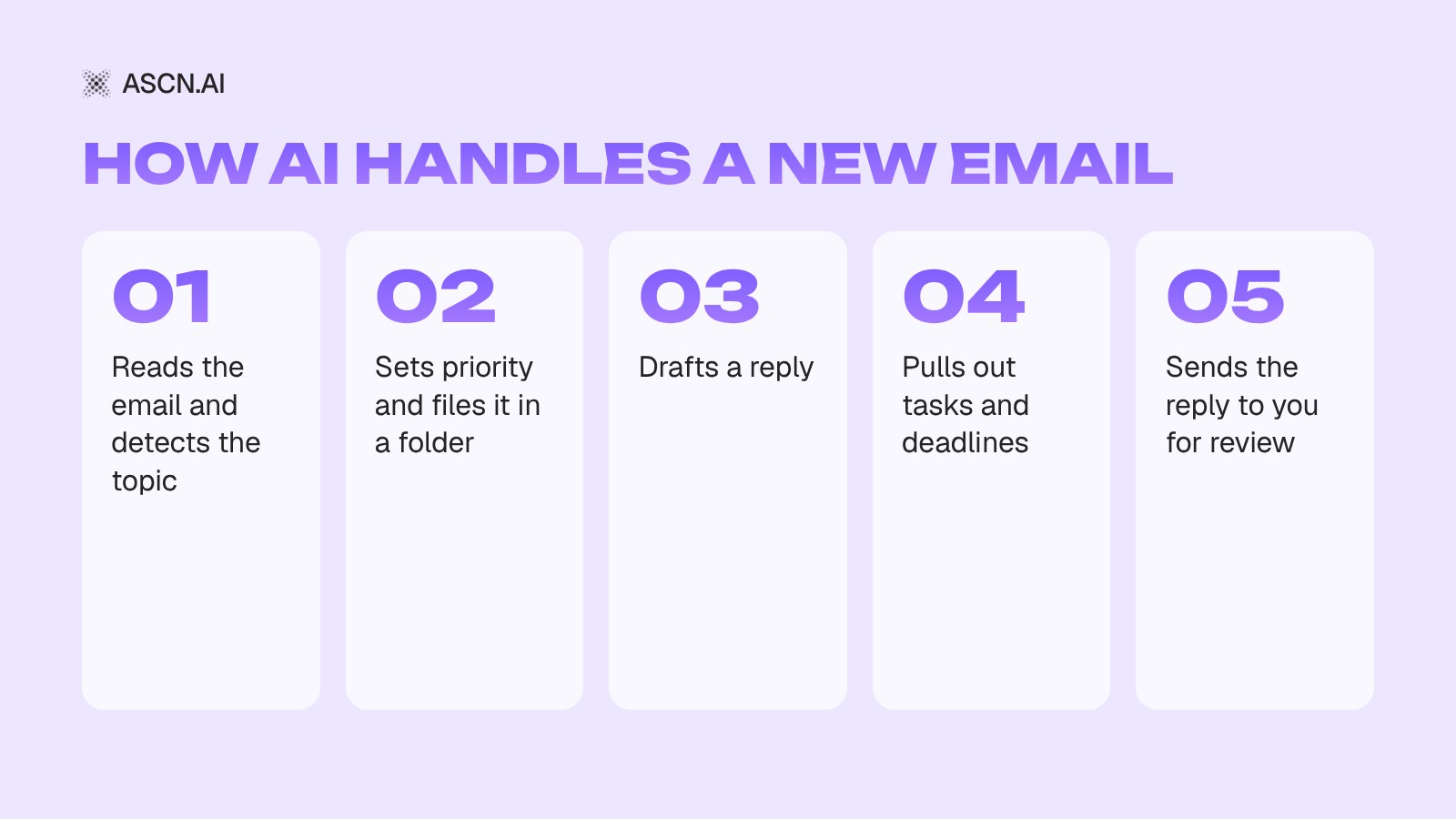
Here are the six tasks that eat up the most time. Most teams start with them.
Sorting and prioritizing
When your inbox holds hundreds of emails, it's easy to miss what matters. Important messages get buried between newsletters, notifications and questions that can wait.
AI reads every email and groups your mail: customer requests, invoices, documents, internal questions, newsletters. You can set your own rules. For example, emails from your three key accounts always go to the top, and promotions go straight to a separate folder.
This matters most to people who hear from many different contacts: business owners, team leads, sales reps.
Reply drafts
A customer asks about price, timelines and payment terms. You answer emails like this five times a day and write almost the same thing every time.
AI drafts the reply for you. It takes prices and terms from your documents and writes in your tone. All you do is check the text and hit Send.
Different emails can follow different rules. For routine questions, AI drafts an answer. A partnership request goes to a manager. A complaint or a dispute gets flagged for manual review.
One rule is non-negotiable: AI takes prices, discounts and deadlines only from verified data. It must never invent terms for a customer.
Summarizing long threads
A deal has been under discussion for two weeks, and the thread has thirty emails. To remember where you left off, you have to read it all again.
AI condenses the thread into a short summary. It shows what you offered the customer, which terms are already agreed and which question is still open.
That saves time when you return to an old project or hand a customer over to a colleague. The new person doesn't have to read the whole history.
Tasks and deadlines from emails
Assignments often arrive right in your inbox. A customer asks for documents by Friday. A partner is waiting for a meeting confirmation. A colleague reminds you about a contract.
AI finds these requests and turns them into a task list. Each task shows what to do, by when and who owns it, if the email says so. Connect a task tracker or calendar, and tasks and meetings show up there automatically.
One setting matters here. If an email has no deadline or owner, AI shouldn't guess. Have it mark the task as open and link to the original email.
Leads and follow-ups
For many companies, email is still a sales channel. It's where leads, price requests and contract questions arrive.
AI recognizes a lead and pulls the details out of the email: name, company, phone number, what the customer needs. Then it logs them in your CRM or a spreadsheet and alerts a sales rep about a hot lead.
Another common scenario is the follow-up. A customer got your proposal and has been silent for three days. AI reminds the rep or drafts a polite follow-up itself. Sales emails are best sent only after a human has checked them.
Morning email digest
You don't have to keep your inbox open all day. You can get one short report a day on what needs your attention.
For example, at 8:30 a digest lands in Telegram or Slack:
- which emails need a reply today;
- which emails relate to deals;
- which documents are waiting for approval;
- which deadlines came up in threads;
- which questions are still unanswered.
In five minutes, a business owner knows what's going on without reading every single email.
How companies use AI for email
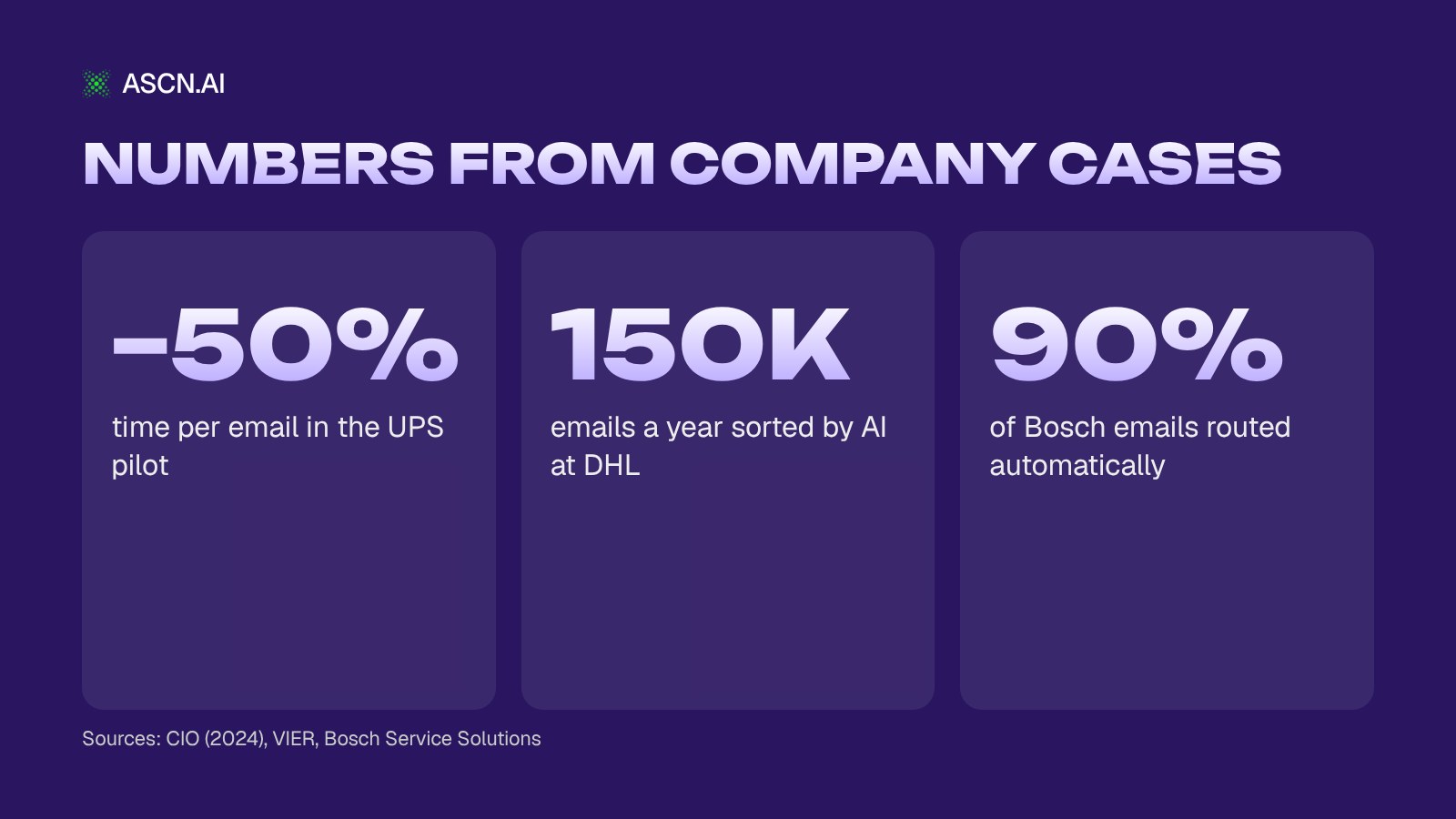
Below are three public examples from large companies. The numbers come from the companies themselves, their vendors and industry media.
UPS: AI drafts replies to customer emails
UPS customer support receives about 52,000 emails a day. People ask where their package is, why delivery was delayed and how to change the address.
The company built its own system on a large language model. AI reads the email and suggests a ready reply. An employee checks it and sends it. No email goes out to a customer without human approval.
In the pilot, the time employees spend on one email dropped by 50%. CIO magazine reported this in 2024.
DHL: AI sorts 150,000 emails a year
The DHL department that handles customer payments and receivables gets about 600,000 emails a year. They used to be sorted by hand, with someone deciding which specialist each one should go to.
Now AI sorts about 150,000 emails a year. It identifies the topic and routes the email straight to the right person. For simple requests, such as asking for an invoice copy, the system sometimes replies on its own within minutes, with no employee involved.
Bosch: 90% of emails routed without a human
Bosch Service Solutions runs customer support for a German carmaker. An employee used to open every email, read it and decide which team should get it. That took more than five minutes.
After AI was introduced, over 90% of emails are routed automatically and without errors. First-pass handling of one email now takes less than a minute.
One detail matters: here AI only sorts emails and passes them to the right team. It doesn't mean emails are handled with no people at all.
All three examples have one thing in common. AI takes over the repetitive work: sorting, drafts, answers to simple requests. Decisions on complex emails stay with people. You can't copy these numbers straight onto your business; the effect depends on the volume and type of your email.
How to set up AI for email in ASCN.ai
In ASCN.ai, you build an email agent without code. You describe the job in a chat, and the agent suggests which services to connect. Email connects directly through Gmail. The agent can read, sort and send emails, and write drafts. A new email can trigger it right away.
According to the docs, basic setup takes 10–15 minutes:
- Create an agent and describe the job in plain words. For example: "Watch my inbox, draft replies and send me a morning digest."
- Connect Gmail with a button in the chat. While you're at it, connect Google Calendar and Telegram, where the agent will send digests.
- Write the rules into the agent's knowledge base: which emails matter more, what tone to use, what's off limits. For example, "don't send emails without my approval."
- Set up a scheduled task (available from the Start plan): "Every day at 8:30, check unread emails from the last 12 hours, write a summary and send it to Telegram."
- Add a trigger for urgent mail: "When an email arrives from [customer name], send me a short summary right away."
By default, the agent prepares a draft and asks for approval before sending. That's handy at the start: you see every reply before the customer does.
A tip from practice: don't put a trigger on every single email. Each run spends credits, and with heavy email traffic that adds up fast. Catch urgent mail with a trigger and collect the rest in a scheduled digest.
You don't have to build the agent from scratch. Take a ready-made template and adjust it:
- Personal Assistant triages your inbox, drafts replies, logs tasks and deadlines in your tracker and sends a morning briefing to Telegram. The template is available on the free plan; the scheduled briefing needs the Start plan.
- Create task from Gmail goes through your mail and turns emails into tasks and a schedule.
- Gmail Assistant sends emails and keeps track of contacts right inside Gmail.
You can start for free: the Free plan gives you 500 credits a week and one active agent. Paid plans start at $29/month, and scheduled and 24/7 work comes with the Start plan. If you need email automation without AI, such as auto-replies and forwarding rules, check out our email automation guide.
Where to start
You don't need to automate the whole inbox on day one. Pick one task that eats time every day and start there.
- Find the bottleneck. Look at what takes the most time: sorting, routine replies or processing leads.
- Write down the rules. Which emails to handle, where to get data for replies, when to create a task and when to bring in a human.
- Start with drafts. For the first two weeks, AI only drafts replies and you send them. That way you'll see where it makes mistakes.
- Compare with before. How much time email took then and how much it takes now. How many drafts you had to rewrite.
- Expand step by step. Once sorting and drafts work reliably, add your CRM, customer follow-ups or calendar tasks.
Is it safe to give AI access to your email?
Your work inbox holds contracts, prices and customers' personal data. So before you connect anything, look at access rights, not just features.
Check which permissions the service asks for, where emails are stored and who else can see them. Grant exactly as much access as the task needs. For digests and drafts, reading emails and creating drafts is enough. You can add permission to send later.
In ASCN.ai, the agent doesn't send emails without your permission and doesn't use your data to train AI models. You can revoke access at any time: disconnect Gmail or delete the agent.
Also check your company's internal policies and the data protection laws that apply to you, such as GDPR. Start with a test inbox or one type of email, and send important customer replies yourself at first.
Why ASCN.ai
ASCN.ai fits when you need AI for email that doesn't just write text but works in your inbox by your rules. Here's what that means in practice:
- No code. You describe the job in a chat in plain words; the agent builds the workflow and suggests the services to connect.
- Gmail and work apps in one click. Google Calendar, Sheets, Notion and Slack connect with a button in the chat; other services connect through APIs and MCP servers.
- Triggers and schedules. A new Gmail message starts the agent right away, and digests arrive when you want them. Scheduled and 24/7 work comes with the Start plan, from $29/month.
- You stay in control. The agent sees only what you allow and doesn't send emails without your approval.
- Your choice of model. Claude, GPT, Gemini, DeepSeek, Qwen and more — switch the agent's model in one click.
The fastest way to start is the ready-made Personal Assistant: AI triages your email and briefs you by morning. Connect Gmail, add your rules and test reply drafts on the free plan.
FAQ
Can AI reply to emails on its own?
Yes, if it has access to the inbox and permission to send. Most people start with drafts: AI writes the reply, and a human checks and sends it. Once you see that it handles routine questions without mistakes, you can turn on automatic sending for those.
Which AI should I use for email?
It depends on volume. If you get only a few emails, an AI chat or your email service's built-in features will do. If you get dozens a day and need to sort them, send digests and pass data to a CRM, you need an AI agent with inbox access.
Can I connect AI to Gmail, Outlook or other email services?
It depends on the tool. In ASCN.ai, Gmail connects with a button in the chat, and you can set triggers on it. Other email services connect through an MCP server or an API. Before you set it up, ask support whether your option will work.
Is AI for email a good fit for a small business?
Yes. You don't need a complex enterprise system. Start with a morning digest or drafts for routine questions. A setup like this takes about 15 minutes. You can test drafts on the free plan at no cost; the scheduled digest needs the Start plan.
Can AI pull tasks out of emails?
Yes. AI finds requests, deadlines and next steps in an email and turns them into a task list. If you've connected a tracker or calendar, the tasks show up there. Double-check important deadlines: if an email has no deadline, AI shouldn't make one up.
How much time does AI for email save?
It depends on how many emails you get and how similar they are. In the UPS and Bosch examples, time per email dropped by half or more. But there's no single number for everyone, so measure the time you spend on email before launch and two weeks after.
AI Agent for Wholesale Orders: Parsing Dealer Emails
AI Agent for Email: The Complete Guide to Email Automation
Neural Networks for Office Automation: AI for Email, Meetings, and Spreadsheets (Guide 2026)
How to Automate Email: A Real, No-Bullshit Guide

How to Create an AI Secretary: A Real Guide to Automation That Works