



- Русский
- English
- Português
AI for Business Analytics: Which Questions It Can Answer and How to Check Its Numbers

Key takeaways
AI for business analytics is useful when it turns a management question into a query against your data, explains the result and flags deviations on its own. The numbers come from code, a spreadsheet or a BI tool working by rules you defined in advance, not from the language model. Without a metrics dictionary and testing on your own questions, accuracy is lower than in demos: even the best system on the BIRD benchmark (October 2026) gets roughly one query in six wrong.
In June 2026, workspace.ru published a case study of an AI analyst for a restaurant chain. In the first version, a lightweight language model received the sales table as plain text, mixed up the columns and invented dishes that weren't on the menu. The fix wasn't a different model but a different architecture: code took over the calculations, and the model was left to phrase the answer. Any AI for business analytics that you can trust with numbers rests on this split.
This article is about analytics for management decisions: why revenue dipped, which channel pays off, how much a product earns, whether there's enough cash for the quarter. The business analyst profession, with requirements and BPMN diagrams, is a separate topic.
Contents:
- How the work splits between AI and calculation
- Five management questions: what AI answers and where it goes wrong
- Can you trust the number? Why demos look more accurate than your data
- Metrics dictionary: the semantic layer in plain terms
- AI inside BI, or an agent that brings the report to you
- Checklist: how to verify an AI answer that contains numbers
- When you don't need AI for business analytics
- How to build an AI analyst in ASCN without code
- Why ASCN.ai
- FAQ
- Where to start
How the work splits between AI and calculation
AI for business analytics is a language model connected to company data: it takes a question in plain language, finds the right metric, runs the calculation and explains the result. The key word is "runs". The model itself is unreliable at adding and dividing, especially when it gets a table as text, as in the first version of the restaurant analyst.
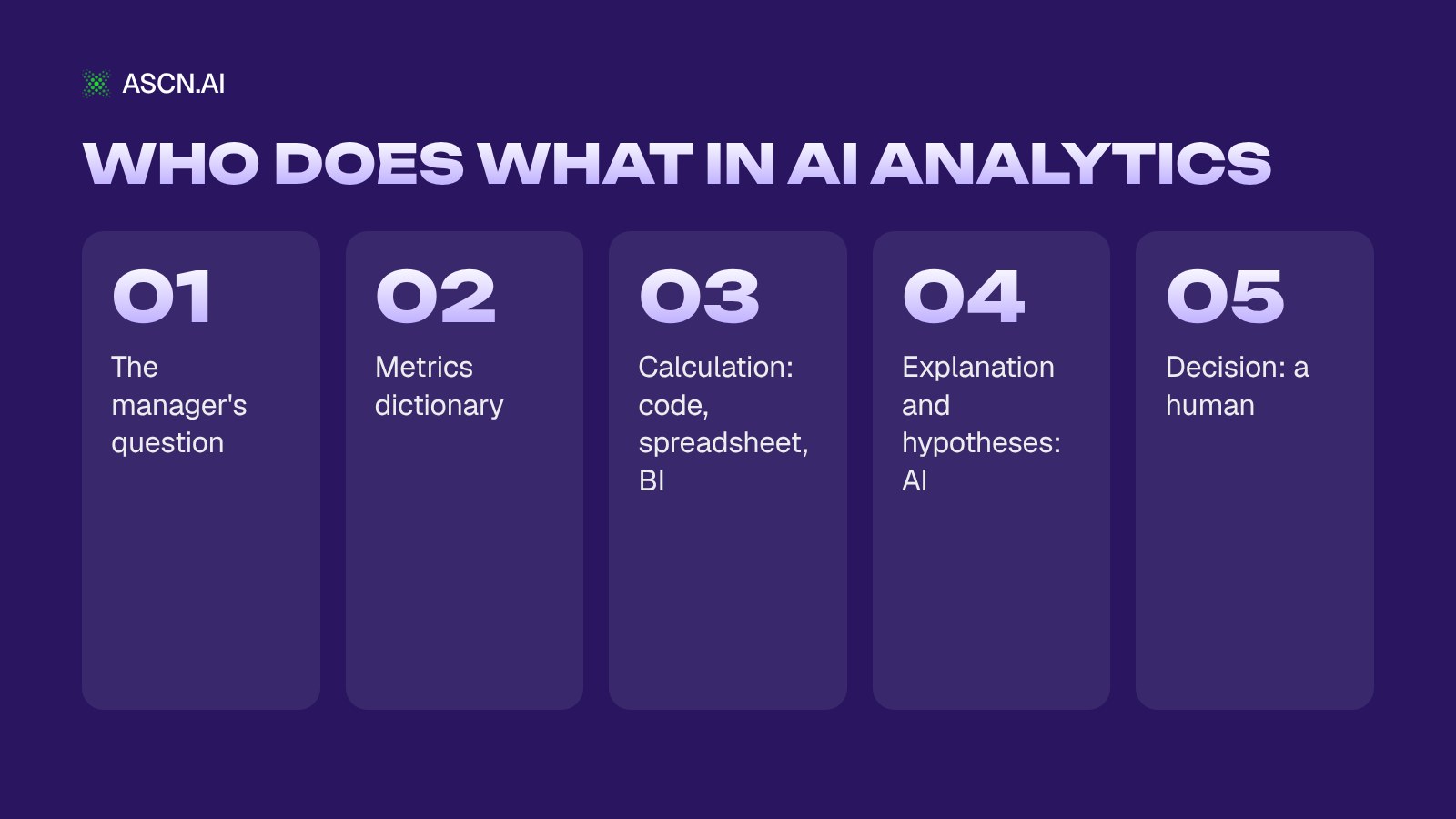
In a working setup, each step has its own owner:
- Question. The manager asks in everyday words: "why is September revenue lower than August?"
- Metric definition. AI looks up in the dictionary what "revenue" means in this particular company: net of sales tax, minus refunds, by payment date rather than order date.
- Calculation. A SQL query, a spreadsheet formula or a BI report returns the number. This step is deterministic: the same query tomorrow gives the same result.
- Explanation. AI breaks the number down into drivers, shows the segment where the drop happened and suggests hypotheses.
- Decision. A person chooses what to do and assigns an owner.
That's how the analyst from the workspace.ru case was rebuilt: the model calls server-side functions, Python with the Pandas library computes the exact values, and the model only phrases the answer. As a side effect, the request to the model shrank from 30,000–100,000 tokens to 1,500–3,000, because it no longer has to read the whole table. Two developers built the prototype in 3 weeks.
For a list of services and models, see our overview of AI tools for data analysis.
Five management questions: what AI answers and where it goes wrong
For the five typical questions a manager asks, AI does the same job: it breaks the number into drivers and explains it, while code or BI computes the number itself. It goes wrong where nobody pinned down the metric definition, the attribution model, the tolerance threshold or the forecast assumptions.
| Manager's question | What AI does | What code/BI computes | How to check |
|---|---|---|---|
| Why revenue dropped | Breaks it into drivers | Traffic, conversion, order value | Match a closed month |
| Which channels pay off | Joins spend and leads | CAC, ROMI | Attribution model in dictionary |
| Unit economics | Finds loss-making items | Margin per SKU/customer | Cost-of-goods formula |
| KPI deviations | Comments, suggests action | Plan, actual, delta | Tolerance set upfront |
| Will cash last | Proposes scenarios | 13-week cash forecast | CFO approves assumptions |
Why revenue dropped
AI splits revenue into traffic, conversion and average order value, finds the segment with the drop (region, channel, category) and suggests hypotheses. It doesn't know the cause: a Garage Eight article on Habr (February 2026) calls this the gap between a detected anomaly and a business action. A common trap is months where sales tax and refunds were recorded differently: the "drop" turns out to be a difference in method, not in sales.
Which channels pay off
AI matches ad spend with leads and payments and calculates CAC and ROMI by channel. But who gets credit for a lead that arrived after three touches, and what counts as a lead in the first place, is a management decision. A Beget blog post on Habr (January 2026) walks through an example: "active customer" means different things to marketing, finance and product, and the model won't pick the definition for you. The attribution model goes into the dictionary; AI only applies it.
Unit economics of a product or customer
The formula "revenue minus fees, cost of goods and advertising" lives in a spreadsheet, and AI shows which products or customers are losing money and because of which line item. The Ozon Analyst agent from the ASCN catalog works this way, for example: profit per SKU is calculated by this formula, and the model writes the recommendations. If the cost of goods in the spreadsheet hasn't been updated since last quarter, the conclusion will be arithmetically correct and wrong in substance.
KPI deviations and anomaly detection in metrics
When AI is used for KPI monitoring, the tolerance threshold is set in advance, for example "deviation from plan above 10%". The agent compares actuals with the plan and previous periods, comments on deviations beyond the threshold and suggests one action. Without a threshold it comments on every fluctuation, and the important deviation gets lost among the small ones.
Will there be enough cash in three months
A 13-week cash forecast is calculated in a spreadsheet across scenarios: payments on schedule, delayed payments, losing a major client. AI spells out the assumptions behind each scenario and puts the bad news in the first line. The assumptions are approved by the CFO or the owner, and the result depends on them more than on the formula.
Can you trust the number? Why demos look more accurate than your data
You can trust a number that a verifiable query computed using your definitions and that matched a reference value. Leaderboards show how systems handle other people's databases, not how AI will answer about your company.
What text-to-SQL benchmarks show
Text-to-SQL is the translation of a plain-language question into an SQL query against a database: it's the step AI performs when you "ask your data".
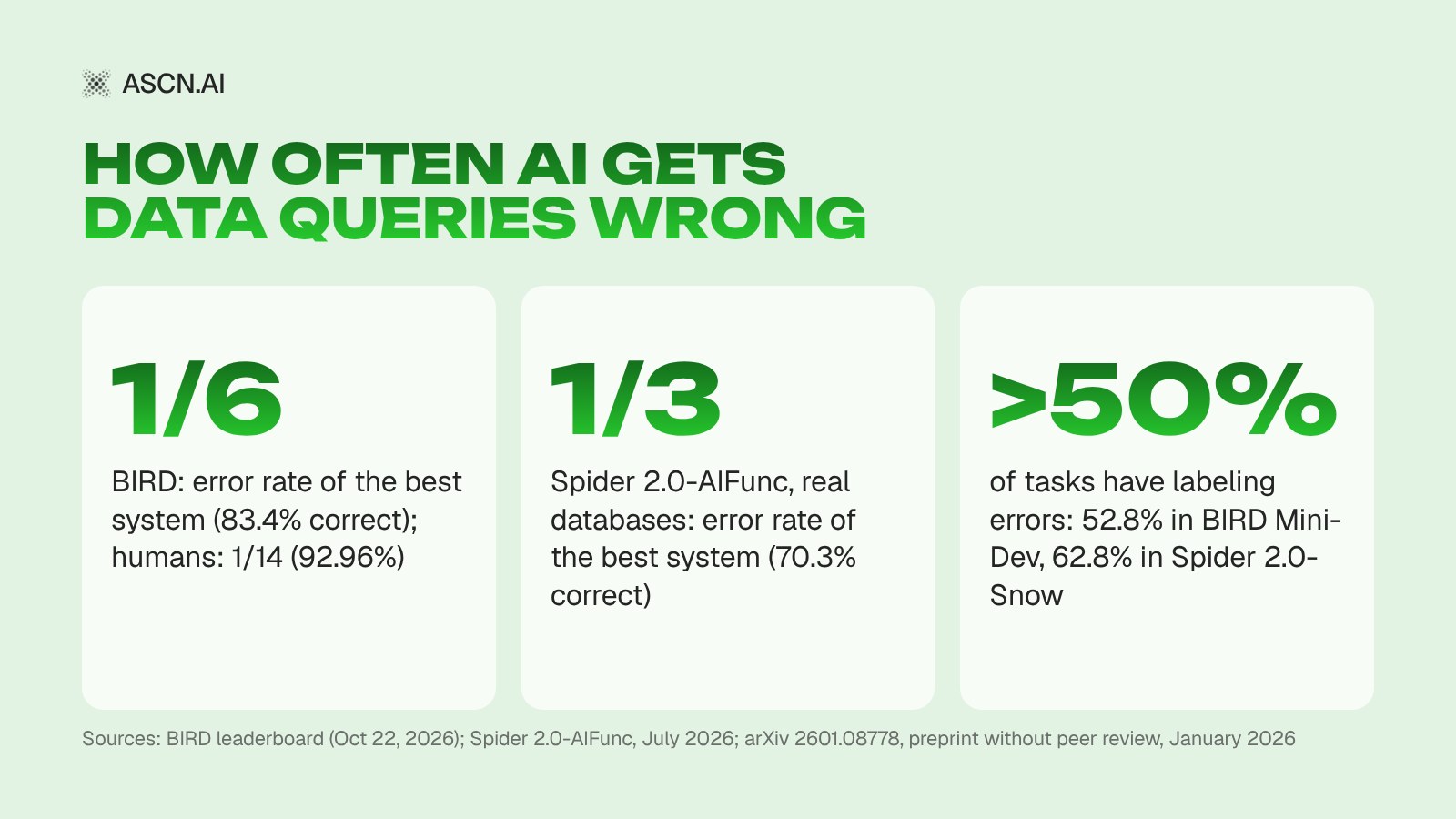
- BIRD. On the official leaderboard, first place has 83.40% execution accuracy, meaning the share of results that matched the reference (submission dated October 22, 2026). Humans, data engineers and students, score 92.96%. In management terms: the best system is wrong in roughly one query out of six, a human in one out of fourteen.
- Spider 2.0-AIFunc. A benchmark from July 2026: 465 tasks against 125 real databases in Snowflake. The best result is 70.3%, so roughly every third task is solved incorrectly. A minimal agent scored 69.0% and kept pace with complex frameworks: elaborate scaffolding doesn't guarantee accuracy.
Why a leaderboard says little about your company
The first reason is the benchmarks themselves. A paper on arXiv 2601.08778 (January 2026, preprint without peer review) found labeling errors in 52.8% of BIRD Mini-Dev tasks and 62.8% of Spider 2.0-Snow tasks. After the fixes, agent accuracy changed by −7 to +31%, and rankings shifted by up to ±9 places. Part of the gap between systems on a leaderboard is a gap in the quality of the reference answers.
The second is that the database schema doesn't record what "revenue" means in your company. Julien Hurault (December 2025) describes a typical failure: columns named "user_id" in different tables refer to different entities, and the model confidently builds the wrong joins.
The third is how demos are built: almost always it's a simple question against a single fact table, and any product looks good on it.
The most dangerous error here isn't a refusal but a convincing wrong answer. The model rarely says it didn't understand the question, as BI practitioners point out on the VSL BI blog on Sostav (October 2026). How such systems evolve from chatting with data to an autonomous agent is covered in our article on AI data analysis agents.
Metrics dictionary: the semantic layer in plain terms
A semantic layer is a description of the company's metrics that AI reads before calculating: what counts as revenue, margin, active customer and CAC, which table to take the data from and with which filters. In a small company it isn't a separate product but a document with an owner.
Here's what one dictionary entry looks like:
- Metric: revenue.
- Definition: paid orders for the period, by payment date.
- Formula: total payments minus refunds, net of sales tax.
- Source: the "Payments" sheet in Google Sheets, exported from the accounting system every Monday.
- Exclude: test orders, internal transfers.
- Owner: CFO.
- Control value: the figure for the last closed month from management reporting.
How much this affects accuracy is shown in the preprint arXiv 2604.25149 (April 28, 2026, not peer-reviewed): 100 questions against a retail dataset in ClickHouse, three models. A 4 KB Markdown document describing metrics and rules raised accuracy by 17–23 percentage points, from 45.5–50.5% to 67.7–68.7%, and the gap between models almost disappeared. It's one dataset, but the conclusion is direct: the dictionary affects the result more than the choice of model.
Gartner's forecast (Market Guide for Agentic Analytics, February 2026), as reported by Cube and Redpanda, says 60% of agentic analytics projects that rely on MCP alone will fail for lack of a consistent semantic layer. BI vendors are moving the same way. In late September 2026, Microsoft made Fabric IQ generally available, and Copilot answers are now grounded in Power BI semantic models.
A dictionary doesn't eliminate errors: even with it, about a third of the answers in the experiment were wrong, so verification is still needed. Don't start by describing the whole database; start with the 10–15 metrics that come up at the weekly meeting: revenue, margin, leads, CAC, cash balance.
AI inside BI, or an agent that brings the report to you
AI inside BI fits if you already have BI with a documented data model. A scheduled agent fits if there's no BI, or if the summary and deviations should arrive on their own without opening a dashboard.
| Approach | Who starts | When it fits | Main limitation |
|---|---|---|---|
| AI inside BI | User asks | BI and data model exist | Only BI data |
| LLM chat with an export | User asks | One-off question | No dictionary or history |
| Scheduled agent | Agent sends it | Regular summary, alerts | Not a data warehouse |
AI in BI tools. In Power BI, Microsoft 365 Copilot answers questions about reports and semantic models while respecting access permissions; it requires a Copilot license (MC1323266, updated August 19, 2026). In Looker, according to the release notes of October 8–9, 2026, data agents in Conversational Analytics reached general availability, while scheduled agentic workflows that send summaries by email and to Slack are in Preview; reference verified queries have been available to everyone since August 28. BI itself is moving toward the "agent sends the report on schedule" model.
LLM chat with an export. For a one-off question it's the fastest option, but a table pasted as text is exactly the scenario where the model from the workspace.ru case mixed up columns. If the export contains customer personal data, sending it to a third-party cloud is a separate compliance question: check the data protection and data residency rules that apply to your business first.
Gartner also predicts (Predicts 2026, as reported by Redpanda) that by 2028, 60% of self-service analytics users will use general-purpose LLMs for ad hoc questions, while regular reporting stays in BI. Our view is that the approaches complement each other: BI remains the source of record for reporting numbers, and an agent takes over scheduled analytical summaries and alerts. If your goal is a recurring report rather than answering questions, see our guide on how to automate reporting.
Checklist: how to verify an AI answer that contains numbers
Accept an AI answer with a number if the metric is in the dictionary, the answer shows the formula and source, and the result matches the report for a closed period. Rerun the set of reference questions and the comparison after every change to the data, the dictionary or the model.
- The metric is in the dictionary. If "revenue" isn't in the dictionary or has two definitions, the answer isn't accepted until a definition is approved.
- The answer shows how it was calculated. Formula or query, source, period and filters in every answer. Looker has a setting that shows the reasoning and query results; in other tools, write the rule into the instructions.
- Match against the reference. The figure for the last closed period matches management reporting to the cent, or the difference is explained (for example, a different cut-off date).
- A set of reference questions. 20–30 questions with known answers, the same principle as verified queries in Looker.
- Honesty test. Ask about a metric that doesn't exist, or a period with no data. The right answer is "no data", not a plausible number.
- Access rights. AI sees only approved sources, and edit and delete permissions stay off until the answers pass verification.
- The decision has an owner. In McKinsey's "The judgment bottleneck" (October 2026; summary), financial analysis shrank from five weeks to under two days, but decisions didn't get faster: executives needed time to check the assumptions. The manager assigns the owner of a decision, not AI.
When you don't need AI for business analytics
AI for business analytics is unnecessary when a pivot table answers your questions, and harmful when your sources calculate the same metric differently: then it just produces a convincingly wrong report faster.
- Little data, all in one table. Five questions a month are covered by a pivot table and formulas.
- Data isn't reconciled. If your accounting system, CRM and Excel calculate revenue differently, you need shared calculation rules first, then AI.
- A warehouse with hundreds of tables and complex relationships. This calls for BI or a semantic layer and a data team; a no-code agent won't replace them and will work on top of prepared exports.
- A one-time, high-stakes strategic decision. AI will speed up preparing the analysis, but judgment and checking assumptions stay with people, and the time saved will be smaller than it seems.
How to build an AI analyst in ASCN without code
In ASCN.ai, an AI analyst is built from a ready-made agent and your spreadsheets: the agent reads data from Google Sheets or Google Drive, checks the metrics dictionary in its knowledge base and sends a summary to Telegram or Slack on a schedule.
- Data. Google Sheets and Docs, Google Drive, Supabase and Notion connect natively. If your accounting system or CRM has no native connector, put an export into Google Drive or Sheets, or connect the system directly through its API or an MCP server, with the key stored under "Secrets and keys". If your data lives in a database, see our guide on connecting AI agents to databases.
- Metrics dictionary. Upload the dictionary to the agent's knowledge base: it's read before every answer. We recommend adding two rules there: "don't answer with a number if there's no data" and "show the formula and source". This is our recommendation, not a built-in feature, so test it with reference questions.
- Ready-made agent. The AI Agent for KPI Reports collects KPIs from Google Sheets, Search Console and GitHub according to a metrics map, builds an "actual / plan / delta" table, comments on every deviation beyond tolerance with one action per block, updates an HTML dashboard and gives a quick snapshot on request.
- Schedule. You create a task with a chat message, for example "every Monday at 9:00 send me the summary in Telegram". You can set an interval in hours, days of the week and a time zone. Scheduled work is available from the Start plan.
- Alerts. ASCN has triggers only for Gmail, Google Calendar and Google Drive, so a deviation alert is a scheduled check: for example, once an hour with the condition "if the deviation is above X, message me in Telegram". The exception is a new or changed export file in Drive, which does have a trigger. Every run uses credits; the documentation recommends checking once an hour rather than every 15 minutes.
- Check before rollout. Run the reference questions from the checklist and compare the first summary with a closed month.
For specific questions from the table above, the catalog has other ready-made agents:
- AI CFO Agent takes bank and CRM exports from Drive and builds a monthly package (P&L, cash flow, variances) plus a 13-week cash forecast in three scenarios.
- Ozon Analyst calculates net profit per SKU and the cost of stockouts.
- AI Financial Assistant for Small Business tracks income and expenses and builds P&L and cash flow in Google Sheets.
- Google Ads Analyst finds campaigns that spend budget without generating leads.
According to the ascn.ai pricing page (October 2026), Free includes 500 credits per week and one active agent, and paid plans start at $29/month: the Start plan adds scheduled work and connecting the agent to Telegram and Slack. Credit usage depends on the model and the amount of data, so the cost of a summary only becomes clear after the first runs.
Why ASCN.ai
ASCN Agent is a cloud platform for AI agents from ASCN.ai: you build an agent by describing the task in a chat. For analytics it offers:
- The agent comes to you. It sends summaries and deviations to Telegram or Slack on a schedule (from the Start plan).
- Ready-made agents. Agents for KPIs, finance and marketplaces come from the catalog and are fine-tuned with chat messages.
- Metrics dictionary in the knowledge base. Definitions and answer rules live in the knowledge base, not in the chat history.
- Switch models in one click. Qwen, Claude, DeepSeek, Kimi, MiMo, GPT and Gemini are available. Given the preprint on dictionaries, it makes sense to pick the model by price and speed and get accuracy from the dictionary.
- Access control. The agent sees only approved sources, keys are stored encrypted, risky actions run only after confirmation, and file edit and delete permissions are separate toggles.
There's a boundary too: ASCN is not a BI system or a data warehouse. With hundreds of tables, the agent works on top of prepared exports or BI, not instead of them.
A good first step is the ready-made AI Agent for KPI Reports.
FAQ
Can AI replace a BI system?
No. BI holds the data model, access rights and regular reports, while AI answers questions on top of them and explains the results. Gartner predicts (Predicts 2026, as reported by Redpanda) that by 2028, 60% of self-service analytics users will use general-purpose LLMs for ad hoc questions, but regular reporting will stay in BI.
Can you trust the numbers an AI model gives you?
Only if the number was computed by a query, formula or BI using a documented metric definition, and the answer matched a reference report. Query generation itself makes mistakes: on the BIRD benchmark (leaderboard, October 2026), the best system gets 83.4% of results right versus 92.96% for humans. Don't accept an answer without a formula, source and period.
What is a semantic layer in plain terms?
A semantic layer is the company's metrics dictionary: what counts as revenue, margin or an active customer, by which formula, from which table and with which exclusions. AI reads it before calculating. In the preprint arXiv 2604.25149 (April 2026, not peer-reviewed), a 4 KB document like this raised answer accuracy by 17–23 percentage points and nearly evened out the results of three models.
Can AI connect to your accounting system or CRM?
Yes, though not always natively: if ASCN.ai has no ready-made connector for your system, the working route is a regular export to a Google Drive folder or Google Sheets. Drive has a trigger for new or changed files, so the agent processes the export right away. A direct connection goes through the system's API or an MCP server, with the key kept in "Secrets and keys".
How does AI detect anomalies in metrics, and why isn't the alert instant?
The agent compares fresh values with the plan, previous periods and the tolerance threshold, and messages you if the deviation exceeds it. In ASCN this is a scheduled task (from the Start plan), for example an hourly check, as the documentation recommends to save credits. Only the trigger for a new or changed file in Google Drive fires instantly; there's no trigger from a database or CRM.
Is it safe to give AI access to financial data?
It depends on access settings: the agent should see only approved sources, and file edit and delete permissions should be off. In ASCN.ai each account is isolated, and keys are stored encrypted. Customer personal data is a separate question: review the data protection and data residency rules that apply to you with a lawyer before connecting it.
How much does AI for business analytics cost?
It depends on the approach. Copilot in Power BI requires a Microsoft 365 Copilot license. In ASCN.ai (October 2026), the Free plan gives 500 credits per week and one active agent, and paid plans start at $29 per month, which is where scheduled work becomes available; credit usage depends on the model and the amount of data.
Where to start
Start with a metrics dictionary rather than with choosing a tool: the first step takes a week and needs no software. Write down five questions you ask your team every week. For each metric in them, record the definition and source, and take the figures for the last closed month as your reference. That's the first version of the dictionary and your first reference questions.
Then connect your spreadsheet to the AI Agent for KPI Reports, upload the dictionary to the knowledge base and compare the first summary with the reference. If the numbers match, set the schedule; if not, the discrepancy will almost certainly show which dictionary definition needs refining. You can start after signing up for ASCN, and a manager on Telegram can help with setup.
AI Implementation in Business: How Leaders Save Time, Grow Sales and Cut Costs
AI Data Analysis Agent: Complete Guide to Tools, Implementation, and Business Value
Connecting AI Agents to Databases: A Complete Guide to Architecture and Implementation

Analytical Summaries in Minutes: How an AI Agent Saves up to 90% of Monitoring Time
How to Automate Reporting: The Practical Guide with No Fluff
AI Neural Network for Data Analysis: Best Tools and Practices 2026