



- Русский
- English
- Português
WhatsApp AI Agent for Business: How It Works and What It Costs After October 1

Key takeaways
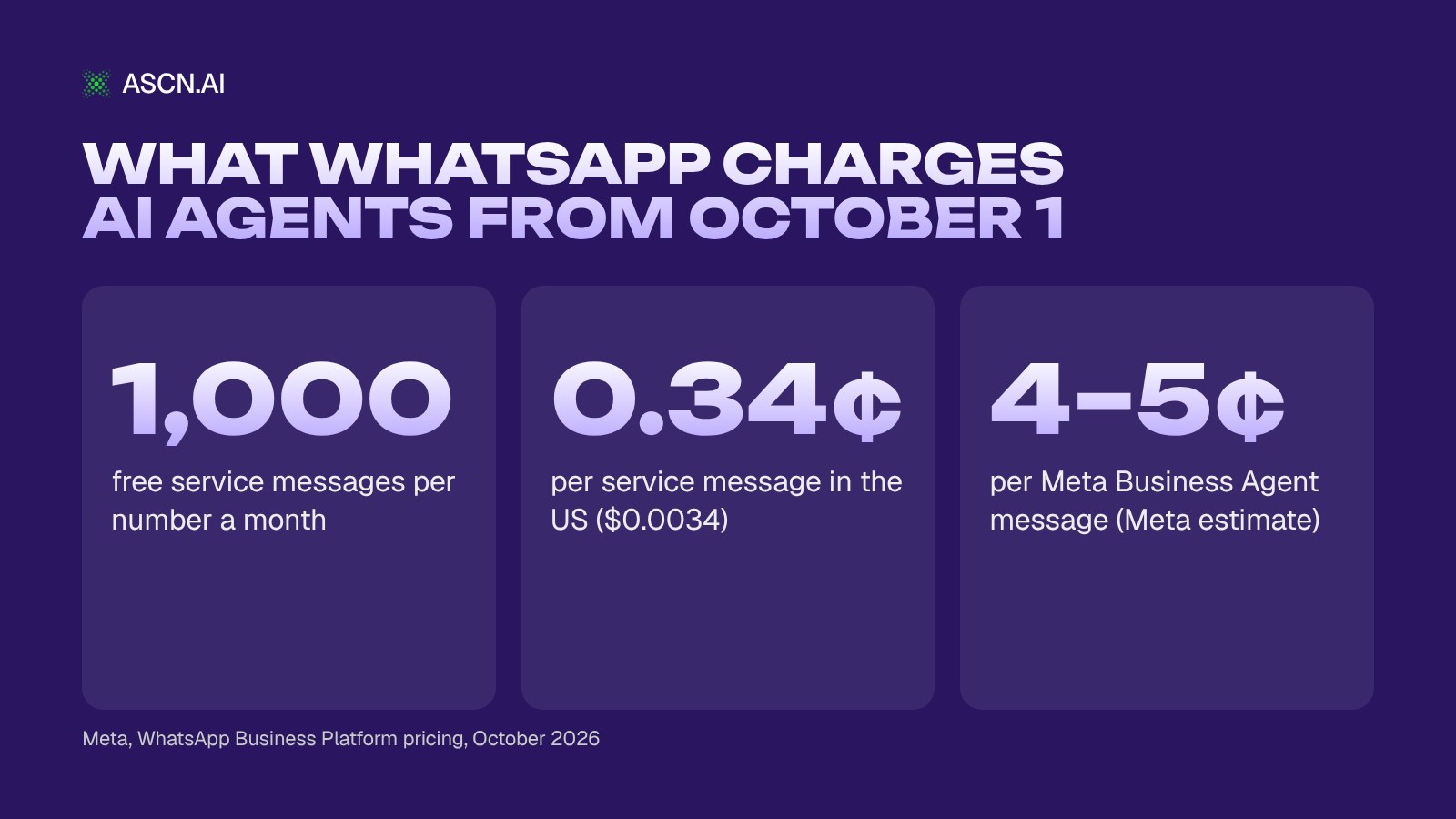
Since October 1, 2026, Meta charges for WhatsApp AI agent replies inside the 24-hour window, billed as service messages on the WhatsApp Business Platform. Each phone number gets 1,000 free service messages a month; then each reply costs the local rate, $0.0034 in the US or $0.055 in Germany. Meta Business Agent replies cost about 4–5¢ each, with no free tier.
Rates and rules below come from Meta's WhatsApp Business Platform pricing page as of October 2026.
Contents:
- What changed on October 1, 2026
- What is a WhatsApp AI agent
- How a WhatsApp AI agent works
- 5 ways businesses use a WhatsApp AI agent
- WhatsApp Business API pricing after October 1
- 7 ways to keep costs down
- Will Meta allow your AI agent?
- How to launch an agent on ASCN without code
- Limits and risks
- Why ASCN.ai
- FAQ
- Bottom line
What changed for WhatsApp AI agents on October 1, 2026
On October 1, 2026, Meta started charging for service messages, the free-form replies a business sends inside an open customer service window. Per Meta's page on non-template messages, these "have not been charged since November 1, 2024". Utility templates sent as a reply inside an open window are now charged too, after being free since July 1, 2025.
Every answer an AI agent sends is a free-form message. So every delivered answer beyond the free allowance now has a price.
What stayed the same: you pay per delivered message, not per conversation, at a rate set by category and the recipient's country code. Customer messages to you are free. The 24-hour window still opens and resets with each customer message, and outside it you can send only paid, approved templates.
What is new is the free allowance. Meta gives every business phone number 1,000 free service messages per month and charges from the 1,001st (Meta pricing page, as of October 2026). Unused messages do not roll over. The allowance covers service messages only, not utility templates or Meta Business Agent replies.
One trap: with no payment method in your Meta account, delivery stops once the 1,000 are used. From reply 1,001 on, customers get nothing.
Meta changes prices only on January 1, April 1, July 1 and October 1, with a month's notice, so review the budget quarterly. All of this is the Platform (API) pricing; the free WhatsApp Business app is a different product.
What is a WhatsApp AI agent (and how it differs from a WhatsApp AI chatbot)
A WhatsApp AI agent is a program connected to a business number on Meta's platform that reads customer messages in plain language, answers from your business facts and takes an action: records an order, books a slot, notifies the owner or passes the chat to a person. For most owners looking for a WhatsApp AI chatbot for business, that is the real goal: fewer chats answered by hand.
AI agent vs rule-based chatbot
A rule-based chatbot follows a script: tap "1" for hours, "2" for delivery, and anything off the menu gets "Sorry, I didn't understand." An AI agent reads free text, finds the answer in your price list or policies and does the next step itself.
Example: a customer writes "Two large pizzas to Elm Street by 7?" A scripted bot sends the menu. An agent checks the delivery zone and hours, confirms the order, writes it to a Google Sheet and pings the manager. For the broader picture, see how to build a chatbot for business.
WhatsApp Business app vs WhatsApp Business Platform (API)
The WhatsApp Business app is a free phone app for answering customers by hand. An AI agent needs a number on the WhatsApp Business Platform, also called the API or Cloud API, the interface software uses to receive and send messages. The October 1 pricing applies to the Platform.
How a WhatsApp AI agent works
A WhatsApp AI agent runs a loop: a message comes in, the agent finds the answer in your facts, decides and acts.
- The customer writes. This opens or resets the 24-hour window.
- The agent looks up the facts: prices, hours, delivery zones, return rules. Answers are only as good as this base, so build the agent's knowledge base first.
- The agent decides: answer, record or escalate.
- The agent acts: writes the order to Google Sheets or Notion, notifies the owner or hands the chat to a person.
- Follow-up: after 24 hours of silence, only a paid template can reach the customer.
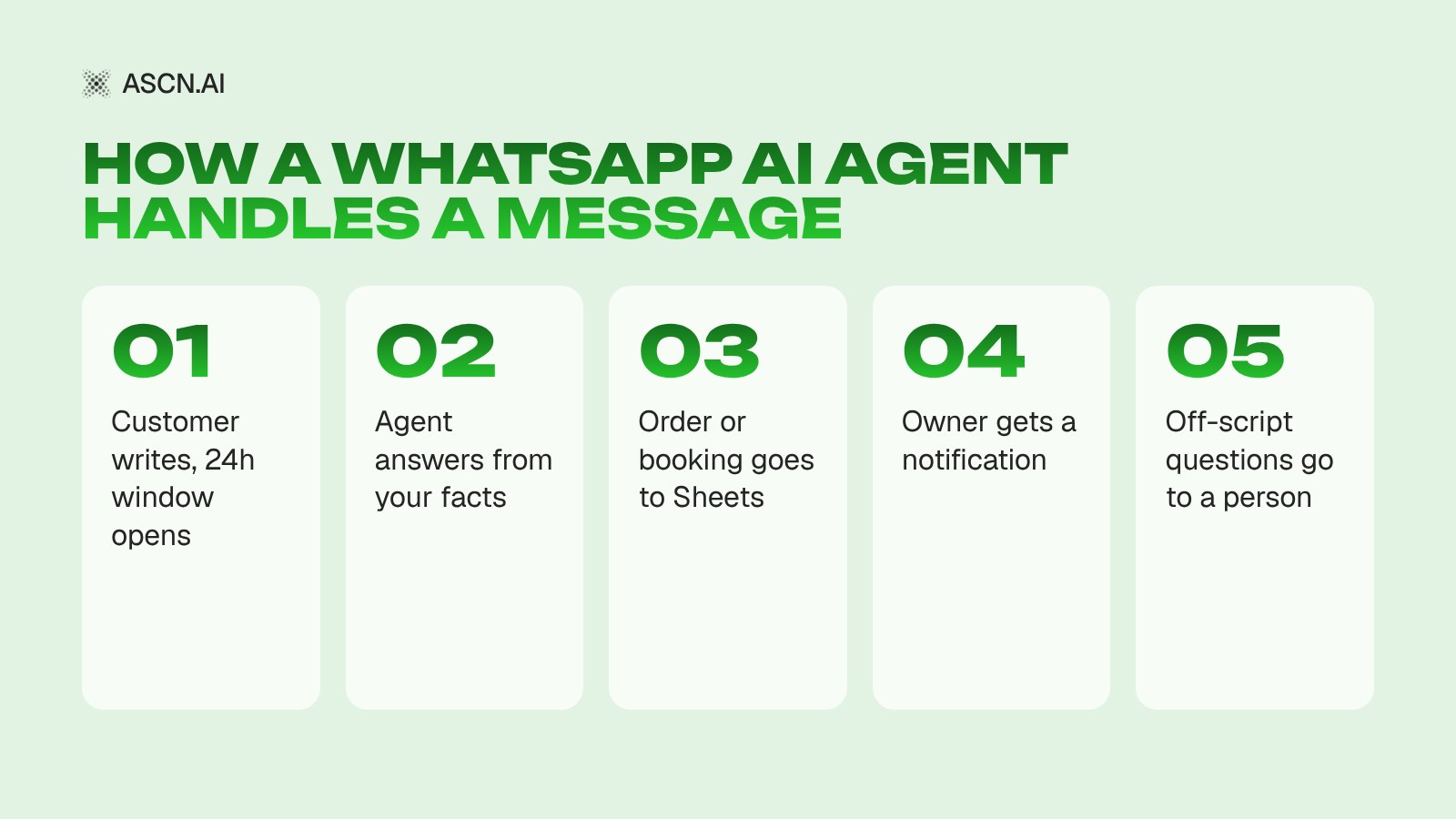
Each delivered reply is one service message: three short bubbles cost three times one complete reply. Count messages per conversation, not conversations.
5 ways businesses use a WhatsApp AI agent
Businesses use a WhatsApp AI agent for five jobs: answering questions, taking orders and bookings, qualifying ad leads, sending reminders and handing chats to staff. The scenes below are illustrations, not client cases.
Answering questions and support 24/7
Hours, delivery, stock, returns: the agent answers in seconds at any hour and sends anything outside its facts to a person. Example: a clothing store gets "Do you have this jacket in M?" at 11 p.m., and the agent checks the stock sheet. More on this job: AI support agent.
Taking orders and bookings
Restaurants, clinics and salons take orders and bookings in the chat. Example: a salon's agent asks for the service, day and name, checks free slots in Google Calendar and confirms. See how a clinic automated appointment booking.
Qualifying leads from Click-to-WhatsApp ads
Real estate agents and local services run Click-to-WhatsApp ads that open a chat instead of a landing page. The agent replies at once, asks about budget, area and timing, and passes warm leads to a person. A fast reply also opens Meta's free entry point window, covered below.
Reminders and order updates
Appointment reminders and shipping notices usually go out when the customer has been silent for a while, so they are utility templates. Those are billed from the first message; the 1,000 free service messages do not cover them.
Handing off to a person
Hand over when the agent is unsure, when a customer complains or when an order is big enough to confirm by hand. Replies typed by your staff are service messages too, so they share the same 1,000.
| Job | Who writes first | Billed as | Meta fee |
|---|---|---|---|
| Questions, support | Customer | Service | Free up to 1,000 |
| Orders, bookings | Customer | Service | Free up to 1,000 |
| Ad lead replies | Customer, via ad | Any category | Free in FEP |
| Reminders, updates | Business | Utility template | From 1st message |
| Staff handoff | Customer | Service | Free up to 1,000 |
The agent and your staff share one pool of 1,000 free service messages per number.
WhatsApp Business API pricing after October 1: what an AI agent costs
WhatsApp Business API pricing for an AI agent comes down to one rule: replies are service messages, the first 1,000 per number each month are free, and the rest cost the market's service rate, from $0.0014 in India to $0.055 in Germany (Meta rate card, as of October 2026). Provider fees and the AI platform come on top.
Message categories and how Meta bills them
Since July 1, 2026, Meta has five message categories, and each delivered message is charged once, under one of them (Meta pricing page, as of October 2026).
| Message type | When sent | Billed by | Free allowance | US rate | Free in FEP |
|---|---|---|---|---|---|
| Service (AI agent reply) | Inside 24h window | Delivered message | 1,000/number/month | $0.0034 | Yes |
| Utility template | Any time | Delivered message | None | $0.0034 | Yes |
| Authentication template | Any time | Delivered message | None | $0.0034 | Yes |
| Marketing template | Any time | Delivered message | None | $0.025 | Yes |
| Meta Business Agent reply | Inside 24h window | Tokens ($2/1M) | None | ~4–5¢ | No |
Utility and authentication templates get volume discounts; service messages do not. The ~4–5¢ is Meta's estimate, based on 20,000–25,000 tokens per message.
An agent built on ASCN or any other third-party tool sends service messages. Meta defines service as non-template messages "not powered by the Meta Business Agent Platform" that "can be powered by a 3rd-party AI solution or people" (Meta, as of October 2026).
Monthly cost by country (with 1,000 free messages)
Meta fees for an agent's replies on one number per month, at rates effective October 1, 2026 (USD):
| Market | Per message | Up to 1,000 | 3,000 | 10,000 | 30,000 |
|---|---|---|---|---|---|
| United States | $0.0034 | $0 | $6.80 | $30.60 | $98.60 |
| United Kingdom | $0.022 | $0 | $44 | $198 | $638 |
| Germany | $0.055 | $0 | $110 | $495 | $1,595 |
| Brazil | $0.0068 | $0 | $13.60 | $61.20 | $197.20 |
| Mexico | $0.0085 | $0 | $17 | $76.50 | $246.50 |
| India | $0.0014 | $0 | $2.80 | $12.60 | $40.60 |
Assumptions: Meta's USD list rates from the Meta pricing page as of October 2026; Meta fees only; one number; every message is a service message delivered in that market. Provider fees, AI platform credits and taxes are excluded. The service rate equals the market's utility rate, with no volume discounts.
A US shop sending 3,000 agent replies a month pays Meta $6.80; in Germany, $110. High-rate markets such as Germany, the Netherlands ($0.05) and the UK need their own math.
Third-party AI agent vs Meta Business Agent: two billing models
Meta Business Agent is Meta's own AI agent for business chats. Since August 1, 2026, its replies cost one global rate of $2.00 per 1 million input and output tokens. Meta puts a typical message at 20,000–25,000 tokens, about 4–5¢. No free tier applies, and it is charged even in the free entry point window (Meta, as of October 2026).
For 10,000 replies a month in the US:
- Third-party agent: 9,000 billable service messages × $0.0034 = $30.60 in Meta fees.
- Meta Business Agent: 10,000 × 4–5¢ ≈ $400–500, by Meta's estimate.
In Meta's examples, a simple 4-message inquiry costs roughly 16–20¢ and a complex 10-message one roughly 40–50¢.
A third-party agent also has AI and platform costs. In Meta's example for Brazil with 10,000 AI messages, Meta estimates a high-complexity third-party setup at about $968 against $400–500 for its own agent, assuming about 9¢ per message for third-party AI. That is Meta's claim, not a benchmark. Price both options on your own volume and market, with every fee included.
What else goes on the bill
- Provider fee. If you connect through a provider, expect a monthly fee or a markup on Meta's rates.
- AI platform. On ASCN, credit use depends on the model and the length of the conversation; plans start at $29/mo, and the Free plan includes 500 credits a week.
- Taxes, where they apply.
The full cost structure is in what AI agent pricing really includes.
7 ways to keep WhatsApp agent costs down
The cheapest WhatsApp AI agent sends one complete reply instead of several short ones, stays within 1,000 free service messages per number and answers Click-to-WhatsApp leads inside the free entry point window.
- Fit the answer into fewer messages. Meta bills each delivered message, not the conversation. Instruct the agent to send one complete reply instead of three short ones.
- Stay under 1,000 a month per number. For a small business, this keeps Meta's fee at zero. The allowance is per phone number, not per account.
- Reply fast to Click-to-WhatsApp leads. Replying inside the window to a customer from a Click-to-WhatsApp ad opens the free entry point (FEP) window, in which Meta does not charge for marketing, utility, authentication or service messages. Per Meta's pricing page, it can stay open for up to 7 days for Click-to-WhatsApp ads under the updated rules; older Meta docs said 72 hours. Meta Business Agent messages are charged even there.
- Inside the window, prefer a free-form reply to a utility template. Inside an open 24-hour window, your agent's free-form reply is a service message, so it counts against the 1,000 free messages. A utility template sent in the same window, such as an order confirmation, is billed from the first message at the same rate. Once you pass 1,000 a month, the two cost the same.
- Mention offers inside replies. Meta does not add a marketing charge for promotional text in a free-form reply. Broadcasts outside the window remain marketing templates ($0.025 in the US).
- Keep a payment method on file. Without one, delivery stops after the free 1,000.
- Check your provider's markup. Ask whether Meta's fees are passed through at cost, marked up or bundled into a plan.
Will Meta allow your AI agent? The January 2026 policy
Yes: Meta allows a WhatsApp AI agent that handles specific tasks for your business, such as orders, support and reminders. Since January 15, 2026, the WhatsApp Business Solution Terms let "AI Providers" offer general-purpose AI assistants only where Meta is legally required to allow it, currently Brazil. A separate arrangement for the EU and Italy applied from February and ended on May 13, 2026 (Meta, AI Providers, as of October 2026).
A quick check that your agent counts as a business agent:
- It answers questions about your business: products, prices, bookings, policies.
- It does not act as an all-purpose assistant on any topic.
- It hands the chat to a person when a question falls outside its scope.
How to launch a WhatsApp AI agent on ASCN without code
The fastest way to launch a WhatsApp AI agent without code is to start from a ready-made agent instead of wiring webhooks. On ASCN.ai, that agent is Messenger Concierge, a ready-made ASCN Agent that answers customers, takes orders and bookings from your facts and notifies you.
What you need first
- A phone number on the WhatsApp Business Platform.
- Meta Business verification, which can take from a few days to several weeks, so start early.
- A payment method in your Meta account, so replies keep going out after the first 1,000.
Meta is making setup easier for developers. On September 15, 2026, it released WhatsApp Business Tools MCP, which lets AI coding agents create a business account, register a number and draft templates, TechCrunch reported. That is account tooling, not an agent that answers your customers.
Launch steps on ASCN
- Install Messenger Concierge. The ready-made agent is available on any ASCN plan, including Free.
- Describe the job in chat and load your facts: prices, opening hours, rules, FAQ. The agent answers only from them.
- Connect Google Sheets or Notion for orders and bookings, plus Google Calendar for appointments.
- Set up notifications and escalation: when the owner gets a message, which questions go to a person, which reminders go out.
- Choose the channels. Telegram works out of the box. WhatsApp connects as a channel: in Messenger Concierge, it is a paid add-on through an external provider.
- Test on real questions before you share the number: a price question, a booking, a complaint, something off-topic.
You choose the model the agent runs on, from families including Qwen, Claude, DeepSeek, Kimi, Xiaomi MiMo, GPT and Gemini. For one inbox and broadcasts across Telegram and WhatsApp, there is the Telegram & WhatsApp Broadcasts template, but it deploys a CRM on your own VPS with Docker.
Limits and risks to plan for
A WhatsApp AI agent can message customers freely only inside the 24-hour window, needs Meta Business verification before launch and stops delivering replies after the free 1,000 if no payment method is on file.
- The 24-hour window. Outside it, only paid, approved templates go out.
- Time to launch. Business verification and template approval take time.
- No payment method, no delivery after the free 1,000.
- Quarterly rate changes. Recalculate the budget when Meta announces new rates.
- AI mistakes. Keep the agent on your facts and route the rest to a person.
- Platform costs vary. Credit use depends on the model and conversation length, so run a test week and measure.
Why ASCN.ai
ASCN.ai suits a WhatsApp AI agent when you want customer chats handled without writing webhook code: you describe the job in plain words, load your facts and get a cloud agent that answers around the clock. Four things make the difference day to day.
- WhatsApp and Telegram in one place. One agent, one set of prices, hours and rules for both messengers, so answers never drift between channels.
- The job is set in chat. Write what the agent should do as a message; it suggests which services to connect, such as Google Sheets for orders or Google Calendar for bookings.
- Answers 24/7 from your facts. A question at 11 p.m. on a Sunday gets the same answer from your price list and policies as one at noon on a Tuesday.
- Hard cases go to you. Write the rule once in the agent's instructions: complaints, large orders and off-topic questions are flagged to a person instead of answered with a guess.
The quickest start is the ready-made Messenger Concierge agent. It answers customers, takes orders and bookings from your facts, notifies you and sends reminders. Telegram works out of the box; WhatsApp is a paid add-on through an external provider. Test the agent on the Free plan, with 500 credits a week and one active agent, then compare ASCN plans before you go live.
FAQ
How much does a WhatsApp AI agent cost per month after October 1, 2026?
A WhatsApp AI agent's Meta fees depend on volume and country. Each phone number gets 1,000 free service messages a month; after that you pay the local rate, such as $0.0034 in the US or $0.055 in Germany, as of October 2026. So 10,000 replies in the US cost about $30.60 in Meta fees, plus provider and AI platform costs.
Are replies inside the 24-hour window still free?
No, replies inside the 24-hour window are no longer free. Since October 1, 2026, Meta charges for service messages, the free-form replies sent inside the 24-hour window. Two exceptions remain: the first 1,000 service messages per phone number each month, and the free entry point window that opens when you reply to a customer who came from a Click-to-WhatsApp ad.
Is there a free WhatsApp AI agent?
A WhatsApp AI agent can run at zero Meta fees if it stays within 1,000 service messages per number a month. The AI platform is a separate cost. ASCN has a Free plan with 500 credits a week and one active agent, but WhatsApp in the Messenger Concierge agent is a paid add-on.
Is Meta Business Agent cheaper than a third-party AI agent?
Whether Meta Business Agent is cheaper than a third-party agent depends on volume and market. Meta Business Agent costs about 4–5¢ per message by Meta's estimate, with no free tier. A third-party agent pays the market's service rate after 1,000 free messages, plus the cost of its AI platform. Price both on your monthly volume and country before you choose.
Can I use a ChatGPT-style assistant on WhatsApp Business?
A general-purpose AI assistant is not allowed on WhatsApp Business in most countries. Since January 15, 2026, Meta's terms allow AI providers to offer general-purpose assistants only where Meta is legally required to, currently Brazil. An AI agent built for your business tasks, such as answering questions about your products, taking orders and sending reminders, is allowed.
Do I need the WhatsApp Business API, or is the WhatsApp Business app enough?
A WhatsApp AI agent needs the WhatsApp Business Platform (API), not the app. The free app is built for answering customers by hand on a phone, while the Platform lets software receive and send messages. The October 1, 2026 pricing changes, including the 1,000 free service messages, apply to the Platform.
Is the 1,000 free tier per account or per phone number?
The 1,000 free service messages are counted per phone number, not per account. According to Meta's pricing page, every business phone number gets 1,000 free service messages per month. Unused messages do not roll over, and the count resets at midnight in your account's time zone. Two numbers on one account mean 2,000 free service messages a month in total.
Bottom line
For most small businesses, Meta's fees for an agent's replies stay small: 10,000 replies a month cost under $80 in the US, Brazil, Mexico and India. Germany, the Netherlands and the UK need their own math. The bigger decisions are which jobs the agent handles and how many messages it sends per conversation.
Once you know your volume and market, start on the Free plan and run a test week to count your real messages per conversation.
Best AI Chatbots for Business in 2026: 9 Platforms Ranked by Actions and Real Cost

How a Cosmetology Clinic Cut Lead Acquisition Costs by 3x and Hit 95% Doctor Booking Rates Using an AI Agent
AI Support Agent: Automating Support and Service Desk Operations
AI Agent Knowledge Base: How to Build an AI Assistant Based on a Knowledge Base
AI Agent Pricing: What You Really Pay for in 2026
How to Build a Chatbot for Business: A Complete Guide to Automating Customer Communication