



- Русский
- English
- Português
How to Automate Your Business With AI Agents: 10 Steps From One Agent to a Team

Key takeaways
How to automate your business with AI without writing code: give an AI agent a job, access to the services it needs, repeatable instructions called skills, and a schedule, and keep for yourself the decisions that can't be undone. In ASCN Agent all of this is set up by sending messages in a chat.
- An ASCN agent starts work without waiting for you: on a schedule or on an event (a new email, a calendar change, a new file in Google Drive), and it sends the result to Telegram.
- The ten steps take you from one agent with a small task to a team of specialists, each with its own role, its own access and its own tasks.
- The main boundary: anything easy to undo, the agent does on its own; anything a customer will see, anything that spends money or can't be reversed waits for your "yes".
- Getting started: the Free plan gives 500 credits a week and 1 active agent. Ready-made catalog agents, the agent API and up to 5 active agents come with the Start plan ($29/mo).
Any AI chat waits for you to open it. You ask, you get an answer, you close the tab. The work is still yours: copy, paste, send, remember to do it again tomorrow.
An ASCN agent works the other way around. It has a role, a memory of your business, access to your services and a schedule of its own. It sorts your inbox at 7 a.m., drafts replies to reviews and sends a report to Telegram while you sleep, drive or sit in a meeting.
The difference is a habit. You stop writing prompts and start delegating. Below are 10 steps, from your first agent to a team that runs without you and calls you in only where a human decision is needed. None of them requires programming.
A note on the screenshots: they were taken in the Russian version of the ASCN interface. The English labels in the text match the same buttons and sections.
Contents:
- 01. Sign up and give the agent its first real task
- 02. Give the agent a job, not a prompt
- 03. Connect services once, and only the ones it needs
- 04. Grant access, not a password
- 05. Explain it once and never again
- 06. Put it on a schedule
- 07. Hire specialists, not a jack of all trades
- 08. Give your agents a shared place to work
- 09. Draw the line between what the agent does alone and what needs your "yes"
- 10. Review once a week and cut what you don't need
- Conclusion: you are no longer the one pushing the buttons
01. Sign up and give the agent its first real task
ASCN runs in the browser: signing up at ascn.ai takes a couple of minutes, and after that you can also talk to your agent from Telegram. The Free plan gives you 500 credits a week and one active agent, with no card required.
There are two ways to get your first agent. You can take a ready-made one from the catalog: Sima runs social media, Clara answers customers, Max does the numbers. Click "Use template" and it's yours. These ready-made specialists are available from the Start plan. Or you can build your own with "+ Create new", which also works on the Free plan. For a closer look at how an agent works inside and how it differs from a chatbot, see our guide to building an AI agent.
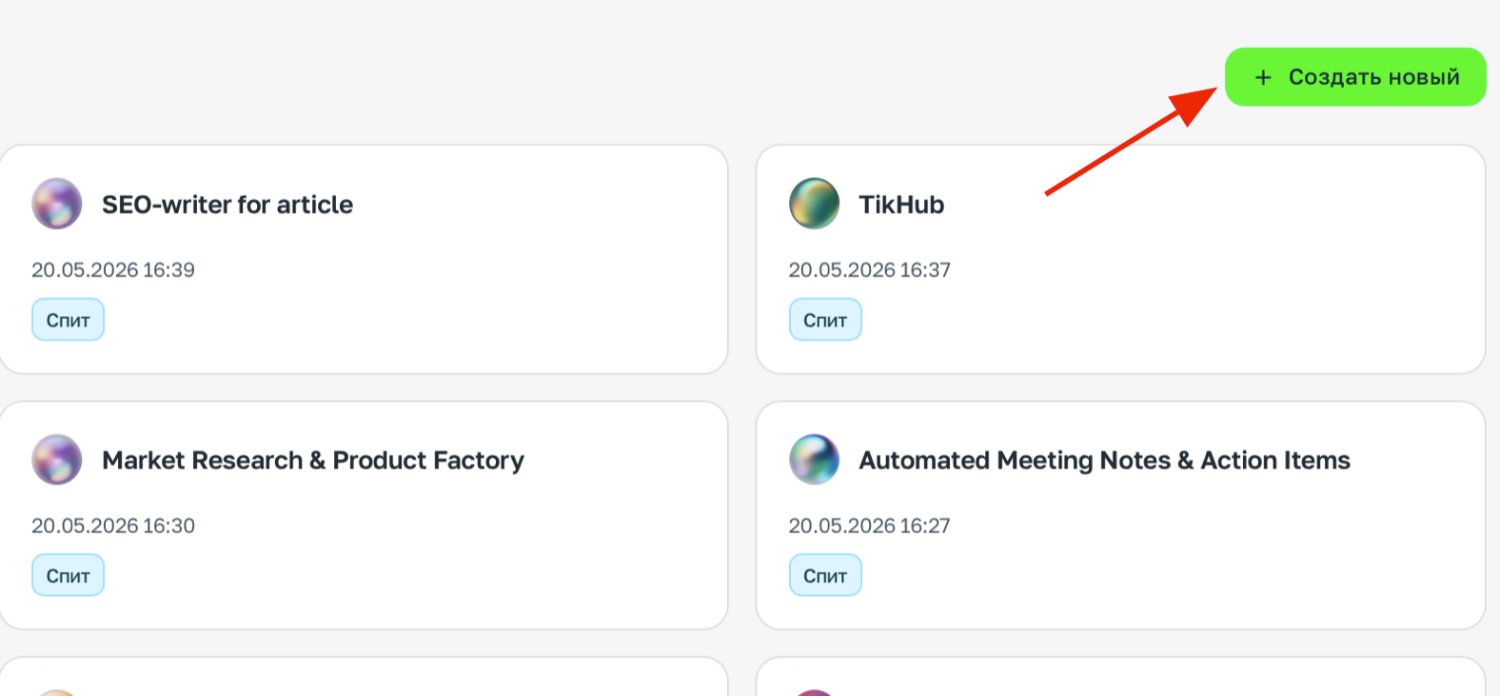
Your own agent starts with the "+ Create new" button.
Make the first task a real one, but small: something you can check in thirty seconds. Every step after this one is about trusting the agent with bigger tasks, a little at a time.
Open [link to a competitor's pricing page] and list the plans in a table: name, price, what's included.
If something isn't shown on the page, say so.
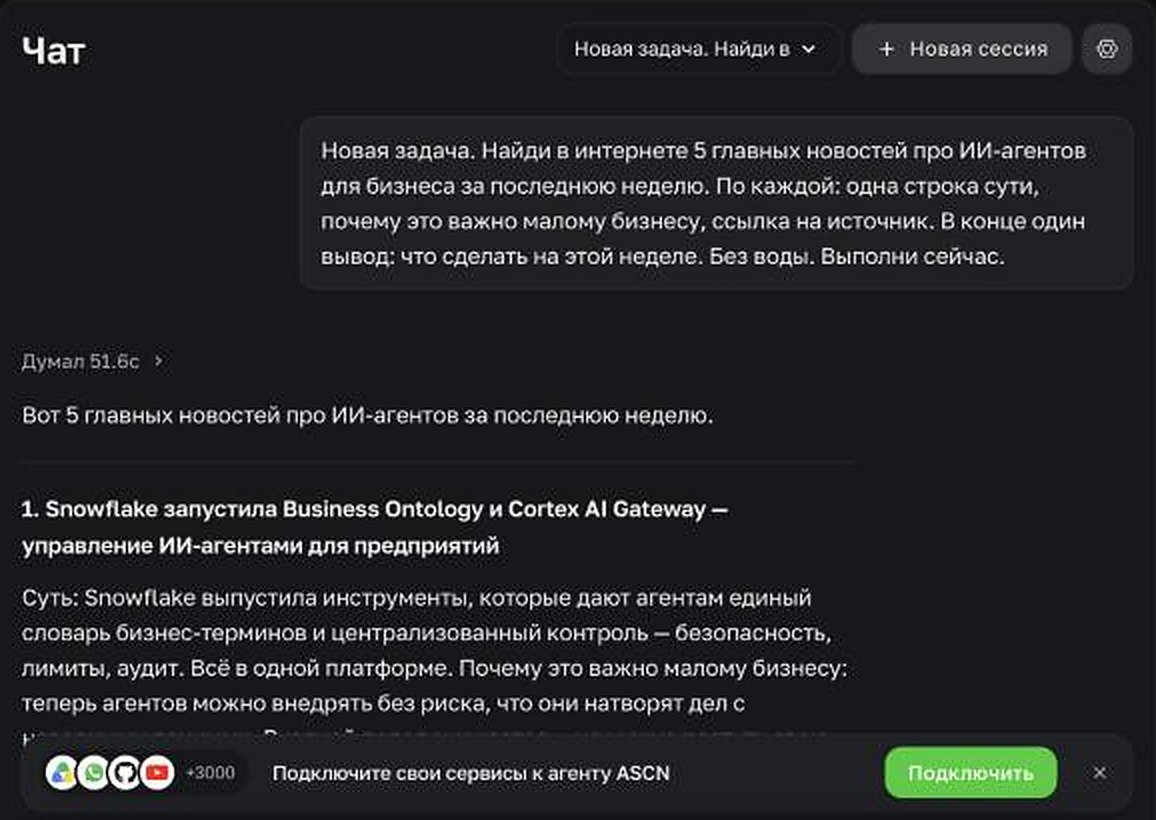
A first task with no connections: the agent searches the web on its own and puts the answer together.
02. Give the agent a job, not a prompt
This is the step where some people start getting value and others give up after a day. A prompt is a request. A job is a role that stays in place: the agent remembers it in every conversation and builds experience in that role specifically.
Name the agent after work a person could do: "Inbox triage", "Review replies", "Lead collector". Then describe the role the way you would brief a new hire on day one. In ASCN this lives in Brain → Knowledge base → IDENTITY.md, but it's easier to paste the text into the chat and ask the agent to save it.
You are my "Inbox triage" agent. Save this as your instructions.
// what you're responsible for
Every morning you go through Gmail. Skip newsletters and receipts.
For emails from clients, prepare draft replies.
Anything with a deadline, an invoice or a legal question goes to the top.
// what good looks like
By 9:00 I know who I need to reply to today.
Drafts sound like me: short, polite, no "I hope this email finds you well". Four sentences max.
// where you stop
You never send anything yourself, only drafts.
You don't touch emails from my accountant or the bank.
If an email asks for money, a password or an urgent decision, stop and ask me.
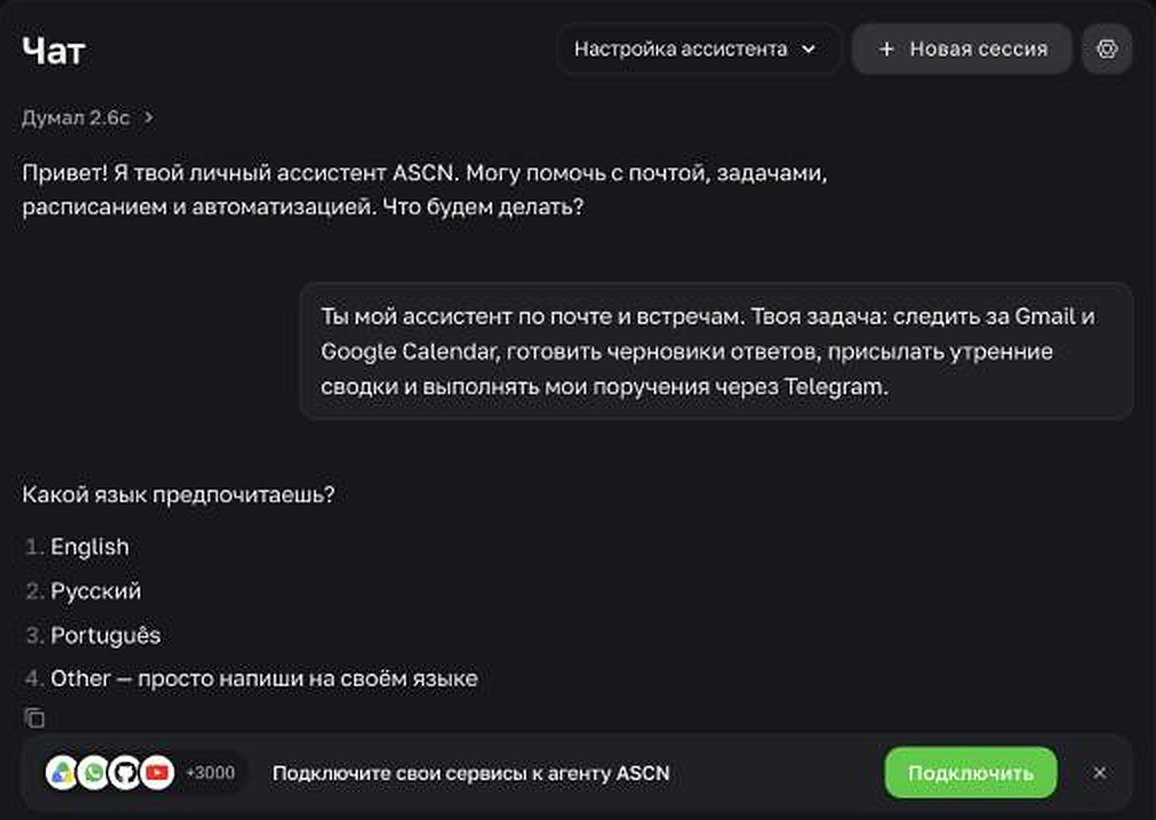
The role is set with an ordinary message, and the agent then asks its own follow-up questions.
The "where you stop" block is the one people skip most often, and it matters most. An agent with access to your email has permission to send emails. If you don't set a boundary, it may decide you want to save time and reply on your behalf. A boundary written down once is what lets you leave the agent working unsupervised. Put it in the instructions specifically: if a rule in the knowledge base conflicts with something you later say in the chat, the agent follows the knowledge base.
Next to IDENTITY.md sits USER.md. That's where the agent keeps what it needs to know about you: your name, time zone, how to address you. Put your price list, rules and examples of your writing into the Knowledge base as files.
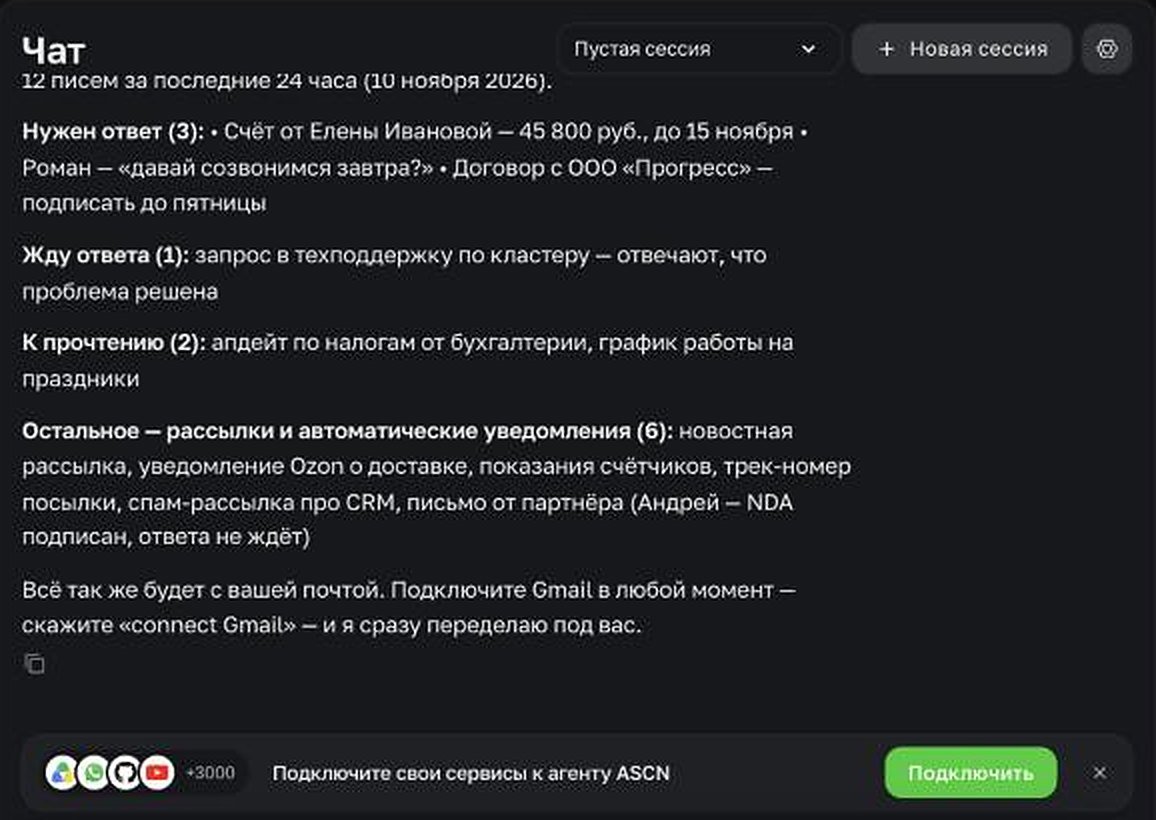
This is what "Inbox triage" looks like: everything that needs a reply at the top, newsletters in one line at the bottom. This summary was built on sample emails, before Gmail was connected.
03. Connect services once, and only the ones it needs
An agent without connections is like a new employee on day one without a building pass. It can search the web and read public pages right away, but it can't see your inbox or your spreadsheet.
Passes are issued in Brain → Integrations → + Add, or with a button right in the chat: the agent suggests what to connect.
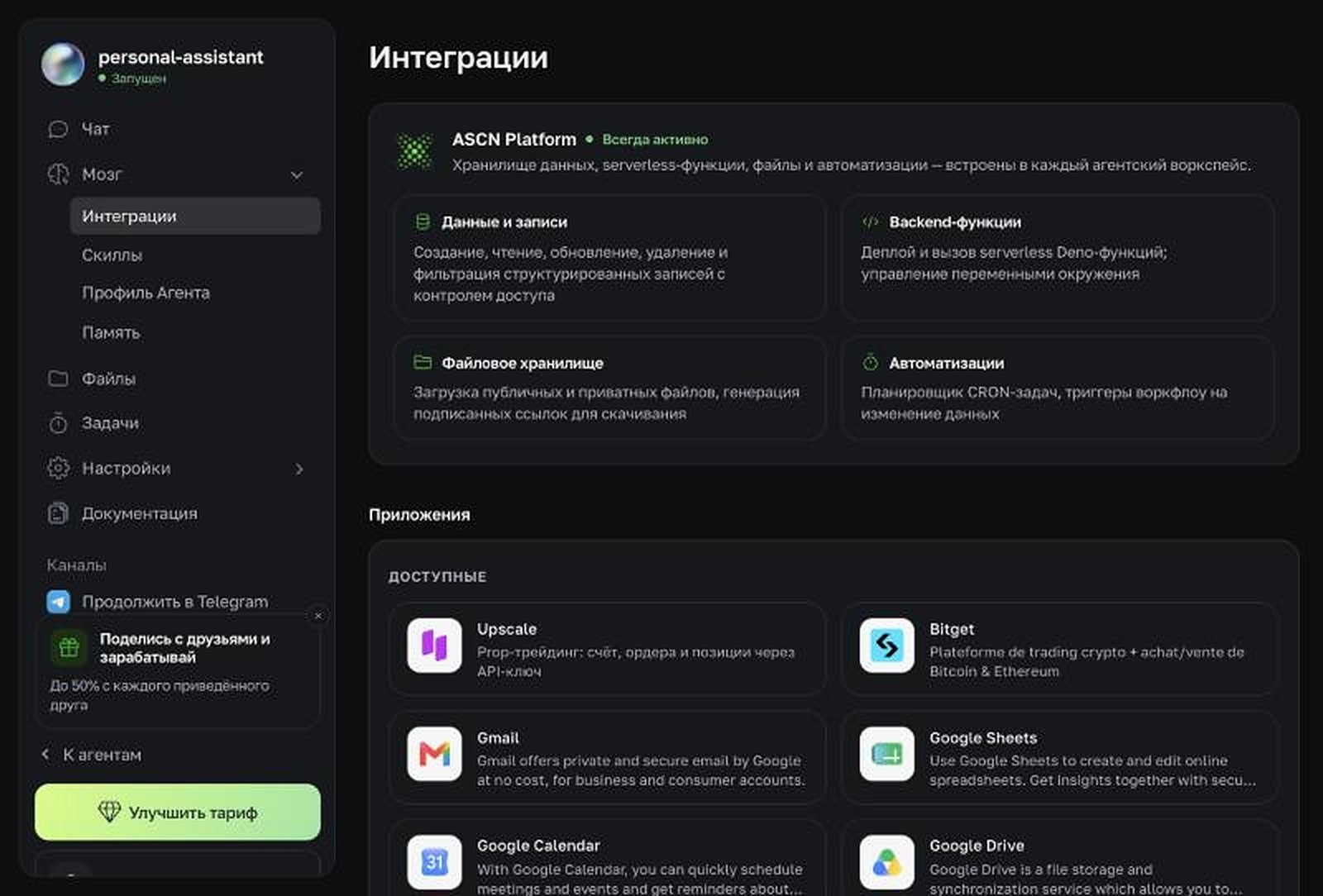
Brain → Integrations: every service you can give the agent access to.
| What to connect | What the agent gets | How it connects |
|---|---|---|
| Gmail, Google Calendar, Google Drive | emails, meetings, drafts, files | one click |
| Google Sheets, Notion | reads data, appends reports | one click |
| CRM such as amoCRM, Bitrix24 | deals and leads | via API or MCP |
| Marketplace seller accounts (Ozon and others) | seller account data | via API or MCP |
| Ad accounts | spend and campaign results | via API or MCP |
| Telegram | messages you, takes tasks from your phone | Channels → Telegram |
One-click connections cover Gmail, Google Calendar, Drive, Docs and Sheets, Slack, Notion, GitHub, GitLab and Supabase. For a service that isn't on that list there are two routes: an MCP server (Brain → Integrations → Additional connections) or the service's own API with a key. What the agent can do in a CRM or on a marketplace depends on what that platform's API exposes; for Ozon, that's the Seller API. It also works the other way: your website or CRM can send messages to the agent through the ASCN REST API.
The main rule: give each agent only what its role needs. A lead collector needs email and a spreadsheet; it has no use for your calendar. Fewer permissions mean fewer places where an agent's mistake can break something.
04. Grant access, not a password
Connecting a service in ASCN looks like a normal "Sign in with Google" window with permission checkboxes. You sign in yourself, the agent gets access, and it never sees your password. You can revoke access at any time.
Services without a connect button work through an API key, for example a Seller API key from your Ozon seller account. That isn't a password either, and it can be reissued too. The key goes into Settings → Secrets and keys: it's stored encrypted, isn't shown again after you save it, and doesn't appear in chats.
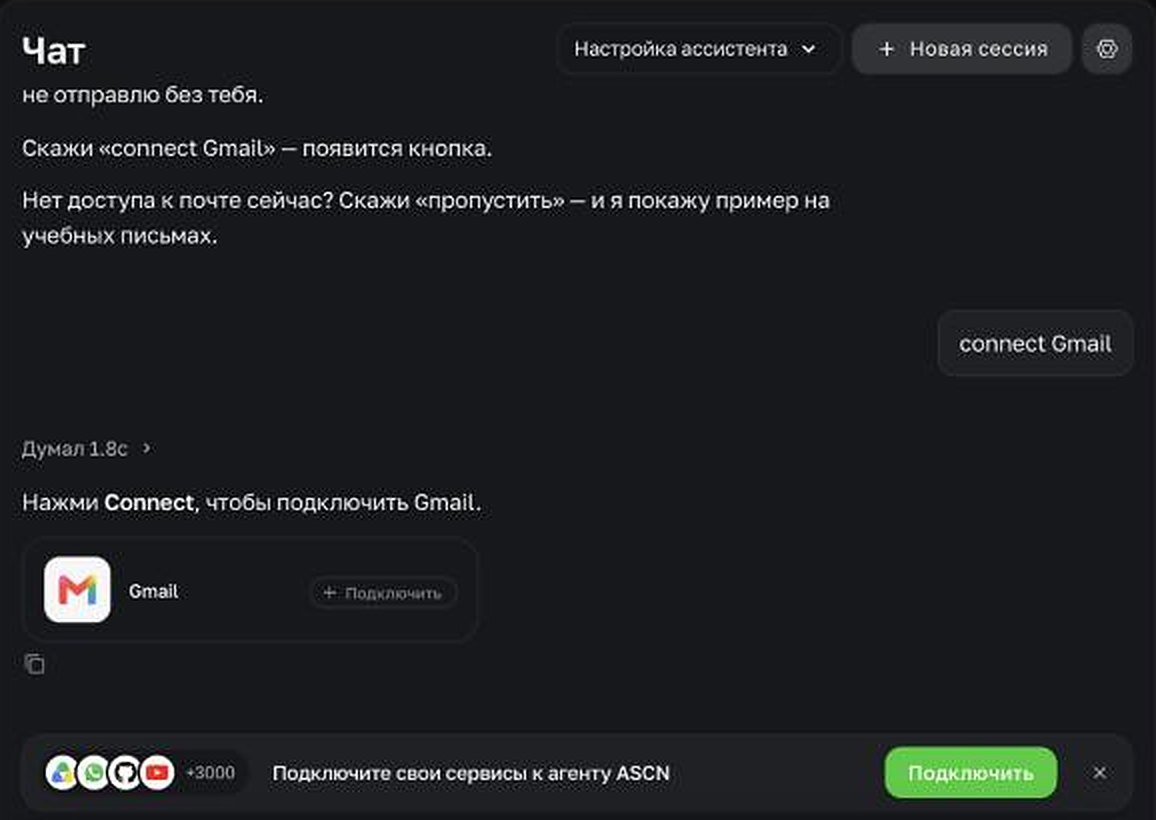
The agent offers the connection as a button. You type your password only in Google's window, and the agent never sees it.
Check two things right after connecting:
- Is it the right account? The agent sees exactly what the connected mailbox sees. Connect your personal inbox instead of your work one, and your summary will be about store discounts.
- Does the access actually work? One question is enough to check:
How many unread emails do I have in Gmail, and what's my first meeting in the calendar tomorrow?
And one rule for good: if someone or something asks you to paste a password into the chat with your agent, that's the wrong path. The agent needs access, not your secret.
05. Explain it once and never again
A familiar story: on Monday the agent produced a great report, and on Thursday it sent half a page of text without a single number. The agent didn't get worse. You just asked in different words on Thursday.
That's what skills are for in ASCN: a set procedure for one type of task. Describe it once, and from then on two words are enough: "sales report". Same steps and same format every time. You create a skill with an ordinary message in the chat, and it shows up in Brain → Skills. That section also has a library of ready-made skills you can add with the "+ Install" button. We picked the ones worth starting with in our roundup of the 40 best AI agent skills.
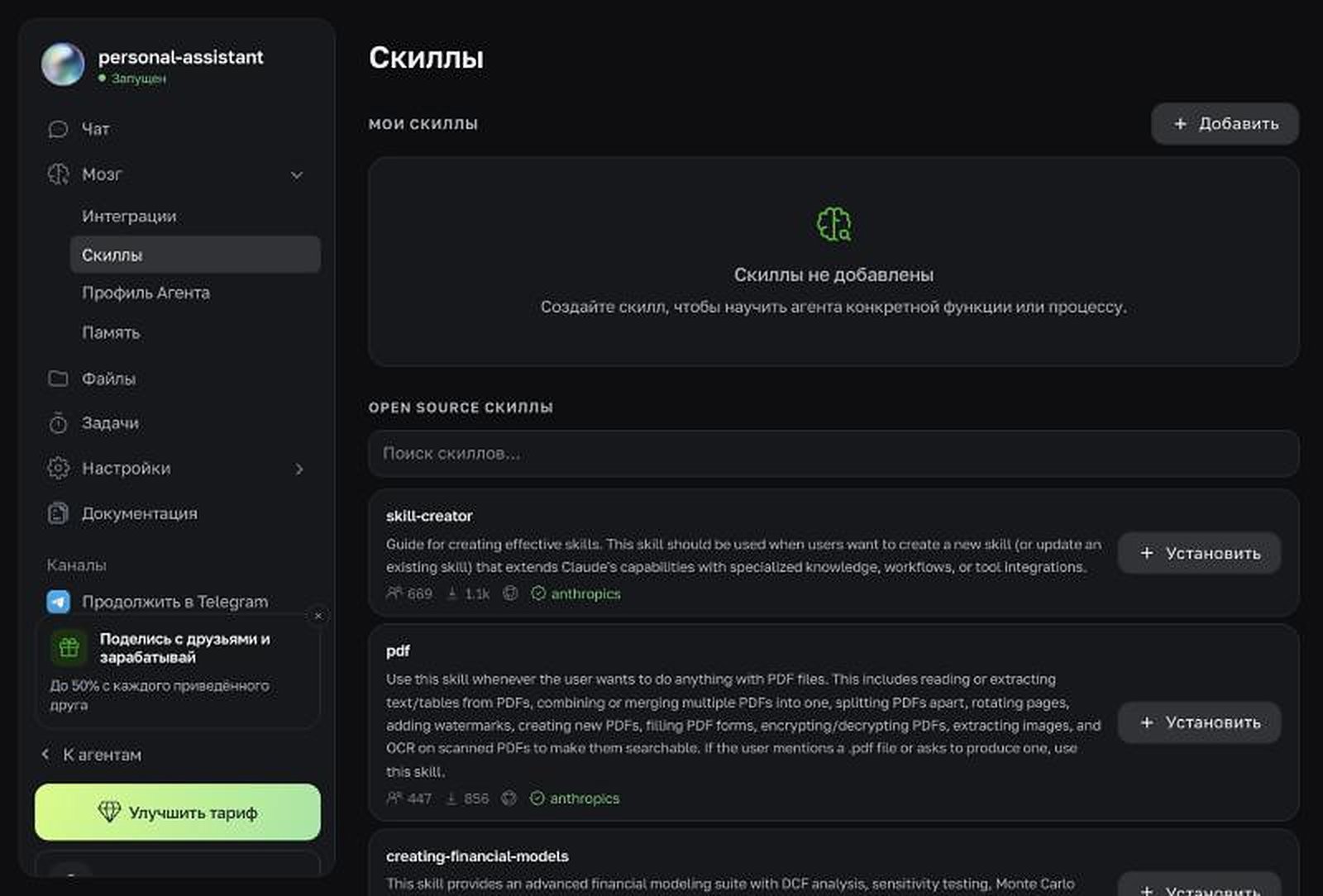
Brain → Skills: your own skills at the top, the ready-made library below.
Create a "Sales report" skill: when I ask for a "sales report", do this:
1. Open the "Sales" Google Sheet, "Orders" tab.
2. Use the period I name. If I don't name one, use last week.
3. Calculate revenue, number of orders, average order value and the top 3 products.
4. Compare with the previous period of the same length, in percent.
5. Start with a 3-line conclusion, then the table.
Don't change anything in the sheet. Don't guess at an empty cell; tell me where it is.
A good skill answers four questions: which phrase triggers it, what the steps are and in what order, what form the result takes, and what to do when there's no data. The last one is the one people forget, and on the day the sheet is empty the agent starts filling the gaps with guesses.
Which skill should you build first? The one you do at least once a week, across two or more services, following the same steps each time. Regular, in several places, identical: if all three apply, that's your skill.
06. Put it on a schedule
A skill tells the agent "how". A task tells it "when". There are two kinds of tasks, and both are set up with a single message in the chat, with no flow builder and no arrows:
- On a schedule: a morning summary, a Friday report, month-end close.
- On an event: an email arrives, a calendar meeting changes, a new file appears in Google Drive. These are the tasks that make an agent feel alive: it reacts right away instead of at a set hour.
// scheduled: morning summary
Every weekday at 8:30, check Gmail for the last 12 hours and today's calendar.
Send me one summary in Telegram: what's on today, who needs a reply, what changed overnight.
// event: new inquiry
When an email containing "price", "invoice" or "order" arrives from someone who isn't in my contacts, draft a reply based on the price list and send it to me in Telegram.
// scheduled: Friday close
Every Friday at 16:00, collect the week's receipts and invoices from email into a Google Drive folder and tell me which ones don't have a match.
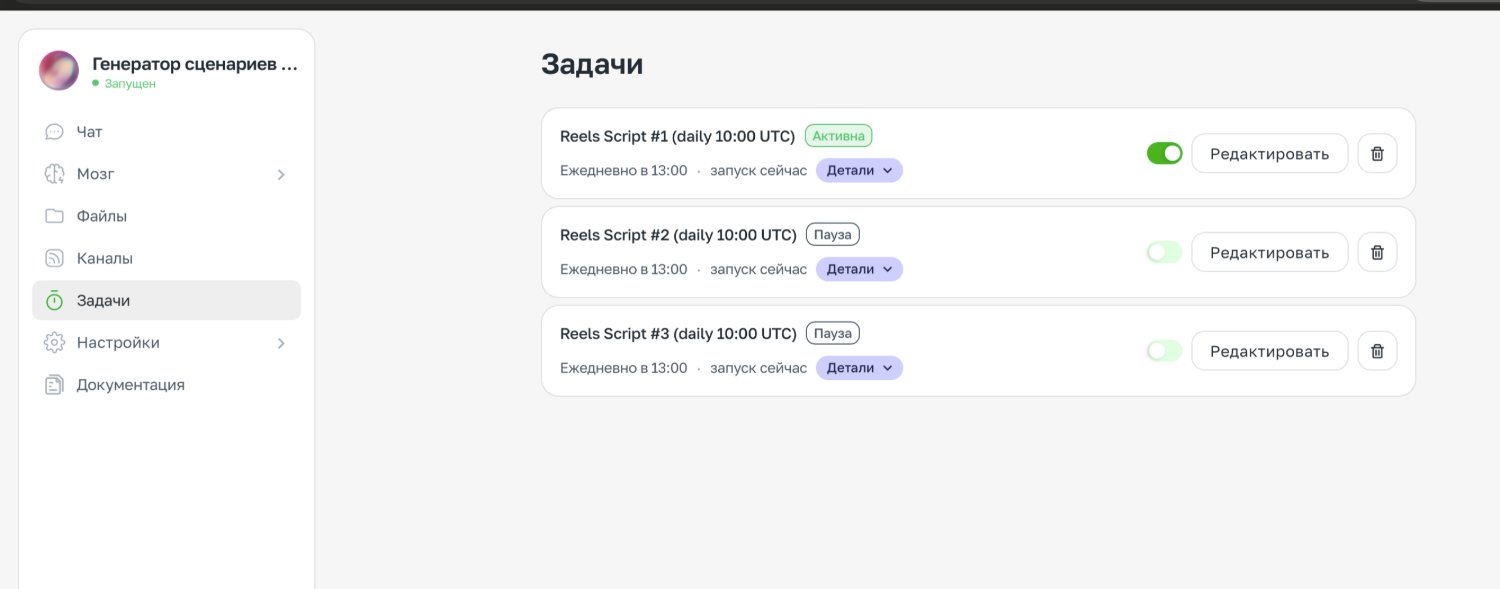
The agent's tasks: when each one runs, plus a toggle to pause it.
Event triggers currently exist for Gmail, Google Calendar and Google Drive. If the service you need has no trigger, schedule an hourly check instead. Every time a trigger fires it spends integration credits, so narrow the condition, as in the inquiry example above, rather than putting a trigger on your whole inbox. And don't wait until morning to find out whether a task works: type "Run the task now" and look at the result while you're there to fix it.
07. Hire specialists, not a jack of all trades
At first the agent sorted your email. Then you asked it to handle leads, write posts and remind you about invoices. A month later its instructions hold twenty rules that argue with each other: clients need a polite tone, you want summaries with no preamble. The agent starts getting confused.
Separate agents mean separate memory, separate permissions and a clear answer to who is responsible for what. An agent that thinks only about reviews gets better on your reviews. Split by area of work, not by task size.
The ASCN catalog already has ready-made specialists. A starter lineup for a small business might look like this:
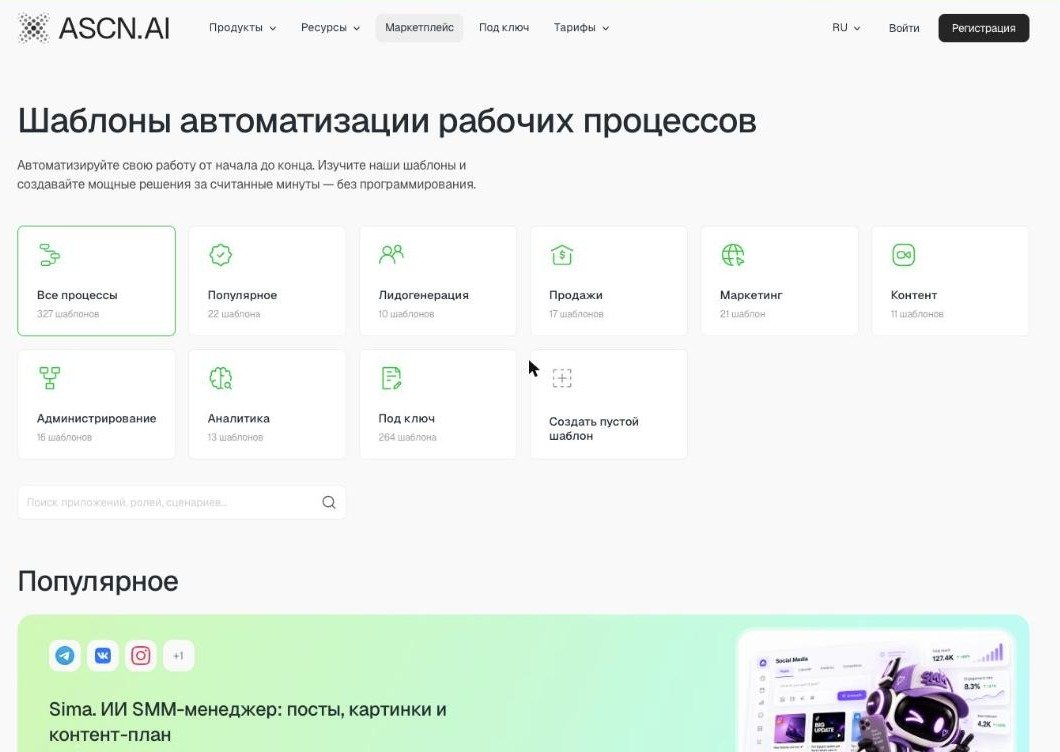
The template catalog: ready-made agents for lead generation, sales, marketing and content.
| Agent | Responsible for | What to connect | Plan |
|---|---|---|---|
| Sima | content plan, posts and images for social media | link to your site or channel | Start+ |
| Clara | customer questions, complaints, reviews per store rules | Gmail, store rules | Start+ |
| Ella | emails and newsletter sequences | email marketing service | Start+ |
| Leon | which ads pay off and which burn money | ad account export | Start+ |
| Max | money: profit, cash gaps, what pays off | bank statement or spreadsheet | Start+ |
| Lara | contract review before signing | the contract file | Start+ |
| Your own agent | anything not in the catalog: leads, summaries, your processes | "+ Create new" | any |
All of these agents are in the ASCN template catalog. Don't hire them all at once, though. A new agent joins when the previous one already runs without supervision. The plans match this pace: Free has one active agent, Start allows up to five. And avoid duplicates: two agents doing the same job spend credits twice.
08. Give your agents a shared place to work
ASCN agents don't message each other directly and don't read each other's messages. Data moves between them through a shared place: one puts a result there, another picks it up and does its part. A shared spreadsheet and the API carry the data, and a shared Telegram group is where you see the whole team's work.
- A shared Google Sheet. The most reliable bridge. The "Lead collector" appends rows at 9:00, Max reads them at 10:00 and works out which channels pay off. The sheet also doubles as a log: you can see who added what and when.
- A shared Telegram group. A group where all your agents post. You see the team's work in one place and can reply to one agent's summary while mentioning another. In a group, an agent responds only to an @mention or a reply to its own message, so you are the conductor here. The bot is added to the group as an admin, and the group's Chat ID goes into Channels → Telegram.
- API. Every agent has a REST API (Settings → API, from the Start plan). Your website, lead form or CRM writes to the agent the same way you do: "New lead: [details]. Add it to the sheet and check whether it's a duplicate."
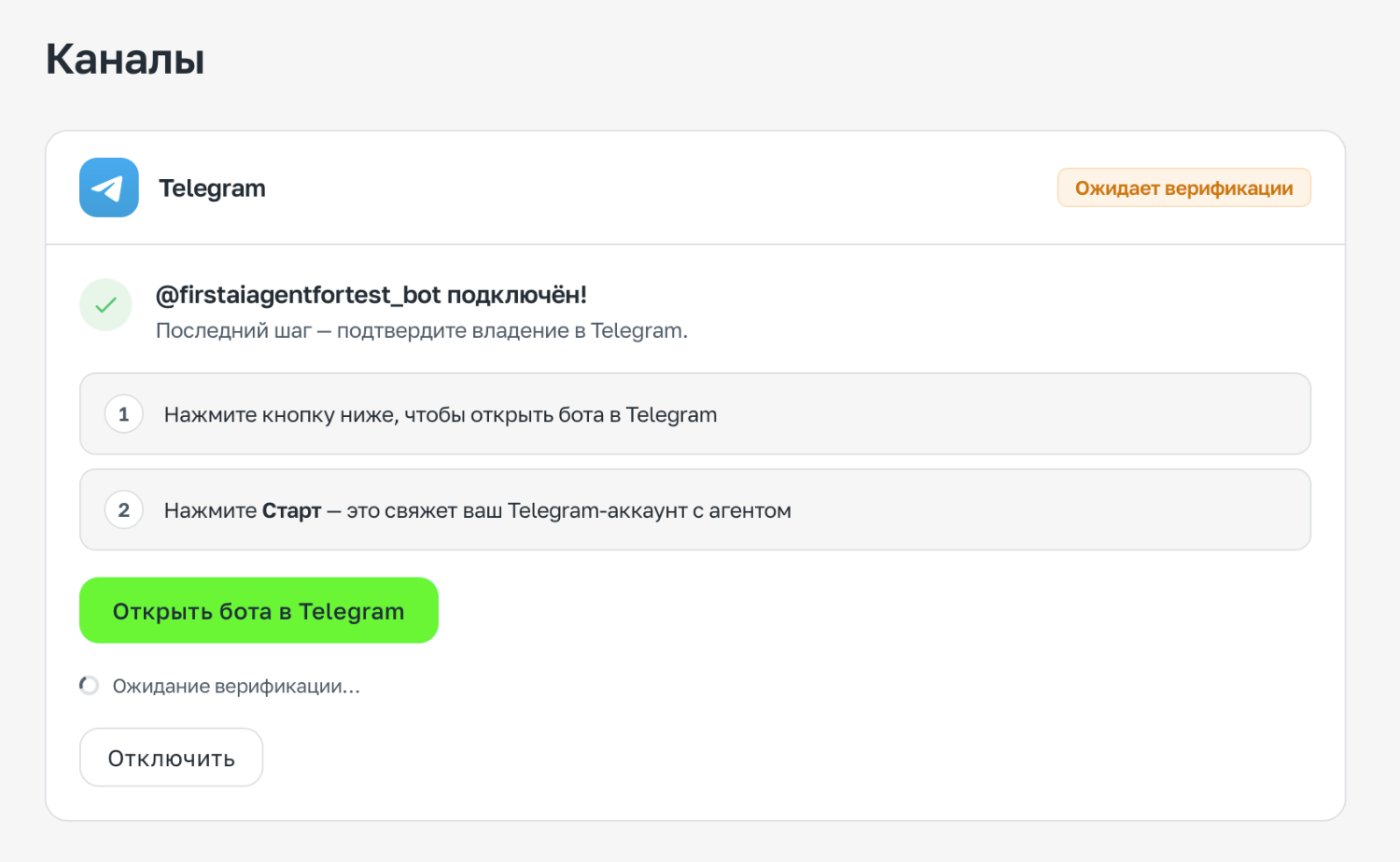
Each agent has its own Telegram bot. Add the bots to one group and the whole team's reports are in front of you.
To keep the handoff from falling apart, agree on the columns in advance and write them into both agents' instructions. If one writes "Source" and the other looks for "Channel", nothing will work. And give each agent one more line: "If a task isn't yours, reply: this is for [agent name]."
09. Draw the line between what the agent does alone and what needs your "yes"
An agent that asks about everything is useless. An agent that never asks is dangerous. You draw the line between the two, and you draw it once.
A simple rule works. The line follows one test, whether an action can be undone, and the size of the task doesn't matter. Anything easy to undo, the agent finishes on its own. Anything a customer will see, anything that spends money or can't be reversed waits for you. Paste this into every agent's instructions:
// do it yourself, without asking
drafts · summaries · search and analysis · writing to my spreadsheets · saving files to folders · calculations
When done, tell me briefly what exactly you did.
// always stop and wait for my "yes"
sending anything to a client, partner or stranger
any money: payments, refunds, discounts, price promises
posting on social media, replying to reviews, anything public
deleting anything except obvious spam
accepting terms, sign-ups, subscriptions
// if in doubt
If you can't undo it within a minute, stop and ask me.
A support agent, such as Clara from the catalog, shows the line well. Set it up like this: it reads customer emails and complaints and drafts a reply to each one according to your store rules, but doesn't send them; the replies wait for your decision. All the reversible work is done, and it stops exactly where the irreversible part begins.
Once a particular type of draft has gone out unedited for a week, you can move the line. But only for that type, and only with one new line in the instructions.
10. Review once a week and cut what you don't need
Automation breaks quietly. Someone renamed a tab in a spreadsheet, and for three weeks a task has been reporting "no data found". The agent works while you sleep, and nobody notices.
Block 15 minutes on Friday in your calendar. Ask three questions about each task: did it run, was the result correct, and would you notice if it were switched off? The third question matters more than it seems: without it, six months later you'll have a pile of half-useful tasks eating credits.
The easiest way is to ask the agent itself for a report:
List every task you ran this week. For each one:
1) how many times it ran;
2) what it actually did;
3) what it skipped, couldn't do or made up;
4) what you left for my approval that I never answered.
At the end, tell me which task you think is the least useful, and why.
And check one result from each task with your own eyes. An agent reporting on its own work is as blind to its own mistakes as we are.
Conclusion: you are no longer the one pushing the buttons
Until now, AI lived in a chat window and the work stayed in your hands. An ASCN agent takes the work over: it has access, memory, skills and a schedule. You keep the decisions.
Technically this is a smaller step than it looks; as a habit, it's a much bigger one. The key skill is no longer "how do I phrase the prompt" but "what exactly am I delegating, and where does the agent's authority end". That's a management question, not a programming one. If you're only launching your business, our guide on how to start a business with AI shows how to split roles between AI employees from day one.
Start with one agent and one task that eats an hour of your day. The Free plan gives you 500 credits a week and one active agent, no card required: sign up for ASCN and give your agent its first task.

40 Best AI Agent Skills From GitHub: Ready-Made Skills for Content, Sales and Marketing

How to Start a Business With AI in 2026: A 5-Step Plan for Solo Founders

How to Build an AI Agent: An Honest Guide (2026)