



- Русский
- English
- Português
Generate SEO-Optimized WordPress Content with AI
Using AI to create SEO content in WordPress isn’t about replacing human creativity. It’s more about speeding up workflows and precisely targeting keywords to get scalable, data-driven results in minutes instead of days

«Using AI to create SEO content in WordPress isn’t about replacing human creativity. It’s more about speeding up workflows and precisely targeting keywords to get scalable, data-driven results in minutes instead of days.»
Introduction to AI-Powered SEO Content Generation for WordPress
So, what does AI-powered SEO content generation really mean? It’s about using advanced artificial intelligence models that analyze data, search algorithms, and user queries to automatically create content optimized for search engines. On WordPress, this translates into getting high-quality blog posts, pages, meta descriptions, and other texts crafted from the start to meet SEO standards—without the usual guesswork of manually selecting keywords or structuring content.
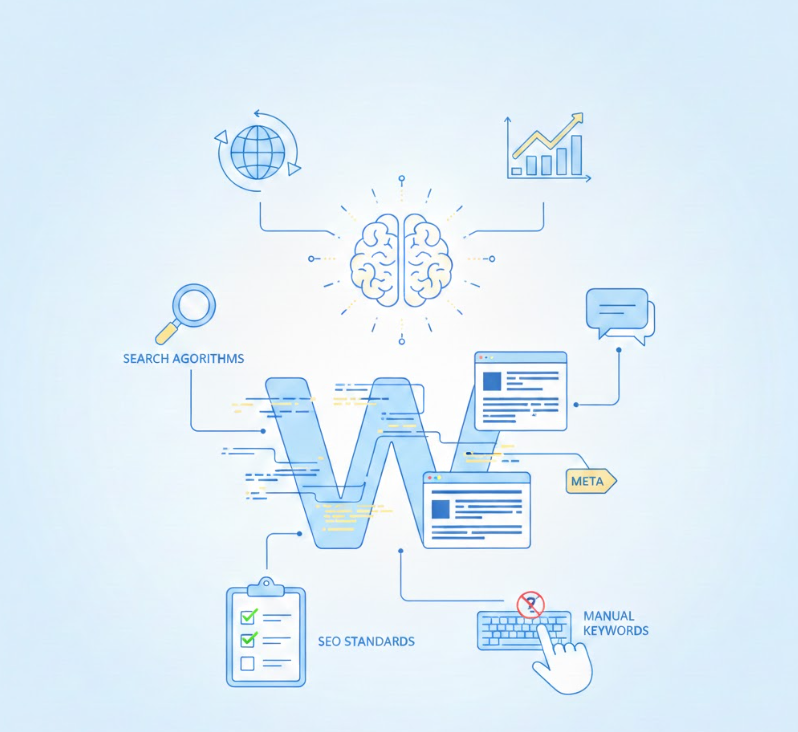
These AI tools rely on machine learning models, which have been trained on vast language datasets. That training helps them understand context and follow SEO rules while quickly producing natural, readable text. It’s like having a smart assistant who knows the ropes of SEO and content creation at once.
Why Use AI for WordPress Content Creation?
Creating and optimizing SEO content consistently is no joke for WordPress users. Balancing fresh content with SEO tactics often takes tons of time and effort. Here’s where AI shines—it automates keyword research, content structuring, and ongoing optimization, slashing your workload. Plus, it beats writer’s block by suggesting new ideas, templates, and drafts you can polish as needed.
By integrating AI, content creation time drops by over 70%, freeing marketers to focus on strategy rather than mundane tasks. This efficiency gain is crucial for scaling—imagine switching from days or weeks of writing multiple optimized articles to doing it in hours. That not only lowers costs but also speeds up publishing without burning out the team.
Who Can Benefit from AI-Generated SEO Content?
Whether you run a small business, blog, marketing agency, or corporate site, AI-generated SEO content can boost your WordPress organic traffic. Beginners get a solid tool to navigate SEO’s complexity, while professionals use AI to supplement their strategy and automate routine steps. Honestly, it’s helpful for just about anyone aiming to streamline content production while keeping SEO sharp.
Understanding SEO Optimization for WordPress
WordPress powers over 40% of websites worldwide. That sheer volume makes SEO critical for visibility and traffic. Proper SEO helps your site rank higher on Google and attracts visitors organically without spending a dime on ads.
SEO isn’t just keywords—it involves technical elements like site speed and mobile-friendliness, content factors like readability and keyword use, and structural aspects like site architecture and internal linking. Overlooking these means losing traffic, leads, and sales.
Unique Features of SEO on the WordPress Platform
WordPress’s modular design—with plugins, themes, and customizable templates—offers huge flexibility for SEO optimization. Tools like SEO automation plugins such as Yoast SEO and Rank Math make creating meta tags, sitemaps, and schema markup easier, which are pillars of Google indexing.
Besides, WordPress supports structured content and custom taxonomies, improving how search engines crawl your site and helping users navigate. Still, WordPress’s open-source nature means you need regular maintenance and plugin compatibility checks to avoid SEO pitfalls.
Common SEO Challenges Faced by WordPress Users
- Too many SEO plugins causing conflicts and site slowdowns
- Duplicate content from theme archives
- Slow loading times—heavy plugins and unoptimized images are usual culprits
- Lack of structured data limiting rich search results
- Keeping up with ever-changing SEO guidelines
Thankfully, AI tools can continuously monitor your site, identify SEO issues, and suggest tailored improvements specifically for WordPress.
Our SEO Services for WordPress
We start with a thorough audit that includes:
- Keyword ranking and traffic analysis
- Technical checks for broken links and mobile usability
- Content relevance assessment and gap identification
- Internal link structure evaluation
This report becomes the roadmap, highlighting growth opportunities and weaknesses to tackle right away.
Technical Optimization for WordPress (Plugins, Speed, Security)
- Installing and configuring SEO plugins properly
- Optimizing caching and image compression
- Ensuring HTTPS security and keeping WordPress up to date
These steps enhance user experience and improve how search engines crawl your site.
Content Optimization (Keywords, Meta Tags)
- Seamless placement of keywords in headings and body text
- Crafting compelling meta titles and descriptions to boost click rates
- Using LSI (Latent Semantic Indexing) keywords to cover related topics thoroughly
We tailor optimizations to your business goals and audience interests for maximum impact.
Site Architecture and Internal Linking Strategies
- Logical organization of categories and sections
- Implementation of breadcrumb navigation and user-friendly menus
- Contextual linking between pages to distribute page authority
This setup helps both search engines and visitors find their way easily through your site.
Monitoring and Reporting Results
SEO isn’t set-it-and-forget-it. We provide clear, actionable dashboards tracking:
- Keyword ranking trends
- Organic traffic analysis
- User engagement metrics
With ongoing monitoring, you can tweak your strategy quickly and keep growing SEO performance.
How AI Generates SEO-Optimized Content for WordPress
- Input: provide keywords, a theme, or base content.
- AI Processing: language models analyze context, SEO factors, and user needs.
- Draft Creation: generating content optimized for readability, keywords, and metadata.
- Integration: auto-insertion of content into WordPress posts or pages.
- Review and Publish: human editors make final tweaks before publishing.
This workflow minimizes manual effort and accelerates publishing cycles.
Role of AI Models in Content Creation
Models like GPT are the “engines” behind natural language generation. They structure sentences, replicate tone, and factor in SEO signals like keyword density and semantic relevance.
Thanks to their ability to produce unique and varied content, they boost reader engagement. Continuous feedback and retraining further improve output quality over time.
Integration with WordPress Platforms and Plugins
Many AI tools connect directly to WordPress via APIs and plugins, enabling you to:
- Generate content inside the WordPress editor in one click
- Automatically add SEO metadata through Yoast, Rank Math, and others
- Schedule and bulk publish AI-generated articles
This seamless integration makes adopting AI straightforward and enhances your content’s quality.
Customizing AI Content to Match Your Brand Voice and SEO Goals
Standard AI content can sometimes feel generic. But you can customize it by:
- Choosing styles and tones—from formal to conversational
- Prioritizing keywords and topics important for your business
- Adjusting text length and complexity to suit your audience
These tweaks ensure content fits your brand naturally and ranks well.
Step-by-Step Setup Guide for AI SEO Content Generation on WordPress
- AI text generators like OpenAI’s API or similar platforms
- Workflow automation services like n8n or Zapier to link AI and WordPress
- SEO plugins such as Yoast SEO and Rank Math for metadata management
- Research tools like Perplexity AI for up-to-date insights
All these tools should work in sync to streamline your process.
Connecting AI Tools with WordPress
- Obtain API keys from AI providers and WordPress
- Install and configure plugins that enable AI content import
- Create webhooks to automate content posting and updates
Don’t forget to keep API tokens secure and private.
Configuring SEO Parameters and Keywords
- Identify primary and LSI keywords based on user intent
- Create meta tag templates for consistent brand identity
- Set up schema markup for enhanced search results
These settings guide AI towards producing relevant and effective content.
Automating Content Creation and Publishing Workflow
- Schedule regular content generation sessions
- Enable auto-saving drafts for later editing
- Define rules for automatic publication after approval
Such automation reduces manual burden and maintains a smooth publishing rhythm.
Best AI SEO Tools and Plugins for WordPress
- OpenAI GPT — flexible API integration with WordPress
- Jasper AI — focused on marketing content, learns brand voice
- Copy.ai — quick content and snippet generator
- Surfer SEO — combines AI with SEO data for content optimization
Features Comparison of Leading AI SEO Tools
| Feature | OpenAI GPT | Jasper AI | Copy.ai | Surfer SEO |
|---|---|---|---|---|
| Tone Adjustment | Yes | Yes | Yes | Limited |
| Keyword Integration | API-based | Yes | No | Built-in |
| WordPress Plugin | Via third-party | Third-party | API only | Yes |
| Content Volume | Unlimited | Subscription-based | Subscription-based | Limited |
Bonus Tools for Enhanced SEO and Content Management
- ASCN.AI NoCode for sophisticated AI automation workflows on WordPress
- Grammarly and Hemingway Editor for grammar and readability
- Ahrefs and SEMrush for deep keyword research
- Rank Math and Yoast for metadata and site audits
Advanced Customization and Optimization Techniques
Different industries use their own jargon and tone. You can train and fine-tune AI to:
- Use professional terminology
- Address specific pain points
- Comply with regulatory and industry standards
This boosts the relevance and authority of your content.
Enhancing Content Quality and Readability with AI
- Break long, complicated paragraphs into digestible bites
- Use active voice and concise sentences
- Improve visual hierarchy with clear headings and lists
AI can analyze and suggest these improvements automatically.
Using AI for Keyword Research and SEO Analysis
AI speeds up keyword discovery by examining:
- Competitors’ content strategies
- Semantically related queries
- Search volumes and keyword difficulty in real time
That helps you pick the most promising keywords.
Automating Multi-Platform Content Distribution (e.g., Social Media, YouTube)
- Generate social media captions and hashtags
- Schedule posts through automation tools
- Create video scripts for YouTube based on blog content
This broadens your audience beyond WordPress.
Measuring Success and Improving AI-Generated Content
Make use of built-in analytics tools to monitor:
- Search engine rankings
- Click-through rates (CTR) from keywords
- Bounce rates and time on site
These insights help spot which content works and where to refine.
Using AI-Powered Reporting Tools and Analytics
AI streamlines reporting by offering:
- Consolidated performance dashboards
- Detection of trends and anomalies
- Recommendations for next steps in content strategy
Iterative Content Improvement Based on Data Insights
- Regular updates to maintain rankings
- Adjusting keywords based on search trends
- Boosting readability and engagement per analytics feedback
This continuous loop keeps your SEO relevant and effective.
Frequently Asked Questions About AI SEO Content for WordPress
Can AI SEO Tools Really Boost Organic Traffic?
Yes, but it works best with human oversight. AI accelerates optimization and scaling, fueling traffic growth. Still, strategy and testing remain key.
What Are the Benefits of Using AI for SEO?
It cuts down repetitive tasks, automates audits and SERP analysis, and frees you to focus on strategy execution.
How Does AI Perform SEO Tasks?
Models use natural language processing to spot patterns in top-ranking pages, generate keyword-fitted copy, detect plagiarism, and help craft optimal titles and descriptions.
Is AI-Generated Content Google-Friendly?
Google values quality and originality. AI content meets requirements if carefully edited for accuracy and user intent. Purely automated, low-quality content risks penalties.
Common Mistakes and How to Avoid Them
Fully automated content can miss nuance and personal touch. Editing is essential to ensure accuracy and brand alignment.
Ignoring SEO Best Practices in AI Content
Think of AI as an assistant—you still need to set parameters to keep keywords relevant and structure proper.
Poor Keyword Targeting and Content Relevance
Without clear SEO goals, AI output can be scattered and ineffective.
Expert Tips and Best Practices for Using AI in WordPress SEO Content
Let AI speed up the process, but keep storytelling, humor, and expertise in human hands for authenticity.
Maintaining Content Uniqueness and Authenticity
Use AI drafts as a launching pad—customize and personalize to avoid duplicate content issues.
Staying Updated with AI and SEO Trends
Algorithms shift often—stay on top by updating AI models and adjusting tactics regularly.
Next Steps: Scaling Your SEO Content Strategy with AI
AI lets you explore new niches, formats, FAQs, and multimedia to reach wider audiences.
Integrating AI Content Generation into Your Marketing Funnel
Combine SEO content with email campaigns, PPC, and social media for a multichannel push.
Continuous Learning and Adaptation for SEO Success
Analyze feedback, gather user data, and refine AI and SEO strategies to sustain growth.
Conclusion
Our team offers tailored packages—from site audits to AI-driven content automation—fully integrated with your WordPress. Reach out to discuss your project and get started quickly.
Pricing and Package Offers
Flexible plans start from $29 per month, ranging from basic audits to full AI automation. Long-term contracts come with special discounts.
Blog and Useful Resources
Keep up with SEO trends and WordPress updates in our regularly refreshed blog.
Updates on Search Engine Algorithms
Stay informed about key Google updates and how they affect WordPress SEO.
Technical Guides and Instructions
Find detailed walkthroughs on plugin setup, site speed optimization, and AI integrations.
Case Studies and Practical Examples
ASCN.AI Case during Falcon Finance (FF) Crash: Using two carefully tuned prompts, our client earned $1000 profit by improving the quality and clickability of SEO posts. More details at ascn.ai.
Flash Crash Earnings on October 11: AI model integration enabled quick content updates, allowing profits on short-term market swings by speeding up analytics publication. More info at ascn.ai.
Can AI Really Increase Organic Traffic?
AI can significantly speed up content creation and optimization, positively impacting organic traffic. Still, results depend heavily on careful setup, timely editing, and a comprehensive SEO approach.
This information is for general guidance and does not replace personalized SEO consulting.
Additional Recommendations
- Regularly refresh your content via AI to keep it relevant and well-ranked.
- Combine AI content generation with marketing channels like email and social media for wider reach.
- Protect API keys and access settings carefully to secure your data.
- Use internal links to thematic articles to boost SEO and navigation ease.
