



- Русский
- English
- Português
Using AI to automate Pinterest posts: Overview and guide

Using AI to automate Pinterest posts: Overview and guide
“AI-powered Pinterest automation opens up new horizons for users, allowing them to create, plan, and publish content faster and more efficiently than ever before.” — ASCN.AI expert, digital marketing team.
Pinterest is a platform where every pin becomes an idea, and every image is the key to engaging and growing your audience. Pinterest automation, especially auto-posting content to Pinterest using ASCN, is a game changer. When both time and quality are important, artificial intelligence for Pinterest helps you create, optimize, and publish pins faster and more accurately.
What is Pinterest automation and auto-posting content?
Pinterest automation is a simplified way to manage visual content on the platform using special programs. Auto-posting is a feature that allows you to post pins on a schedule without constant manual control. When using AI for Pinterest, the process reaches a new level: AI helps to automatically create images, generate descriptions, and choose the best time to publish.
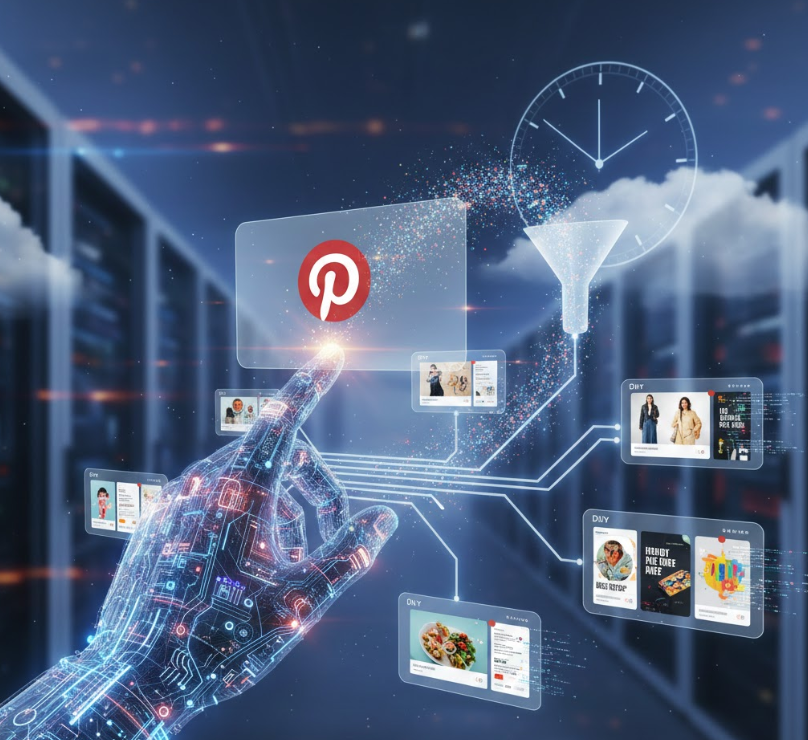
In practice, it all comes down to working with the Pinterest API and scheduling systems that provide a constant and steady stream of pins, maintain account activity, and engage more users.
Automating social media posts saves marketers up to 40% of their time and increases engagement.
Why Pinterest automation is important
Automation solves key problems: it saves resources and time. Manual content management takes a lot of effort and time, reducing productivity. With the introduction of auto-posting, the workload on the content management team is reduced, freeing up time for creativity and in-depth analysis.
Consistent posting frequency and optimization for the target audience allow you to expand your reach and increase engagement. Automatic features help you schedule posts for peak user activity times, so each pin gets more views and interactions.
Regular posts increase user engagement by 30%, keeping your audience interested and active.
Key benefits of auto-posting and content management
Auto-posting helps you respond to trends and current topics in a timely manner. AI on Pinterest saves you time when selecting topics, generates ideas for new pins, and automatically creates images and descriptions — while reducing the likelihood of errors and maintaining a consistent style.
In addition, AI facilitates audience segmentation and targeting, analyzes user responses, and quickly adjusts the publication strategy. This makes marketing content on Pinterest more dynamic and accurate.
Artificial intelligence in Pinterest automation
AI systems for Pinterest are based on machine learning algorithms, natural language processing, and generative image models. These technologies don't just create content — they analyze user preferences, predict trends, and optimize publication times.
AI recognizes styles and themes, suggests ideas for pins, and adapts images and descriptions to the platform's format. This gives marketers and users a deeper and more diverse set of tools, ensuring higher-quality posts and account growth.
AI is capable of creating unique visual content that increases the originality and appeal of posts on Pinterest.
Why Pinterest is a promising platform for content automation
Pinterest stands out for its visual format—users come here to find inspiration, ideas, and products. This demand creates a high need for creative and diverse content, where the competent selection of images and descriptions plays a key role and blends naturally with the capabilities of AI.
The platform's growth is accompanied by an increase in the number of active users and investments in visual marketing. Since Pinterest is built on collections and long-term ideas, automation helps keep pins fresh and relevant at all times, without interruption.
Visual marketing on Pinterest shows annual audience growth of over 25%.
Overview of tools and services for auto-posting using AI
ASCN is a multifunctional tool for automating Pinterest using artificial intelligence. The platform provides a no-code builder where you can quickly and easily create auto-posting scenarios, connect AI agents to generate images and texts, and plan pins based on analytics.
The main advantages of ASCN are ease of configuration, high publication speed, and a powerful analytics module to improve marketing effectiveness. The platform helps create unique content by analyzing results and offering recommendations for increasing engagement.
The ASCN platform reduces content managers' working hours and enables them to create more relevant content, as evidenced by increased customer engagement.” — ASCN.AI expert.
Comparison of ASCN with other similar tools
Unlike universal services, ASCN focuses on comprehensive Pinterest management and Web3 integrations, expanding analysis and optimization capabilities. Many alternatives offer only basic auto-posting and scheduling.
ASCN actively uses AI agents, which improves content quality, reduces the impact of human error, and speeds up publishing. These features set ASCN apart with its deep analytics and intelligent automation.
| Function | ASCN | Competitors | Comment |
|---|---|---|---|
| NoCode script settings | Yes | Partially | Convenient for users without programming skills |
| AI image generation | Yes | No/limited | A big advantage for diverse visual content |
| Flexible publication planning | Yes | Yes | Advanced scheduling capabilities in ASCN |
| Integration with Pinterest API | Yes | Partially | Ensures stability and security |
| Performance analytics | Built-in with AI optimization | limited | Improving strategy based on data |
| Customer support | 24/7 and training materials | Partially | Quality support reduces risks |
Setting up automatic content posting on Pinterest using ASCN
Step 1: Create an account and connect to Pinterest
Registration with ASCN begins with creating an account on the platform. After logging in, connect your Pinterest account via the API by following the simple instructions on the interface. This will allow the system to manage pins and receive data about your profile.
Connecting via the official Pinterest API guarantees the security and stability of auto-posting.
Step 2: Setting up a publication schedule
Next, set up a schedule. ASCN allows you to set a precise schedule that takes into account time zones and audience activity peaks. This maintains a steady flow of content, ensuring that posts are relevant to the season and current events.
The ASCN interface provides visual tools for easy schedule management—track and make changes with ease.
Step 3: Integrating AI analytics and optimizing posts
ASCN AI modules collect engagement data, analyze pin effectiveness, and recommend the best times and types of content. This helps tailor images and descriptions to audience interests, increasing conversion and follower counts.
The system quickly adjusts the strategy in real time, taking into account feedback and trends thanks to AI agents.
Best practices and tips for using AI for auto-posting on Pinterest
The quality of pins must remain high: pay attention to visual appeal and uniqueness. AI helps create original images and identify template-based or ineffective elements.
The ideal approach is to combine automatic analysis with manual review to maintain standards and eliminate monotony.
Performance analytics and strategy optimization
Track metrics such as views, clicks, saves, and user interactions with pins. ASCN offers in-depth analytical reports with recommendations for improvement.
Analytics data will tell you when to change your schedule, which topics work best, and how to use new AI features to increase conversion rates.
Success stories
ASCN.AI helped several major brands increase engagement by 30% in three months and significantly save time for marketing teams.
ASCN.AI case study on Falcon Finance (FF): The client implemented AI-generated pins and auto-posting, reducing preparation time from 15 to 3 hours per week and increasing organic traffic by 25%.
What happened on the night of October 11 | Case study on flash crash earnings: Automation with ASCN ensured effective marketing management and increased audience engagement.
Automation of re-pins and use of AI
Another important aspect is repin automation. This helps maintain activity and interest in the account by adding relevant and trending content.
Services such as Zapier or IFTTT allow you to create chains: for example, a new blog post automatically turns into a pin, and popular pins can be reposted to your boards.
AI helps you select the most relevant and trending content for repins, as well as create unique descriptions and visual options. This combination reduces the time spent updating your account and improves content diversity.
Integration with RSS feeds: the official way to automate
Connecting RSS feeds is one of the official ways to automate publishing on Pinterest. It allows you to automatically create pins from your website content.
Basic rules for connecting RSS feeds:
- You can connect as many channels as you want, but only from a verified site.
- Each channel can publish pins to different boards, including secret ones.
- Updates are added within 24 hours, starting with the oldest entries.
- Limit: maximum 200 pins per day.
RSS 2.* and RDF formats are supported. Atom is not yet available. RSS must be in XML format with <image>, <enclosure>, <media:content> tags for images, and must also correctly contain <title> and <description>.
All links must lead to a verified domain, otherwise Pinterest will reject the pins.
Common mistakes when connecting RSS feeds:
- Reconnect one channel (you need to use a different URL).
- Inaccessible URL or problems receiving data.
- Incorrect RSS format.
- Links to unverified domains.
To connect, log into your business account via a PC, select “Create multiple pins” → “Automatic publishing” in the settings, paste the URL, and select the board for publishing.
Common mistakes and risks of auto-posting on Pinterest
Automation makes tasks easier, but there are pitfalls:
- Account suspension: Failure to comply with API rules and mass spam posts may result in suspension. Use the official Pinterest API and regulate your posting frequency.
- Synchronization failures: Automated systems sometimes process content incorrectly, especially after changes to RSS or API..
- Low relevance: Publications without quality control reduce trust and engagement.
- Technical errors: Constant monitoring and support are required to resolve issues in a timely manner.
It is recommended to regularly check automatic posts and analyze the results to optimize your strategy.
Frequently asked questions about AI for Pinterest and auto-posting
Is it safe to use auto-posting?
Using proven tools and official APIs, such as ASCN, ensures data security and compliance with platform rules. Proper configuration and constant monitoring reduce the risk of blocking and errors.
This information does not replace consultation with security specialists and the terms of service.
Is it possible to set up individual publication scenarios?
ASCN offers flexible scenario settings using AI logic and triggers. This helps tailor content to different audiences and events without programming.
How to solve technical problems and where to go for support?
ASCN support is available via the official website and chat. Specialists assist with integrations and promptly resolve issues. In addition, there is detailed documentation and training materials.
The Future of AI in Pinterest Marketing and Content Automation
Artificial intelligence simplifies and speeds up the creation and auto-posting of pins, improving content quality and expanding Pinterest's marketing capabilities. ASCN combines AI analytics, ease of configuration, and deep integration to serve as a reliable assistant for users.
The use of AI in marketing increases efficiency by 35% and reduces content creation costs. — McKinsey, 2023.
Next steps for effective use of the tool
Launching automation is just the beginning. Regularly analyze data, test new AI features, and adjust your strategy. ASCN will help you make your posts more intelligent and effective.
“Automation with ASCN allows you to not only publish content, but also build development strategies on Pinterest without wasting time.” — ASCN.AI team
Brief recommendations for users
- Start by integrating Pinterest and creating a posting schedule.
- Use AI to create images and text pins.
- Track key metrics with built-in analytics.
- Optimize your schedule and content based on AI recommendations.
- Optimize your schedule and content based on AI recommendations.
Automating Pinterest with artificial intelligence is a way to not only save time, but also improve the quality of visual content, increasing audience activity and engagement. ASCN.AI tools provide everything you need to achieve these goals without complex technical knowledge.
AI Assistant: A Guide to Creating, Selecting, and Using
How to create hashtags using AI: a complete guide
How to Create Content with AI: A Complete Guide