



- Русский
- English
- Português
YouTube Manager Skill
YouTube Automation with ASCN Agent automates every aspect of your content strategy, from channel audits to video script writing. This tool helps marketers and solopreneurs optimize their channels, increase engagement, and save time for creative work through data-driven analysis.

YouTube Automation for the Entire Channel with ASCN Agent automates all aspects of your YouTube content strategy, improving your video optimization to get more subscribers and/or views.
General Overview
The YouTube Manager offers marketers and solopreneurs who want to optimize their channels on YouTube a single platform with several automated features that will help them manage their content. The average complexity of the tool is medium, making this product useful for these audience types and those without prior knowledge.
How Automation Works
The agent will analyze your channel, identifying information related to your specific niche and the size of the audience you want to target as well as the objectives of your channel (i.e. building brand awareness, increasing sales). This information will determine what necessary actions are needed to achieve maximum efficiency. Once all this data has been collected, appropriate sub-skills will execute specific actions from the agent.
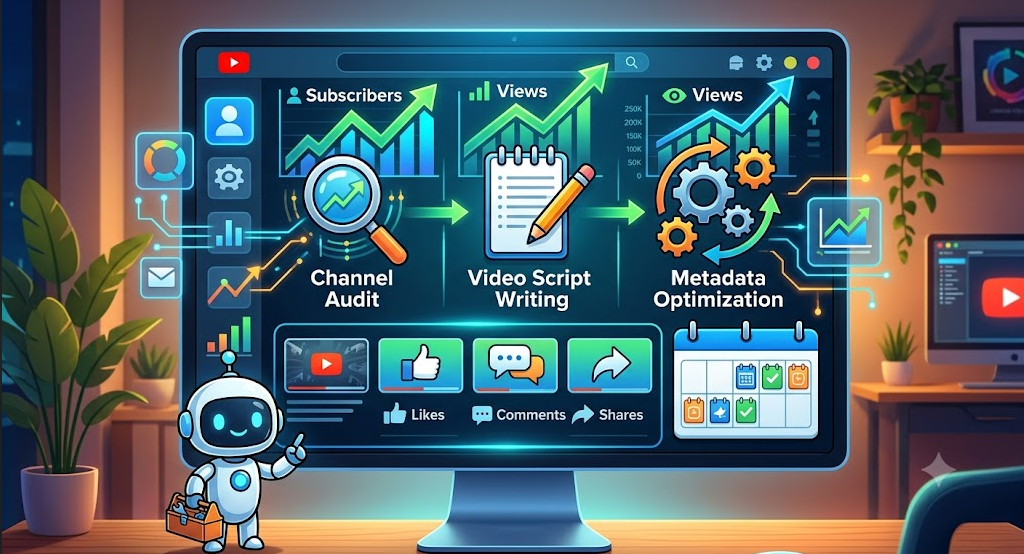
Every sub-skill will perform some unique action to complete the user's desired task. For example: the Channel Audit sub-skill will assess your channel and provide you with a list of weaknesses, as well as recommendations on how to increase your channel's engagement. The Video Script Writing sub-skill allows you to save time by not having to create a script each time you write a video. There are also sub-skills available for optimizing metadata to increase likelihood of receiving successful engagement during promotion of material.
By simplifying the management of your YouTube channel, the ASCN agent provides channel owners with recommendations based on high-quality, data-driven analysis of best practices for growing their channel.
Why It Is More Effective Than Manual Work
Automating your YouTube Channel Management allows marketers and solopreneurs to save time while performing repetitive tasks on YouTube, allowing them time for creativity. The software will process data, optimize content, and negotiate with advertisers on behalf of the user to deliver the fastest and best quality of information.
Every recommendation from the agent is based on the latest data and benchmarking, giving users more targeted and actionable recommendations. Instead of providing general recommendations, agents provide recommendations that have been tested for effectiveness by other users and will meet the criteria of modern platforms.
Because errors in content promotion are typically due to subjective evaluations, the results from using the system also yield a greater likelihood of successful content promotion.
What Results Users Get
In Addition to Saving Time, Automation Improves Content Quality. One of the things users get from the system is to improve the material they produce as a result of automating content management processes. With clear and detailed instructions based on the latest data and benchmarks, users can now develop their strategies and quickly adapt to changes on their platforms.
Users have noted their results from using automation in YouTube Channel management include:
- Increased Subscribers due to higher quality content.
- Increased Engagement with Viewers (more likes & comments).
- Improved Search Engine Ranking of Videos, leading to increased organic traffic.
Thus, the use of automation in YouTube Channel Management not only saves the user time but improves the success of the user's content marketing initiatives significantly.
Implementation Examples
While there currently aren't any specific case study examples available for the YouTube Manager skill, data from actual user experiences demonstrate that automating the management of content within YouTube can yield significantly improved results. Several marketers and others working independently have found that by utilizing this tool, they have been able to more effectively plan and execute their content strategy.
Automation benefits users in the following ways:
- The ability to systematically create and publish content streamlines the management of your channel.
- The ability to analyze your competitors and make optimizations to your content based on data will improve your chances of getting your content to be seen by others.
- The ability to have quality scripts and metadata created for all of your videos will enhance their visibility to people and allow for additional users to find them.
When you are using the YouTube Manager skill you can spend more time focusing on the creative parts of your work while letting the automation processes handle any repetitive tasks you may have to deal with. This enables the management of your channel to be performed more efficiently and with greater precision.
What You Get
Utilizing the YouTube Manager skill offers you several key advantages that together can help improve both the way you run your channel and the quality of the content you produce. The first is a complete channel audit based on a variety of criteria including SEO, performance and monetization; this audit will help you to discover your channel's weaknesses and identify areas that require attention.
The automation also provides optimized scripts and metadata for all of your videos (i.e., compelling titles, descriptions and tags) that not only satisfy all of today's standard requirements of the various platforms, but will also improve the visibility of their contents. Additionally, the system includes placement recommendations that will help to enhance the level of engagement and interaction between your audience and your content.
Another benefit is the availability of a content calendar with recommended posting times; a content calendar assists you in planning and organizing your content strategy, particularly for the purpose of ensuring that you have a specific number of new videos, maintaining contact and interacting with your subscribers, etc. Therefore, using the YouTube Manager skill gives you the ability to manage the time and resources necessary to develop the creative part of your material.
Launch Instructions
The YouTube Manager skill can easily be set up; all that is needed is to follow a few simple steps. First, you will want to clone the YouTube Manager skill repository to your local machine. By doing this you will then have access to all the files and resources required to begin using the YouTube Manager automation system. After cloning the YouTube Manager skill repository, you will copy the necessary files to your ASCN skills directory so that the system will recognize and utilize the files.
The next step after cloning and copying the files into the ASCN skills directory is to set up the API required to automatically retrieve the information pertaining to your channel. Setting up the API will allow you to effectively analyze the data from your channel in order to generate the most accurate and pertinent recommendations. Ensuring you have the necessary keys and permissions to operate the system is also critical to the complete functionality of the automation system. For example, you will want to obtain a YouTube Data API v3 key from the Google Cloud Console and configure the environment variables that correspond to the automation processes. Once you complete these steps, you will have the capability to use the YouTube Manager automation processes to manage your YouTube channel and develop your content strategies.
