



- Русский
- English
- Português
YouTube Knowledge Engine (search + synthesis + repositioning)
The YouTube Knowledge Engine platform helps marketers and solo entrepreneurs automate the analysis and synthesis of information from video content using AI technology. By extracting structured data and identifying trends, users can save significant time and improve the quality of their content strategies.

The platform automates the analysis and synthesis of information from YouTube using state-of-the-art AI technology; therefore, it is ideal for marketing professionals and entrepreneurs.
General Overview
The YouTube Knowledge Engine platform helps marketers and solo entrepreneurs automate the analysis and synthesis of information from video content. Its level of complexity is medium, making it easy for users with various levels of technology and analytics intelligence to utilize its features. Additionally, the use of automated research tools dramatically speeds up the process of researching information, which is crucial as market conditions continue to evolve rapidly.
With the YouTube Knowledge Engine platform, users can not only find relevant videos, but they can also extract structured data from those videos, which improves the quality of their analyses. This is imperative to produce quality content requiring in-depth knowledge of the subject matter and current trends. Automating processes can save users a significant amount of time and money, which will ultimately lead to more successful results.
How Automation Works
The automation of the analysis and synthesis of information from YouTube is performed by a powerful AI agent that employs several technologies and tools when processing data. The system has a user interface that allows users to input search terms to locate YouTube video content that meets those parameters and extract structured information from the results. The structured information extracted includes things like semantic concept extraction and the ability to synthesize a comprehensive knowledge base using information from multiple videos.
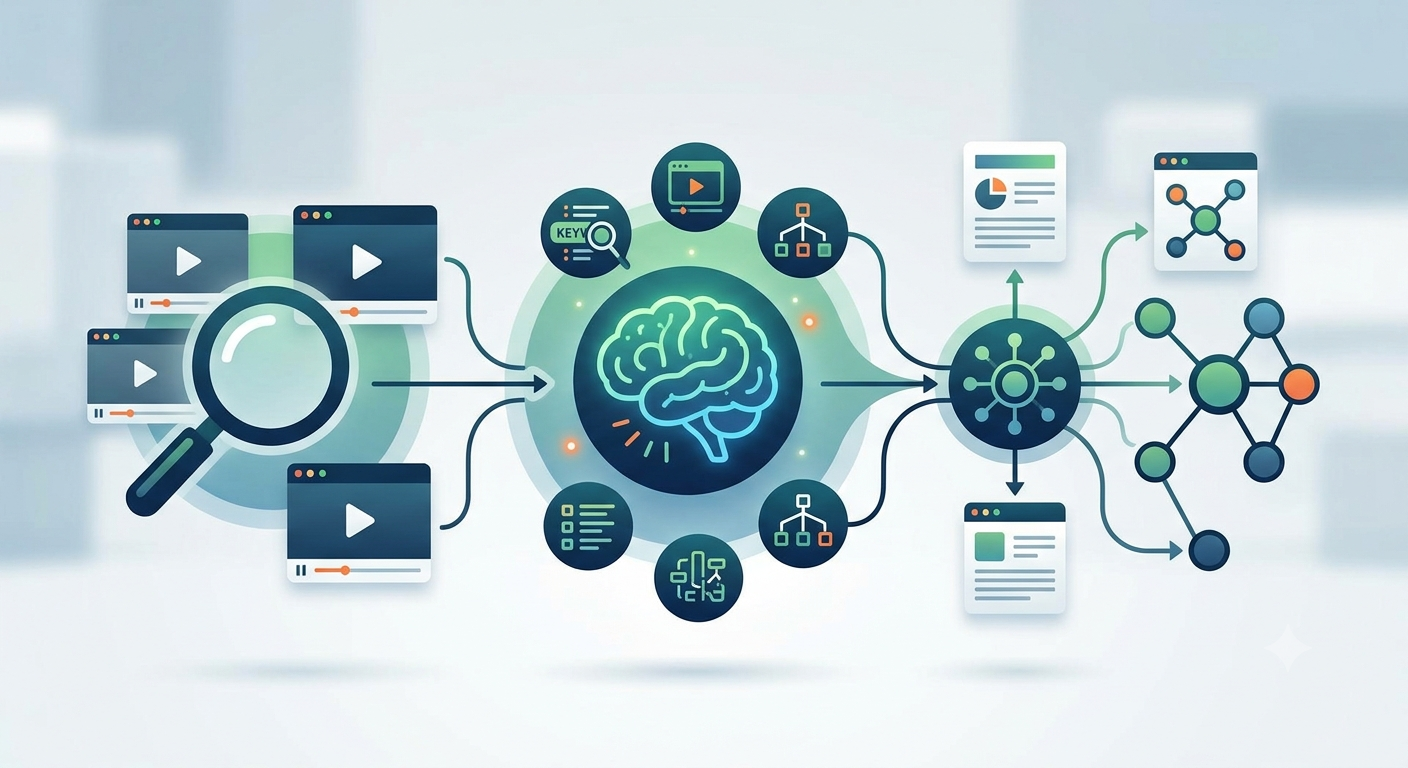
There are several stages in this workflow:
- Video Search: The agent executes a search based on established criteria and provides all relevant videos.
- Content Analysis: The agent analyses the contents of each of the provided videos and labels them with — key elements, key concepts, and meta data.
- Information Synthesis: Information is synthesized from multiple sources to generate a well-rounded and thorough analysis.
These phases are a fast method for marketers as well as sole proprietors who need information quickly. Users now have more time to emphasize the aspects of their business that require their immediate attention, such as developing content and strategizing, rather than performing data-processing tasks.
Why It Is More Efficient Than Manual Work
By utilizing the YouTube Knowledge Engine, users simplify and accelerate the process of analyzing information compared to performing comparable tasks manually. The process benefits from the automation of repetitive tasks, such as searching, sorting, and saving time and resources spent on processing information. An example would be that the system processes all search and analysis queries to create a complete view of the key points of each video.
Automation will yield a higher degree of accuracy and consistency in analysis due to using an algorithm to extract key concepts and combine the information from several sources; thus eliminating the trouble typically associated with reliance on a human to analyze a wide variety of videos. Marketers and sole proprietors can gain a more thorough understanding of a specific subject due to the depth of data available and the reliance on a machine to complete the analysis.
As a result, users will have the following benefits:
- Speed: Having more time to perform strategic tasks allows for the benefits of using the YouTube Knowledge Engine.
- Accuracy: Systematized extraction and algorithmic processing reduce the margin of error found in manual observation.
- Depth: Deeper insights are achieved through the synthesis of multiple data points simultaneously.
What Results Users Achieve
Users of the YouTube Knowledge Engine have experienced a mistake in their ability to analyze and synthesize information. One key advantage of using an automated system is that it saves users time on researching and processing data — this is particularly useful for marketers and solo entrepreneurs who often have limited resources. The system saves users 40–60 minutes of time each day so that they may utilize this extra time to engage in more strategic tasks.
Additionally, automated analysis of knowledge allows users to better understand the subject they’re collecting and synthesizing information about. Users are able to:
- Create Better Quality Content: With a better understanding of current trends and relevant topics, users can easily create high-quality content.
- Improve Strategies: The synthesis of a variety of information about competitors and the marketplace creates a level playing field for identifying potential growth opportunities.
- Facilitate Learning: The generation of structured materials (such as flashcards and learning paths) will help to improve the effectiveness of the learning experience.
As a result of using the YouTube Knowledge Engine, users will not only save time, but they will also improve the quality of their output, which provides better results for their business. Automation has made information gathering and analysis more accessible and less time-consuming; this means there are new opportunities for creativity and innovation.
Implementation Examples
Marketers and solo entrepreneurs report that the automation of YouTube information collection and analysis is making it easier for them to conduct their work. For example, automation enables speedy gathering and assessment of competitor video information to aid in creating effective content strategies.
Users who have used the agent have multiple strategies included with their implementation experience as follows:
- Educational Content Synthesis: Flash card creation and learning paths based off of analyzing multiple educational/instructional type videos.
- Competitor Content Analysis: Identifying up-to-date areas where popular topics and trends on current content can enable improvement for positioning in that respective niche.
- Marketing Strategy Optimization: Gathering and processing information from the most viewed videos enables directions for creating new marketing material.
Thus, automation assists users in not only saving time, but also increasing the quality of their results. The system allows users to shift attention away from lower-priority tasks and focus on higher-priority items (content creation and strategy development), so it is an essential tool for modern marketers.
What You Get
Users of the YouTube Knowledge Engine gain tools for analyzing and synthesizing information found in videos and thus marketers (and those establishing businesses) can improve their effectiveness in completing higher-priority tasks (content and strategy) than with previous methodologies.
Main benefits include:
- Time Savings: Users save approximately 40–60 minutes daily through reduced research and analysis due to automating this portion of their process.
- Deeper Analysis Abilities: Users can synthesize knowledge from multiple videos providing them with greater insights about a particular topic.
- More Relevant Content Creation: Users can analyze trends present when discovering new pieces of content to create, ensuring they develop relevant pieces of content.
Therefore, it is essential that all marketers utilize the system to develop and maintain effective content management and analytics.
Launch Instructions
To begin using YouTube Knowledge Engine you'll need to follow a few steps. The YouTube MCP Tools package may be installed globally using npm, thereby allowing most users to utilize this platform. Below are simple steps for set up.
1. Install the YouTube MCP Tools package globally:
npm install -g youtube-mcp-tools2. To use the program without installing it globally, use npx:
npx youtube-mcp-tools3. Configure system configuration: Add your YouTube API key to the configuration file so that it can gain access to the information needed for analysis and synthesis.
4. Launch the system: Follow the directions as described in the documentation. Once complete all features of the package will be available for conducting automated video analysis.
You will receive regular updates and digests with helpful content on your Telegram account, keeping you apprised of new marketing and content trends. Therefore when used as a tool it serves double duty as an effective resource for you in your work.
