



- Русский
- English
- Português
Warm Lead Nurture: personal follow-ups that re-engage warm leads
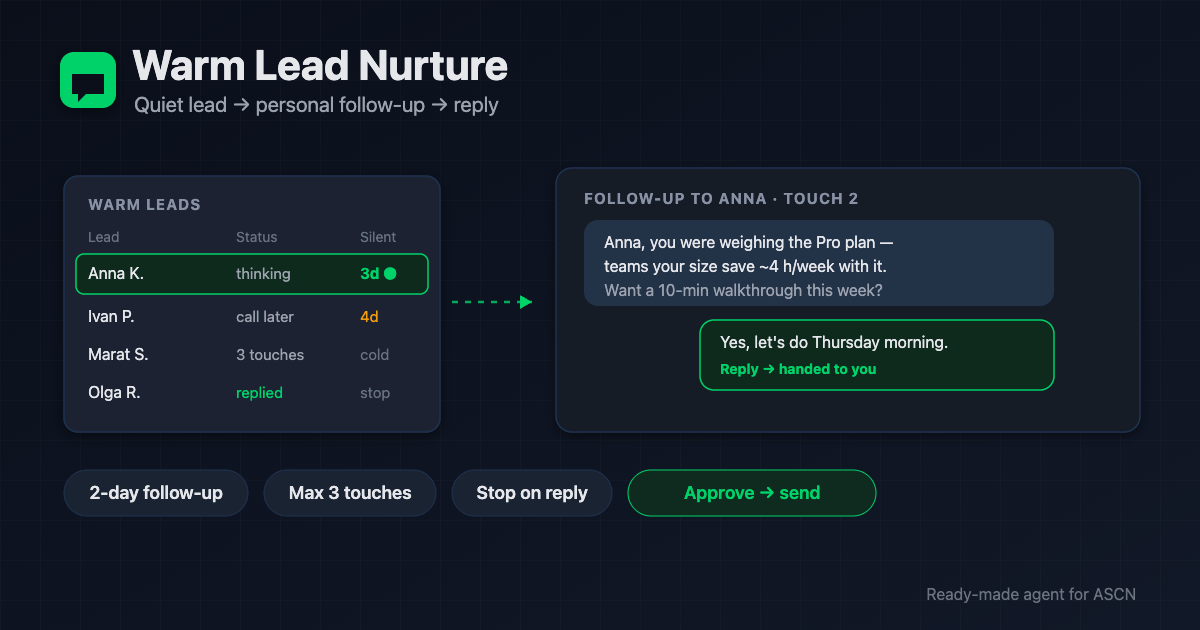
The agent watches leads who said 'I'll think about it' and writes a personal follow-up after 2 days. Max 3 touches, stop after a reply. Sends with your approval.

For new users: your first ASCN subscription payment doubles the term. [Use template] [Ask a question]
Overview
Most deals are lost not to a "no" but to silence. A lead says "I'll think about it" — and no one follows up. Reps forget; CRM sequences sound like a robot and get ignored. A dedicated rep to chase warm leads costs $800–2,000/month.
Warm Lead Nurture is a ready-made AI agent for the ASCN platform that follows up like a human:
- 🔎 Watches your warm leads in a sheet — the ones who are "thinking" or asked you to call back
- ✍️ Writes a personal follow-up — by name and by the lead's last interest, not "just checking in"
- 🎯 Picks the message type — value, a real offer, a case, or a simple "still relevant?" question
- ✅ Sends you the batch to approve — "send all / edit #N" — or sends itself if you enable auto-send
- 🛑 Stops after 3 touches with no reply and marks the lead "cold" — no spam
You run it in plain chat. Every lead and touch history lives in your Google Sheet.
How the agent works
No coding. You run everything from a chat.
- Install from the marketplace. Open the page, click "Use template" — the agent is in your account in under 5 minutes.
- Tell it what you sell. Offer, benefit, 2–3 real cases. The agent saves them and uses them in messages.
- Connect the sheet and channels. Google Sheets of leads, Telegram and/or Gmail — one click each.
- Set the rules. After how many days of silence to follow up (default 2), how many touches before "cold" (default 3).
- Then every day. The agent finds who's due for a touch, writes the follow-up, and sends it to you to approve or sends it itself.
Why it beats a rep on follow-up duty
- No warm lead forgotten. The agent checks the base daily and follows up on time — deals don't leak into silence.
- Human messages, not a robo-blast. By name, by last interest, value in the first line — the kind people actually reply to.
- One subscription instead of a salary. A follow-up rep runs $800+/month. The agent covers the same work for the price of a plan.
- No spam, no reputation risk. Max 3 touches, stop after any reply or opt-out, no fake urgency.
- You always decide. By default no message goes out without your approval.
What users get
Across setups, the agent brings back warm leads that would otherwise be lost to silence and takes daily manual follow-up off reps' plates.
Conversion depends on the base quality, the strength of the offer, and how the cases are written. The agent delivers timely, personal contact — closing the deal stays with you.
Adoption snapshot
B2B services — agency
- Connected: Google Sheets of leads, Telegram
- Result: daily follow-up on "thinking" leads, 3 touches, stop after a reply
- Effect: a share of stalled leads re-enters the conversation
Online school — courses
- Connected: Google Sheets, Gmail for email
- Result: personal follow-ups by interest (price / program / start date)
- Effect: fewer "I'll think about it and vanish", more booked consultations
SaaS for small business — subscription
- Connected: Google Sheets, Telegram, auto-send
- Result: touches on day 2 and day 4, a case per interest
- Effect: reps' time saved on manual reminders
Figures are illustrative — an expected effect for the niche, not a guaranteed result.
What's included
- A ready-configured agent: role, rules, and three skills (find leads, write follow-ups, send) already written.
- A lead base and touch history: a sheet the agent maintains so no one gets over-touched.
- Sending under control: an approval batch in Telegram or auto-send — your choice.
- Honest follow-up rules: max 3 touches, stop after a reply, no fake urgency.
- Personal manager and community: setup help on the Personal plan and above.
While others lose deals to silence, follow up with warm leads personally and on time — through an agent that works every day. 🔥🔥🔥
Set the offer once — and the agent brings "I'll think about it" leads back into the conversation.
FAQ
Do I need coding skills?
No. The agent installs from the marketplace and is set up in plain chat: tell it what you sell, and it connects the sheet and channels and runs a test.
How is this different from cold outreach?
It works warm leads already in your pipeline. The agent doesn't find new people or send cold emails — it personally follows up with those who said "I'll think about it".
Does it send by itself or ask first?
By default it sends you a batch to approve. Auto-send can be turned on — that's your standing consent, and it can be paused.
Won't this look like spam?
No. Max 3 touches, stop after any reply or opt-out, every message personal and free of fake urgency.
Which channels are supported?
Telegram and email (Gmail). The agent follows up on the channel the lead used, and keeps email volume within safe deliverability limits.
How is my data kept safe?
Contacts and correspondence live only in your Google Sheet, not in agent memory. Each agent is isolated, and you can revoke any service at any time.
What happens when a lead replies?
The agent immediately stops following up, sets the status to "replied", and hands the thread to you.
Use template · Ask a question · Order a done-for-you setup
