



- Русский
- English
- Português
Dual-agent outreach for startup founders
The two-agent solution automates cold outreach to help startups and entrepreneurs eliminate time-consuming and redundant tasks. By integrating with tools like Gmail and Telegram, this method increases productivity and allows for more efficient client communication.

Automating cold outreach for entrepreneurs and startups is the main goal of the two-agents solution.
General Information
The main goal of the two-agents method is to help startups eliminate the time-consuming and redundant task of cold outreach. With two agents, entrepreneurs can increase the level of productivity at work and spend less time on repetitive tasks. These agents work according to the timetable, which allows users to choose the most convenient time for communicating with clients. This is especially important for startups where every minute matters. The integration with popular apps like Gmail and Telegram simplifies the process for those who do not possess technical skills.
This solution is applicable to both solo entrepreneurs and small teams that want to raise sales volume and reach more customers. Using this system, entrepreneurs can not only speed up the process but also improve the communications with clients and, as a result, increase revenue. For instance, users claim that the automation in cold outreach prevents mistakes due to possible errors that occur during work.
How the system works
Cold outreach automation is possible thanks to two agents that work according to a timetable. This eliminates the need for human monitoring of the successful delivery of messages to clients and sending them. Each agent has its own task, which means that while one agent deals with collecting information regarding the target audience, another one is responsible for the delivery of messages. Such an approach ensures the regularity and systematicity in working with clients.
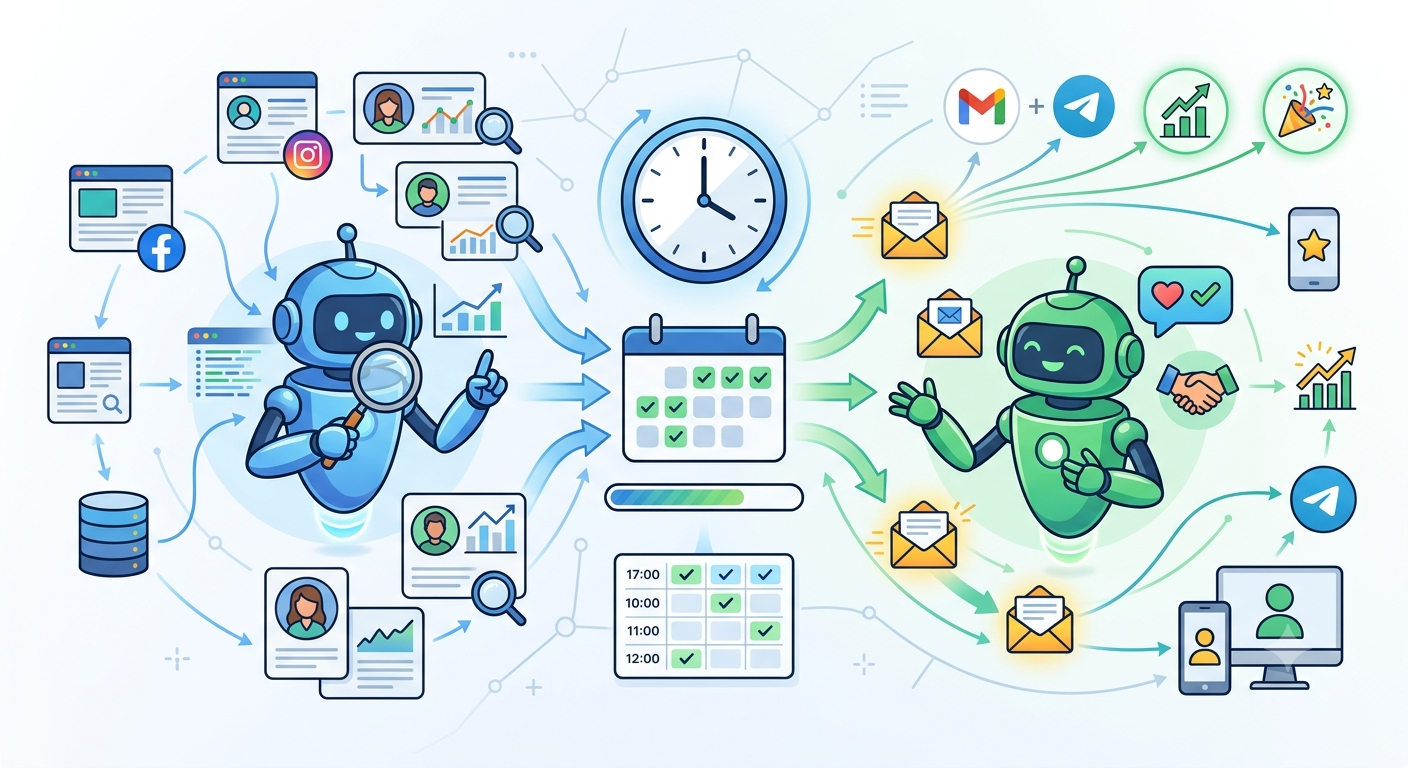
Integrating with modern channels
Every agent will be able to make his/her own daily schedule, and send messages at the right time. That is the effective way to utilize time and resources which is especially true for startup companies and independent entrepreneurs as every minute is precious.
Also, it is possible to use automation for data collection and analysis regarding the interaction with clients. Thus, outreach methodology might be changed according to the results obtained, further increasing conversion ratios and sales. Such a system is rather simple and does not require any specific technical knowledge, meaning that the use of the system is possible for a large number of people.
Why is it more effective than manual overseas communications?
The two-agent system of cold outreach has a wonderful impact on efficiency as compared to the manual type of operation. According to information on the efficiency of the two-agent outreach model, it is victorious over any outbound campaigns with respect to efficacy and trustworthiness.
Experiences of Users
Users of the two-agent outreach system report considerable success in their business sales. Automation allows for saving time on repeated routine processes and yields quality connection with target markets. The two agents represent the business in two different time frames so that there is no gap in communication and clients do not have to wait for a reply. The process becomes more trustworthy and effective, which leads to a higher conversion rate.
Users claim that the implementation of the automated system allows for gathering and processing information about their clients. Users can start changing their outreach strategies based on this information, which is impossible without automation. Automation solutions also create an opportunity to collect data about customer interactions in a more accurate way and change the outreach strategy according to real numbers and figures. There are many reviews where users mention the advantages in sales after implementing such a system.
By implementing a two-agent system businesses can concentrate their efforts on strategic business development. Startups should take advantage of time saved in order to come up with new ideas and improve their products leading to an increase in revenue and customer base.
What You Gain
When using a two-agent system owners of startups and businesses gain a few significant benefits. First of all, process automation helps to save a lot of time spent on performing routine processes, so you free up more than 15 hours every month to engage in business development and communication with clients.
Second, the system offers consistent and systematic outreach so you make sure that there are no gaps in communication. Your agents work according to the schedule making the process more predictable.
Thirdly, users of the system can gather and analyze data in a way that was impossible before. Therefore they can now make better decisions concerning outreach since they are acting based on real data. Users feedback proves that such a system works and brings results.
Guide on Getting Started
If you are interested in starting a two-agent outreach system you can follow several steps. First of all you can register at the ASCN.AI platform and access the ClawHub marketplace where you can find the necessary templates and ready-made workflows to set the agents up.
Then you should set up integration with such services as Gmail and Telegram to enable your agents to communicate with the potential clients.
The next step is creating the schedule for the agents that will allow communication and data collection.
It is important to test the agents on the small amount of data to make sure that they are configured properly. When everything is working well, you can start operating the system without difficulties. Do not forget to track the results of your outreach and change your outreach strategy based on the data you receive.
