



- Русский
- English
- Português
Twitter/X Account Automation
ASCN Agent allows you to manage your Twitter/X account effortlessly using natural language commands to automate routine tasks like posting, replying, and monitoring. By streamlining your workflow, this tool helps you focus on high-level strategy and audience engagement while significantly increasing your productivity.


Take the hassle out of managing your Twitter/X account using automation (ASCN Agent) that completes these tasks for you simply by typing commands in natural language.
General Overview
Using automation makes managing your Twitter/X account much more efficient and easier. No longer will you have to switch between multiple applications and tools; you can spend that time developing content and strategy instead of performing repetitive daily tasks.
Some examples of the types of things you can do with ASCN Agent include:
- Posting to Twitter.
- Replying to messages/comments.
- Liking and retweeting content.
- Following and unfollowing accounts.
- Sending DMs.
Using ASCN Agent to perform these tasks through Twitter/X account automation, you will spend less time on routine tasks, and more time engaging with and managing your followers.
How the Automation Works
ASCN Agent connects to the Twitter API, making it possible for you to interact with your account without switching between different applications/tools. By performing all commands within a single application, the process will be quicker and easier.
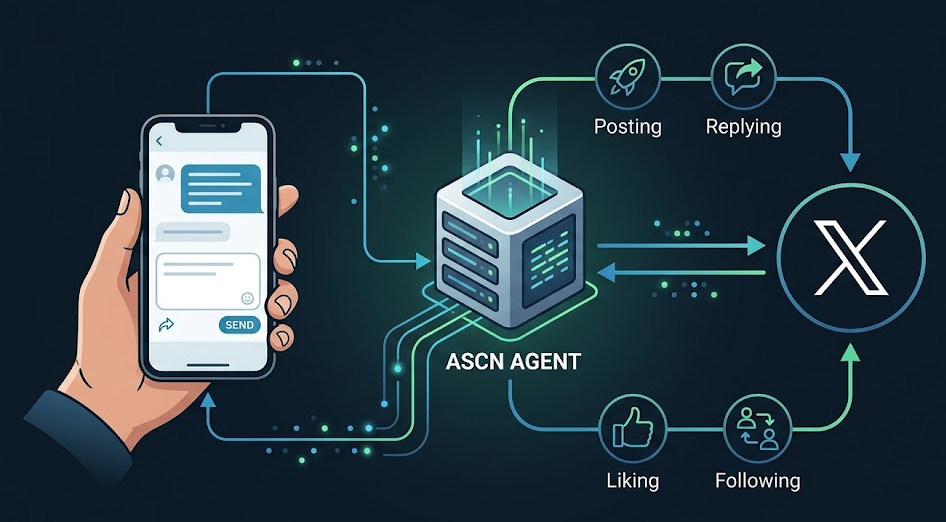
To use ASCN Agent to automate your Twitter/X account, follow these steps:
- Connect ASCN Agent to the Twitter API to create a direct interface for interacting with your account using ASCN Agent.
- Issue commands simply by entering in the chatbot to perform things such as posting tweets or monitoring accounts and making connections with followers.
You can use many commands to make managing your Twitter/X account virtually effortless. For example, you will easily post tweets, reply to comments, change the number of followers, and be notified.
Why It Is More Effective Than Manual Work
The automation of managing Twitter/X accounts greatly improves both marketer's and solopreneur's productivity and efficiency. The biggest benefit is that it eliminates the need for selecting winners by hand from any contest. The automated systems gather and manage information and choose winners randomly (eliminating human error) which saves time and creates a more efficient winner selection process.
Automation also allows for gathering of information about followers and their interaction without having to use complex parsing scripts to process that data. Therefore, analysis of that data becomes much easier to accomplish, allowing marketers to focus on higher level strategic tasks. Tracking the user activity associated with followers as well as identifying who are most engaged, and adjusting content based on those interests becomes relatively easy compared to the process of parsing.
In addition to providing speed to routine tasks, automation improves the overall quality of the interaction marketers have with their audience, resulting in better outcomes and increased levels of engagement.
What Results Users Obtain
Users of automated Twitter/X account management report significantly reduced time spent on account management, which provides them with more time to devote to creating content and engaging with their audience strategically, both of which will improve the level of interaction they will have with their audience.
In addition to increasing the amount of time able to devote to developing and strategizing content for their audience, automating manages followers' interactions with their account which improves the amount of activity on followers' accounts due to being able to respond to comments and messages quicker than would occur without an automated system. Not only are users able to post content with automated systems, they can also use automated systems to interact with their followers and help provide a more lively, engaging and dynamic experience around that account.
Also noteworthy, automating the collection of data will simplify how that data is analyzed. Tracking the success of posts and interactions with users helps you adapt your promotional strategy to create more targeted content that leads to an increase in followers and their engagement with your brand.
Users also report that they save considerable time managing their account and have better interaction with their audience.
Implementation Examples
While we do not currently have specific examples of how companies have implemented Twitter/X account automation, we can highlight key features from our implementation experience that show how well the system works. Marketers and solopreneurs that use the ASCN Agent have noted that automation makes it incredibly easy to manage their accounts and interact with their audience.
The system enables not just posting of content, but also responding to your users' comments, which gives you the opportunity for a much more interactive experience with followers. Automation reduces the amount of time that you will spend on routine tasks, allowing you to concentrate on the strategic development of your account and the creation of quality content.
Additionally, users have stated that automation allows you to quickly analyze the data associated with how users interact with your content and how they engage with it, thus helping you create more focused content and increase your follower count on the platform. As such, the ASCN Agent can be valuable to anyone looking to grow their presence on Twitter/X.
What You Get
The management of your Twitter/X account is very simple and effective and, with the use of the automated account management, you will no longer have to worry about routine tasks as they will be automated, allowing you to focus on planning and strategy.
You can now pick winners in contests automatically instead of manually deciding who wins, which will save you time as well as greatly enhancing your efficiency. You'll also be able to monitor your account for new tweets, allowing you to react quickly to what your followers are doing. All of these factors will combine to make the management of your Twitter/X account a lot more efficient and less labor intensive.
- Full control of your Twitter/X account via chat.
- Winners picked automatically for contests.
- Monitoring your account and getting notifications of new tweets.
These three benefits alone will help to improve the quality of interaction between you and your audience as well as to increase the engagement of your audience, which ultimately translates into an increase in both the number of people following you and the amount of activity they perform. The automation of all of this will be a vital tool in helping you to succeed in SMM.
Launch Instructions
To help you get started with the automation of your Twitter/X account using the ASCN Agent, there are a few steps you will need to take in order to get everything set up quickly, allowing you to begin managing your account right away.
The first step is to install the appropriate plug-in that will enable the connection between your agent and the Twitter API. This can be accomplished with the following command:
openclaw plugins install @xquik/tweetclawOnce you've installed the plug-in, you can create your first tweet, which will allow you to test your system. For example, you could create a tweet by typing out something like: "I just released a new feature — check it out!"
Additionally, the system will allow you to run a contest by randomly choosing people who have retweeted your tweet.
And finally, you can also retrieve data on the users who liked your tweet. You can export this data in CSV format for use in a data analysis tool. Be sure to set up account monitoring for your account, for example, @elonmusk, so you will receive notifications for new tweets and are aware of current trends in your Twitter/X feed.
Important: You will need to pay $100/mo for a Basic Twitter API or else you will not be able to use the service. Your API key will allow you to communicate with the Twitter API via standard HTTP API calls.
