



- Русский
- English
- Português
Automate Dutch Public Procurement Data Collection with TenderNed
TenderNed is the central e-procurement platform in the Netherlands, facilitating over €116 billion in annual public spending across sectors like IT and construction. This guide explores how to transition from manual monitoring to automated workflows, helping your business save hundreds of hours and never miss a critical tender deadline.

TenderNed is an e-procurement platform in the Netherlands owned by RVO (Netherlands Enterprise Agency), which works with PIANOo (Dutch Public Procurement Expertise Center) to support e-procurement in the Netherlands. TenderNed was established in 2012, per the Aanbestedingswet 2012 (Dutch Procurement Act), and covers the entire procurement lifecycle from the procurement publication, bid submissions, evaluations, and awarding of contracts. All public agencies in the Netherlands are legally required to publish tenders above the EU minimum threshold at TenderNed.
In terms of scale, there are €116 billion in public spending per year, with more than 25,000 publications per year. There are more than 3,000 agencies across the various sectors, including construction, IT, health, infrastructure, and professional services publishing tenders in the Netherlands. TenderNed has the following EU minimum thresholds: €143,000 for purchases through central government, €221,000 for purchases from sub-central authorities, and €5.54 million for works contracts.
With automation, a business of two employees can monitor tenders as well as a staff of a large-scale bid team, thus leveling the playing field among tendering companies.
The True Cost of Manually Checking
If a company has an active bid team, the process of monitoring tenders through the use of TenderNed will take from 10–15 hours a week. This equates to between 520–780 hours of time per year, or $15,000–25,000 in cost per analyst if they perform the checks consistently. In reality, analysts do not check the tenders on a regular basis, resulting in missed deadlines and tenders received a week after the submission date.
| Approach | Setup Time | Monthly Cost | Technical Skill Required |
|---|---|---|---|
| Manual Monitoring | 0 | Free | No |
| ASCN.AI Monitor Done for You | 48 Hours | From $59 | No |
| DIY n8n Template | 2–5 Days | Free Host | Yes |
| Jorpex SaaS Monitor | Minutes | Monthly Subscription | No |
5 Steps How the TenderNed Automation Workflows Work
The automation solution will connect directly to the TenderNed API and will complete the data collection for all tenders according to a predetermined daily schedule (By Default) or hourly (for time-sensitive sectors).
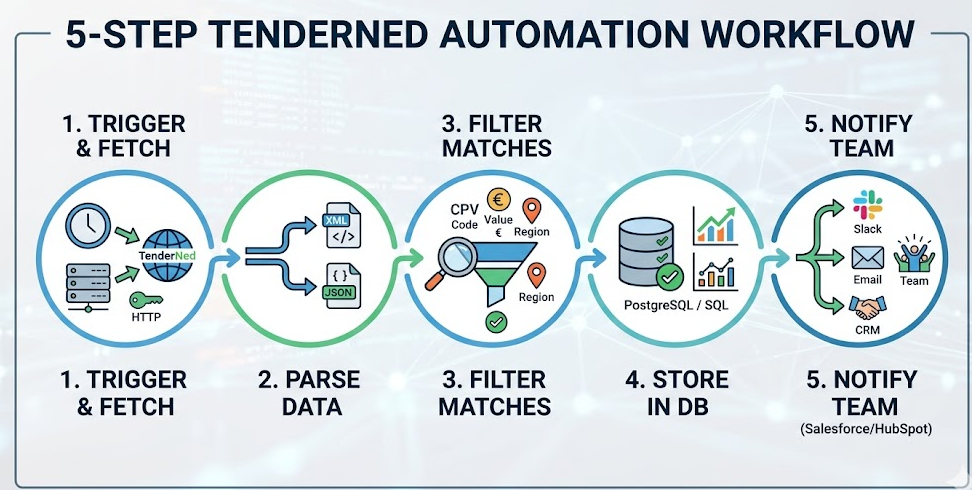
Step 1 - Trigger and Fetch Publications
The scheduled trigger uses HTTP Basic Authentication to call the TenderNed API and retrieve up to 100 tender publications per call (pagination is used to retrieve larger results).
You can get your API credentials by contacting functioneelbeheer@tenderned.nl and accessing documentation at tenderned.nl/info/swagger/, which is interactive and auto-updating. There is also an example code repo on GitHub.
Step 2 - Parse the XML and JSON Tender Data
Each tender creates both XML and JSON API calls in parallel. The XML endpoint returns all tender documentation, evaluation criteria, and requirements for submission. The JSON endpoint returns structured metadata, such as reference numbers, CPV codes, keywords, dates, and estimated contract values.
You will collect the following fields for each tender:
- Publication ID and Date
- Organization Name (Contracting Authority)
- Tender Title and Description
- Reference numbers (kenmerk, TED numbers)
- Estimated Contract Value
- Submission Deadline
- CPV Codes
- Procurement Type
- Contact Details (email, phone)
- Geographic Region
Step 3 – Filter the Tender List by CPV Code, Contract Value and Region
Common Procurement Vocabulary (CPV) codes are used in the EU for the classification of procurement items. You will filter by 72000000 for IT services, 45000000 for construction, 85000000 for health services, or any combination of the above. In addition, you will apply contract value thresholds and filters based on specific contracting authorities' geographic regions and keywords.
As an example, an IT consulting firm based in Utrecht used the CPV 72000000 filter with minimum value of €50,000. In the first week, they received three tenders that they did not manually catch — including one from a municipality that they had not tracked before.
Step 4 – Store the Matched Tenders in Your Database
Matched tenders are stored in PostgreSQL, MySQL, or other SQL-related databases. They will include timestamps, source references, all fields, and will be deduplicated. After being matched for between six and twelve months, patterns will emerge that show which agencies publish tenders in the first quarter, which CPV categories have seasonally high demand, and which authorities maintain annual cycles. The anticipation of what may happen is more important than just being prepared for an unanticipated event.
Step 5 - Send Your Team Notification Immediately
Every time there is a new matched tender, you can send your team a notification through the following ways:
- Via Slack: by sending a message to your bid channel along with the tender title, contracting authority, estimated value, submission deadline, CPV code and a live link to the tender in TenderNed
- Via email: same as above
- In your CRM: set up new opportunity records in HubSpot or Salesforce for the newly matched tender; assign to the appropriate team member, add a task for them to meet the due date.
Technical Setup for TenderNed's API
To set up the TenderNed's API, you will need three things: API credentials, HTTP Basic Auth configuration, and two data endpoints.
How To Get Your API Credentials
To get your API credentials register at tenderned.nl. Email functioneelbeheer@tenderned.nl to request your API access. You will be sent an HTTP Basic Auth username and password for the three nodes of this workflow: Publications Fetch, XML Detailed, and JSON Detailed.
TenderNed API Key Parameters
Please visit tenderned.nl/info/swagger/ for full documentation. The API key parameters are:
- Offset: start position for pagination
- Size: amount of results to return in response (maximum of 100)
- Filters by date range
- Filters by status (published, awarded, cancelled)
Who Benefits Most From Automated TenderNed Processes?
For construction and engineering companies who are competing for Rijkswaterstaat infrastructure, water board, and municipal projects that have a value regularly exceeding €500,000. Missing one of these submission deadlines can have dire consequences.
For technology service providers who are focusing on offering their services for Digitale Overheid contracts, the Dutch government is one of the top technology buyers in Europe. CPV 72000000 appears to have multiple new tenders posted each week.
For consulting agencies who are monitoring contracts for advisory, audit, and research type contracts, procurement cycles will become predictable and consistent once you have 6 to 12 months of historical data. Facility managers tracking multiple CPV clusters across dozens of authorities cannot accomplish this manually; Automated means of tracking the CPV clusters makes this possible by simply automating.
This applies to firms that are not based in the Netherlands. All member states of the EU and signatories of the GPA may bid on above-threshold contracts in the Netherlands via procurement directives. There is a free process for registration, however, you will need an ESPD (European Single Procurement Document) to submit an above-threshold bid.
TenderNed Automation Service by ASCN.AI - 59 dollars per month live in 48 hours
Your company will have all TenderNed data collection automation deployed regardless of how technical your background is. All of the following are included in your automation subscription:
- Configuration of your TenderNed API credentials, and setup of your HTTP Basic Auth
- End-point integration of XML or .JSON with 10 field extraction from tenders
- Custom Filtering of CPV codes matching your sector
- Filtering by contract value, contracting authority and region
- Integration with your company's database, either (PostgreSQL or MySQL) or your company's preferred database
- Set-up of notifications to your company via Slack, email or CRM (HubSpot or Salesforce)
- Scheduled automation, with error handling, logging of run time, retry logic, and monitoring of status
- Incremental updates that only process newly published tenders at each execution, and facilitate deduplication
- Optional load of your company's historical data from TenderNed Open Data (dating back to 2016)
Your subscription for the TenderNed Automation Service starts at a cost of 59 dollars per month. Schedule a 30-minute consultation at no charge. During this consultation we will work with you to establish a mapping of your CPV categories and qualification filtering criteria. We will also automate the creation of the TenderNed automation solution in your company within 48 hours of the consultation.
Most Commonly Asked Questions
Is TenderNed API free of charge?
Yes, the TenderNed API is free to use for suppliers. You will be required to request a credential from TenderNed by e-mailing functioneelbeheer@tenderned.nl. There is no associated subscription fee.
How often will the automation run?
The default running schedule is daily; however, for time sensitive sectors we can run the automation every hour.
Are there possibilities to limit contracting authority targets?
Yes, filters can achieve this as there can be exclusions and inclusions for governmental agencies, ministries, and municipalities. The use of filters will allow suppliers to establish qualification funnels rather than solely receiving raw alerts.
Can non-Dutch companies use TenderNed Automation Service?
Yes, ASCN.AI serves as a provider of services to EU companies. The EU's procurement directives do allow for suppliers from member states of the EU to submit tenders for contracts awarded at an above-threshold amount by contracting authorities in the Netherlands, regardless of the location of the supplier’s business.
What are the Primary Differences Between TenderNed and TED?
TenderNed is the national tendering system designated by the Netherlands; it is required for all contracting authorities of the Netherlands and permits the publishing of tenders on a voluntary basis at below-threshold amounts. TED is the EU-wide journal of tenders and is designated only for tenders awarded by contracting authorities above the threshold amounts. TenderNed provides suppliers with access to all tenders in the Netherlands (above and below threshold) because TED does not have an exhaustive listing of tenders awarded in the Netherlands.
What is the expected time of receiving alerts after a new tender is published using the TenderNed Automation Service?
When you subscribe to using the default daily schedule, you can expect your company to receive tender alerts within 24 hours after the tender is posted. If you subscribe to the hourly schedule, you can expect to receive alerts within one hour after the tender is posted.
Don't let another opportunity for receiving new tenders with the Dutch government slip away. Contact ASCN.AI for a free consultation and to automate your company's processes for receiving tenders with the Dutch government in 48 hours, and receive your first alert in 49 hours.
