



- Русский
- English
- Português
Telegram cold database mailing for lead generation
Hot leads at a low cost: automated sending of personalized messages to a cold database. First contact with the client is automated, with no manual effort

General description
Do you have a solid base of your potential customers on Telegram? Launch an automated newsletter from personal Telegram accounts using it and let your managers work only with the users who have already responded. The system saves your managers time and effort, helps optimize the cold mailing process, and also allows you to create a personalized newsletter for a minimal budget. The agent writes messages to your database, and if the user has not responded within an hour, she sends a repeat message herself
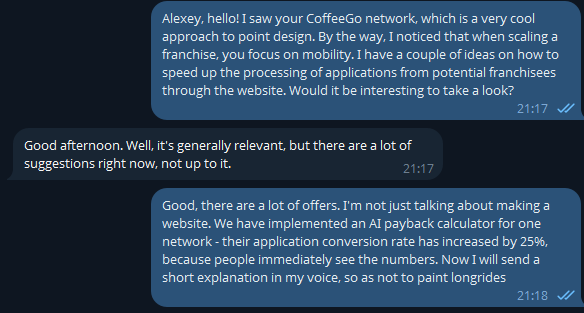
How automation itself works
You don't need to be a programmer. We have reduced the management of the system to working with tables.
-
Database loading: You simply paste the list
@usernameinto the Google Spreadsheet. -
Offer settings: You write one basic message text. The AI itself will make it unique for each client.
-
Connecting accounts: In one click, you authorize your Telegram accounts through a simple web page.
-
Launch: Press the "Start" button. The system will distribute the load by itself, pause between messages and start sending out.
-
Getting leads: You just log into a Telegram chat or CRM and respond to those who are already interested and warmed up by the AI agent.
Why does it sell better than a human?
The system doesn't just "throw text", it mimics the work of a top sales manager:
-
AI Personalization: A personalized message is sent to each potential customer based on your template, which allows them to be banned less often, and also increases openness
-
Multimedia boost (+40% conversion rate): Automatic funnel:
Text 1 → Text 2 (reminder)
What results did other users get
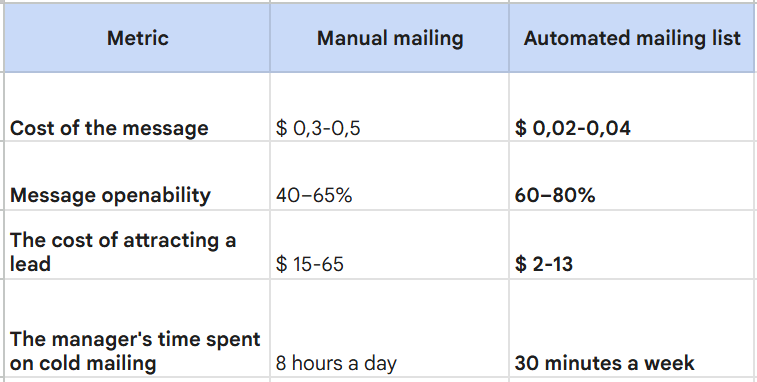
According to statistics, in a system of 40 telegram accounts, it can generate about 15,200 touches per month. With a minimum conversion rate of 1%, you get about 152 leads
Statistics on the implementation of this automation
B2B-Dev Studio Marketing software development
Coverage: 9,200 touches/month.
Dialog conversion rate: 29%.
Result: 819 scheduled demo meetings.
CPA (Lead cost): 4,76$.
EdTech Premium Mentoring and Online Education
Open Rate: 78%.
Audit records: 92 people/month.
Read-to-write conversion: 18%.
Mailing budget: 300$
Fittech Fitness center
Total reach: 12,000 contacts.
CRM hot leads: 450 people.
Saving time: 40+ manager's working hours/month.
CAC (Cost of customer acquisition): 5.38$.
Why is it more profitable than any other advertisement?
7 times cheaper than Telegram Ads: You pay for the result, not for impressions. With a reach of 7,500 people, the cost of a message can be from $0.02 to $0.04, including all keys and servers.
What do you get after purchasing a subscription
-
Ready Workflow: System logic for the ASCN NoCode platform
-
Instructions for "13 steps": Step-by-step guide from server rental to the first message
- Personal Manager: A personal manager who will help you set up automation
Stop buying expensive leads and start producing them 🔥🔥🔥
Launch your own infrastructure, which pays off from the first closed transactions.
