



- Русский
- English
- Português
A universal assistant in Telegram
Automate task management and communication by integrating a universal Telegram assistant with Gmail and Google Calendar. This solution provides a single interface for essential tools, helping operations managers and founders save time and increase overall team productivity.

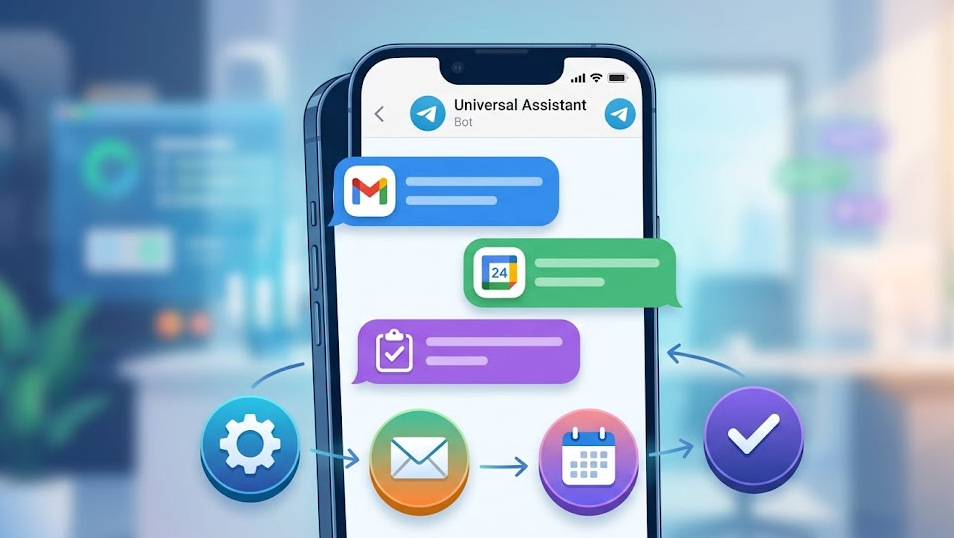
Automate task management and communication with a universal assistant on Telegram. Integration with both Gmail and Google Calendar means work can be carried out more efficiently and it simplifies the way people will interact with different tools.
General Description
The universal assistant on Telegram is a solution that provides a single interface for all of your tools and therefore improves task management and communication tremendously. This solution allows users to effectively organize their work and do so through integration with some of the most popular services including Gmail and Google Calendar. This type of assistance would be very beneficial for operations managers and business founders who often need to transition quickly between many different tasks and applications.
Central access means less time is required to complete tasks that are routine in nature. Users can set automatic reminders and manage their tasks directly from Telegram, decreasing the difficulty of utilizing the two systems. When integrated with other tools, users will not have to switch between applications and, as a result, increase their productivity overall. Replicating this system of automation is also easy to do. Telegram, Gmail and Google Calendar are native ASCN connectors.
How Automation Works
Automation occurs through the universal assistant on Telegram by following five simple steps that simplify both task management and communications. The first step is to create topic categories for the various contexts in which tasks will be performed (e.g., by general setting, task updates, video ideas in the planning stages), as all users will have access to the same list of topics, will reference them in a similar way and will identify and complete their respective tasks more easily.
The second step is to connect all of your tools via the ASCN configuration and through the integration of Gmail. Users can handle everything, including messaging, assigning work and keeping up with the work, without having to leave the Telegram app.
Once the integrations have been established, the next function to implement should be the creation of automatic reminders and tasks. Having automatic reminders will help ensure that no important events or deadlines go un-noticed and will enhance the overall efficiency of your work. Automation frees you up to be able to concentrate on your critical tasks by eliminating operations that are required to perform routine operations.
Why It's Faster Than Doing It Manually
The use of a universal Telegram assistant greatly enhances work efficiency. The use of the universal Telegram assistant will reduce the amount of time that you spend switching between applications — giving you an opportunity to continue working on completing the work that you started. Rather than switching between various tools for project management and communicating, users will have access to all the tools necessary to complete the work and communicate with team members in one interface.
In addition to minimizing time spent switching between applications, the use of the universal assistant also reduces the amount of time taken to perform tasks and communicate with other team members. It is very easy for users to create a task, assign or ask colleagues to execute it and track the progress of an assigned task without being distracted by duplicative or redundant work. This is essential for operations managers and/or founders, given that they need to quickly react to changes and make rapid decisions.
Moreover, integration with Gmail and Google Calendar enables users to receive notifications in real time and reminders in Telegram directly. As a result, users can prevent missing key events or deadlines and can therefore work in a more organized manner. Thus, automation not only cuts down on overall time but also helps to raise the overall productivity of the team.
Results That Users Are Reporting From Their Universal Telegram Assistant
All users who use the universal Telegram assistant have indicated that there have been improvements in the management of tasks and communications. With the integration of Gmail and Google Calendar into the universal Telegram assistant, users get live notifications and reminders of important events and deadlines right in the chat, ensuring that users can react quickly to changes — especially important for operations managers and founders.
A significant benefit to system users is the amount of time saved by automating many routine operations; reducing this time leads to an increase in overall productivity. Automating processes prevents constant switching between applications, producing an average savings of 40 to 60 minutes per day. Users are able to concentrate on more essential tasks, benefiting their performance as a team member.
Additionally, automation helps create a more organized approach to work. Users are able to monitor task progress easily and manage tasks with improved communication within the team. Therefore, implementing a universal Telegram assistant provides better utilization of time and resources, which are critical components for any business to succeed.
Implementation Examples
Currently, there are no specific examples of users implementing the universal Telegram assistant; however, based on experience with implementing it, several broad categories of implementation can be identified. There has been extensive activity in the areas of task management and communication through a universal Telegram assistant in all areas of business, from small companies to established organizations.
Operations managers and founders of both large and small businesses are utilizing the universal Telegram assistant to:
- Organize workflows by establishing topics in Telegram for specific contextual categories (updates, video concepts, and managing contacts).
- Automated reminders can help with your planning and keeping on top of deadlines, reducing your chance of missing them.
- You will receive notifications in real-time via both Gmail and Google Calendar, as well as manage your tasks from the chats.
Telegram's universal assistant is now becoming the main way of improving workstation efficiency, so that you can focus more on doing the work and improving your processes. The solution is targeted for anyone who wants to be more productive and more organised at work.
Benefits of having a universal assistant
For businesses using a universal assistant like Telegram, the improvement in task and team member communication management will be enormous. The first positive impact will be that it will enable your team members to streamline their task management process, enabling them to see and manage their personal and professional tasks and also assign to other people. For any individual engaged in operations (both operational managers and founders), it will be vital that you can respond quickly to changes and delegate effectively.
Automation will also eliminate a lot of the nuisance associated with doing repetitive tasks. You can eliminate missing tasks by automating reminders for important events, like deadlines. Depending on how much time you can save by automating reminders for important events like deadlines, you could potentially save 40 minutes to 60 minutes of your time every single day. Therefore, your entire team should see and have an increase in productivity.
Both real-time notifications and the ability to manage your tasks within Gmail and Google Calendar combine both of those applications into one location. Therefore, in addition to having the convenience of the included features into a single application, it is also extremely advantageous for you because of how you will be using the time and resources more efficiently.
Step by step to create a universal assistant
To create your universal assistant of Telegram within your business, you must follow a few simple steps. First, you must create topics in Telegram (e.g. settings, updates, video ideas, etc.) to help catagorize and group the various types of information you manage so that your business will be more effectively run.
Next, you must connect your ASCN.Agent accounts to the other tools you use (Gmail/Google Calendar) through the ASCN configuration so that you can integrate into your Assistant with them.
Finally, connect and test each of all your integrations together to verify their ability to provide you with task management notifications as soon as you receive new tasks in the automated Assistant to maximize the effectiveness of your automation and increase your total team's productivity.
