



- Русский
- English
- Português
SMM Content Factory: posts for every network with images on autopilot
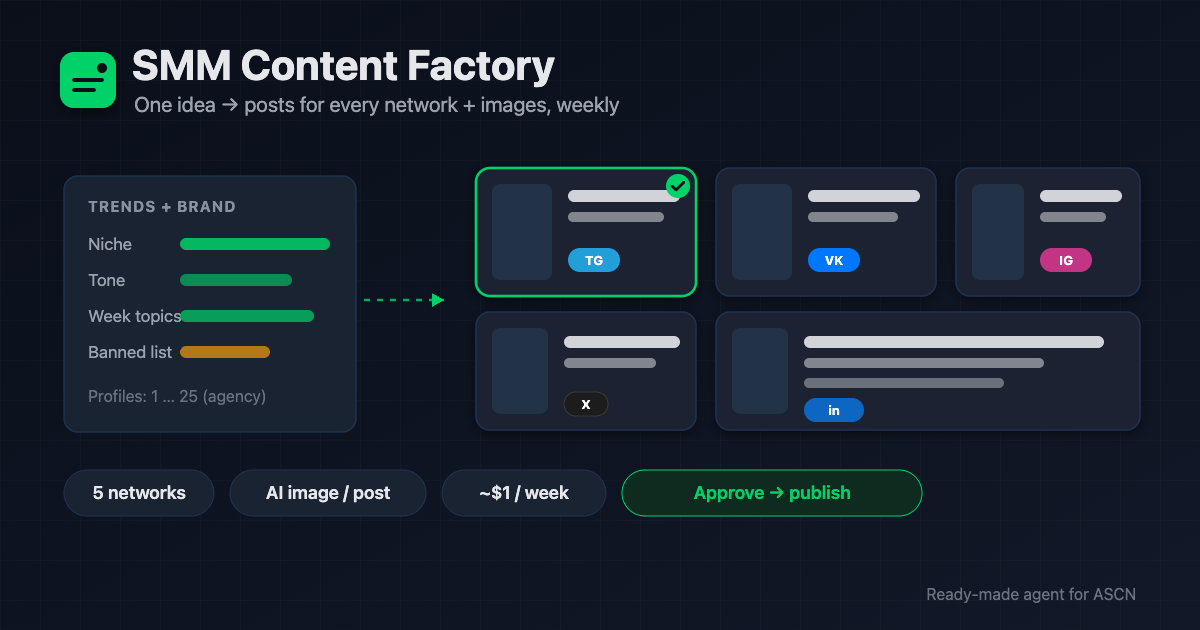
The agent researches trends, writes posts for Telegram, VK, Instagram, X and LinkedIn, generates an image for each, and publishes after your approval. One brand or 25 agency clients.

For new users: your first ASCN subscription payment doubles the term. [Use template] [Ask a question]
Overview
Running social media eats 6–10 hours a week: come up with topics, write posts for each platform, find or make images, publish everything. A freelance SMM manager charges $600–1,500/month; an agency retainer runs higher. And the content still ships late and samey.
SMM Content Factory is a ready-made AI agent for the ASCN platform that runs the whole content pipeline for you:
- 🔎 Finds real weekly trends for your niche via web search — no invented "news hooks"
- ✍️ Writes posts per network — Telegram (no hashtags), VK (≤3), Instagram (≤10), X (≤280 chars), LinkedIn (professional)
- 🎨 Generates an image for each post via AI (OpenRouter, Gemini 2.5 Flash Image)
- ✅ Sends the whole package to Telegram for approval — "approve all / edit #N"
- 📅 Publishes after approval — Telegram directly, other networks via Blotato or as a ready package
You run it in plain chat, in ASCN or Telegram. For agencies, the agent keeps each client's profile separate and never mixes their content.
How the agent works
No coding. You run everything from a chat.
- Install from the marketplace. Open the page, click "Use template" — the agent is in your account in under 5 minutes.
- Tell it your brand and networks. Niche, audience, tone, banned topics, links, platforms. The agent saves the profile to a sheet. For an agency — several profiles.
- Connect services in chat. Google Sheets and Telegram in one click. The image key is stored in the encrypted vault.
- Get a test package. The agent builds a few posts with images and sends them for approval before publishing.
- Then on command or on schedule. "Build this week's package," or automatic prep every Monday; publishing with approval or on autopilot.
Why it beats hiring an SMM manager
- A package in minutes, not hours. Trends, per-network copy, and images come together in one pass — you just approve.
- One subscription instead of a retainer. A manager runs $600+/month. The agent covers the same work for the price of a plan plus cents per image.
- 25 clients from one agent. Each client's profile is separate — an agency scales content without growing the team.
- Steady pace and quality. The agent never forgets a platform, never misses a deadline, and doesn't repeat topics from the last 4 weeks.
- You decide what goes live. By default no post publishes without approval.
What users get
Across setups, the agent prepares a weekly package of 5 posts with images in minutes of work instead of 6–10 hours by hand. Copy is adapted per network, images are ready, and topics don't repeat.
Reach and engagement depend on your niche, the profile quality, and your posting strategy. The agent delivers a stream of ready content; your setup and offer decide how it converts to followers.
Adoption snapshot
Local business — coffee shop / bakery
- Connected: Telegram, Google Sheets, image key
- Result: 5 posts a week to Telegram and VK, an image for each
- Effect: about 8 hours a week saved on content
SMM agency — managing clients' social media
- Connected: 15 client profiles in Google Sheets + Blotato
- Result: weekly packages per client for the manager to approve
- Effect: one specialist handles 3–4x more clients
Expert creator — online education
- Connected: Telegram, Instagram (as a package), image key
- Result: rotating formats — useful / engaging / selling
- Effect: a steady content plan with no separate SMM hire
Figures are illustrative — an expected effect for the niche, not a guaranteed result.
What's included
- A ready-configured agent: role, rules, and three skills (trends, post writing, publishing) already written.
- Brand profiles and a content log: sheets the agent maintains so it never repeats topics.
- Publishing under control: a Telegram package, approval before it goes live, a report on every post.
- Optional automation: weekly package prep and autoposting — created only with your consent.
- Personal manager and community: niche-setup help on the Personal plan and above.
While others pay an SMM manager for a batch of posts, hand the content pipeline to an agent that builds it in minutes and runs all your social channels. 🔥🔥🔥
Set the brand once — and every week a package of posts with images waits for your approval.
FAQ
Do I need coding skills?
No. The agent installs from the marketplace and is set up in plain chat: tell it your brand and networks, and it connects services and builds the first package.
Which networks does it publish to itself?
Telegram directly, VK via a token. Instagram, X, and LinkedIn have no open posting API, so the agent publishes there through Blotato or hands you a ready package (text + image) for manual posting.
How much does image generation cost?
About $0.03–0.10 per image via OpenRouter. A 5-post weekly package is roughly $1/month on top of your ASCN plan. The agent shows each package's cost.
Does it work for an agency?
Yes. The agent keeps each client's profile separate (niche, tone, banned topics, history) and builds a package per client without mixing content.
What language does it write in?
Your audience's language. Image prompts are in English (models render more reliably that way).
How is my data kept safe?
Keys live in an encrypted vault and never reach chats or logs. Each agent is isolated, and you can revoke any service at any time.
Can it publish without approval?
Yes, if you enable autoposting — that's your standing consent to scheduled publishing. By default the agent asks for approval before every package.
Use template · Ask a question · Order a done-for-you setup
