



- Русский
- English
- Português
SEO + AEO for agencies (keyword + technical audit)
Automating SEO and AEO processes allows agencies to manage clients efficiently without needing extensive technical expertise. This guide explains how the ASCN.AI platform streamlines site audits, keyword research, and reporting to boost productivity and client satisfaction.

For agencies, automating the processes of SEO and AEO will make it much easier to manage clients without needing an extensive level of SEO knowledge.
Overview
The ASCN.AI platform is for marketing and operations managers who want to streamline SEO and AEO processes for their clients. Using automation has simplified the management of multiple projects at the same time. The template is not overly complicated (medium complexity), which makes it easy to use for all different levels of SEO knowledge. The system allows you to conduct technical audits to analyze sites and keywords to improve search engines' visibility.
With the agent boringly performing constant tasks, specialists can devote their time to doing strategic planning and creating creative parts of their job. For agencies to be more productive and improve the quality of customer service, this is an excellent option because of the lack of a technical SEO background.
How does automation work?
The ASCN.AI agent automates many different tasks for agencies to make the SEO and AEO process easier. First, the agent automatically analyzes your website's health by identifying any technical issues that might hinder your website's performance with search engine results. Immediately removing errors allows for increased overall site performance.
Secondly, the agent identifies keywords that customers are searching for. By identifying the most searched keywords, the agent assists you in focusing on the most highly targeted content.
Evaluation of SEO pages provides a list of recommendations, thus simplifying the overall optimization process.
Finally, the ASCN.AI agent sends out monthly posts to your Google Business Profile so that you can maintain social media posts to help drive more customers to your business. To conclude, not only does the system produce automated SEO Reports that allow analysis of the results, but it also makes it easier for clients to understand the reports.
Reasons Why The Automation of SEO & AEO Processes is More Effective Than Manual Processes
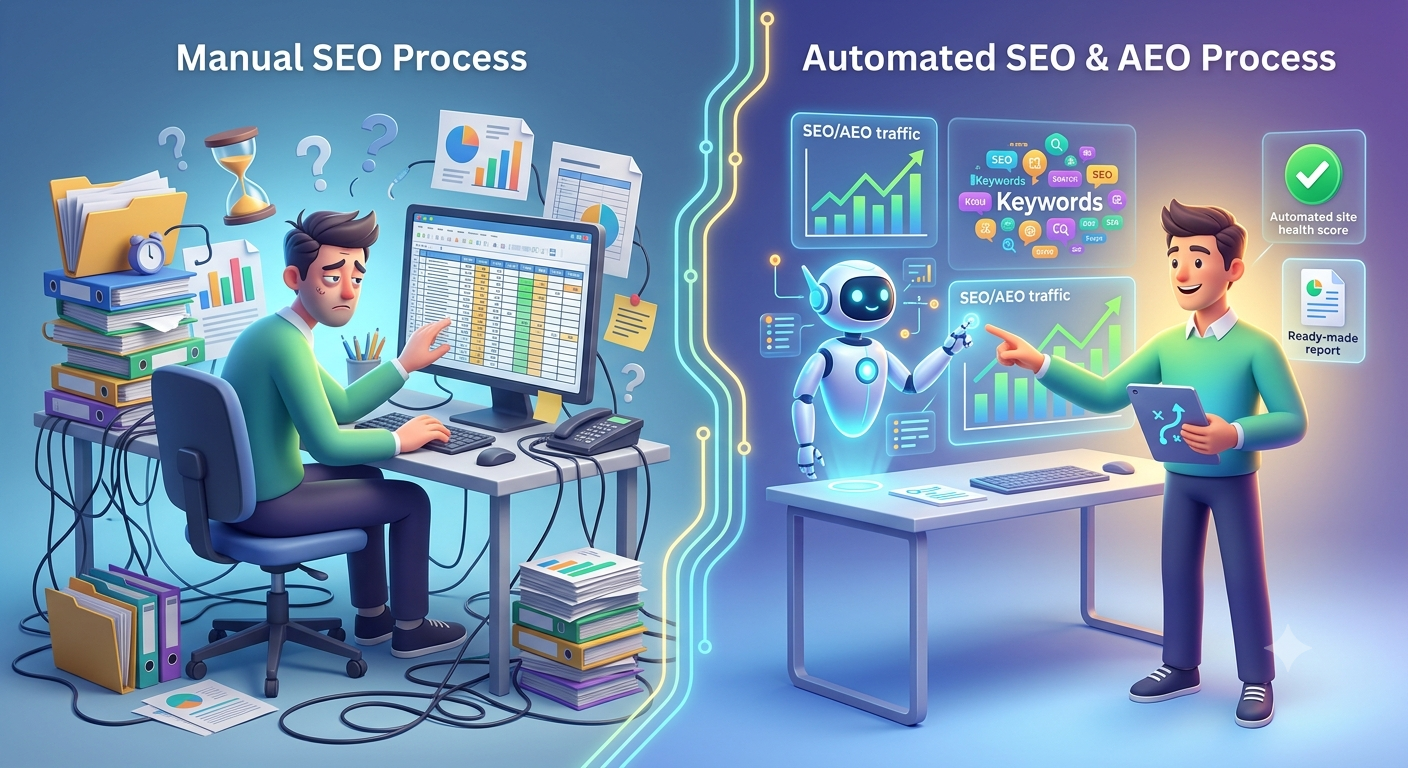
The automated agent for automating all SEO and AEO processes provides agencies with increased operational efficiency. The first benefit is that the automated agent allows the agency to save a significant amount of time on routine daily tasks like site health analysis and keyword research. This gives agency staff members more time for creative and/or strategy type of work, which improves the overall quality of service provided to the client.
The second benefit is that using an automated agent to automate SEO and AEO processes helps reduce the chances for errors that are related to human error. The possibility of making mistakes or reaching the wrong conclusion is much lower when using the automated agent for the purposes of analysis. The automated agent will provide accurate data and recommendations based on the analysis as well. This reduces the chances for misunderstandings between the agency and the client and increases the overall reliability of the agency's services.
Additionally, the automated agent is capable of providing professional recommendations to an end client, even if that client does not have an extensive knowledge of SEO. The use of the automated agent allows agencies to handle all project management activities without needing to get caught up in all of the technical details associated with those projects, thereby contributing to the agency's ability to grow their business and provide their clients with the service they expect.
What Do Users Receive
Users of the ASCN.AI system receive complete information regarding their website, including Health of Site, Keywords used on their website, and recommendations for improving the SEO of the website. Automated processes for analysis and optimization greatly improve the overall quality of search engine optimization; likewise, clients can now see the results of their improvement efforts through clear and concise reporting, thus building a stronger trust between the client and the agency.
Professional SEO Reports generated by the ASCN.AI automated Agent for the client will include the following:
- Site Health Analysis with a Score and a List of Suggestions for Correcting Site Errors.
- Relevant keywords for possible types of target audiences.
- Pre-made content for posting to a Google Business Profile to keep the target audience engaged and active with your business.
The results from automating client data allow agencies to both improve service and gain the satisfaction of their clients, thus sustaining business growth. The ability of their users to use automated services has provided them with more time for developing strategies on how to compete in a competitive market.
Automated provider examples
Through the vast experience of the agency's SEO and AEO process automations, many agencies have reached significant improvements to their clients through the use of automated processes, which returns them to their last known ranking. For many marketers, steady evaluations of their clients' health have allowed clients to begin to receive favorable search results. This allows for increased organic traffic, which allows for an increase in conversion levels.
Many agencies also indicate that they have improved their content quality through automated keyword identification which enhances their content being more closely aligned with their target clients' inquiries. The generation of pre-made social media posts for Google Business Profiles allows for a large monthly reduction of time spent on social media for agencies; this will result in increased interaction by users and therefore ultimately lead to a higher number of inquiries.
Finally, the agency will receive not only favorable search engine rankings but also quality reports that provide their clients with the information necessary to track their performance as well as determine what is working best. This creates a strong bond between the agencies and their clients which is a significant factor in the long-term relationships.
What You Get
If you choose to automate your SEO and AEO processes, you can experience a variety of benefits associated with automating how you manage clients and the quality of service you provide to clients. A core benefit of the system is that it provides a site health score and recommendations based on the analysis of the website and allows for quick identification and resolution of technical issues that may affect a website's rank in search engines.
In addition to the score and recommendations of the website's health, you will receive a list of keywords and keyword phrases to target based on the relevant queries of your client’s target audience. The use of these keywords and keyword phrases will increase the success of content produced for the website and further increase the chances of attracting new clients to the website.
Another key benefit of using this system is that it includes pre-written posts for use on the Google Business Profile of the respective client, which makes managing social media a lot easier and provides greater opportunities to maintain an online presence. Additionally, by providing clients with monthly SEO reports that outline the work that has been completed, you will have a better understanding of how to measure progress and adjust the overall strategies employed on behalf of the client.
Putting all of these pieces together will ensure that you operate in a more structured and efficient manner which, in turn, provides the opportunity to grow your business and improve client satisfaction.
Set Up Instructions
To automate your SEO and AEO processes with the agent, the following steps must be followed to successfully implement SEO and AEO automation. The first step is to install the required tools to run the system. The tools you need are Claude Code and Firecrawl, which are necessary to provide the system's capabilities as well as to provide efficient project management.
The next step is to run the command to add a new client. This will initiate the system's analysis of that client's data and create the appropriate records for processing the data. Once the system begins processing the data, you will need to create a site audit. You can create a site audit by using the command /audit, which will provide you with a complete assessment of the health of the client’s website, including any potential technical problems.
Once you have the site audit, the next step is to retrieve the keywords that you will be targeting. You can perform this step by executing the command /keywords. Targeting keywords will allow you to focus your content on the most relevant queries for your client’s target audience. Finally, using the command /gbp-calendar, you can create posts for your client’s Google Business Profile, which will help to ensure that you regularly update the content on the website and that there are periodically new posts made on the client’s social media.
By completing all of these steps, you are able to set up automation and make your clients' SEO and AEO processes much easier and simpler.
