



- Русский
- English
- Português
Automate lead qualification calls with Salesforce, Retell AI, and OpenAI analysis
Learn how to connect Salesforce to Retell AI and OpenAI via n8n to automate lead qualification calls within 60 seconds of record creation. This workflow uses AI voice agents and GPT-4o analysis to slash SDR costs by up to 90% while significantly increasing lead conversion rates.

Connecting Salesforce to Retell AI and OpenAI through n8n will enable new leads to be called using AI voice and BANT qualification known within 60 seconds of record creation. Once the call is made, OpenAI's GPT-4o will score the call transcript, and create a Salesforce Task with the complete analysis. The average cost for AI calls per lead is $0.30 - $1.50 compared to $5 - $15 for a human SDR.
Quick Facts
- Lead/First Contact = <60 sec
- Cost of AI Call = $0.30 - $1.50 vs $5 - $15 for human SDR
- Reported ROI for AI Voice SDR = 317% with 5.2 mo. Payback
- AI qualified 60% more sales than manually qualified leads
- Setup time = 15-30 minutes using n8n template #8929
- Retell AI is SOC 2, HIPAA, and GDPR compliant
Is This Right for You?
To qualify for this automation you must have the following:
- You must be using Salesforce CRM
- You have at least 20 inbound leads/month with phone numbers
- You have defined qualification criteria (BANT)
- You are losing deals due to slow follow up speed
If you are currently using HubSpot or Pipedrive, the Retell AI + OpenAI nodes are identical, only the trigger and task creation nodes differ.
What This Automation Will Do
This automation will call every new Salesforce lead within 60 seconds using a Retell AI voice agent, then use OpenAI GPT-4o to analyze the transcript of the call, and create a scored qualification report as a Salesforce Task automatically with zero SDR involvement with first contact.
Lead Qualification Automating Pipeline in 5 Steps
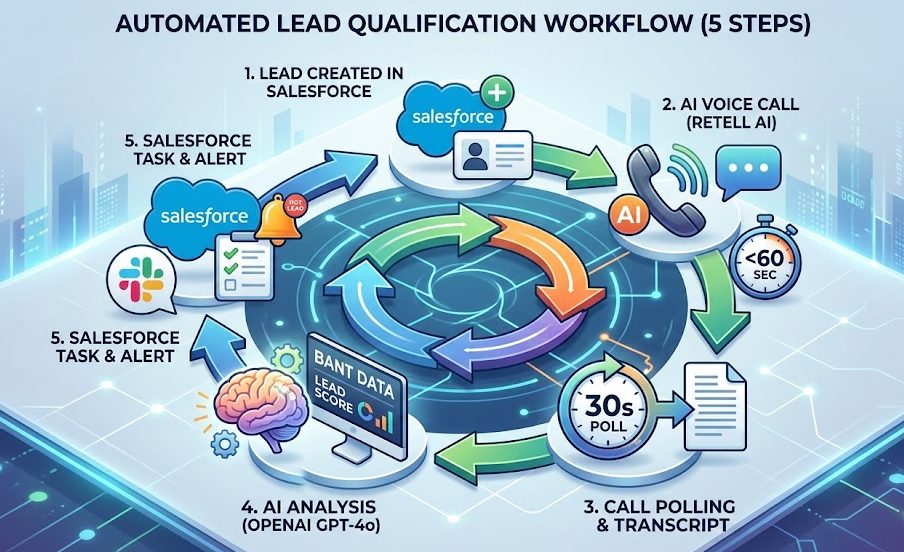
You can automate lead qualifying phone calls with Salesforce by utilizing Retell AI and OpenAI through automation of the workflow below, which will automatically execute 5 steps on each newly created Lead record:
- A Salesforce webhook is fired with the new created lead data — lead name, lead phone number, lead email address, lead company name, lead source — transmitted via https post method to n8n with the new lead being created.
- Retell AI will place a call to the new lead — n8n will use the Retell AI v2 API to create the call to the new lead for you in a matter of seconds, utilizing your pre-configured sample lead qualification call script.
- n8n will create a polling loop that will check the status of the lead called every 30 seconds, until the status changes to
endedand the transcript is able to be returned. - OpenAI GPT-4o will analyze the transcript of the call and extract the various BANT signals from the transcript, score the lead on a 0-100 scale, and return you a structured JSON object containing the budget, timeline, pain points and next steps for the lead.
- If the score is greater than or equal to 80, n8n will create the Salesforce task with the full analysis from the AI in the lead record, and optionally fire a Slack message to the assigned rep.
Why 2026 Will Be The Year of Automated Lead Qualification Calls
In 2026, you will find that leads contacted within 5 mins of the assignment of the lead will be 100 times more likely to qualify than leads that you contact after being assigned for 30 minutes. However, the average time for the industry to contact leads is 42 hours after they have been assigned a lead status in Salesforce. By utilizing AI voice automation, you can now call your new leads at the moment of peak interest.
Important Statistics
- Companies that contact prospective customers after one hour of making contact are 7 times more likely to be successful at qualifying that lead (Study of 2.24 million leads, HBR).
- Qualifying Lead Call Within 5 Minutes vs. 30 Minutes: 100x More Likely To Qualify.
- Teams that respond to calls within one minute of receiving call (391%) as opposed to responding within twenty-four hours (42%) will achieve significantly higher conversion success rates than teams that do not respond within one minute (319%) or 60 minutes (319%). Sources: Verse.ai.
- Acceptable Average Time Spent Responding To Incoming Leads: 42 Hours
- 63% of Businesses Never Respond to New Inbound Leads
AI Voice as compared to Human SDR Cost
| Metric | AI Voice (this Workflow) | Human SDR |
|---|---|---|
| Cost Per Call | $0.30 - $1.50 | $5.00 - $15.00 |
| Annual Cost | $3,000 - $6,000 | $110,000 - $150,000 |
| Calls Per Day | Unlimited | 30 to 50 |
| Response Time | < 60 Seconds | 42 Hours Average |
| Average Reported ROI | 317% - Average - Payback in 5.2 Months | Various |
Workflow
Step One - Salesforce Lead Trigger Via Webhook
When a lead is created in Salesforce a Lead Create trigger will trigger the HTTP request action with the corresponding n8n webhook URL and an immediate HTTP 200 will be returned so as not to run into a Salesforce timeout.
Salesforce Setup: Salesforce Setup -> Flows -> Record Triggered Flow -> Lead Create -> HTTP Request -> Corresponding n8n Webhook URL (pure Salesforce Flow only, no Apex required).
Step Two - Call Triggered by Retell AI
The Retell AI will make a phone call to the prospective customer using the Retell AI API by POSTing to https://api.retellai.com/v2/create-phone-call, with the from_number, to_number (lead phone number), and agent_id. The Retell AI will return a transaction ID, the agent will then dial the prospective customer within a few moments.
Alternatively, you can use the @retellai/n8n-nodes-retellai community package to create a Retell node.
Step Three - Call Status Polling
Call status should be monitored every 30 seconds until the call has completed or you have repeated this six times over 10-minute intervals. If you reach 10-minute intervals and the call has completed, the process will continue. If the call has not yet completed after six tries, an error task will be created.
Step Four - Analysis Performed by OpenAI GPT-4o
Send all data on the completed call back to OpenAI's GPT-4o in the form of an object with an array and a structured JSON schema (strict: true). The following data will be generated: lead_score (0 to 100), budget, timeline, need, authority, pain_points, next_action and summary. Cost per call is approximately $0.002.
Step Five - Task Created within Salesforce and Slack Alert Sent for Hot Leads
A task will be created on the lead record with all of the structured OpenAI JSON data. If the lead score is equal to or greater than 80, an optional alert will be sent via Slack immediately to the assigned sales person.
Business Impact
- End-to-End workflow time (Lead Trigger, Call, Analysis and Task Creation) will be approximately 3-7 minutes.
- Cost per 100 daily leads using Retell AI for $45 plus OpenAI for $0.20, total approximately $45 per day versus average cost per day of $800 for human SDR calls.
- Companies that have adopted this workflow are reporting an average ROI of 317% with an average 5.2-month payback period (Retell AI, 2025).
- Companies will produce an estimated 60% higher number of sales qualified leads using this process as compared to using a manual process (landbase, 2025).
- The process can scale from one to ten thousand leads per day without needing to adjust configuration.
Frequently Asked Questions
Can I use HubSpot instead of Salesforce? Yes, only the trigger node at the beginning of the process as well as the task creation node will be different. The Retell AI and OpenAI nodes will remain the same.
What will the total cost for 100 leads? Total cost will range from approximately $45-$150 depending on average call lengths. The average costs for 100 human SDR calls will be between $500-$1,500.
Is this solution compliant with the GDPR? Yes, Retell AI is compliant with SOC 2, HIPAA, and GDPR. When deploying in the EU, use the EU data region, all data will be retained for fewer than 90 days and you must include AI call disclosures on all new lead registration forms.
Can I customize the lead scoring rubric? Yes, you can define your own lead scoring rubric through the OpenAI system prompt. You define all thresholds and criteria.
Disclaimer: Retell AI, OpenAI, and benchmarking data is accurate as a function of the first quarter of 2026. Please verify with official documentation prior to any production deployment.
Build Your Custom Version With ASCN.AI
ASCN.AI will build a custom version of this automated process to your CRM, ICP, qualification criteria, and team set-up. The estimated production deployment timeframe is between 1-2 weeks.
