



Start with ready-made AI agents with instructions on how to manage them on the marketplace. Browse the library
Back to templates

Sales Prospecting Agent

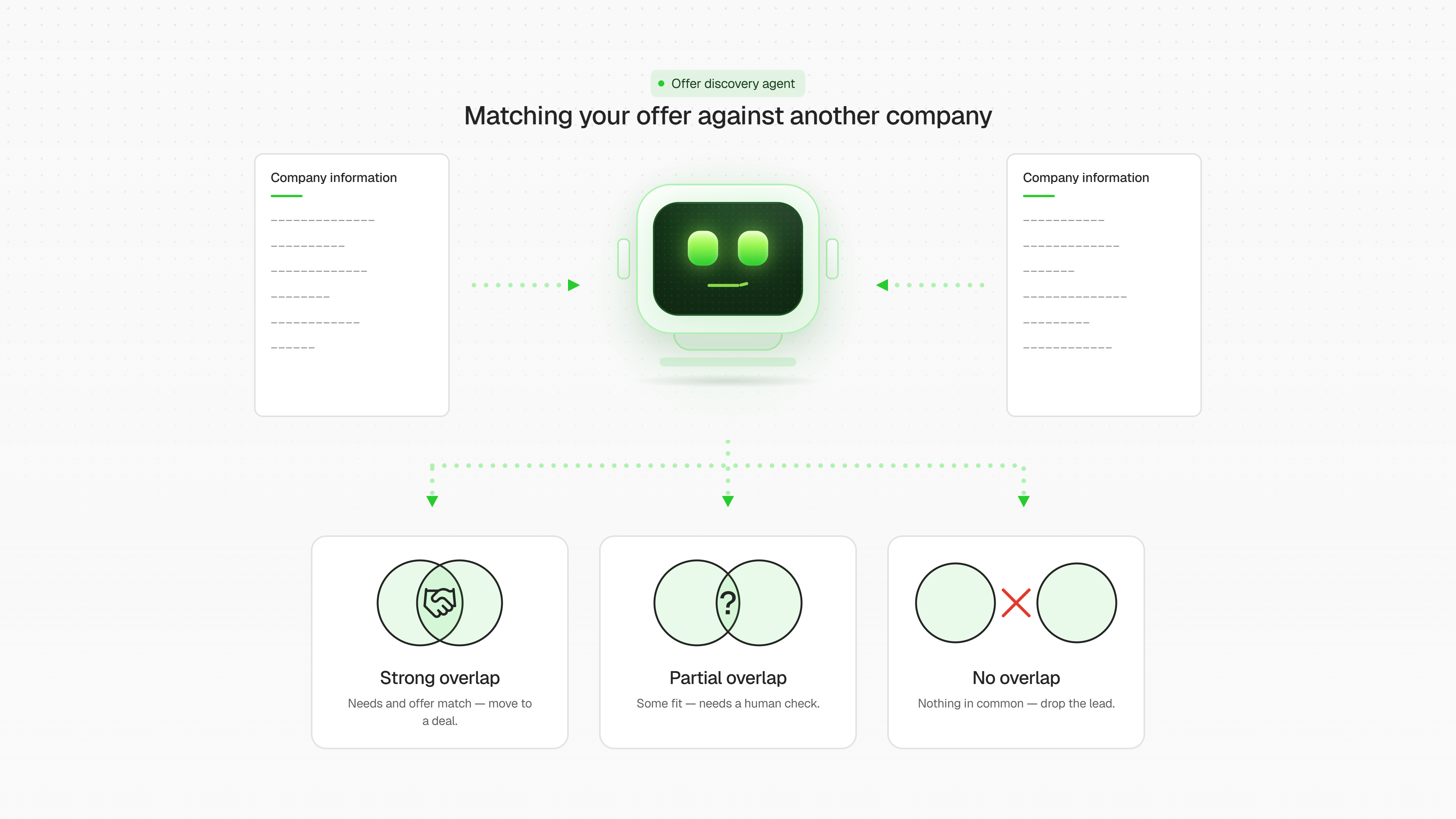
An agent that finds the common ground between your product or service and a target company. It delivers a detailed sales opportunity report, backing up its conclusion with evidence.
Sales Prospecting Agent
Created by:
Author
Vlad
Last update:
3 August 2026
Categories
Other
Marketing
Bonus for you
Renew your subscription now and get one of the additional bonuses

What kind of agent is this

This is an AI agent that takes over a routine but critically important part of a sales manager's or biz-dev specialist's job: gathering and analyzing information before a cold outreach to a potential client or partner. Instead of manually googling the company, scrolling through LinkedIn, and piecing contacts together by hand, the agent does this systematically, following a clear algorithm — and delivers a ready-made, structured report at the end.

How it works

  1. 📋 Asks the user what their company does (or what they do, if they're a freelancer), and which company needs to be analyzed.
  2. 🔍 Researches the user's business — products, expertise, size, positioning — to understand exactly what can be offered.
  3. 🎯 Deeply analyzes the target company: what it does, whether it's growing, whether it's hiring, what its pain points and needs are, and who the decision-makers are.
  4. 📞 Finds real decision-maker contacts — email, LinkedIn, phone numbers — with links and source attribution.
  5. ✅ Forms a verdict: whether it's worth making an offer, what kind of offer, and how to approach it — backed by evidence from the collected data, not guesswork.

Why it's useful to the user

  • ⏱️ Saves hours of manual research before every sales contact.
  • 🧩 Highlights the overlap between what the user offers and what the target company actually needs — not just a generic company overview.
  • 📊 Delivers an action-ready report, not dry facts: complete with a verdict, a pitch, and contacts.
  • 🔗 Always cites sources and direct links — no fabricated data.
  • 💾 Remembers context, so the analysis can be revisited and refined later.

In essence, it's a personal B2B analyst that turns the question "is it worth reaching out to this company?" into a concrete, evidence-based action plan with ready-to-use contacts.

FAQ
Still have a question
Do I need coding skills to set up this template?
No coding skills required! This template is designed for no-code users. Simply follow the step-by-step setup guide, connect your accounts, and you're ready to go.
How does this template help maintain data security?
All data is processed securely through official APIs with OAuth authentication. Your credentials are never stored in the workflow, and you maintain full control over connected accounts and permissions.
What is a module?
A module is a single building block in the workflow that performs a specific action — like sending a message, fetching data, or processing information. Modules connect together to create the complete automation.
Can I customize the template to fit my organization's specific needs?
Absolutely! You can modify triggers, add new integrations, adjust AI prompts, and customize responses to match your organization's workflow and branding requirements.
How customizable are the AI responses?
Fully customizable. You can edit the AI system prompt to change the tone, language, response format, and behavior. Add specific instructions for your use case or industry terminology.
Will this template work with my existing IT support tools?
This template integrates with popular tools like Gmail, Google Calendar, Slack, and Baserow. Additional integrations can be added using available API connectors or webhooks.
What if my FAQ knowledge base is empty?
No problem! The template includes setup instructions to help you populate your FAQ database with commonly asked questions and answers. Start small. As new questions arise, you can easily add more FAQs over time.
Is there a way to track unresolved issues that require follow-up?
Yes! You can configure the workflow to log unresolved queries to a database or spreadsheet, send notifications to your team, or create tickets in your issue tracking system for manual follow-up.
What if I want to switch from Slack to Microsoft Teams (or another chat tool)?
Simply replace the Slack module with a Microsoft Teams or other chat integration module. The core logic remains the same — just reconnect the input and output to your preferred platform.
If you have questions about the template, reach out to our support team
Ask a question
message
By continuing to use our site, you agree to the use of cookies.