



- Русский
- English
- Português
RevOps System: CRM + Enrichment + Cold Email
RevOps is a comprehensive solution designed to automate lead generation and sales management by combining CRM, data enrichment, and cold emailing. By leveraging a database of over 250 million contacts, it enables businesses to reach prospects and target their audience in a fast and efficient manner.

Use RevOps to speed up your lead generation and sales management ways.
General Description
RevOps is the right solution that will help you automate the lead generation and sales management processes. This solution combines CRM, data enrichment, and cold emailing that make it very easy to reach the prospects. The solution uses a huge database of 250+ million contacts that help to target an audience in a fast and efficient manner.
The process of automation minimizes the chances of making mistakes related to manual work, and at the same time, it frees employees’ schedules for other important work. Users of the system say that integrating all necessary aspects into one solution allows them to increase the amount of emails sent as well as the quality of work with the customers. Like, firms using the system claim they experience a boost in emails opened which leads to more meetings with clients.
At the same time, the system processes incoming replies with the help of artificial intelligence and helps to answer the requests in a quick way. Therefore, businesses do not only get better leads but also higher conversion rates.
How Automation Works
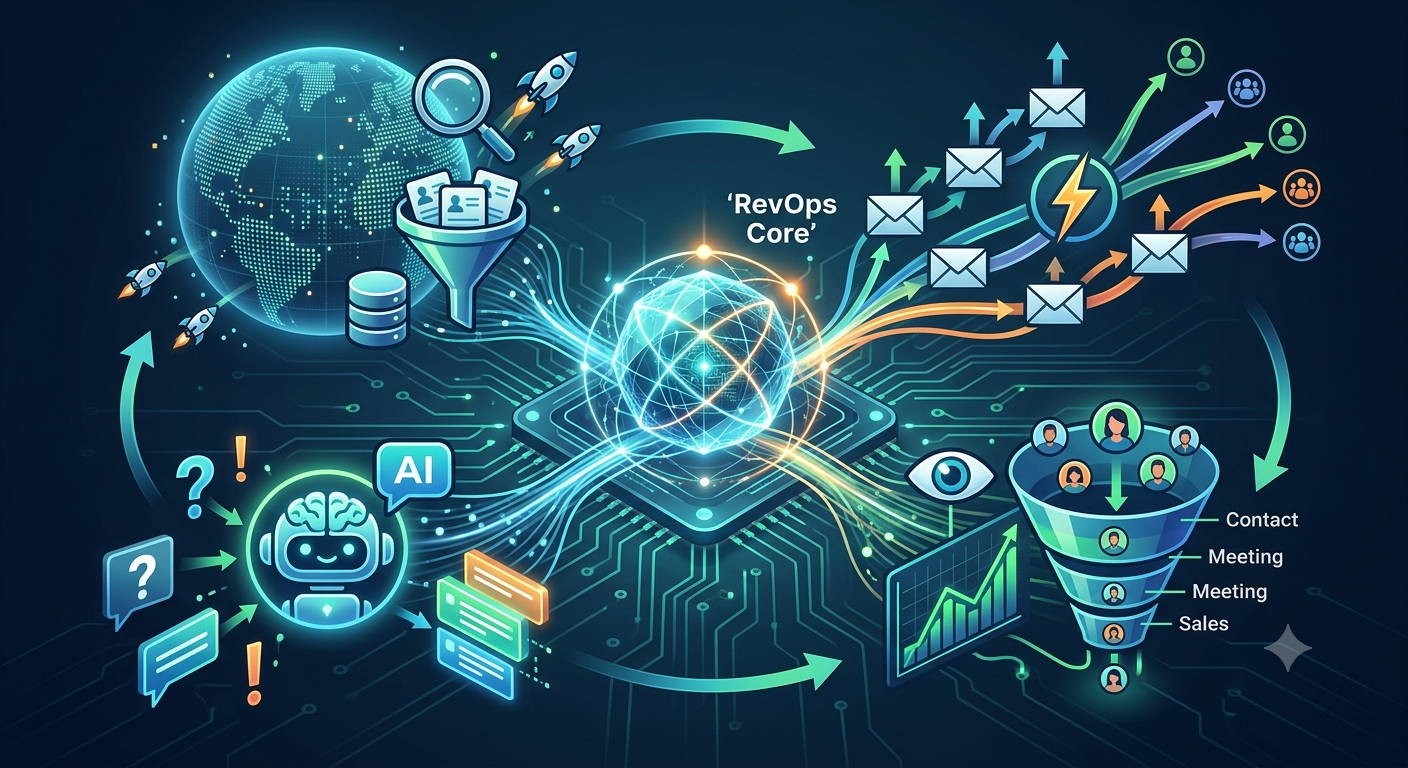
The whole process of automation in RevOps has several important steps that help to manage the process of lead generation and sales management effectively. The system automatically searches for prospects using the database of 250M contacts.
The agent is responsible for creating and sending both multi-stage email campaigns and single emails to efficiently reach out to a larger audience while increasing the chances of hearing back from them. AI and knowledge bases are used to process the incoming responses so that queries are replied to quickly and the service is improved. For example, according to testimonials from companies that have been using this technology, using automated reply processing leads to a decrease in time spent on communicating with customers.
In addition, the system is capable of tracking contact engagement while they proceed through the engagement process enabling better and faster communication.
Why It Is More Effective Than Manual Work
The use of the system can lead to a significant reduction in time spent on looking for and processing leads. There can be taken a lot of time on manual insertion of leads that can take up to 40-60 minutes every day, while automation enables the completion of this function even quicker and better than humans until now. The tool is held responsible for processing tasks that previously required human intervention.
Results Users Achieve
Businesses that have implemented RevOps systems state that they have been able to win many qualified leads and improve sales results. Automation of operations allows them to be much faster in searching for and working with leads. In particular, incoming leads are processed automatically with the help of AI, which reduces the time of interacting with customers. For example, the company states that it takes only 10 minutes to process incoming queries.
Automation also leads to the elimination of human mistakes, which consequently brings more benefits. Companies state that automation allows them to utilize all necessary tools in one place, therefore bringing better results. As a result of having implemented RevOps systems, businesses are able to cut the processing time of incoming inquiries and achieve other operational goals automatically.
Implementation Examples
Though it is not possible to showcase the results achieved by specific companies that have implemented RevOps system, the fact that they are applying the system makes it possible to see how effective automation of operations is. According to various companies using the system, the integration of CRM, data enrichment, and cold email outreach helps to speed up the processes of sales and build better communication.
Automation reduces lead sourcing and processing time, thereby increasing the number of qualified contacts. System users reported that they have more meetings with prospective clients due to multiple level email campaigns and processed incoming responses. This fact proves that people should not doubt the effectiveness of RevOps system when it comes to attaining business goals.
In addition, it is worth mentioning that automation of processes allows avoiding mistakes made by people and improving the quality of performed services. This means that due to the system, companies are assured of getting an increased amount of qualified leads, overall effectiveness of sales increased, and other factors that make RevOps attractive.
What You Get
When using the RevOps system, you will enjoy several advantages that make the process of sales management much easier. First, you will get a full-functioning customer relations management (CRM) system, which will help you manage customer interaction properly. When everything is managed properly, it will lead to better service quality.
Moreover, the system offers data enrichment, enabling the addition of other information about the company and contacts. Thus, one will be able to have a full picture of potential clients with the help of this information and become more effective at targeting and converting leads. Users state that thanks to data enrichment they have a better idea of clients’ requirements and can offer better solutions.
Another advantage of the system is processing clients’ responses to email campaigns using artificial intelligence. This allows answering queries much faster, thereby raising clients’ satisfaction. Moreover, users of the system will receive reports concerning the status of the sales funnel and the quality of leads.
Setup Instructions
To start working with automation, you need to follow several rules. First of all, you should install an agent, which will allow you to get all required options. When you get the agent installed on the required device, the instructions on the official website should be followed.
Once the agent is installed, it should be activated. This step will make it possible to register the agent and get the required API key. It is also necessary not to forget to set the right configurations. For example, the company email and website should be specified.
Once the agent is activated, it can be run. After that, it will allow starting working on customer generation.
