



- Русский
- English
- Português
Email personalization based on resume + Gmail drafts
Learn how to automate the cold emailing process by utilizing personalized emails tailored to candidate resumes. This system allows you to adjust mailing parameters for specific clients and integrate with Gmail to significantly boost efficiency and save time.

Automating the cold emailing process by utilizing personalized emails tailored to the resumes. The ability to adjust mailing parameters to cater to the specifics of every single client is the major advantage of the system. Another implementation of this idea is the integration with Gmail making the process of email sending even easier.
General Description
Moreover, thanks to the automated work, the monitoring of the campaign results becomes available, which means that the effectiveness of the strategy can be assessed. The sophistication of this feature lies in the fact that after receiving the statistics from the campaign, users can easily adjust the email templates they have been using in order to increase the success of their communication.
How the Automation Works
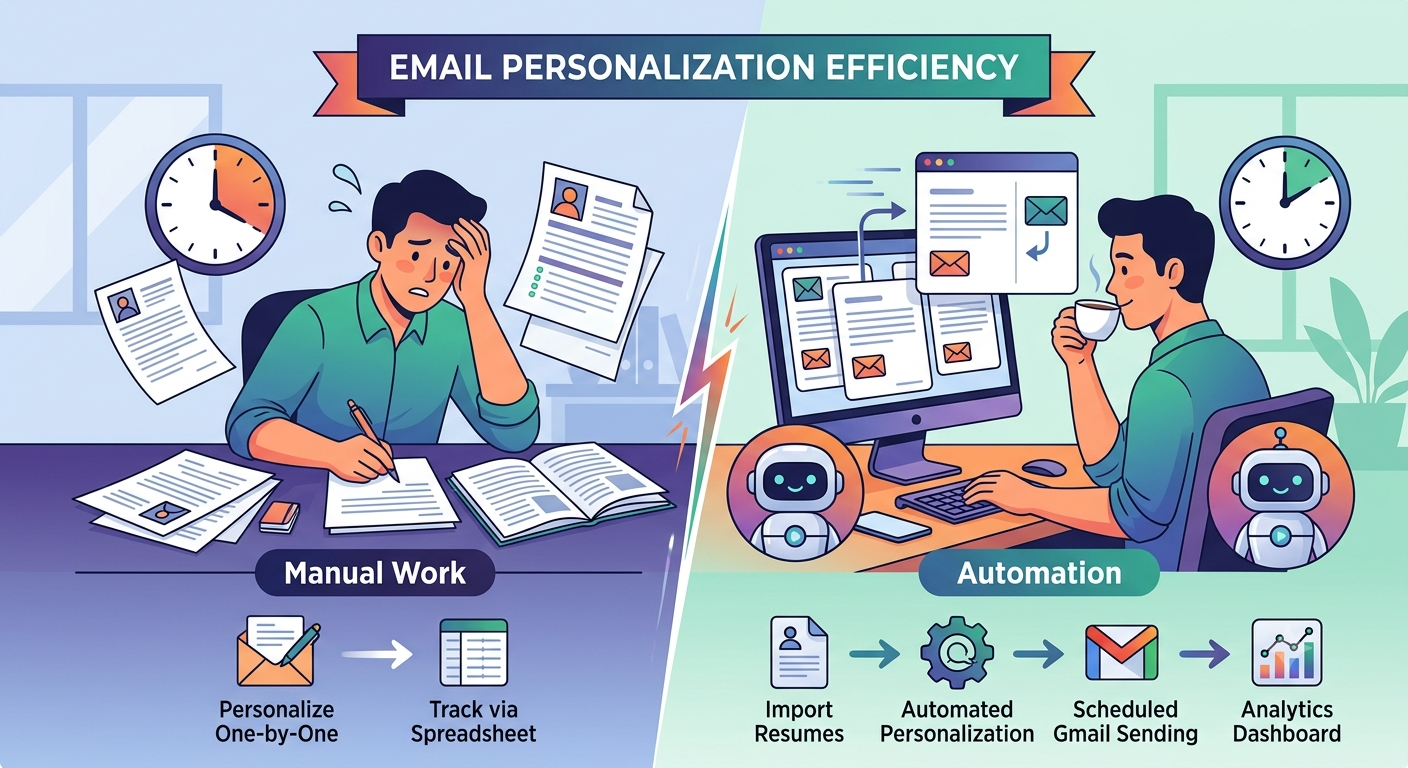
The email personalization by means of automation turns out to be more advantageous as compared to manual work due to several aspects. First of all, the system allows users to save some time as a significant amount of time can be gained as a result of creating custom proposals. This is an important factor that allows users to concentrate on other matters as solutions have been prepared, and they can use their time for more precious tasks.
Why It Is More Effective Than Manual Work
Secondly, using an automated approach leads to the accuracy of the timing of sending the messages. Thanks to the automated work of the agents, the occurrence of missing an important email or being overloaded at a certain point in time cannot happen.
In addition to that, the system enables the statistics of the campaign results to be gained. Moreover, the users can adjust the email templates to optimize them. Overall, it can be said that the automated email personalization provides users with the possibility to create letters easily and achieve good results in terms of the conversion rate, unlike manual work which does not bring much effectiveness.
Results Users Achieve
Users who have adopted email personalization automation based on resumes have reported that their cold outreach methods have considerably gained in efficacy. A practical experience shows that this automation saves users between 40 to 60 minutes of time spent on preparing customized proposals every day. That gives users an opportunity to devote more time to other essential activities of a business, including fostering relationships with customers and performing market research. Additionally, scheduled mailings improve conversion rates. Users emphasize that consistency in sending emails allows them not to miss a chance to reach their clients. Furthermore, using automation enhances tracking the effectiveness of the email campaigns.
The system is integrated into the user’s Gmail account, which makes the email sending process easier. The users are ready to respond immediately to changes in their communication methods.
Implementation Examples
The technology used for email personalization automation on the basis of resumes is used by solopreneurs and businessmen for their outreach. From the user’s perspective, automation has enabled the formation of better relationships with clients. For instance, use of the technology results in generating effective email drafts for sending. The working principle of the system is laid down in its schedule. It not only ensures regular and uninterrupted mailing activity, but also maintains continuity in communicating with clients. Users confirm that due to this feature, they never miss any important contacts.
This is very helpful for entrepreneurs managing their own emails, as it lets them dedicate more time to managing other essential activities of their business. This solution is great not only because of time-saving effect of automation, but also because it improves exactness.
What You Get
Very first benefit of web-based email personalization automation is that it saves time spent on writing proposals. You will save a considerable amount of time and will be able to pay attention to pursuing more important things like building client relationship.
Second, the system guarantees that emails are sent regularly. This gives the chance to receive more positive response from potential clients. Agents act according to their schedules, which makes sure there is no risk of missing important messages.
In addition, automation allows for easier mail outcome control, which allows for making necessary changes. It will lead to better conversion rate and enhanced quality of client interaction.
Launch Instructions
For successful launch of email automation based on resumes, there are certain steps to take. You need to register with the ASCN.AI platform and choose the needed agent from the ASCN marketplace. After that, configure the integration with your Gmail account. This will enable the system to create drafts automatically.
Next, you have to configure the schedule of the agent’s work. Define the days and hours you want to send the emails. Make sure you have all needed data available so that the agent is able to analyze resumes and make custom proposals.
When the integration and the schedule are set, you will have to send some test emails. This will verify that everything is working properly. You will begin real email mailing after that.
