



- Русский
- English
- Português
Automate LinkedIn Lead Generation with Browserflow — Auto Find & Invite LinkedIn Leads at Scale
ASCN.AI leverages Browserflow to automate LinkedIn lead generation by identifying prospects that match your Ideal Customer Profile and sending personalized connection requests on autopilot. This no-code solution allows you to scale your outreach safely, potentially adding 350+ new targeted connections per month without manual effort.

ASCN.AI uses Browserflow to automate the process of generating leads from LinkedIn by searching the database for people that match your Ideal Customer Profile (ICP), bypassing those you'd already connected with, and sending out personalized connection requests completely on autopilot at a rate of 20 to 30 per day with a free account or 30 to 50 with a Sales Navigator account. With an estimated acceptance rate of about 30%, this means that you could have as many as 350 new targeted connections within just 30 days from these automated connection requests alone. Setting this up can be done in less than 30 minutes using ASCN.AI's no-code solution.
Quick Stats – Automation for LinkedIn Leads on Social Media 2026
- LinkedIn generates 75 to 85% of B2B social media leads according to DigitalApplied 2026
- LinkedIn Lead Gen Form conversion averages 13%, whereas the average conversion for landing pages is only 4%
- For free accounts, safe number of connection requests per day is 15-20
- For Sales Navigator, safe daily limit is 30-50
- Safe weekly maximum for most accounts is approximately 100
- 23% of automation users facing restrictions within 90 days if they do not adhere to safe protocols
- Cost to use Browserflow is low: starts at $19/month, with 7-day free trial
- Using ASCN.AI takes less than 30 minutes to complete setup from scratch
You see how LinkedIn provides 75 to 85% of all B2B leads from social media. So this is a real lead generation channel. The problem is that the process of getting these leads is manual — it takes 3-5 minutes for each prospect, and you can't scale that beyond 20 per day without dedicating a lot of time strictly to clicking.
By using Browserflow as the browser automation engine to handle all the steps in the connection request cycle (Find profiles, check for connections, send personalized requests for connections, log activity into the computer memory), ASCN.AI allows you to run this whole process on autopilot. Below are the details of how ASCN.AI works, what safety limits to follow while using it, and what results to expect.
Ready to get going with no coding? The pre-built LinkedIn Lead Automation Template from ASCN.AI is located in the NoCode marketplace. Simply connect your LinkedIn account, set your target ICP and run. Launch in ASCN.AI NoCode →
What is the definition of LinkedIn Lead Generation Automation
LinkedIn Lead Generation Automation automates the time-consuming, repetitive aspects of outreach (profile finding, checking connection status, sending invitations and logging in to your CRM) at all times. You still conduct the conversations. The automation makes it possible for you to build pipeline entry points.
Why LinkedIn Will Be the Leader in B2B Prospecting by 2026
80% of LinkedIn users make business decisions. Lead Gen Forms typically have a conversion rate of 13% - More than 3x the typical landing page rate. The average return on ad spend based on LinkedIn is 121% return (Google Search 67%, Meta 51%). B2B lead generation costs 28% less per qualified lead via LinkedIn than by Google Ads. Systematic outreach across volume builds real pipeline.
What Will Change When You Automate Connection Requests?
20/day manual creation = 60 minutes worth of work effort. 20 - 30/day automated = zero minutes of daily effort post-setup. 60 days = 1,200 - 1,800 new high-quality relationships built in the background. The automation creates the entry point. Follow-up conversations, which do require a person, complete the pipeline.
How ASCN.AI Automates LinkedIn Outreach with Browserflow
The entire flow: find profiles → check connection → invite in controlled loop → log to CRM. All orchestrated by ASCN.AI in a visibility layer. All LinkedIn interactions done with Browserflow via a no-code solution. Browserflow has been purposely built to run inside your current LinkedIn Browser session because it works just like you would when browsing manually. You are still utilizing your browser to browse manually without any kind of headless or detectable extension. Therefore, your chance of detection with Browserflow is significantly lower than other tools that would bypass LinkedIn's normal log-in layer. Browserflow starts at $19 per month with a 7-day free trial period.
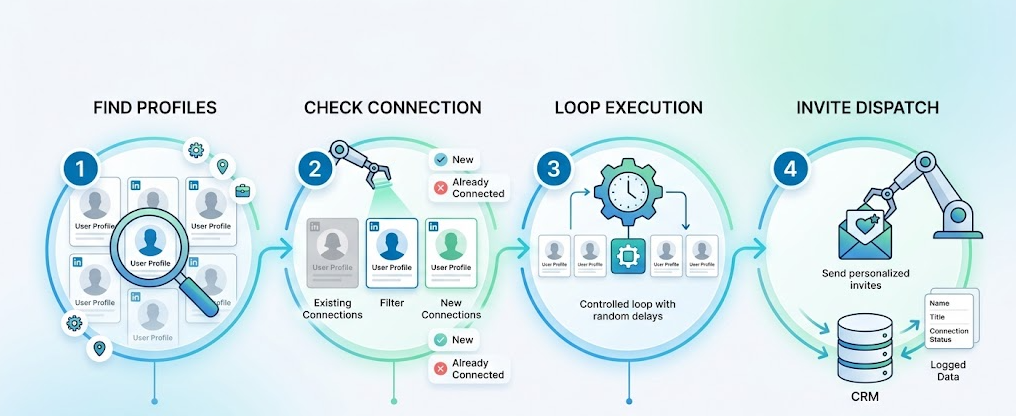
The 4-Step Workflow Architecture
- Profile Discovery – Browserflow will search for profiles on LinkedIn based on their role, industry, location or keyword and return a list of matching profile URLs.
- Connection Check – The workflow will check each of the profiles returned from the previous step to determine whether you are already connected to them. If you already have a connection, they will be skipped.
- Loop Execution – The remaining profiles returned will be processed one at a time, performing a random amount of time delay between them.
- Invite Dispatch – The connection invitation will be sent to each of the profiles returned, along with an optional note; it will be logged into your CRM/Google Sheets.
Step 1 – Auto-Find LinkedIn Profiles That Match Your Ideal Customer Profile
When you provide Browserflow with a LinkedIn search query or URL, Browserflow will extract all of the matching profile URLs for processing. You can filter down to job title, industry, company size, location and keywords from the user's profile. Using Sales Navigator will allow you to unlock additional filtering capabilities as well as increase your daily connection limit from 30-50. You can also import profile URLs from a CSV file or your CRM export to eliminate the need for a search.
Why Quality Targeting Matters for Your Safety
A targeted list of 50 high fit profiles has a better response rate than a broad list of 500 low fit profiles. The more relevant your list is, the higher your acceptance rate will be. Your acceptance rate then helps establish a positive LinkedIn Trust Score for you — this is important if you intend to automate on LinkedIn over the long term — therefore better targeting equals better results and lower risk.
Step 2 – Smart Connection Check (Skip Existing Connections)
The workflow will check each profile identified for current connection status. Profiles with a "Message" (already connected) or "Pending" (request already sent) status are automatically skipped. Profiles with a "Connect" status are the only profiles that are advanced to the invitation step.
By filtering out these profiles who already have a message status, this will allow you to keep a clean behavioral signature and to also avoid duplicate request being sent (which may look like impersonation) and to also help to protect your budget for pending requests since you can only have a maximum of 750 pending requests.
Step 3 - Send LinkedIn Connection Requests in Bulk
Once filtered, an invite for each profile will be sent one at a time with a randomized delay of 30-120 seconds between each action. Once the list of profiles has been exhausted, or the daily limit has been reached, the process will stop and any profiles that were not invited will be placed in a queue for the next scheduled run.
Personalization Variables
The following variables can pulled from Browserflow's data collection: {firstName}, {company}, {jobTitle}, {industry}, {location}. Write one message template with variables that automatically fill in for each person i.e. Free Accounts can send about 150 personalized invite notes in a month will be able to use those for the highest priority people and send a blank invite out for the higher volume of 2nd tier targets.
Template that Receives an Accept: "Hi {firstName}. I saw your profile while I was doing research on the {industry} teams at {company}. We are building automation tools for {jobTitle}s. Would love to connect."
LinkedIn's Safety Rules - Daily Limits and Expected in 2026
23% of users that use automation for their accounts will lose their accounts within 90 days due to not following the safety rules. LinkedIn has sophisticated detection mechanisms that look for patterns in user sessions (serial number of session); how frequently someone uses the tools; if the IP address has changed within the same session; and if the user is using the system differently each time.
Safe Limits by Account Type
| Account Type | Safe Daily Limit | Weekly Limit |
|---|---|---|
| Free LinkedIn | 15-20 / day | ~100 |
| LinkedIn Premium | 20-25 / day | ~100-120 |
Increase new accounts over four weeks, starting with five to ten per day. An account that changes its pattern will appear like a human being. An account sending 25 requests at 10-second intervals each day at 10:00 AM will appear like a machine.
Make Connection Request Messages Personal by Adding a Variable
Most personal messages will do better than blank requests; therefore, even just one variable (using {company} or {jobTitle}) from the scraped profile data indicates you've looked at the person's profile. The better templates will be kept under 200 characters in length, reference something specific about the person they are contacting, and have no sales pitch included.
- "Hi {firstName} — I really admire what you are doing at {company} in {industry} and it would be great to have the opportunity to connect with you"
- "Hi {firstName}, I create automation for {jobTitle} and it looks like we may have an overlapping area, would like to connect with you"
Sync LinkedIn Leads to your CRM or Google Sheets
After sending the connection request, the workflow will log the lead automatically (name, title, company, LinkedIn link to profile, date sent, status). The following integrated applications are supported for logging leads into your CRM: Hubspot, Notion, Airtable, Google Sheets - all via ASCN.AI's pre-built integration blocks with no API code being needed.
A follow-up workflow will run 24 to 48 hours later to confirm whether they accepted or rejected your request; if they accepted, their status will be updated in your CRM, and the next action will be triggered (personalized first message, Slack alert to the sales rep, Hubspot task created) completing the entire outbound cycle from start to finish.
What to Expect in terms of Results
If you use the conservative model (free account), sending 20/day at 30% acceptance — you're going to have 132 new connections/month (20 × 22 working days per month multiplied by 30% accepted invitations).
However, if you're using the optimized model (Sales Navigator), and you increase to sending 40 requests/day at 40% acceptance — you're going to get 352 new connections/month (40 × 22 × 40% accepted invitations).
Acceptance Rate Benchmarks
- 15%-25%: Sending blank invitations to a broad audience
- 25%-40%: Sending personalized messages to your ideal customer profile (ICP)
- 40%-55%: Sending highly targeted invitations with a strong message
These people are people who opted into your network. Therefore, at equivalent volume to cold emailing, the potential for conversion is significantly higher because the first point of friction — unknown sender — is already taken care of.
Frequently Asked Questions
Is it safe to automate LinkedIn connections in 2026?
When done properly, yes! Stay between 15-30 connection requests per day (free) and 30-50 (Sales Navigator). Randomize your delay. Don't automate during off hours. Warm-up new accounts gradually. The 23% reported restriction rate in 2026 research on automated connection requests is primarily due to excessive volume or the use of detectable extension-based tools. The ASCN.AI Browserflow approach, which operates in your authenticated browser session, provides lower risk of detection than traditional headless (API driven) browsers.
How many connection requests can I send on LinkedIn each day?
Daily safe limits are typically: 15-20 for free/public profiles and 30-50 for Sales Navigator users, while the soft/approximate weekly ceiling (i.e., may vary depending on other user activity) is generally below 100 per week for most user types. LinkedIn's approach to automated engagement isn't strictly based on the number of requests, but rather uses behavioral analysis as a litmus test to measure success against three metrics: Consistency; the manner in which time has been utilized; and positive response rates will all count as much as raw number of connections.
What is Browserflow and how does ASCN.AI use it to automate LinkedIn?
ASCN.AI leverages Browserflow's no-code browser automation to drive user interactions with LinkedIn without relying on headless browsers or an easily detected Chrome extension, resulting in less risk of detection compared with alternatives. Browserflow pricing begins at $19 per month with a 7-day free trial.
Is it possible to create an automated system that produces leads for LinkedIn without having to write any code?
You can absolutely do this. You will be able to configure every element of the automation through ASCN.AI's NoCode platform by utilizing the visual workflow builder, meaning no coding required! To provide you with even greater ease, ASCN.AI offers fully constructed lead generation automation templates within its Marketplace. All that is needed from you is to connect both your LinkedIn and CRM accounts, establish targeting criteria, create your messaging templates, and your automated flows will automatically execute on a pre-set schedule!
What occurs when LinkedIn identifies my automation as potentially nefarious?
LinkedIn has three tiers of enforcement for unlawful activity based on degrees of severity: Soft Restriction (visibility, but will not notify you), Temporary Action Limit (LinkedIn will halt connecting with and/or messaging users and send you an email warning), and Permanent Account Ban (exceptional cases that would require severe infractions). Staying below daily limits of restriction and mimicking human-like timing will significantly reduce the odds of account restrictions when using browser-session-based automation products such as Browserflow.
How do I personalize LinkedIn connection requests?
ASCN.AI utilizes personalization variables provided from Browserflow-scraped profile data that will generate unique messages for both prospects and recipients: {firstName}, {company}, {jobTitle}, {industry}, and {location}. You will be able to create one messaging template for all corresponding profile-related variables and generate messaging that is personalized based upon the delivery of that correspondence. You can expect that free LinkedIn accounts can typically generate around 150 personalized invite notes per month, so plan user distribution accordingly!
Will my LinkedIn leads automatically synchronize with my CRM using ASCN.AI?
Yes! Every time a connection is made, ASCN.AI will automatically log that lead information into your CRM after each request has been sent. For example, with the use of HubSpot, Notion, Airtable, or Google Sheets, the workflow will check back with the prospect a few hours after making the initial connection to see if they've responded (e.g., accepted) to and/or if they'd like to proceed to the next step in your outreach sequence as a result.
