



- Русский
- English
- Português
Automate Indeed job tracking with ScrapeOps, Google Sheets & Slack alerts
ASCN.AI automates the tracking of Indeed job postings by scraping listings every 6 hours using ScrapeOps residential proxies for seamless data extraction. This system delivers structured data directly to Google Sheets with real-time Slack alerts, helping recruiters and job seekers eliminate manual monitoring and respond to new opportunities instantly.

Using ScrapeOps residential proxies, ASCN.AI automates the tracking of jobs that are posted on Indeed by scraping listings (i.e., Job Title, Company, Salary, Location, link) every 6 hours, delivering structured data to Google Sheets in real time with alerts via Slack for new matches as soon as they appear. The overall setup time is about 48 hours and monthly pricing starts at $59.
- Schedule trigger: ASCN.AI will run the workflow every 6 hours based on the schedule you specify.
- ScrapeOps Proxy Fetch: Using residential proxies, ScrapeOps will automatically bypass anti-bot detection by pulling the search results from Indeed.
- Data Parsing: Using the ScrapeOps Parser API, the data will be extracted from raw HTML to correctly populate the fields Job Title, Company, Salary, Location, and Job URL.
- Google Sheets Append: The new listings will be appended as rows to Google Sheets, and duplicate listings will be filtered out by Job URL so they will not be duplicated in Google Sheets.
- Slack Alert: You will receive a Slack alert with the appropriate job details; each alert will include a link to Indeed for each new match.
Quick Facts
- Setup Time: 48 hours from kickoff call to having a completed and operating pipeline.
- Beginning Price: $59/month for a starting plan with up to 3 search queries.
- Run Frequency: ASCN.AI runs by default every 6 hours or hourly on the Agency Plan.
- Data Captured: A total of 7 fields will be captured per listing (i.e., Job Title, Company, Salary, Location, Job Type, Date Posted, and URL).
- Availability of Salary Field Data: Understanding the job marketplace, it is estimated that approximately 60% of all the jobs listed on Indeed have salary data.
- Market Share of Indeed: According to 6sense and their global job board report, Indeed holds a 32.87% share of the marketplace.
- Recruiters ROI: In a recent report by InCruiter, companies that utilize AI tools to hire faster have seen a 31% shorter time to fill positions and 340% ROI within 18 months.
What is Indeed Job Tracking Automation?
The process of Indeed Job Tracking Automation is the collection of job postings from the Indeed job board using an automated process and then structuring the job postings into organized rows in Google Sheets with instant notifications sent to Slack when new job postings meet your qualifying criteria. You can expect to have your pipeline up and running in 48 hours with ASCN.AI. There’s no need for any technical setup on your part!
The Drawback of Manually Monitoring Indeed
Searching for a job on Indeed takes an average of 20-30 minutes. Not because Indeed is slow, but for the reason that it takes time to copy and paste the job title, company name, salary, and URL into a spreadsheet.
A team of five recruiters will waste 10+ hours weekly entering data into their spreadsheets. By the time they complete the spreadsheets the data is already outdated. Each recruiter may have used a different filtering system for their individual searches; some recruiters don’t check for jobs on busy days. By the time the spreadsheets are complete, they could have hundreds of duplicate listings because of the same three jobs being listed multiple times.
If a great role gets posted at 7 PM, there’s a chance that you’re not going to see it until the next morning when you have three competitors calling the hiring manager.
Manual monitoring is a cost. Automation eliminates the cost.
What Automated Indeed Tracking Provides
Every six hours, ASCN.ai will check Indeed for all the positions and locations you selected. Every new job will automatically show up in your shared google spreadsheet in the correct format. All duplicates will also automatically be filtered. If a job matches your salary and/or keywords, you will immediately be notified in your slack channel of the job title, company name, estimated salary, and direct link to the job.
When your recruiters open slack in the morning, they will immediately see the current job opportunities. The spreadsheet will be current and ready to use.
How ASCN.AI Helps Automate the Process of Scraping Indeed Job Listings — The Process
Five Phases. Each Phase will automatically begin based on your schedule. There will be no human involvement in any phase after the initial setup.
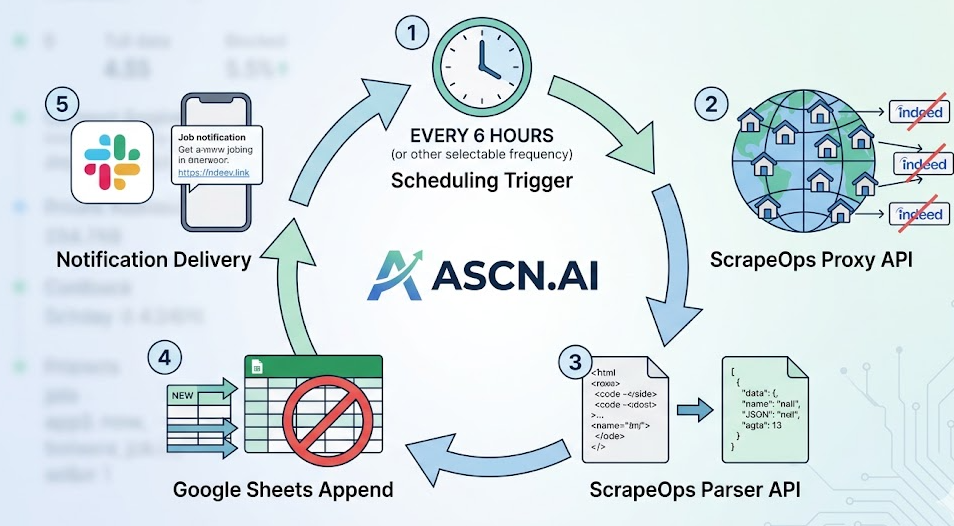
- Scheduling Trigger — The workflow can run every 6, 24, or 1 hour. You will choose.
- ScrapeOps Proxy API — The ScrapeOps Proxy API allows for requests to be made from authentic residential IPs so that they will not trigger any form or types of anti-bot detection, CAPTCHA and rate limits.
- ScrapeOps Parser API — The ScrapeOps Parser API will take raw HTML data from the Indeed job search engine and convert that to structured JSON data that allows you to easily parse the relevant job details including the Job Title, Company Name, Location, Salary Estimate, Job Type, Posted Date & Job URL without requiring you to create or manage your own parsing code.
- Google Sheets Append — All listings that we have validated will continue to be appended to your Google Sheet. We perform a check for duplicates each time we are run by comparing job URLs against any other existing URL in your Google Sheet so there is no possibility of a duplicate showing up on your Google Sheet no matter how many times you run the system in any given day.
- Notification Delivery — For each job found, either a Slack message will be sent to you to notify you of that job (including the specific job listing details), along with a direct link to the job or only new listing jobs matching your specified keyword or salary criteria in ScrapeOps will be alerted to you.
What Data Is Extracted from Indeed
The following seven fields will be extracted for each job found on Indeed and outputted to separate, clean columns in your Google Sheets. About 60% of jobs located on Indeed have salary information. If an employer does not supply a salary we will not fill in that specific field on their job.
An Example of this data is as follows:
| Field Name | Example | Notes |
|---|---|---|
| Job Title | Senior Software Engineer | Exact copy of job listing |
| Company Name | Stripe | Employer name as posted by Indeed |
| Salary Estimate | $180K - $220K per year | Approximately 60% of jobs show salary estimate, if no salary is given that field will be an empty string. |
| Location | Remote / NY, NY | If job is "Remote" we will include "Remote". |
| Job Type | Full-time / Contract | Full-time, Part-time, Contract or Remote |
| Posted Date | 2026-04-28 | Date time of this job has been extracted from the source. |
| Job URL | https://indeed.com/... | Using a direct link to the listing is a way of identifying repeat postings to avoid duplication. |
A staffing agency that was previously manually creating a daily report took 45 minutes per day to find all the newly posted jobs. They now have between 60 - 80 new postings waiting for them in their Google Sheet every morning, reducing their job-sourcing time from a total of 2.5 hours to less than 15 minutes with their team of three.
ScrapeOps — The Engine Behind Reliable Indeed Scraping
Indeed blocks data center IP addresses. They make use of CAPTCHA, and they use PerimeterX and Cloudflare to limit access to their site. A simple scraper will not last long and will fail in a few minutes. ScrapeOps has been specifically developed to run at scale in these restrictive conditions.
ScrapeOps Proxy API - Bypassing Indeed's Anti-Bot Policies
The ScrapeOps Proxy API Aggregator sends all requests from residential IP addresses, which are real homes, not data centers that Indeed has blocked access to. The ScrapeOps Proxy API has also built-in functionality to bypass requests through Cloudflare, PerimeterX, and DataDome. The full functionality of selecting a proxy, rotating out a proxy, CAPTCHA overcoming, and maintaining a sticky session for pagination is provided. The free tier allows for 1,000 requests per month, and paid plans start at $15 per month with unlimited residential proxy bandwidth.
ScrapeOps Parser API - Turning Raw HTML into Structured Data
ScrapeOps parses separately from scraping. You send in the raw HTML and receive back a structured JSON. If Indeed modifies their web page structure, ScrapeOps modifies their parser so your pipeline is not affected. You will send the POST request with the HTML to ScrapeOps and receive back the JSON that contains all seven required fields. In the case where a field is not returned (for example, salary, which is blank), ScrapeOps will catch that error (missing field) and log it as a blank in your request instead of as a run failed.
Reliability in Scalability
For teams that track multiple locations for various positions, the pipeline is able to process all the information without changing any configuration. Pagination will happen automatically — you will need to search multiple pages on Indeed for the results. Any job that is listed on Indeed can be found in the Google document that has been set up every 6 hours as part of this default frequency of 6 hours.
Google Sheets Integration — Your Live Job Database
Your "Live Job Database", which is a Google Sheet integrated with this system, will be updated as new job listings are made available and all listings go through a deduplication process and then each individual listing will be appended to the Google Sheet as a new row. There will be 7 fields extracted from each listing to create 7 columns for the Job Title, Company, Salary Estimate, Location, Job Type, Posted Date & Job URL. Your team has access in real-time to the same Live Google Sheet, meaning there is no need to export or email CSVs of any job listings.
Column Structure and Custom Mapping
You can use the default columns or create custom columns for your Google Sheet. The default columns include: Job Title, Company, Salary Estimate, Location, Job Type, Posted Date & Job URL. If desired, ASCN.AI can create custom columns for you when setting up your Google Sheet. You could create an additional Priority Column based on the Salary Tier (Salary will be auto-populated based on the Salary Tier), a Status Column to track outreach and a Source Column if you are using more than one pipeline of job listings.
Deduplication — No Duplicate Rows
Deduplication is also accomplished using the Job URL; therefore, each Google Sheet will be checked to see if the Job URL exists in the Google Sheet before it gets appended to your Google Sheet. So by utilizing the pipeline system to append listings to your Google Sheet, you avoid 240 duplicate copies of the same job listings for every 10 searches that you complete at 6-hour intervals every week.
Team Collaboration
Team members can have access to the Google Sheet you have created for your team with whatever level of permission you choose, i.e. Recruiters can make notes for themselves, flag specific listings, filter by Salary, create Pivot Tables and the pipeline continues to add new listings to your Google Sheet.
Slack Alerts — Instant Notifications for High-Value Matches
Not all new job listings meet the criteria for immediate action; therefore Slack Alerts are configured to fire for each new listing only based on the criteria defined by the user and not based on the number of new job listings found. Therefore, if you run a search and there are no new job listings returned that meet your search criteria a Slack message for that specific run will not be sent.
How Slack Notifications Are Configured
In order for alerts to work with Slack, there will need to be a Slack Webhook URL that connects the alert system to your Slack channel of choice. There are three ways to set up notifications for new job postings:
- All New Listings: If you want to be alerted when any job becomes available after having been filtered out as a duplicate, we will send you an alert via Slack each time something new is put up for hire. An example of this would be if someone posted a job after you were done searching.
- Salary Threshold: This will only give you an alert if the salary target of the job is above your minimum set, e.g., $150,000 and above.
- Keyword Match: This will only notify you of a job if it contains some of the words you specify in the job title, such as “Senior Manager” or “Director Marketing.”
Who Benefits from Automated Indeed Job Tracking?
Job Seekers — First to Know About New Postings
- Hire Immediately: By having an automated tracking system in place with Indeed, you can expect to receive new job postings within 6 hours of being posted to Indeed, not 2 days later after a manual search.
- Salary Filters: Set your salary filters and only receive alerts for positions you would like to apply to.
- By Applying Early, You May Get a Job Before Anyone Else.
Recruiters and HR Agencies — Hiring Intelligence at Scale
Studies show companies that use AI-powered tools to help recruit have experienced, on average, 31% shorter recruitment periods and an average of 340% ROI within 18 months of implementation (InCruiter, 2026). Manual processing time per recruiter averages approximately 10 to 15 hours per week to search job sites.
Sales and Marketing Teams — Hiring as a Growth Signal
By monitoring companies that are hiring 10+ engineering jobs over a period of time, you will know that they are growing. To see what your competitors are doing when they are looking to hire Engineering Managers, set up a company search through ASCN.AI and you will be notified instantly via Slack as soon as a good candidate becomes available.
Data Analysts — Labor Market Research
As of April 17, 2026, the Job Postings Index from Indeed was 105.27; this is about 5% higher than the pre-COVID-19 times and estimates for job postings range from 6.8 million to 7.4 million by the end of this year (Indeed Hiring Lab, 2026).
Pricing and Setup Timeline
ASCN.AI's automation for tracking job postings from Indeed starts at $59/month and can be up and running in 48 hours with no technical skills required.
| Plan | Price | Searches | Frequency | Team Members |
|---|---|---|---|---|
| Starter | $59/mo | 3 | Every 6 Hours | 1 |
| Growth | $99/mo | 10 | Every 3 Hours | 5 |
| Agency | $199/mo | Unlimited | Hourly | Unlimited |
48-Hour Deployment — How It Works
- Kick off call (30 minutes) to define search query, location filter, salary alert threshold, Slack channel, and Google Sheet structure.
- Credential Setup — ASCN.AI will set up your ScrapeOps API credentials, Google Sheets OAuth and Slack Webhook.
- Test Run — The pipeline will run once on your target search; you will review the output and confirm the quality of the data extracted.
- Activate Schedule — The workflow becomes active on the frequency you choose and monitoring begins.
Compliance and Legal Considerations
Indeed's terms of use prohibit automated access to their platform, and users of ASCN.AI are responsible for complying with Indeed's ToS, robots.txt directives, and laws in their jurisdiction.
The 2022 decision in hiQ Labs v. LinkedIn (US 9th Circuit Court of Appeals) determined that scraping data that is publicly available does not necessarily violate the Computer Fraud and Abuse Act. All ASCN.AI pipelines are configured with rate limiting by default.
Data Privacy — All data that is scraped goes into your own Google Sheets account. ASCN.AI does not retain your Indeed information.
Frequently Asked Questions
When will the Indeed scraper run?
ASCN.AI has a default schedule for the scraper to run every six hours. You can also run the scraper as frequently as hourly (on the Agency Plan).
Is ScrapeOps able to be blocked by Indeed?
ScrapeOps uses real residential proxies and can effectively scrape jobs automatically using proper rate limiting (blocking is rare).
Am I able to track multiple job titles and locations at once in ScrapeOps?
Yes, each search query will only return results for one job title and one job location. The Starter Plan allows you to create 3 search queries; the Growth Plan allows you to create 10 search queries; the Agency Plan allows you to create an unlimited number of search queries.
What happens if Indeed changes its page structure?
ScrapeOps will maintain the ScrapeOps Parser API and update the parser if/when Indeed changes its HTML structure. The updated parser will automatically be used in your pipeline; and ASCN.AI will monitor pipeline activity and address any issues in a timely manner.
Can I send alerts from ScrapeOps to Teams or other applications instead of Slack?
Yes, ASCN.AI has the ability to configure Microsoft Teams Webhook integrations as an alternative to Slack. It is also possible to send alerts via Email using Gmail in addition to Slack or Teams. All three notification options can work together.
Will I need to have a ScrapeOps account separately?
No, ASCN.AI will manage your ScrapeOps API credentials for you in every plan. You will not need to go through the process of managing a ScrapeOps account to utilize your API key(s).
Is it legal to automate the tracking of jobs on Indeed?
Yes, automated tracking of jobs on Indeed for legitimate reasons has been established as legal in the US by the 2022 hiQ Labs v LinkedIn case that was decided in the 9th Circuit Court of Appeals. Therefore, users must comply with Indeed's User Agreement and must comply with local laws in their jurisdiction.
