



- Русский
- English
- Português
Inbound Request Router: intake triage and routing to your CRM
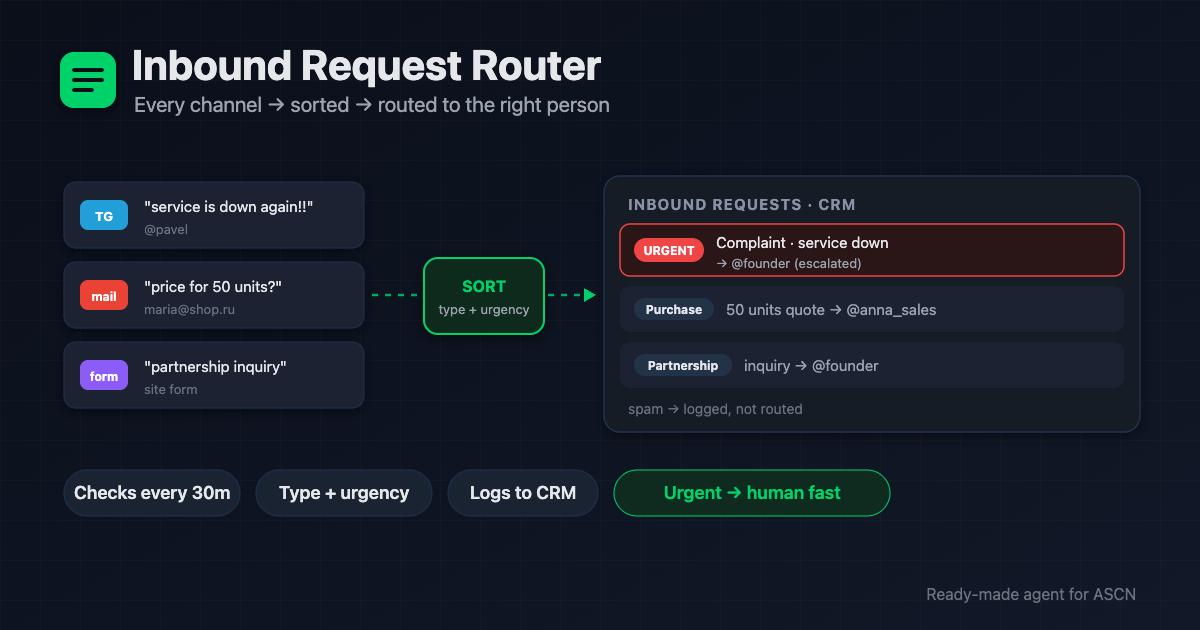
The agent collects requests from email, Telegram, and forms, sorts them by type and urgency, logs them to a CRM, and notifies the owner. Urgent ones escalate to a human.

For new users: your first ASCN subscription payment doubles the term. [Use template] [Ask a question]
Overview
Requests land across email, Telegram, and website forms — and someone burns an hour a day copy-pasting them into a spreadsheet, guessing the priority, and forwarding to the right teammate. Things slip; an angry customer waits a day. A part-time ops coordinator costs $600–1,500/month.
Inbound Request Router is a ready-made AI agent for the ASCN platform that handles intake for you:
- 🔎 Checks every channel — email, Telegram, website forms — and never takes one request twice
- 🏷️ Sorts by type and urgency — purchase / question / complaint / partnership, high / medium / low
- 🗂️ Logs it to your CRM — name, contact, essence, product, source — only what's in the message
- 👤 Assigns the owner by your matrix and notifies them in Telegram
- 🔴 Escalates urgent requests to a manager right away — so the important stuff doesn't wait
You run it in plain chat. Every request and its history live in your Google Sheet.
How the agent works
No coding. You run everything from a chat.
- Install from the marketplace. Open the page, click "Use template" — the agent is in your account in under 5 minutes.
- Name your channels. Email (Gmail), Telegram, website forms (via forwarded email or a shared sheet). One-click connect.
- Set up the team. Who handles purchases, questions, complaints, partnerships — plus who gets urgent escalations.
- Set the rules. Urgency and type signal words for your niche. How often to check: every 15 / 30 / 60 minutes.
- Then it runs automatically. The agent checks channels, sorts new requests, logs them to the CRM, and notifies owners — urgent ones escalated.
Why it beats sorting by hand
- Nothing gets lost. Every request lands in the CRM and with an owner — no "forgot to forward".
- Urgent reaches a human instantly. An outage complaint or a big deal escalates to a manager the same minute.
- An hour a day back in your schedule. Manual sorting and hand-offs go to the agent.
- One subscription instead of a coordinator. An intake coordinator runs $600+/month. The agent covers it for the price of a plan.
- Facts only. The agent doesn't invent data — what's not in the message is "unknown", not a guess.
What users get
Across setups, the agent takes about an hour a day of manual intake off the team and cuts the time for an urgent request to reach the right person from hours to minutes.
The effect depends on your inbound volume and how the routing matrix is set up. The agent delivers fast sorting and hand-off — the quality of the reply to the customer stays with your team.
Adoption snapshot
Online store — retail
- Connected: Gmail, Telegram, Google Sheets, a 3-person matrix
- Result: requests sorted by type, complaints escalated to the owner
- Effect: urgent messages reach a human in minutes instead of hours
B2B service — services
- Connected: Gmail (site forms), Telegram, CRM in Sheets
- Result: purchases → sales manager, partnerships → founder
- Effect: about an hour a day saved on manual sorting
Agency — multiple departments
- Connected: Telegram, Gmail, a per-department matrix
- Result: every request with the right team, spam filtered out
- Effect: a clean queue — people see only real requests
Figures are illustrative — an expected effect for the niche, not a guaranteed result.
What's included
- A ready-configured agent: role, rules, and three skills (collect, classify, route) already written.
- An inbound CRM in Google Sheets: every request with type, urgency, owner, and status.
- A routing matrix: who gets what and how urgent escalates — set in plain words.
- Classification rules: signal words for your niche so sorting is sharper.
- Personal manager and community: setup help on the Personal plan and above.
While inbound drowns in a shared inbox and chat, hand intake to an agent that sorts it, logs it to the CRM, and gets urgent things to the right person. 🔥🔥🔥
Set the team up once — and the inbound stream sorts itself, with nothing lost and nothing delayed.
FAQ
Do I need coding skills?
No. The agent installs from the marketplace and is set up in plain chat: name your channels and team, and it connects services and runs a test sort.
Does the agent reply to customers?
No. It sorts and routes requests internally. Replies to customers are a person's or a dedicated sales/support agent's job.
How does it see new requests?
It checks channels on a schedule (default every 30 minutes; 15 for speed). Website forms arrive via forwarded email or a shared sheet — no direct webhook needed.
Do I need paid keys?
No. Gmail, Telegram, and Google Sheets are built-in integrations and free.
Can I connect a real CRM instead of a sheet?
Yes, via API or a custom MCP (HubSpot, Pipedrive, amoCRM) after approval. Out of the box the CRM is Google Sheets, which covers most needs.
How is my data kept safe?
Requests and contacts live only in your sheet, not in agent memory. Each agent is isolated, and you can revoke any service at any time.
What about urgent requests at night?
Routine summaries arrive in your window (08:00–23:00), but a genuinely urgent request may notify outside it — that's the point of escalation.
Use template · Ask a question · Order a done-for-you setup
