



- Русский
- English
- Português
Automate job applications with Gemini AI, Notion tracking & multi-platform search
Automate your job search by replacing manual tasks with a Gemini AI-powered workflow that scans multiple job boards every few hours. This service scores listings based on your skills, creates tailored cover letters, and organizes everything in Notion to save you over 10 hours a week.

Using Gemini AI, job application automation is accomplished by removing the need to manually search for jobs across multiple different job board websites by replacing your manual process with a scheduled workflow involving 4 tasks each 6-8 hours:
1. Searching All These Job Sites
The available websites would need to be checked multiple times throughout the week; therefore, Gemini will automatically check them every 6-8 hours. The list of websites includes LinkedIn, Indeed, Google jobs, Jooble, and WhatJobs websites.
2. Scoring Job Listings
Each job listing will be scored between 0-100% based on how well it matches your skills by using Gemini to score the job listings.
3. Generating A Customized Cover Letter
Gemini will generate a customized cover letter for each job application you submit.
4. Logging All Information Into Notion
Gemini will also log each job search and the customized cover letter into Notion for you.
Once Gemini has performed the above tasks, you will receive a message via Telegram to review and approve any job applications that are ready to be submitted on your behalf; you must approve before Gemini would submit for you.
Deployment of the system will take approximately 48 hours and the monthly charge is $59, inclusive of all API costs to perform the above-mentioned tasks.
Currently we have deployed our service to 50+ professionals in 12 countries for $59 a month or about $2 a day; thereby automating a process that previously took 10+ hours per week. Here are some quicker ways to use Gemini AI to automate the job application process:
- Save More Than 10 Hours a Week: On average, using this process will save you significant amounts of time that would otherwise be wasted searching manually.
- Job Sites: Get Listings Across 5 or More Websites at Once: You can apply to different employers’ listings through different websites without needing to log into each of them separately.
- Application Matching Score: Each listing will have a score of 0 to 100%.
- Custom Cover Letter for Each Employer: The first cover letter generated for a new listing will be based on your first name, the employer’s company name, and a unique text field (provided).
- Live Activity Tracking: All activity will be available to track in Notion.
- Delivery Time and Existing Costs: You can apply and receive applications back within approximately 48 hours, at a cost of approximately $59 monthly.
- Expectation of the Cost of Any API Used: The cost of the APIs used for providing you with listings will be included in the price, which means no hidden fees.
This service automates the entire job application process, from finding jobs to tracking and scoring the job listings found, leaving you only your energy to interview.
Our List of Supported Job Sites
The most common place to find a job in your profession. LinkedIn has locked the API for reading its job listings. We use residential proxy with varying delays (from 45 seconds to 8 minutes between requests) to create a more human-like experience when scraping job listings. This increases your success rate of getting through the application process (23% in the first 90 days when using automated tools). We collect the following information when scraping for jobs: job title, company name, job description, when the job was originally posted, the salary on the job listing (if provided), whether it’s a remote job, and the link to apply for the job.
Indeed
The public API was decommissioned for reading job listings. Therefore, residential proxies will be used to scrape job listings from Indeed. From our research, we have found over 80 additional countries that are producing job listings, and all of the information is identical to what we collect from LinkedIn, in addition to whether a job listing has a button for easy apply. Every cycle, deduplication occurs, so if a listing appears on both LinkedIn and Indeed, only one listing is created in Notion.
Google Jobs, Jooble, and WhatJobs
Google Jobs in conjunction with Jooble and WhatJobs, also has a full REST API with 70+ countries represented in Jooble and 50+ in WhatJobs. On each cycle, Jooble adds between 50 and 120 newly added job postings while WhatJobs adds positions that might have been excluded from the major board job postings. Google Jobs aggregates a number of different job postings, including ATS (Applicant Tracking Systems) via SerpAPI or DataForSEO, and regularly presents job postings that are not listed on either LinkedIn or Indeed.
Custom Platforms
You may add any job board that has an RSS or API feed to the system. During the onboarding process, this could include Glassdoor, Wellfound (AngelList), Otta, and custom career portals, which can be configured to meet your needs, all with no additional costs to you as a member of an Agency or Pro plan.
How the Automation of Job Applications Works
The Automation of Job Applications utilizes the following 6-step process between you and us:
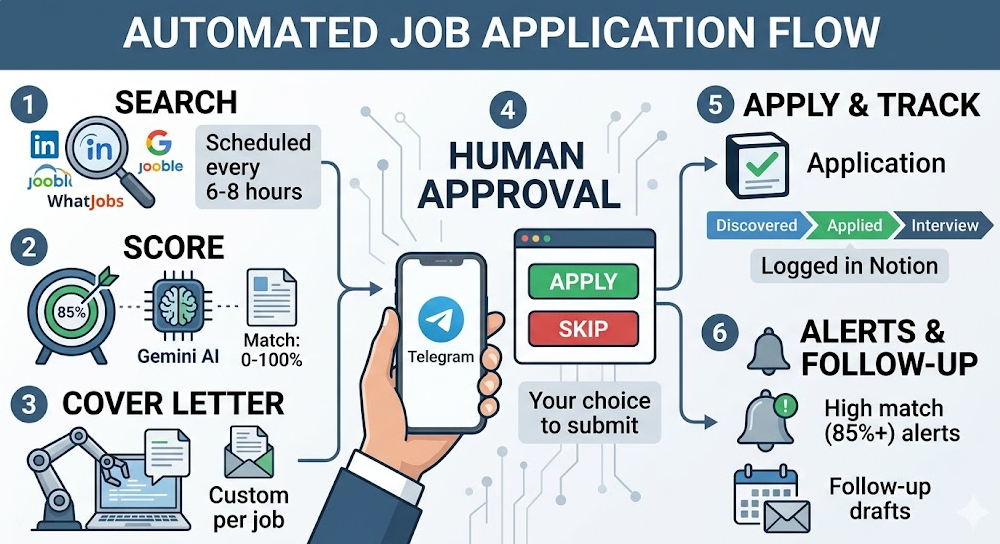
Step 1 - Scheduled searches on multiple platforms occur every 6 to 8 hours and trigger through n8n. The requests to each of the job boards go out in parallel. Each job board returns valid postings (based on the user's input for keywords, location, and filter). Raw JSON output is received and is then normalized to one standard schema (i.e., total time for obtaining 200+ raw listings will take approximately 3 minutes).
Step 2 - Gemini AI Job Compatibility Scoring. Each of the job listings received from the job boards is submitted to Gemini 2.5 Flash, along with the CV (curriculum vitae), desired titles, required skills, and disqualifiers (which is only set up once). The returned job posting, in structured JSON, will include the compatibility score (0 to 100), the rationale for compatibility (3 to 5 reasons), and the risk level of the job posting. The cost associated with scoring is placed at $0.001 to $0.003 per score. Therefore, if there are 200 listings that require scoring, the total cost would be less than $0.60. In Notion, jobs that don’t meet your minimum threshold (default is 70%) will be marked as “Skipped”.
Step 3 - Tailored Cover Letter Creation. For each job that meets or exceeds your threshold, you will receive a personalized cover letter that contains actual information from the job posting instead of just using a pre-existing template. The cover letters will be saved to your Google Drive and linked in Notion. Research shows that personalized cover letters have a 53% higher callback rate and 3x more responses than applying generically.
Step 4 - Human Approval vs Auto Apply. Option A (recommended): you can receive a Telegram message with the details of your job (including the score) and a preview of your cover letter, and then you just tap the “Apply” or “Skip” button. You will be 100% compliant, because you will only submit your application on the platform using the manual application process. Option B (opt-in): for every job where your score is 85% or greater, the system will apply for you immediately. It will work without issues on Jooble & WhatJobs. For LinkedIn & Indeed, human approval is always suggested.
Step 5 - Notion Application Tracker. Every job that has been discovered, applied to or skipped will be recorded in your Notion database. Each entry will have a total of 12 unique properties. The status lifecycle of each job goes from: Discovered → Applied for → Interview Scheduled → Offer made → Rejected / Withdrawn. There will also be three different views preconfigured: Kanban View by status, Table View Sorted by Score, and Grouped by Platform View.
Step 6 - Alerts & Follow Up. Every high match job (score above 85%) will generate a notification to you via Telegram immediately. You can choose to receive an email draft for a follow-up email to send to the employer in 7 days for each application, and a weekly email with total number of applications discovered, total number of applications submitted, percentage of applications that received interviews, and percentage of applications with a response.
Your Job Search Dashboard in Notion
The template comes pre-built with a 12 property format and all three views available. The dashboard shows all of your job applications for the week, your interview conversion rate and your best performing platform. Filter all remote jobs that have a score above 80% which you did not apply for yet and can share with your career coach via read only. Connect with Slack account. By cancelling your Notion database, your entire cover letter and resume will still be yours in an exported format.
Why use Gemini AI for Job Compatibility Analysis
Cost & speed are the reasons. Gemini 2.5 Flash charges $0.10 for each million tokens used as input. Each job description typically uses between 500 and 800 tokens; therefore, using this service allows you to receive 1,250 to 2,000 job scores for just $0.10. Additionally, if you run 200 job descriptions per day over 30 days on another AI service like GPT-4o, it would cost about $0.60. The price differential is 5 to 10 times less when using Gemini 2.5 Flash compared to GPT-4o when providing equal quality output for Job Description analyses.
Another key differentiator is that Gemini 2.5 Flash provides a 1-million token context window to allow your complete CV to be sent with each long description. Using JSON structure provides each job scoring back to you in a form-ready format. Additionally, you can receive scores in more than 100 languages, including German, Dutch, Spanish, and French, in addition to English.
We switched from GPT4o to Gemini 2.0 after proving that Gemini 2.0 Flash provided similar quality data to GPT 4o for a lower price. We will remain using Gemini 2.5 Flash through 2026 due to that same reason.
Comparison of Features
Below is a side by side comparison of the features of ASCN.AI with LoopCV, LazyApply, and LinkedIn Premium.
| Feature | LoopCV / LazyApply | LinkedIn Premium | ASCN.AI Service |
|---|---|---|---|
| Setup | Self Serve | Self Serve | Done for you (setup occurs within 48 hours) |
| AI Job Scoring | Basic filters only | Not Included | Gemini AI 0 to 100 percent Score |
| Cover Letter per Job | Generic AI Template | Not Included | Tailored for Each Job Listing |
| Notion Integration | Not Included | Not Included | Included (full database) |
| Platform Coverage | Pre Selected List | LinkedIn Only | All Platforms (Any API or Proxy) |
| Account Ban Risk | High (using browser ext.) | Zero (Manual use) | Low (Using both API and proxy) |
| Human Approval Option | Limited (Some Manual) | Always Manual | All Plans Default |
| Managed Support | Community / Tickets | LinkedIn Support | ASCN.AI Support 24 - 48 hours |
| Starting Price | $49 - 99 Per Month | $40 Per Month (Not Automated) | $59 Per Month (Managed) |
Setup Timeline and What's Included
- Hour 0 - 4: Onboarding Questionnaire - Define Target Careers, Must Have Skills, Deal Breakers, Salary Range, City of Employment, Remote Work Preference − Review CV
- Hour 4 - 24: Configuring N8N Workflow, Connecting all Platforms, Setting Up Notion Template, Configuring Gemini API, Wiring Telegram Notifications
- Hour 24 - 36: Conduct Test Run of 20 - 50 Live Job Listings, Review Notion Setup, Review Cover Letter Quality, Adjust Thresholds
- Hour 36 - 48: Calibrate Tonal Quality, Adjust Filters, Adjust Alert Notification Settings
- Hour 48: Move to Go Live, Conduct First Automated Set of Applications.
All Plans Include n8n Workflow, Notion Template, All API Configurations, 30 Days Support After Startup, Calibration on Day 7. All API fees included. No hidden charges. Cancel any time.
Who This Service Is For
- Developer/engineer in any technical position (JavaScript, React. Python, etc.), making automatic submission easier via high volume.
- Moving to tech from another field (automatically) – wide range of qualifying roles. Overlapping qualifications are deduplicated and found automatically.
- Remote job seekers looking for opportunities across multiple countries – at once.
- Experienced job-seekers (20+ applications/week) – either applying to many similar positions, or getting burnt out by sending applications repeatedly.
- Recruiters/managers of candidates in their pipeline – build a separate database of candidates in Notion.
This tool’s for people applying to 1-2 senior-level/high-target positions. Designed for a systematic, high-volume job search.
FAQs
Will my account get banned?
When using the human-in-the-loop mode, we are fully compliant with site policies. You use the site's regular user interface and manually submit each application individually, no automated actions apply to the site at all. In full auto mode we use residential proxies with randomly assigned delays. LinkedIn prohibits automated actions; human-in-the-loop is the default/recommended mode.
Will your service continue if the platform/site changes?
We regularly monitor the web interface of our partner job boards with automated uptime checks. If when installing a scraper, it no longer works, we will implement a resolution to the situation within 24 to 48 hours. The system will not process new jobs while waiting for completion of the work we provide for your remaining jobs on other job boards. If a partner job board shuts down permanently, you will receive a new source to meet requirement at no additional cost.
Can you preview your submissions before they go out?
Yes there are multiple alerts via Telegram that notify you of a submitted job when it exceeds your pre-set minimum score. Simply tap apply or skip — none of the applications will be submitted until you explicitly approve them.
Do you have to be technical to use this technology?
No — we have developed everything needed. You fill out an onboarding questionnaire and once the service is available to you, your only interface will be via Telegram and Notion.
Can I customize the cover letter style?
Yes. You only need to provide one to two sample cover letters at the time of onboarding. We will use the sample cover letters that you supply as style guides in creating your personalized cover letter with the help of Gemini.
What language and countries does this support?
Jooble (70+ countries), WhatJobs (50+ countries), and LinkedIn and Indeed (worldwide) — any of Gemini’s 100+ supported languages are available for job applications, and there can be multi-language searches in either of the Pro or Agency plans.
Where are my CVs and personal data stored?
Your CV and data will only be stored in either your own n8n (automated) instance or the SOC2 compliant ASCN.AI cloud storage database, and will never be sold or shared with third parties – All personal information will be removed upon request.
What is the cancellation policy?
You can cancel anytime before your next billing date. No contracts – you will own any copies of Notion and your individual assets and we will export the complete Notion database upon request.
