



- Русский
- English
- Português
Automate Google Analytics Reporting
Automatically generate and schedule Google Analytics 4 reports through ASCN.AI without any coding or manual data entry. This platform delivers professional reports via email, Slack, or Google Sheets within 48 hours, helping marketing teams save up to 80% of their reporting time for a low monthly fee.

You can automatically generate reports from Google Analytics (GA4) through the ASCN.AI platform within 48 hours by simply connecting your property once using the Google Analytics Data API, setting your reporting levels & schedules, and receiving automated reports — delivered via email, Google Sheet, Looker Studio &/or Slack for just $59/month — without needing any coding.
To create automated reports using Google Analytics, follow these steps:
- Connect your GA4 property to the Google Analytics Data API (OAuth 2.0 or Service Account)
- Set the desired metrics, dimensions, and date ranges
- Schedule reports to deliver (daily, weekly, or monthly)
- Select an output method (Email (PDF/CSV), Google Sheets, Looker Studio, or Slack)
- Reports will be delivered automatically according to the scheduled timeline.
Quick Facts — GA4 Reporting Automation
- Marketing teams generally spend 35.5 hours a week producing manual reports (Coupler.io, 2025)
- By automating workflows, companies can reduce the time required to create and produce reports by 80% (DataSlayer, 2025)
- The GA4 Data API is completely free — providing up to 200K daily tokens for all standard properties (Google)
- The GA4 built-in email report scheduler only supports a maximum of 50 recipients at a time.
- ASCN.AI's scheduled report delivery offers access to 4 different reporting channels and unlimited number of recipients and is capable of being implemented within 48 hours.
- Businesses using marketing automation receive an average return on investment (ROI) of 544% (Thunderbit, 2026)
- As of 2026, GA4 will support over 14.2 million active (non-deleted) websites (DigitalApplied, 2026).
What Is Google Analytics Reporting Automation?
Google Analytics Reporting Automation is a scheduled-export based process between GA4 Data API metrics to formatted reports automatically delivered via Email (PDFs/CSV format), Google Sheets, Slack, or Looker Studio — without needing to log into Google Analytics or manually export data.
ASCN.AI has automated GA4 reporting processes for over 100 marketing teams from an array of business types (ecommerce, SaaS & lead generation), totaling to over 500 active (non-deleted) GA4 properties. The report pulling process is the same every week - someone manually pulls all the reports from GA4 by logging in, setting the date range, downloading the report as a PDF, copying the numbers from the PDF to Slack – usually taking about 30 minutes or longer.
That’s a total of 35.5 hours per week for a 10-person agency… basically one full-time employee is being spent copying data from one screen and pasting it to another (Coupler.io, 2025). And for agencies that work with multiple clients, they will spend an estimated 4-10 hours per month on each client for reporting. If they are working with 15 clients, that could add up to 60-150 hours per month for just client reports.
With automation, the reporting process is completed via a single, automated workflow that connects to the GA4 Data API, retrieves the configured data based on a schedule, formats it, and delivers it. No more logging in, no more exporting, and even if the analyst is on vacation, the reports still come in without issues!
The Real Cost of Manual GA4 Reporting
The cost of GA4 manual reporting is really two-fold. The first and most obvious cost is time. The second cost, which is typically not talked about much, relates to accuracy of data – preparing reports by hand has a tendency to result in mistakes (copying and pasting errors). Furthermore, the reports are sent anywhere from 1-3 days in arrears after the month ends. Therefore, the data is “old” by the time the weekly report reaches the inbox of the stakeholder. In comparison, with automation, the amount of time it takes to prepare reports is reduced by approximately 80%, and there are no copying/pasting mistakes (DataSlayer, 2025).
How ASCN.AI Automates Your GA4 Reports
ASCN.AI connects to your GA4 Data API using a Service Account (no developer required), builds an automated report for your selected metrics and delivers a formatted report to your selected destination within 48 hours of being set up.
There are three steps involved in ASCN.AI automating your GA4 Report. Once the ASCN.AI GA4 Report is set up, it runs without human input.
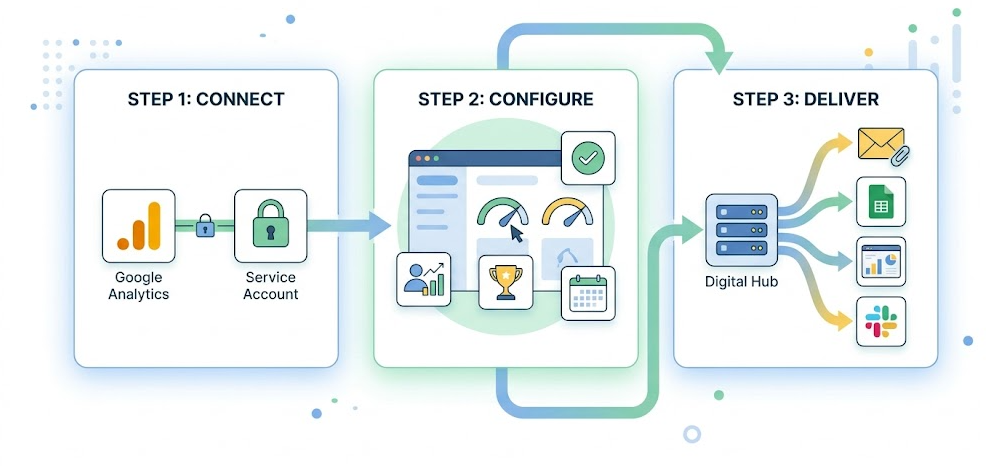
Step 1 - Establish Connection Between GA4 and Data API
ASCN.AI sets up a Service Account with read-only access to your GA4 Property using the GA4 Data API v1. ASCN.AI does NOT need any admin access to the GA4 Account, there are NO changes to your GA4 tracking set up and the Service Account is isolated to your GA4 Property and may be revoked from the Google Cloud Console.
The GA4 Data API is free, Standard Properties have 200,000 daily API tokens available; most automated reports will use well under 500 API tokens per day (Google Developers). Even running several workflows with multiple reports will be well within the daily quota for API tokens.
Step 2 - Configuration of Metrics, Dimensions and Schedule
You tell us what you want to track; sessions, conversions, revenue, engagement rate, traffic source, device share or any other custom dimension added to your GA4 Property. You also tell us the date range you want to track your metrics or the schedule frequency you want your reports to be sent. ASCN.AI will build the entire API configuration needed for you. You check before anything is published.
Step 3 — Automated Delivery
The workflow will run on time. It calls GA4’s Data API, processes the information, and then sends it to your destination. Error handling is integrated; if an error occurs, the API will automatically retry after a 5-minute wait. If the retry fails, a notification is sent out. No report will be left out without prior notice. The first report will be sent out automatically by 48 hours after setup.
Report Delivery Choices
ASCN.AI can deliver your automated GA4 reports by four means; scheduled email (in either a PDF or CSV format), through Google Sheets auto-sync, digitally through a Looker Studio live dashboard, and through Slack or Telegram alerts—either individually or in conjunction with one another.
Email Reports: PDF & CSV (Scheduled)
You could have the report delivered to you formatted as an HTML email or as a PDF attached to an email; both ways allow for any frequency of delivery. The email subject line is customizable and may be branded or unbranded. There is no limit to the number of receivers on any staff email list because it can be used with individual email addresses or any Google Group. Recipients do not need to have access to GA4.
Google Sheets Auto-Sync
Your GA4 data could also be written directly to a Google Sheet at a scheduled time, with new rows being added to it each time. The data can be shared across the company with no access to GA4 for the end-users. It also allows you to avoid any Looker Studio limits; because the Looker Studio pulls from the cached Google Sheet instead of pulling directly from the GA4 API, it will avoid getting a “not enough quota” error (Napkyn, 2025).
Live Looker Studio Dashboard
Your GA4 account can be automatically refreshed every day so that the numbers are current every time you look in the morning—no need to login to GA4 to check! It could also allow you to see combined data—Google Ads, Search Console, and GA4 data. The built-in GA4 connector for Looker Studio provides 200,000 daily tokens shared across the two properties, but additional heavy use may result in a lack of quota (DataBloo, 2025). With the way ASCN.AI is caching Sheets, you will avoid the limitation on your daily tokens for using the GA4 API entirely.
Alerts on Slack and Telegram
Automated digest reports sent out periodically, in addition to alerts for thresholds like "sessions down 20% compared to last week," allow users to remain within Slack to view analytics with minimal switching of tools.
Metrics for GA4 That Can Be Automated
All standard metrics available in GA4 (sessions, conversions, revenue, engagement rate, traffic sources), as well as any custom dimensions/events registered in your property can be included for automated reporting through GA4's Data API.
Traffic and Acquisition Reporting
Sessions, users, new users, and page views broken down by source/medium/campaign/channel grouping, organic vs paid vs direct traffic comparisons, and all three types of comparisons can be displayed in daily/weekly/monthly trendlines.
Events Engagement & Conversion Reporting
Engagement rate per session, average session duration, non-engaged sessions, count of completed key events, conversion rate by source/device. You have access to all key events you have configured within your GA4 property.
E-Commerce and Revenue Reporting
Your e-commerce metrics include transaction count, purchase revenue generated, average order size and checkout abandonment rate. First-time buyers will see how much revenue was generated at each source, product category and coupon used. Works with both Shopify and WooCommerce, and is compatible with any GA4 implementation.
Custom Dimensions Reporting and KPI Reports
All custom events, custom parameters, calculated metrics will be included in the report if registered in your GA4 property (e.g., revenue per session, cost per conversion, leads generated by channel) can be computed in the transformation layer.
Technical Architecture
ASCN.AI utilizes GA4's Data API v1 (to access unsampled data), n8n self-hosted (to automate workflow), and direct integrations for delivery via Gmail, Google Sheets API, and Slack API. Your data will remain within your own infrastructure.
GA4 Data API v1
Three report functions: runReport for standard metrics, runFunnelReport for funnel analysis, and runRealtimeReport for almost real-time checks. Service account must have analytical.readonly scope. Standard Reports are not subject to sampling, as opposed to GA4 Explorations where the event-level data is gathered but extracted based on the 10 million event threshold (OWOX, 2025).
Workflow Automation (n8n)
You can use n8n (self-hosted) to build a Google Analytics data scraping automation solution as follows:
Cron Trigger (triggered by a schedule) --> Google Analytics Node (via the Data API to pull data from GA) --> Transformation Layer (converting number types, applying calculations for delta, and applying conditional logic) --> Push Output (email, Google Sheets, Slack). None of your information will be transferred to any 3rd party cloud service.
Why not do it yourself with n8n?
Sure! You can build your entire workflow in approximately 8-20 hours and with costs ranging from $400-$1,000 as an initial load capital expense (not to mention support/maintenance). In comparison, ASCN.AI can implement the same solution in 48 hours for $59/month (which includes your ongoing maintenance).
BigQuery Integration
For properties that generate millions of events a day or need event-based analysis, (ex: multi-touch attribution or data joins with CRM systems), ASCN.AI will create a BigQuery export and automate query generation. This covers 5% of the entire reporting use cases; most workflows create and use the Data API (InfoTrust).
Pricing and Deployment
ASCN.AI will deploy your GA4 reporting automation in 48 hours for $59/month. Pricing is as follows:
- Starter: 4 reports & 1 Property
- Growth: 20 reports & 5 Properties
- Agency: unlimited
There is no contract commitment to use this service annually.
Set-Up in 48 hours - No Developers are Required
The entire technical set-up will be completed, including establishing a Service Account, building the workflow, providing delivery connections for errors and testing. You will only need to provide access to your data with the appropriate credentials and send a short summary of your requirements. You will not need to write any code, manage any credentials, maintain any technical/IT infrastructure, or experience service issues; ASCN.AI will resolve your issues — it's part of the package!
Plans Beginning At $59/Month
| Plan | Reports/Month | Delivery Channels | Properties | Support |
|---|---|---|---|---|
| Starter | Up To Four | Email + One Other Channel | One | |
| Growth | Up To Twenty | All Channels | Up To Five | Priority |
| Agency | Unlimited | All + BigQuery | Unlimited | Dedicated |
No yearly commitment. You can cancel at any time. A free 30-minute consultation is available prior to purchase. Request a sample report.
A five person team spends 60 hours a month on manual GA4 reporting at an hourly rate of $50 = $3,000/month in labor expense. Marketing Automation has a 544% average ROI, with 76% of firms getting returns in the first year (Thunderbit, 2026).
FAQs – Google Analytics Reporting Automation
Will I be able to automate reports across multiple GA4 properties?
Yes! Multi-property setups are fully supported. Each created property will have its own separate metrics, schedule, and delivery configuration and can be managed from a single location.
How does the agency-client setup work?
Agency plans have unlimited amounts of properties. Each client will have a separate workflow that will have its own schedule and delivery. Consolidated cross-client dashboards are available by request.
Is ASCN.AI different than GA4's built in scheduled emails?
GA4 native: email only, 50 limit on recipients, PDF or CSV only with no custom formatted options, will not integrate with google sheets or slack, no threshold alerts, 12 month expiration period. ASCN.AI: four channels, unlimited recipients, custom formatted option, threshold alerts, no expiration, automatic maintenance.
Do I need to give ASCN.AI access to my GA4 administrator account?
No, ASCN.AI will access your GA4 account with read-only analytics.readonly access via Service Account only and no administrator/editor permissions. Access can be removed any time via the Google Cloud Console.
What will happen if the API fails or exceeds the quota?
The workflow will automatically retry the request. If there are ongoing durable errors, a notification will be sent. High volume properties with near-exceeding quota limits, ASCN.AI will configure batching of requests and retry logic.
Does it work with custom events and dimensions?
Yes! Any custom event or custom metric/key event that has been registered in GA4 will be available via the Data API and will be available for use in automated reports.
Does it work with ecommerce platforms like Shopify and WooCommerce?
Yes! ASCN.AI will work with any GA4 implementation including Shopify, WooCommerce, or through your own custom event tracking. All ecommerce metrics will be included in the automated reports.
When will my first report be ready?
At the latest, within 48 hours of receiving access to your GA4 property and the completion of your briefing form. Most clients get at least one of their automated reports within 24 hours.
Begin with ASCN
Don’t waste time with manual GA4 exports! ASCN.AI will have automation for you within 48 hours — email reports, Google Sheets, Looker Studio dashboards, Slack digests or any of the above combination.
Schedule a free 30 minute consultation with us. Provide us with what reports you currently pull, how often and where you would like them delivered. ASCN.AI will create it, test it and deliver it to you with no maintenance on your part whatsoever.
Starting at just $59/month. No developer required. Cancel at any time.
