



- Русский
- English
- Português
Daily Task Agent
ASCN.Agent automates repetitive daily work, allowing entrepreneurs to focus on strategic goals and creativity. This guide explains how the Daily Task Automation Agent streamlines routine operations to boost overall business productivity.


ASCN.Agent lets you automate daily repetitive and monotonous work, so you can spend more time working towards your most important goals and objectives, and less time on mundane tasks, allowing more time for your creativity and strategic thinking.
General Overview
The Daily Task Automation Agent makes it easy for solo entrepreneurs and founders to automate their day-to-day operations by automating routine tasks, which frees you up to devote more of your time and energy into those activities that drive your business. This utility has a medium level of implementation complexity — thus, you don’t have to have a high degree of technical knowledge to be able to implement this agent as part of your business.
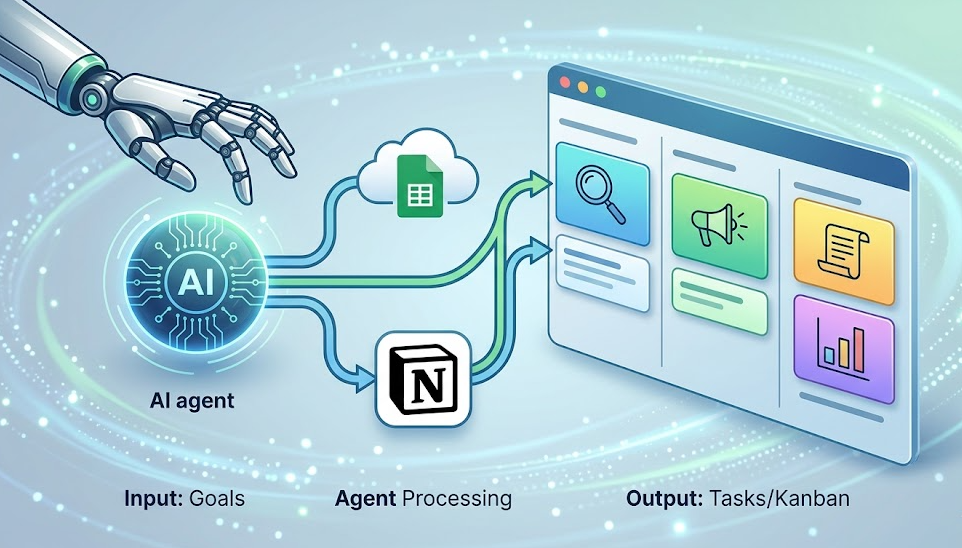
It’s also important to note that you will need to move your task state storage to Notion or Google Sheets because ASCN operates in a sandboxed environment with limited resources. While this limitation requires an initial setup step, the end result will be a powerful task and productivity management tool that will enhance your ability to deliver value to yourself and keep you accountable for getting your tasks done.
How the Automation Works
To start automating your tasks with the Agent, you need to develop your goals and objectives for the use of the Agent. Once all this information has been provided to the Agent, it can now start determining what it is that you want it to automate for you. This is the most critical step because the information you provide to the Agent in this step will determine how well the Agent performs from this point forward.
Starting each day, the agent will produce 4–5 tasks it will automate for you to accomplish independently. Each of these tasks will be designed to help you achieve one or more of your goals and objectives. These 4–5 tasks will consist of various types of work, including research, content creation, writing scripts, and/or analyzing data. Since you will be using the Agent to automate your tasks based on a predefined schedule, you can expect to receive your results without needing to monitor your progress.
The Agent will keep track of the tasks you have completed through a Kanban board that the Agent creates. This will give you the ability to see in real-time how much progress you have made and, the Kanban board helps you manage your work and makes it easier to do so — this is especially important for solo entrepreneurs and founders who want to work most efficiently.
Why Is Automating Your Work More Efficient Than Manually Completing Your Work?
When your tasks are automated, and an agent runs them for you, your productivity increases dramatically. You do not need to plan and manage your daily activities; therefore, you are free to focus on other key business areas, like developing strategies or being more creative with your innovative products or services. This makes sense for solo entrepreneurs and founders, who often do not have time to work on all aspects of their business.
In addition to executing your tasks using the agent, the agent will be able to identify tasks that may have been previously missed and provide suggestions to complete those tasks. Additionally, the agent will create links between your goals and the tasks you need to accomplish in order to achieve those goals, which will increase the chances of completing significant and useful tasks that will benefit your business.
In addition to the advantages listed above, one more important benefit of using a Kanban board is that it improves how well you track your progress. This can help you assess where you are in the process of completing your tasks and allows you to adjust your daily activities in real-time. The transparency of the task management process makes it a more systematic approach to achieving goals that will deliver results.
How Do Users View The Results After Implementing The Kaizen / Kanban?
After implementing a Kanban board, users attribute a significant decrease in time spent performing routine activities while allowing them to spend more time working on strategy development. Additionally, that time is now available for more significant projects and idea development.
Another benefit users experience after implementing a Kanban board is that an agent performs/produces work that they may have otherwise overlooked. Users have found that using the Daily Task Execution Agent will help them spend more time on high-value tasks such as strategic planning and developing new product ideas, since they do not have to spend so much time automating routine tasks. Users have also shared that the Daily Task Execution Agent allows them to create minimum viable products (MVPs) for new products quicker than if they were created manually.
Users have also reported that using a Kanban board to measure and track their completion of tasks allows them to see the progress of their tasks and make adjustments to them in real-time for more efficient project management. Therefore, the process of automation through an agent is significant for completing objectives and improving overall company performance.
Benefits
A Daily Task Execution Agent provides users with many benefits that will encourage higher productivity and efficiency. First, the system creates tasks to meet the user’s business objectives in accordance with his/her priorities, eliminating wasted time, providing more time for time-intensive tasks, such as strategizing, or being creative.
Secondly, as part of the functionality of the agent, an individual will generate a Kanban Board to perform ongoing task management. By creating a Kanban Board, an individual will have access to up-to-date task performance information that can help facilitate work plan changes. The use of a Kanban Board, therefore, provides an individual with the ability to complete a work task in a timely and efficient manner, which is ideal for entrepreneurs and/or business founders, who are primarily focused on improving their productivity.
Combined with the project management capability of the agent is the ability to create mini-apps in order to streamline the performance of standard processes. For example, using the agent, an individual can develop and establish a simple task management application or social media automation. In doing so, an individual will not only be able to optimize their own performance, but will also open up a universe of potential for creating innovative solutions to organization management, which translates into increased productivity. Therefore, the agent provides the user with an incredible opportunity for achieving performance.
Setting Up The Daily Task Execution Agent
In order to successfully launch the Daily Task Execution Agent, there are several simple steps to ensure that the agent is utilized to effectively complete work tasks. The first step is to write down the individual’s objectives and deliver these objectives to the agent. Completed objectives are important to ensure that the agent will develop the appropriate tasks for the user.
Once you have identified your objectives, you will need to determine how to set a daily schedule. Establishing a daily schedule will create a framework for executing and completing tasks, as the agent will execute tasks on the designated date and time every day. You will have the ability to set the time of day for the agent to begin its daily task execution cycle, thereby, creating an immediate workflow.
If you desire to do so, you may also create a Kanban Board to assist in tracking your progress on your tasks. A Kanban Board facilitates performance tracking and monitoring of the performance of a task and, ultimately, will provide you with an efficient environment for managing projects. Consequently, you will be in a position to complete your work more efficiently with the ability to identify priority and implement project management tools through the Daily Task Execution Agent.
