



- Русский
- English
- Português
CreatorCrawl data parser
Automate social media data collection for marketing and analysis using the CreatorCrawl scraper. This AI-based agent allows you to research and audit platforms like TikTok, Instagram, and Twitter in real-time via an integrated API.

Use the CreatorCrawl scraper to automate the collection of data from social media for marketing and analysis purposes.
About CreatorCrawl
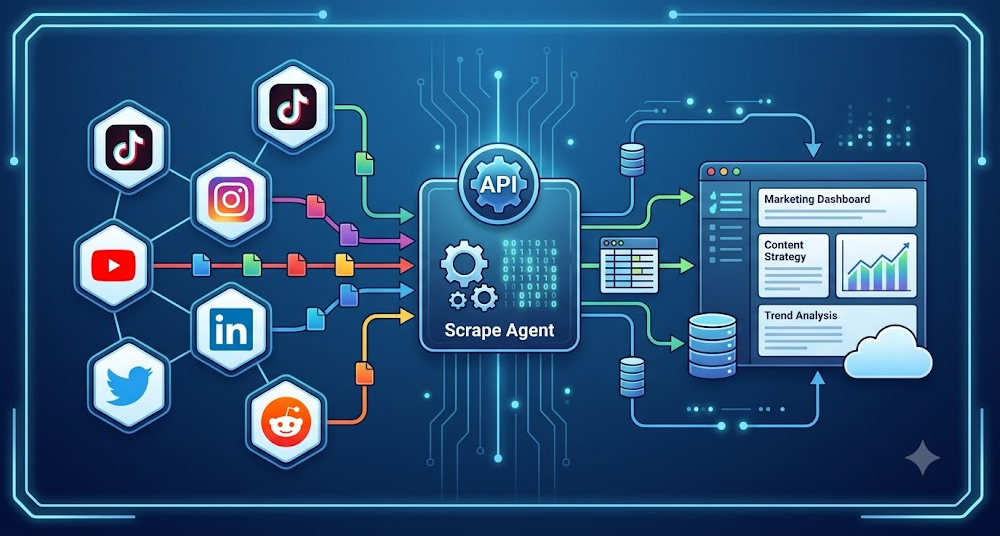
CreatorCrawl is an AI-based agent that enables people to research, audit, and collect data from large social media platforms — such as TikTok, Instagram, YouTube, LinkedIn, Twitter, and Reddit — automatically. These data are then made available through the CreatorCrawl API.
Using real-time data, marketing and analytical professionals can make decisions and refine their social media marketing efforts. For example, when working with the latest data on viral content/hashtags, the ability to quickly adapt to a shift in audience preferences allows for faster updates to promotional materials (in both advertising and content).
How Automation Works
The CreatorCrawl API allows the agent to collect real-time data from the various social media networks, which enables the agent to extract large quantities of data regarding content, trends, and profiles quickly and accurately. Once the CreatorCrawl scrape agent has been set up, any requests for data processing will activate all aspects of the scraper, creating significant efficiencies in workflow.
Another benefit to automation is the ability to schedule regular data collection, allowing for timely and fresh data to be received by marketing and analytical professionals, which, in turn, increases overall work productivity and reduces time spent on routine tasks. As such, marketing and analytical professionals can concentrate on other aspects of the work such as data interpretation and strategic decision-making based on recent data. For example, an agent that uses the CreatorCrawl API to collect popular hashtags through Twitter will assist in planning content that better resonates with customers.
Why It Is Better Than Performing Manual Work
Manually gathering social media content requires significant amounts of time. Marketers and analysts need to stay on top of what's happening in social media and that takes between 40–60 minutes per day. By automating this work with an agent, marketers and analysts save a considerable amount of time, allowing them to put more resources into critical work like analyzing data, and developing strategies.
The agent operates on a schedule which means that data will automatically be collected at specified intervals without any ongoing intervention, making it much easier for users to monitor competitors and trends in real-time. Since many of the tasks automated can easily be done on a regular basis, this dramatically increases productivity and ultimately improves the quality of the analysis. This enables marketers and analysts to utilize data collected when making decisions versus trying to come up with ideas or alternatives.
Compared to information collected manually, automation has been shown to reduce the amount of time a marketer or analyst spends collecting information by more than 50%, making it an extremely attractive option for most professionals.
In addition to saving time, automation also increases the quality of work by providing marketers and analysts with a way to respond to changes in the ever-changing social media landscape.
Results from Actual Users
Users report a significant reduction in the amount of time it takes to collect data as well as improvements in the quality of their analysis as a result of automating their processes using an agent. Marketers and analysts now have access to up-to-date data from social media in real-time without the need to search for the information manually; users can instead spend up to 15 hours a month on more productive tasks such as strategy development or analysis of the data they received.
In addition, automation provides users with higher quality and the overall great increase in the effectiveness of marketing campaigns through speedy adjustments due to the current trends and preferences that change continuously. Having access to the latest information regularly allows marketers and analysts a better understanding of what customers want, and gives them greater insight into their competition. As such, using the agent saves marketers and analysts both time and enhances the overall productivity of their teams.
Implementation Examples
Although no specific examples of implementing the CreatorCrawl data scraper are available, based on the implementation experience in general, there are many areas where the CreatorCrawl data scraper has proven to be necessary in practice. Marketers and analysts can use the agent to automate social media monitoring. Marketers and analysts receive timely updates regarding current trends and competitive products without manually collecting data. For example, many professionals who performed this process with automation indicated that making decisions using only the current data available was much simpler than in the past when they used manual collection to evaluate the information.
Users can focus on the more strategic aspects of their work because they have spent less time collecting large amounts of data. Data could be collected on viral materials and current hashtags, allowing marketers and analysts to make faster, more accurate decisions based on real-time data from the social media marketplace. The addition of the CreatorCrawl data scraper to the workflows of marketers and analysts contributes to improved analysis quality and productivity, especially.
What You Get
With CreatorCrawl Data Scraper, you can build amazing opportunities for marketers and analysts alike. The latest data from six topmost social platforms would help them respond quickly to changes in trends and audience preferences. This is key to both planning an effective marketing strategy and getting targeted advertising campaigns up and running.
Secondly, the system allows automated report generation for content and trends queries. What this means is the platform allows the users to be sent regular updates without this pertaining to manual information collection, thus saving much time and resources. Automated reports free up time to be spent on data analysis rather than gathering it, augment overall team productivity. For instance, generating competitive advantage reports becomes easier and faster, thus allowing a rapid adjustment to market changes.
Furthermore, constant access to the latest bits provides insightful market and competitor awareness. This creates an informed decision-making atmosphere, leading to strategic adaptations responding to changing audience behavior. In a more practical sense, this shows that the CreatorCrawl data scraper automates not just data procurement but hugely improves the quality of analysis and strategy planning in marketing.
Launching Instructions
To work with the CreatorCrawl data scraper, follow some very basic steps. First, use the command: npx skillkit@latest install creatorcrawl/creatorcrawl-skill to install the template. This command will automatically download and install everything needed for your agent to start working with the CreatorCrawl API.
After installing, data source configuration should take place. You will require an API key obtainable at creatorcrawl.com. This key accesses the latest data updates for social networking. Be certain all parameters are properly set so that your agent can successfully work through the API and get the required data. It would also be wise to check out the actual API documentation before using or implementing any of the features.
After doing this, you will be able to activate the system quickly and start automated data collection from popular social platforms. This will ease a lot of work for you, making the data analysis efficient while allowing focus on more important tasks.
