



- Русский
- English
- Português
Back to templates
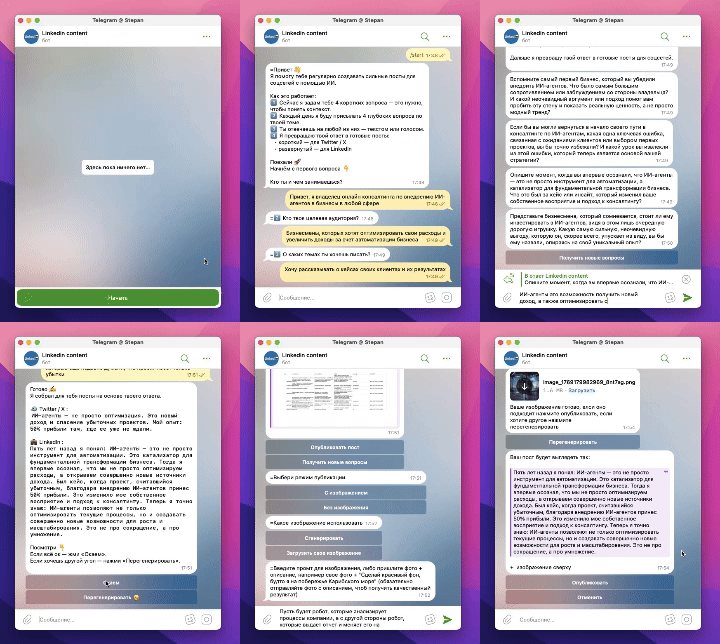
AI agent in Telegram for blogging on LinkedIn
An AI agent turns your thoughts (from chat or voice) into image posts and publishes them on LinkedIn and X/Twitter on autopilot

Created by:

David K.
Last update:
12 December 2025
Categories
Turnkey
Not sure how to set up an AI agent?
Pay for a subscription and get setup training as a gift. Learn how to prepare the agent to work on your tasks.


If you have questions about the template or want to launch it for the best results, contact us and we'll help you set it up quickly

FAQ
Still have a questionDo I need coding skills to set up this template?
No coding skills required! This template is designed for no-code users. Simply follow the step-by-step setup guide, connect your accounts, and you're ready to go.
How does this template help maintain data security?
All data is processed securely through official APIs with OAuth authentication. Your credentials are never stored in the workflow, and you maintain full control over connected accounts and permissions.
What is a module?
A module is a single building block in the workflow that performs a specific action — like sending a message, fetching data, or processing information. Modules connect together to create the complete automation.
Can I customize the template to fit my organization's specific needs?
Absolutely! You can modify triggers, add new integrations, adjust AI prompts, and customize responses to match your organization's workflow and branding requirements.
How customizable are the AI responses?
Fully customizable. You can edit the AI system prompt to change the tone, language, response format, and behavior. Add specific instructions for your use case or industry terminology.
Will this template work with my existing IT support tools?
This template integrates with popular tools like Gmail, Google Calendar, Slack, and Baserow. Additional integrations can be added using available API connectors or webhooks.
What if my FAQ knowledge base is empty?
No problem! The template includes setup instructions to help you populate your FAQ database with commonly asked questions and answers. Start small. As new questions arise, you can easily add more FAQs over time.
Is there a way to track unresolved issues that require follow-up?
Yes! You can configure the workflow to log unresolved queries to a database or spreadsheet, send notifications to your team, or create tickets in your issue tracking system for manual follow-up.
What if I want to switch from Slack to Microsoft Teams (or another chat tool)?
Simply replace the Slack module with a Microsoft Teams or other chat integration module. The core logic remains the same — just reconnect the input and output to your preferred platform.