



- Русский
- English
- Português
Competitor Price Watch: daily competitor price monitoring in Telegram
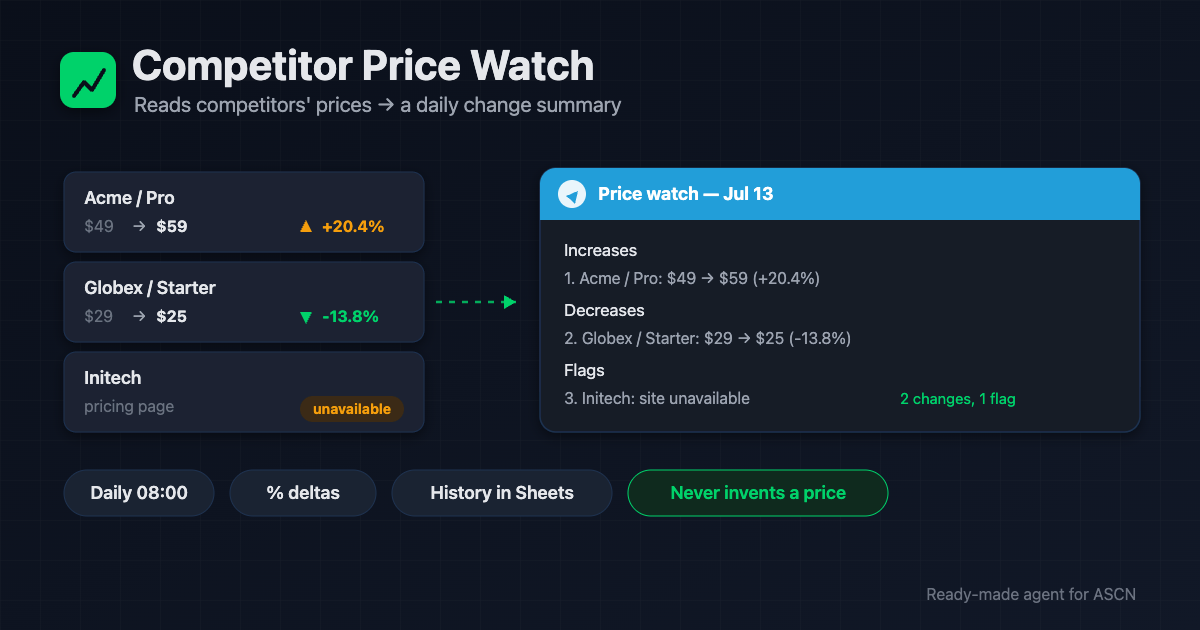
Every morning the agent reads competitors' pricing pages, compares to yesterday, and sends a change summary with % deltas. Facts only, history in Google Sheets.

For new users: your first ASCN subscription payment doubles the term. [Use template] [Ask a question]
Overview
Checking competitor prices by hand is 30–60 minutes a day across a dozen sites. Within a week everyone quietly stops, and a competitor's price cut goes unnoticed for months — after customers have already left. Competitive-intelligence tools cost $50–300/month and are often bloated.
Competitor Price Watch is a ready-made AI agent for the ASCN platform that watches prices for you:
- 🔎 Reads competitors' pricing pages every morning — from your list
- 📊 Compares to yesterday and computes the change in percent
- 🔔 Sends a short Telegram summary — who, what, was → became, delta %
- ✅ Says "No changes" when nothing moved — no noise
- ⚠️ Flags an unreachable site or an unreadable price — it never invents a number
You run it in plain chat. Your competitor list and full price history live in your Google Sheet.
How the agent works
No coding. You run everything from a chat.
- Install from the marketplace. Open the page, click "Use template" — the agent is in your account in under 5 minutes.
- Give it the competitor list. Name + pricing-page link + what to track. The agent saves it to a Google Sheet.
- Connect services in chat. Google Sheets and Telegram in one click. For JavaScript-heavy sites you can add the Firecrawl parser.
- The agent test-reads the pages. It confirms it can see prices on each one and stores the first snapshot as a baseline.
- Then it runs automatically. Every morning at your chosen time you get a change summary, or a short "No changes ✅".
Why it beats checking by hand
- Zero missed changes. The agent checks daily, no weekends off, no fatigue — a competitor's move won't slip past.
- 30–60 minutes a day back in your schedule. The routine goes to the agent; you get a ready summary.
- One subscription instead of an intel tool. Monitoring tools run $50–300/month. The agent covers it for the price of a plan.
- Facts and history only. Every number links to its source with a date; the full trend lives in your sheet.
- Quiet when it's quiet. No changes → one line. The agent doesn't manufacture noise.
What users get
Across setups, the agent replaces 30–60 minutes of daily manual checking with a short morning summary and catches price changes the same day instead of weeks later.
The value depends on how price-sensitive your niche is and how fast you react. The agent delivers timely facts — deciding what to do with them is yours.
Adoption snapshot
SaaS company — subscription product
- Connected: Google Sheets, Telegram, 8 competitors
- Result: a morning summary of plan changes, a flag when a competitor drops below you
- Effect: same-day reaction to a price cut instead of "found out a month later"
Online store — electronics
- Connected: Google Sheets, Telegram, Firecrawl for JS pages
- Result: price control on 20 key products across 5 competitors
- Effect: about 40 minutes a day saved on manual checks
Online school — courses
- Connected: Google Sheets, Telegram, 6 competitors
- Result: an alert when competitors start a sale
- Effect: own promotions launch on time, not in catch-up mode
Figures are illustrative — an expected effect for the niche, not a guaranteed result.
What's included
- A ready-configured agent: role, rules, and three skills (read prices, compare, report) already written.
- A price-history sheet: the competitor list and full day-by-day history in your Google Sheets.
- A controlled daily summary: a short Telegram report or "No changes", with flags for unreachable sites.
- Flexible rules: a change threshold, markers for big moves and for prices below yours.
- Personal manager and community: setup help on the Personal plan and above.
While competitors quietly change prices, be the first to know — every morning, before your first coffee. 🔥🔥🔥
Set the list once — and the agent brings you the change summary while you run the business.
FAQ
Do I need coding skills?
No. The agent installs from the marketplace and is set up in plain chat: give it the competitor list, and it connects services and takes the first price snapshot.
How does the agent read prices?
Through built-in web reading — like a normal visitor, but automatically. For JavaScript-heavy sites you can connect the Firecrawl parser. Prices behind a login are off-limits.
What if a site is down or a price can't be read?
The agent flags "⚠️ unavailable" and retries tomorrow. It never invents a number or passes yesterday's price off as today's.
Do I need paid keys?
No. Built-in web reading and Telegram are free. Firecrawl is optional, only for tricky JS pages.
How many competitors can it track?
Effectively unlimited — the agent processes the list in batches. More pages means a longer run and higher usage; you set the scope.
How is my data kept safe?
Keys live in an encrypted vault and never reach chats or logs. Each agent is isolated, and you can revoke any service at any time.
Does it give pricing advice?
No. The agent reports factual changes. Deciding how to respond stays with you.
Use template · Ask a question · Order a done-for-you setup
