



- Русский
- English
- Português
Setting up and developing a custom AI assistant based on OpenAI and ChatGPT
A detailed guide to creating custom OpenAI assistants for deep crypto market analytics and business process automation. This article covers setting up Function Calling, working with the knowledge base, and integrating real on-chain data using practical case studies from ASCN.AI.

For several years now I have worked with AI technology specifically in relation to cryptocurrencies. While many people are probably familiar with a personal OpenAI assistant as something straightforwardly similar to ChatGPT but presented in a different manner; they are wrong! A well-built assistant with its own set of tools is more than just another co-worker. It is also an analyst with no hours of operations.
That assumes you know how to connect it correctly; otherwise, you won't be able to take advantage of these capabilities. Let us explain how you would properly establish a customized OpenAI assistant to get the full benefits from it.
Customized OpenAI Assistant
A Customized OpenAI assistant is defined as a GPT-based AI agent/assistant that has been defined and developed with the capabilities or functions necessary to support specific workflow activities or task requirements of an organization based upon the overall business competency of the organization and an organization's business rules. Unlike generalist services that exist with a standard solution like ChatGPT which has a vast amount of general knowledge, a customized OpenAI assistant uses only that type of knowledge that is based upon your organization's specific business / operational processes and procedures. To illustrate the difference: ChatGPT is a general consultant who has some knowledge about almost all companies; a customized OpenAI assistant is essentially an expert in its own right as it relates to executing your organization's business processes based on the accessibility of your organization's data, system, and knowledge (within your definition of success) in support of organizational goals.
A customized OpenAI assistant provides the following core capabilities:
- Function Calling - Invoking (calling) a function via a provided API that is necessary to the execution of a workflow activity;
- Knowledge Retrieval - Accessing either documents or structured data that has been uploaded either to a website or to a document repository (e.g., SharePoint);
- Code Interpreter - Executing (running) Python code to either process/transform data or do some other function in support of workflow execution;
- Custom Tool Integration - Integrating external service(s) or source(s) of data/information with your organization's business operations;
- Conversational Memory - Maintaining context throughout the course of an interaction with the assistant.
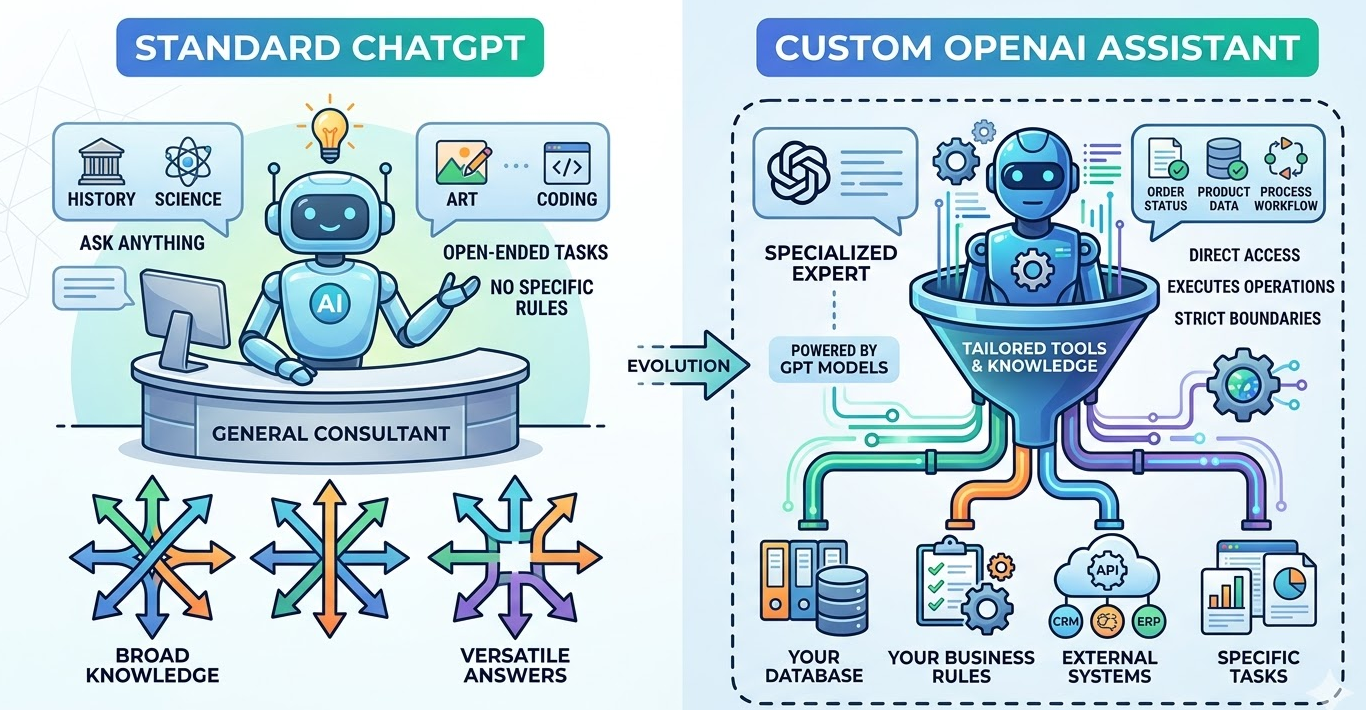
The ASCN.AI team created a crypto-assistant based on these very principles. We don't rely on publicly available internet data; we "bolted on" tools that analyze on-chain data, DEX metrics, and process sentiments from Telegram. The assistant doesn't just answer questions—it references real-time blockchain data, analyzes wallet activity, and aggregates signals from various sources. The key difference is that custom assistants transform from reactive chatbots into proactive agents capable of executing tasks and making decisions based on up-to-date data.
According to OpenAI documentation, assistants with properly configured tools perform tasks 3-4 times more effectively than those using text prompts alone. Why? Because they don't hallucinate answers—they verify data through function calls.
Core Components and Tools for Creating an AI Assistant
To build a functional OpenAI assistant, we need four basic components.
Assistant Configuration Layer
In this layer, the "personality" and limitations are defined. You configure: System Instructions (how the assistant should behave and what specialized skills it can perform) and Model Selection (GPT-4, GPT-4 Turbo, etc.).
-
Temperature and response style
-
File access permissions
Tool Integration Framework
Tools expand the robot's capabilities beyond text:
|
Tool Type |
Task |
Use Case Example |
|
Function Calling |
Executing API operations |
Get wallet balance, initiate a trade |
|
Code Interpreter |
Running Python code |
Transaction analysis, report generation |
|
Knowledge Retrieval |
Processing uploaded docs |
Searching internal knowledge bases |
|
Custom Tools |
Interacting with external services |
Updating CRM, querying databases |
Thread Management System
This supports dialogue context—all messages within a single "thread" are saved, allowing the assistant to reference previous points.
Run Execution Engine
With every new request, the assistant creates a "run"—a processing chain:
-
Input analysis
-
Identification of necessary tools
-
Sequential function calling
-
Final response assembly
A concrete example: for on-chain analysis, ASCN integrated three tools:
-
Ethereum node API for live transactions
-
DEX aggregator for prices
-
Telegram channel sentiment parser
The assistant decides which tool to call: if asked about "whale" activity, it uses the on-chain tool; if asked about market opinion, it uses Telegram data. Technically, the OpenAI Assistants API is the mechanism that manages all of this. Your job is to describe the tools and their schemas; the model's job is to decide when and how to use them. This is fundamentally different from traditional chatbots with rigid scripted code.
Step-by-Step Guide to Setting Up and Developing a Custom Assistant via OpenAI API
Before writing code, set up your development environment and get API access.
Step 1: Create an OpenAI account and get API keys
Go to platform.openai.com, register, and generate a secret key in the API section. This key authenticates your identity for requests.
Security tip: do not store keys directly in the code. Use environment variables or secret managers.
# Example for .env (do not commit to public repositories)
OPENAI_API_KEY=sk-proj-xxxxxxxxxxxxxxxxxxxxxxxx
Step 2: Development environment setup
pip install openai
Initialize the client:
from openai import OpenAI
import os
client = OpenAI(api_key=os.environ.get("OPENAI_API_KEY"))
Step 3: Verify API access
response = client.chat.completions.create(
    model="gpt-4-turbo-preview",
    messages=[{"role": "user", "content": "Connection check"}]
)
print(response.choices[0].message.content)
If you received a response—everything is ready. Authentication errors? Try regenerating the key.
Typical setup issues:
-
Using an old key format (starts with sk- but is deprecated).
-
Low balance or missing credits—check billing.
-
Regional restrictions—sometimes a VPN helps.
At ASCN.AI, we started on the free tier with a 3-request-per-minute limit. For real-world tasks with streaming data, we upgraded to a "pay-as-you-go" plan with a limit of 10,000 requests per minute. Conclusion: plan your infrastructure ahead of time.
Creating the Base Assistant: Parameters and Concepts
Now that the environment is ready, let's create the assistant.
Step 1: Define the assistant's goals
Before coding, think about:
-
What tasks will the assistant solve?
-
What data sources does it need?
-
What should be autonomous and what requires human control?
Our example: "Analysis of crypto projects based on on-chain data, social signals, and market metrics—without investment advice."
Step 2: Create the assistant via API
assistant = client.beta.assistants.create(
    name="Crypto Analysis Assistant",
    instructions="""You are an expert in cryptocurrency projects.
Analyze on-chain data, social sentiment, and market metrics.
Do not give investment advice or price forecasts.
Always state data sources and confidence levels.""",
    model="gpt-4-turbo-preview",
    tools=[
        {"type": "code_interpreter"},
        {"type": "retrieval"}
    ]
)
print(f"Assistant created with ID: {assistant.id}")
Key Parameters:
|
Parameter |
Purpose |
Example |
|
name |
Assistant name |
"Crypto Analysis Assistant" |
|
instructions |
System prompt defining behavior |
Operation manual |
|
model |
GPT model version |
"gpt-4-turbo-preview" |
|
tools |
Connected tools |
code_interpreter, retrieval, function |
|
file_ids |
Attached knowledge bases |
List of File IDs |
Step 3: Configuring assistant behavior
The instructions field is the primary control element. In it, you define:
-
Scope of responsibility (what to do and what not to do)
-
Response format
-
Data processing rules
-
Risk boundaries
A working example from ASCN:
instructions = """Role: Crypto project analyst. Data sources: on-chain metrics, Telegram channels, DEX data. Output format: structured analysis with sources cited. Limitations: no financial advice, no price forecasts. Risk handling: flag low-confidence data, require verification for legal questions."""
The assistant follows strict constraints and does not deviate from them until you change the config. It's important to understand—this isn't just a prompt; it's architectural control.
Typical configuration mistakes:
-
Too broad instructions, like "analyze everything about crypto."
-
Lack of safety rules and data verification.
-
Unclear hierarchy of sources—conflicting data processing.
OpenAI Assistant Setup: Steps and Recommendations
After creating the assistant, you need to set up dialogue management and message processing.
Step 1: Create a thread for the current dialogue
A thread stores the history and context. Create a separate thread for each user:
thread = client.beta.threads.create()
print(f"Thread created: {thread.id}")
Save the Thread ID in your database to refer back to it for each user request.
Step 2: Send messages to the thread
For example, a user asks:
message = client.beta.threads.messages.create(
    thread_id=thread.id,
    role="user",
    content="Analyze on-chain activity for Ethereum address 0x742d35Cc6634C0532925a3b844Bc9e7595f0bEb"
)
Step 3: Run the processing cycle (run)
This triggers the assistant's processing:
run = client.beta.threads.runs.create(
    thread_id=thread.id,
    assistant_id=assistant.id
)
Step 4: Wait for the run to complete
Since processing is asynchronous, check the status:
import time
while run.status in ["queued", "in_progress"]:
    run = client.beta.threads.runs.retrieve(
        thread_id=thread.id,
        run_id=run.id
    )
    time.sleep(1)

if run.status == "completed":
    messages = client.beta.threads.messages.list(thread_id=thread.id)
    print(messages.data[0].content[0].text.value)
Performance considerations:
-
Depending on tool calls, a run takes between 5 to 30 seconds.
-
External API calls add latency.
-
The Code Interpreter times out after 120 seconds.
Optimal architecture:
Request → Create message → Start run → Check status →
↓
If action required → Execute function → Submit result → Continue run
↓
If completed → Get response → Return to user
Our experience: in the first version of ASCN, we forgot about timeouts. During market crashes, runs would freeze, and users thought the system was broken. We added a 45-second timeout with graceful degradation—on tool failure, we provide a cached answer with a warning.
Development with OpenAI API: Key Challenges and Code Examples
Let's move to creating a real assistant that can call functions and handle complex tasks.
Full working example: Crypto Wallet Analyzer
from openai import OpenAI
import os, json, requests

client = OpenAI(api_key=os.environ.get("OPENAI_API_KEY"))

def get_wallet_balance(address):
    """Queries Ethereum wallet balance via Etherscan API"""
    api_key = os.environ.get("ETHERSCAN_API_KEY")
    url = f"https://api.etherscan.io/api?module=account&action=balance&address={address}&tag=latest&apikey={api_key}"
    response = requests.get(url)
    data = response.json()
    if data["status"] == "1":
        balance_eth = int(data["result"]) / 1e18
        return {"address": address, "balance_eth": balance_eth}
    else:
        return {"error": "Invalid address or API error"}

assistant = client.beta.assistants.create(
    name="Wallet Analyzer",
    instructions="You analyze Ethereum wallets using on-chain data. Always provide exact balances without speculation.",
    model="gpt-4-turbo-preview",
    tools=[{
        "type": "function",
        "function": {
            "name": "get_wallet_balance",
            "description": "Gets the ETH balance for a specific wallet address",
            "parameters": {
                "type": "object",
                "properties": {
                    "address": {"type": "string", "description": "Ethereum wallet address"}
                },
                "required": ["address"]
            }
        }
    }]
)
Explanation:
-
Assistant receives a question about wallet balance.
-
GPT-4 understands it needs to call
get_wallet_balance. -
Run status changes to
requires_action. -
Function call is triggered with arguments.
-
Result is returned to the run.
-
Assistant builds a response based on factual data.
Best practices for function calls:
-
One function—one task.
-
Return structured JSON, not plain text.
-
Handle errors—don't return a "naked" failure.
-
Document parameters in detail.
-
Test on edge cases and invalid data.
Integrating Custom Tools and Plugins into the AI Assistant
OpenAI assistants support three standard tool types and an unlimited number of custom functions. To achieve performance and stability, it's vital to understand their purposes.
1. Code Interpreter
Executes Python in an isolated environment.
-
Tasks: Data analysis/visualization, mathematical calculations, processing files (CSV, JSON, Excel), report creation.
-
Limitations: No network access (cannot call external APIs), 120-second timeout, only standard and data-science Python libraries available.
2. Knowledge Retrieval (File Search)
Searches for answers in uploaded documents using semantic search.
-
Tasks: Querying internal knowledge bases, answering questions from documents, finding procedures/policies, historical context.
-
Limitations: Max 20 files (512 MB), search quality depends on content, no complex database queries.
3. Function Calling (Custom Tools)
Triggers your own code via API.
-
Capabilities: Arbitrary external API calls, database queries, starting business processes, third-party service integration.
Function Calling in GPT-4: How to Use and Configure
Function calling transforms GPT from a text generator into an executor of specific actions. The model generates JSON with the function structure and arguments, your server executes the call and returns the response, and GPT incorporates the data into the final answer.
Core process:
User Input → GPT Analyzes → Identifies Function →
Returns JSON with name + parameters → Your code executes →
Returns Result → GPT builds response
Why function calling is superior to other methods:
|
Approach |
Limitation |
Function Calling Advantage |
|
Prompt Engineering |
Model hallucinates data |
Calls real API, factual data |
|
External Script |
No conversation context |
Model decides when to call the function |
|
Hard-coded Logic |
Inflexible and hard to maintain |
Model adapts to user requests |
Automating AI Agents and Workflows with Custom GPTs and Tools
Automation shifts the assistant from reactive to proactive mode:
-
Activators (triggers) based on time, event, or condition.
-
Autonomous decision trees.
-
Multi-agent orchestration.
-
State management.
Case Study: No-Code Solution (ASCN.AI NoCode Platform)
For non-programmers—a visual script constructor based on OpenAI.
Structure example:
[Trigger: New message in Telegram] → [AI Agent: Message intent analysis] → [Logic: If intent = "token_analysis"] → [Tool: Call OpenAI assistant with custom functions] → [Action: Send report to Telegram].
"The NoCode platform allows you to set up complex AI auto-scenarios in minutes without a programmer." — ASCN.AI NoCode Team.
Frequently Asked Questions (FAQ)
How to expand an assistant's functionality?
Add native tools, custom functions, integrate third-party services, and expand knowledge bases through documents. Grow functionality according to user needs.
What are the limitations of OpenAI custom assistants?
Technical: response time limits, max run duration, context window size, recursion risks in calls, API rate limits. Functional: no direct database access; runs don't necessarily save state; output is text-only; limited real-time interaction.
How to test and debug integrations?
Test at multiple levels: Unit tests for functions, Integration tests for the assistant, and End-to-end scenarios. Maintain detailed logs, verify responses, and trace function calls. Fix typical errors with schema validation and timeouts.
