



- Русский
- English
- Português
Automating your podcast from production to publishing
This article explores how automation can streamline the entire podcasting workflow, from initial research and scriptwriting to post-production and social media promotion. It demonstrates how solo entrepreneurs and marketers can save over 15 hours a month by eliminating repetitive tasks while significantly enhancing content quality.

Using automated podcast production from start to finish (from research through to uploading) can be an effective way to improve your creation process.
Overview
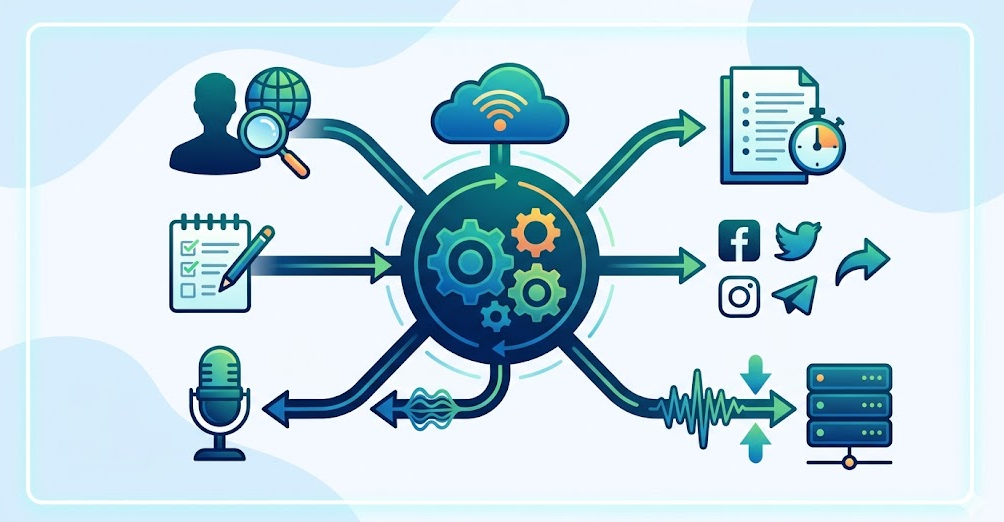
Through automation, you can manage all aspects of creating your podcast: finding a topic, writing your show scripts, creating show notes, promoting on various social media platforms (Facebook, Twitter, Instagram), etc. This solution is ideal for solo entrepreneurs and digital marketers who are trying to create an efficient workflow while producing their shows.
Automating every aspect of the podcast creation process allows you to spend less time completing repetitive, routine tasks, which contributes to improving the overall efficiency of podcast creation. This is why you receive what we refer to as a complete package of podcast materials (research, scripts, show notes, social media posts, etc.) when using this type of solution. By saving time and enhancing the quality and value of podcast content for all listeners, this solution meets the needs of today's competitive podcast market.
Copy with modification. Transcription requires Whisper API (or equivalent) (approximately $0.006/minute). All other aspects of finding and generating audio content can be accomplished within ASCN.
How Pod Automation Works
Using a multi-stage sequential process, Pod Automation allows you to greatly reduce the amount of time you spend creating podcasts, as well as simplifying many of the steps of the content creation process. For example, when using Pod Automation, in Stage 1, the Pod Automation system automatically generates your research and your episode planning prior to you recording your show. Stage 1 consists of conducting research on your episode's topic, developing any interview questions you may want to use during recording, creating an outline for your episode, and so forth so you show up to record with materials you can use right away.
Once you have recorded your episode, the system will automatically generate show notes for your episode and promotional content you can post on social media that will promote the episode. The show notes will include a list of the major topics that were discussed during the show (along with timestamps for each topic) as well as any resources mentioned during the show, thus significantly enhancing the listener experience. The promotional content you will receive will allow you to easily promote your new episode via multiple social media platforms. Competitor monitoring, when desired, enables you to keep track of new episodes of podcasts in your market niche. You will know what's currently trending and will have the opportunity to update your content to respond to the trends, and may lead to more people seeking out your podcast.
Why It's More Effective than Manually Doing It
Podcast automation has made it much easier for users to automate the repetitive tasks associated with podcasting, allowing you to free up more time for your creative process. Consider the amount of time you spend researching topics and creating content — both of which can take many hours, and now these same tasks can be done in a matter of minutes. If you were to do this five times per week, you would be able to free up 60 minutes per day (which equates to over 15 hours per month) for you to record your podcast or improve the quality of your podcast.
Another benefit of automation is that it reduces the amount of time spent on preparing show notes and writing social media posts. The time you would have spent writing or editing is now saved since your automation software generates ready-to-use material for you. This is very advantageous for an entrepreneur working solo or in a small team, since every hour counts.
When you are free to focus on your podcast versus working on the content of your podcast, you will have a greater ability to interact with your guests and the topics being discussed, thus increasing the overall value of your content to your listeners. Furthermore, by saving time, podcast automation provides an opportunity for users to increase the quality of their podcast. This leads to increased growth in your audience and more interest in the projects that you are doing.
What Results Users Achieve
Overall, podcast automation users experience a substantial decrease in the time needed to prepare for their podcast. Automation has enabled solo entrepreneurs and small teams to prepare podcast materials effectively and efficiently to help relieve any stress related to that process. Users comment that with the help of their podcast automation software, they can stay active on social networks like Telegram, allowing them to provide timely updates to their audience regarding new releases and other news regarding their podcast.
Users also report a dramatic decrease in time spent preparing for each of their episodes, enabling them to spend more time on recording and creative development.
Implementation Examples
Examples of how automated software has been implemented are not presented here; however, general trends/reporting of benefits seen by other users would be useful to note. Through automation, marketers and solo entrepreneurs can cut down on the time it typically takes to prepare to produce their podcast. Users report that automation results in topics and notes being produced for their episodes much faster and easier than ever before. For example, some individuals choose to use automation to create posts for Telegram, which allows them to rapidly communicate with their followers regarding new episodes or updates to their show. This helps them to keep their content fresh and retain their audience.
Automation also creates an easy and efficient infrastructure for developing and uploading podcasts, removing many of the stressful factors involved with the entire process. Users can utilize automation to identify current trends and respond to them more effectively, thereby increasing the value of their content.
What You Get
By using podcast automation, you receive an all-inclusive set of resources that greatly reduce the amount of time needed to create content. This includes things like research on topics or writing scripts so you’re prepared to record. The system also provides you with show notes containing the significant talking points of the episode with timestamps that your listeners will find useful.
In addition, you receive social media posts to effectively promote your new episodes. There are enhanced episode descriptions to facilitate better visibility for your episodes when listed on platforms such as Spotify and Apple Podcasts. Therefore, your content has the potential to attract new listeners.
Thus, not only are you receiving completed resources, you are also benefiting from an automated system designed to save you time and effort so that you can focus on creating the creative elements of creating a podcast, which is extremely important for marketers and solopreneurs seeking to improve the quality of their content and increase the amount of engagement from their listeners.
Launch Instructions
To launch your podcast automation effectively, you’ll have to follow these simple steps that facilitate optimizing your content creation process. First, you will have to set up an agent to create: research on your episode and an episode outline prior to recording your podcast. This allows you to know what information you need about your episode topic and the guests that will be appearing on your episode.
Next, after you’ve finished recording your episode, you’ll use the agent to produce show notes and marketing material to promote your podcast episode. The time spent developing these materials will be reduced significantly, because the agent will automatically process your audio file into a transcript then utilize this information to generate the various items used to promote the episode. Be sure to save all of your completed materials in a format that can be used in the future as needed.
You may wish to add some monitoring to your competitors’ RSS feeds. By doing this, you’ll stay current on new episodes released by your competition and will be able to respond to topics of interest in an expeditious manner. Through setting up monitoring, you’ll be more in touch with the industry and be more enjoyable for your audience.
