



- Русский
- English
- Português
Automate daily keyword research with Google Sheets, Suggest API & Custom Search
ASCN.AI provides a fully automated keyword research process that integrates real-time Google Search Suggest data directly into your Google Sheets. This tool helps SEO professionals cut manual research time by 80% and significantly reduce costs while maintaining fresh, structured data for content planning.


ASCN.AI has a fully automated keyword research process that reads from your Google Sheets and uses the Google Search Suggest API to find real-time autocomplete data, gets lookup data on each result returned and puts all that data back in your Google Sheets, every day, automatically. Set up takes 47-72 hours and costs from $59 per month depending on your needs.
The Manual Process of Doing Keyword Research
Doing keyword research manually is very time-consuming. The majority of SEO professionals spend 10 to 15 hours per week on keyword research. First, they go to Google and type in their "seed" keyword. After looking at the Google Suggest results to find good keywords to use, they copy and paste them into a spreadsheet. Then they repeat this process until they reach 20 keywords. They then have wasted an hour on keyword research, and by the time they are finished, their data is already out of date.
Automating SEO processes
Automating SEO processes with awesome keyword research automation increases the productivity of an SEO team by as much as 300%. According to Search Engine Journal, the amount of time an SEO professional spends on keyword research can be cut by as much as 80%, according to Marketo. One SEO professional went from 15 hours of keyword work per week to just two. He went from 200 keywords researched to 600 keywords researched after implementing automated keyword research.
Currently, 70% of the top 100 ranked sites are using automated keyword research. That means only 30% are still using manual methods.
ASCN.AI places you in the automated group. ASCN.AI does not require any coding skills to perform keyword research and there is nothing advanced to know to run your automations.
ASCN.AI Automates Your Keyword Research Process in Four Easy Steps
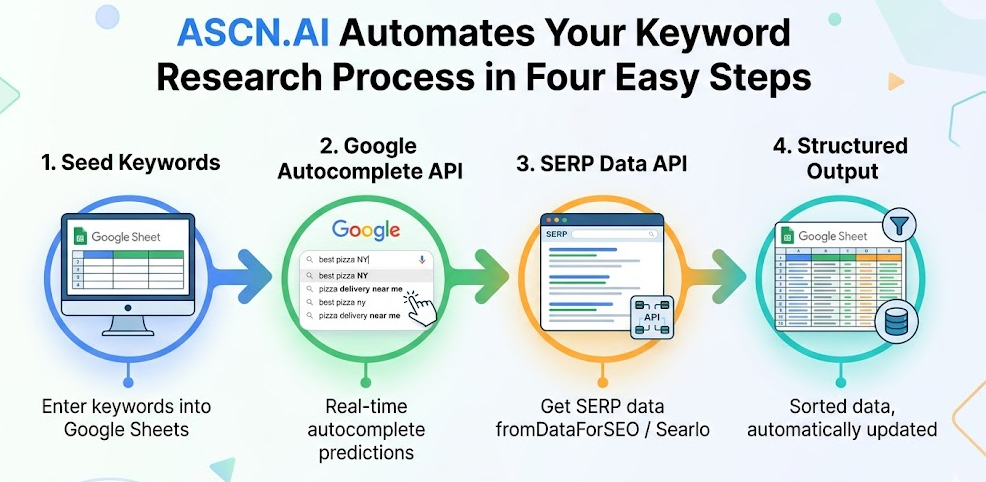
Step 1 – Enter Your Seed Keywords Into Google Sheets
In order to properly execute an automation script, first you must create a list of keywords (the list can contain up to 100 keywords - starter plan) then select which keyword to pull based on rotation logic - pull once a day with cycling through all of your keywords before repeating.
Step 2 – Google Autocomplete API (via Google Search Suggestions)
After selecting a keyword you will get a call to Google Autocomplete API (via Google Search Suggestions) providing you with the ability to get the most current ("real-time") predictions from users typing into Google.
Step 3 – SERP Data API (DataForSEO or Searlo)
For every Google Autocomplete suggestion returned by the Google Search Suggestion API for the selected seed keyword, you will call DataForSEO or Searlo to pull the actual SERP data - namely, page titles, URLs, and text snippets from the top ranking pages returned by Google.
As of January 1, 2026, Google will shut down the Google Custom Search JSON API to all customers - you have until then to make the transition to either DataForSEO or Searlo and will get richer (search volume/difficulty) and cheaper data from either source ($0.58/1k vs $5/1k).
Step 4 – Structured Output to Your Spreadsheet
Where the work lands in your spreadsheet: you will receive/see the date pulled, seed keyword, Google Autocomplete suggestions, page titles, URLs, text snippets from the SERP data, and then deduplication will be done automatically. You will have everything you need (data) for content planning when the data arrives.
Manually vs Automated Keyword Research: The Comparison
As it stands ($50/h as of 1/7/21), when estimating the costs of your keyword research tracked manually, it costs $2,000 ($50/h * 10h/wk * 4wks) - this same process performed via automation within ASCN.AI will cost you $59/month (significantly less than you currently pay). Below is the raw data supporting the comparison of manual versus automated keyword research.
| Metrics | Manual Keyword Research | ASCN.AI Automated Keyword Research |
|---|---|---|
| Time | 10-15 hours/week | <1 hour (review time only) |
| Keywords | 5-20/day | 50-500+/day |
| Data Freshness | Whenever you get to it | Daily, by schedule |
| Output Format | Adhoc | Inconsistent | Varies | Structured | Consistent | Uniform |
| Cost | $500-1,500/month | Starting at $59/month |
For Whom Is This Tool Designed?
SEO professionals & content marketers with several clients - daily reports of consumable, usable data without having to do client specific work.
Bloggers/Independent Authors seeking to establish topical authority - get every angle on your unique niche.
Digital Agencies on Professional plan: many sheets for input (1 per client), audit trail via time stamps for monthly reports.
eCommerce companies: one client realized 142 competitor keywords which had high competition - after they targeted these keywords their organic traffic increased 37% in three months.
Pricing & Timeline
It takes approximately 48 hours after our consultation call to set up this application/service.
Starter Plan - from $59/month: The starter plan is intended to provide you with daily keyword research for up to 100 seed keywords and export your data to Google Sheets - API costs of these services are included in this plan.
Professional Plan - custom pricing: The Professional Plan will provide you with a custom price based on your specific needs and includes: multiple input sheets; thousands more for API enrichment (volume; CPC, difficulty) than the starter plan; the capacity for exporting your data to many different formats; and the cost of these services will include all API usage costs.
FAQ
Q - Is Google Search Suggest API free?
A - There is no upfront or per-query cost associated with using the autocomplete endpoint of Google Search Suggest API and the implementation of ASCN.AI provides proper rate limiting. As a fully supported alternative, DataForSEO's autocomplete API is available for you to use.
Q - What happened with the Google Custom Search JSON API?
A - Google has closed to new customers as of January 1, 2026. All current customers must migrate away from the Google Custom Search JSON API by January 1, 2027. ASCN.AI will use either DataForSEO or Searlo - each offers greater value and richness than the Google Custom Search JSON API.
Q - Do I need technical knowledge to use ASCN.AI?
A - No, ASCN.AI will take care of everything you need to run ASCN.AI and you will only work directly with your Google Sheet.
