



- Русский
- English
- Português
Automate invoice processing with GPT-4o classification and XML export to accounting
ASCN.AI leverages GPT-4o to automate the scanning, structuring, and validation of invoices for seamless integration with accounting systems like QuickBooks, SAP, and Xero. By eliminating manual data entry, businesses can save an average of 10–30 minutes per invoice and significantly reduce processing costs. This guide outlines a 5-step automation workflow that ensures high accuracy and rapid deployment within 48 hours.

ASCN.AI processes scanning, structuring and validating your invoices for easy delivery to programs such as QuickBooks, SAP, or Xero. Can you say goodbye to hours wasted manually inputting invoice data into your accounting system? This will help you save an average of 10–30 minutes per invoice.
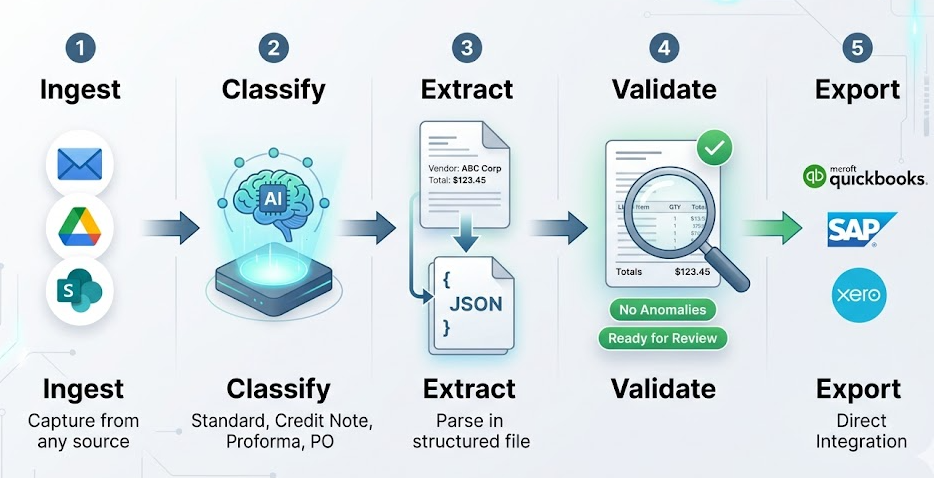
5 Steps to Automate Invoice Processing with GPT-4o:
- Ingest — Your invoices will automatically be ingested through email, Google Drive or SharePoint.
- Classify — Using artificial intelligence, we will classify your invoices into one of four categories: Standard, Credit Notes, Proforma, and Purchase Orders.
- Extract — Our artificial intelligence will extract vendors names, invoice numbers, line items, taxes and total amounts into a structured JSON file.
- Validate — Our system will validate that the numbers match and check for anomalies before sending the invoice to you for your review. If all numbers match and there are no anomalies flagged our system will automatically export all validated data as an XML file straight to either QuickBooks, SAP, or Xero or your ERP system.
- Export — All validated data exported as an XML file straight to your QuickBooks, SAP or Xero or your ERP system.
What is Automated Invoice Processing?
The issue with invoice scanning in a manual way is one of time. Someone on your team has been entering vendor names and invoice amounts into your accounting software for years. Not only does this take 15 minutes per invoice, but there has also been a 3% error rate, and occasionally, vendors call looking for their payments.
While the global AP automation market was projected to reach $6.94 billion in 2026, only 8% of finance teams had fully automated their AP. However, the other 92% of organizations still process invoices mostly manually.
The True Cost of Manual Invoice Processing
The direct costs associated with manually processing invoices are $12.88 – $22.75 per invoice (10–30 minutes of staff time, error corrections due to inaccuracies and the cost associated with delays in processing) for companies with an average of 500 invoices per month; therefore, you could be spending as much as $6,000 to $11,000 each month on data entry alone.
Additionally, due to an estimated 2-5% error rate and the associated downstream cost of payment disputes, the total cost would likely be $4,500 to $12,000, or more when you factor in these additional costs.
Failures of Traditional OCR
Traditional OCR captures data from photographs or scanned documents; this works well where documents are formatted the same way each time, but does not give reliable results when documents vary in format. A logistics company within the transportation industry attempted to implement a rules-based OCR solution that would recognize and read 47 separate vendor invoice templates it received from its various suppliers, but encountered numerous difficulties due to the fact that each template could have the same information, but be formatted differently (i.e. have different languages, have the same columns in different locations on each template, have different date formats, etc.) and thus the template method was continually failing. There is no reason to worry about template failures when using a solution built on top of GPT-4o because it comprehends what an invoice is without having to use templates.
How This Works: Step-By-Step Invoice Processing Using ASCN.AI and GPT-4o
ASCN.AI and GPT-4o work together to automate all of your company’s invoice processing, but require access to your invoice source and your accounting application for the entire process to be automated. 5 steps are used to handle the complete invoice processing automatically.
Step 1 — Invoice Ingestion
ASCN.AI tracks all locations where invoices are received (e.g., Gmail or Outlook [e.g., emails], Google Drive folders [i.e., folders containing your invoices are monitored for new files], SharePoint [i.e., folders are monitored for new invoices with OAuth, supporting incremental sync processing], and/or programmatically via Webhooks. The possible formats include PDF, PNG, JPG, and TIFF. The ASCN.AI invoice ingestion process supports the addition of invoices regardless of the quantity of invoices (e.g., supports from 1 to 500 invoices) using the same configuration.
Step 2 — Use of GPT-4o to Classify Invoice Documents
The invoice document type will be assigned a document type by GPT-4o (e.g., standard tax invoice, credit note, debit note, proforma invoice, purchase order, receipt, payment advice) prior to any of the invoice data being extracted. New vendor invoice formats will be processed without requiring reconfiguration of the monthly invoice process. Any invoice with a low confidence invoice document classification will automatically have to pass through the low confidence invoice queue before the invoice data is extracted.
Step 3 — Structured Data Extraction
Default Data Fields:
- Header — includes Invoice No., Invoice Date, Due Date, PO No., Payment Terms
- Vendor (Supplier) — includes Vendor Name, Address, Tax ID (#, VAT#, EIN#, TRN), Contact
- Customer (End User) — includes Billing Name, Address, Account No.
- Line Items (Describes each product/service) — includes Item Description, Quantity, Unit Price, Discounts, Line Total for every line item
- Totals — includes Subtotal, Tax Rate, Tax Amount, Grand Total, Currency Code
Null values for Uncertain Fields — When there is an Uncertain Field the system returns NULL rather than making an assumption to avoid errors. System will feed resolved NULL values into the validation process.
Step 4 — Validation Process / Cross-Checks
Automated checks: Line Item Totals must equal Subtotal (+ or - $0.01), there must be a valid Date Logic, Duplicate Detection, Validated payment must meet Threshold Requirements for Approval Routing, NULL Field must escalate to the Human Review Team when a validated payment does not comply with any of these checks — 94–97% of invoices will auto-export. All invoices that do not export due to system errors will route to the human team for resolution. Avg. correction time for human reviewers is (30–90 sec.) and avg. time to export is 1–2 business days once all invoices have been reviewed.
Step 5 — XML Export to Your Accounting System
All validated data will be converted into your accounting systems XML format. All draft billing will automatically appear in your A/P queue.
Export for EU businesses will include PEPPOL compatible UBL 2.1 XML. This will be done in compliance with Germany’s 01/2027 implementation date and France’s 2026 phase-in schedule.
Destination Options:
- QuickBooks Online (QBO): Direct API / Auto Creates Draft Billing
- QuickBooks Desktop: QBXML format via Web Connector
- SAP Business One: XML format via DTW or DI API
- Xero: UBL 2.1 XML Import or Xero Bills API
- Custom ERP: Generate JSON or XML to any REST endpoint via Webhook
Quality, Speed and Performance
Production profile — 8 months, 25,000+ invoices processed, 94.7% of invoices processed with straight-through processing, 5.3% of invoices processed with human review. Speed: 3.8 to 12 seconds for invoices.
| Invoice Type | Accuracy | Notes |
|---|---|---|
| Digital PDF (text-based) | 97% to 99% | Text machine-readable directly from document. |
| Scanned, good quality (300 DPI plus) | 90% to 94% | Standard scanner output. |
| Scanned, poor quality | 85% to 90% | Low resolution and/or skewed or faded scans. |
| Handwritten fields | 82% to 88% | Printed template plus handwritten amounts. |
| Multi-language | 90% to 95% | 47 plus natively supported languages. |
| Multi-page complicated | 88% to 93% | Page assembly creates complexity. |
Standard single page invoice — 4 to 6 seconds. Multi-page — 8 to 12 seconds. Async comparing 100 invoices — 8 to 12 minutes. Manual comparing 50 invoices at 15 minutes — 12.5 hours. Automated — 7 minutes.
Cost and ROI
| Metric | Manual Processing | ASCN.AI Automated |
|---|---|---|
| Cost per invoice | $15.00 to $22.00 | $0.60 to $2.50 |
| Processing time | 10.00 to 30.00 minutes | 4.00 to 12.00 seconds |
| Error rate | 2.00% to 5.00% | <1.00% |
| 100 invoices/month cost | $1,500.00 to $2,200.00 | ~$120.00 |
| 500 invoices/month cost | $7,500.00 to $11,000.00 | ~$450.00 |
| Breakeven volumes | — | ~30 to 50 invoices/month |
| Annual savings (500 inv/mo) | — | ~$85,000.00 - $125,000.00 |
Service pricing — $59.00/month includes: Workflow setup, GPT-4o prompt tuning, XML mapping, validation rules, human review queue, monitoring, on-going maintenance.
Setup — 48 Hour Deployment
- Day 1 AM: Discovery call, credentials and samples are received, configuration starts.
- Day 1 PM: Draft workflow is live, accuracy testing completed on samples, prompts iterate on accuracy of invoices.
- Day 2 AM: Accuracy verified (typically 90% plus full end to end pipeline connection), connection made with full pipeline and live testing using real invoices; team walkthrough completed, awaiting live monitoring.
Your Responsibilities / Must Provide: Access, accounting system API credentials, validation rules, and 20 to 30 sample invoices. ASCN.AI to perform all other aspects of configuration.
Customers We Serve
- Finance and AP departments — Replace data entry with financial analysis time.
- SMBs (50–2,000 invoices/month) — Enterprise AP platforms do not include this segment, ASCN.AI does.
- Accountants / Bookkeeping firms — One workflow per client, the economics compound at scale.
Security and Compliance
ASCN.AI does not keep invoice images or extracted financial data permanently after processing. Invoices are processed in transit from image to GPT-4o to JSON, validated, and exported, and are at no time retained. The original documents remain in the original source system.
- Azure OpenAI EU deployment for data residency requirements.
- Every invoice has a complete audit trail that consists of: References back to the original file (document); timestamp when it was created; JSON extracted from the invoice; validation result of extracted JSON; export status.
- UBL 2.1 PEPPOL XML output is compliant with EU e-invoicing mandates (Germany Jan 2027 and France 2026).
Frequently Asked Questions
How accurate is GPT-4o in the extraction of invoices?
In the 8-month production period over 25,000 invoices, GPT-4o has provided 94.7% straight through processing; 97% to 99% accuracies on digital PDF, 90% to 94% accuracy on standard scanned in items.
Which Accounting Systems does the XML export support?
QuickBooks Online/Desktop, SAP Business One, Xero, and any ERP that has an API that supports REST.
How long does it take to set up?
Typically, it takes 48-hours from the time of your first call until the live pipeline for ASCN.AI.
If the AI cannot read the invoice; what happens?
The only fields that are corrected by the human reviewer are the ones that are flagged by AI as needing correction. Human reviewers typically take 30–90 seconds to correct each flagged field and it is estimated that 3–6% of the invoices processed will require some type of field correction.
What is the cost?
There is a monthly service charge of $59.00 and there is an API cost of $0.015–$0.030 per invoice. The breakeven per month is estimated at ~30–50 invoices.
Does ASCN.AI handle multi-language invoices?
Yes, ASCN.AI processes in 47 plus natively supported languages via GPT-4o.
Is the invoice date stored or used to train AI?
ASCN.AI does not retain any storage of invoices or invoice data after processing per OpenAI API standard terms; no invoice data will be used to train AI.
Starting at $59/month, please contact ASCN.AI to set up a brief conversation regarding your invoice volume and the accounting system used to process those invoices.
