



- Русский
- English
- Português
Automate employee onboarding with Slack, Jira, and Google Workspace integration
ASCN.AI automates the employee onboarding process by integrating HR systems like BambooHR and Workday with Slack, Jira, and Google Workspace into a single, seamless workflow. This solution reduces onboarding time from 12 days to just 4, cutting HR administrative effort from hours to under 10 minutes while significantly boosting new hire satisfaction.

With ASCN.AI, you can automatically onboard employees by integrating your HR system (BambooHR, Workday, Google Sheets) with Slack, Jira, and Google Workspace in a single automated workflow that provisions all user accounts in parallel (5 minutes). With automation, the onboarding process has gone from 12 days to 4 days and average total effort of HR administrators has fallen from 3+ hours to under 10 minutes.
The time it takes to onboard employees has fallen from an average time of 12 days (manual) to 4 days (automated). The HR department has saved over $105,000 by using ASCN.AI's services instead of spending the same amount on hiring new employees (30 new hires at $708/year).
In addition, new employees are 40% more satisfied with their onboarding experience than they would have been without using ASCN.AI's services.
Some of the supported integrations are: BambooHR, Workday, Google Sheets, Typeform, ADP, Greenhouse, and Lever.
Pricing for ASCN.AI starts at $59/month and includes both hosting and support for their service(s).
A prime example of how much of a problem manual onboarding can be is that an engineer started at XYZ Inc. on Monday (after receiving welcome email from HR) and was still waiting for someone to help get her Slack set up (3 days later). Additionally, her Jira account did not have an account created yet and her Google Workspace account was created in an incorrect organizational unit. Finally, her HR department also forgot to complete the BambooHR onboarding checklist as the new employees onboarding checklist was not completed correctly. Unfortunately for the new employee, the above examples are typical.
The cost of a manual onboarding process is $4,700/hr and this cost is based on successful onboarding (Whatfix, 2026). When onboarding does not go smoothly (46.4% of time) and it takes at least 1 full week for the HR department to complete all necessary administrative tasks, the HR department may experience losses of $25,000 - $50,000 (AIHR, 2026).
ASCN.AI automates the manual employee onboarding process. When a new employee is hired, their information is entered into your system and 60 seconds later, Google Workspace, Jira entry process, Slack join & welcome email with credentials are all completed. One event triggers all of the tasks to occur so that you can have everything ready for them to start in their new job. The entire onboarding process has a provision to be completed within 48 hours for $59 monthly.
What Gets Automated
The automation of the process for all systems occurs from one triggering event to completion with ASCN.AI enabling quicker onboarding times than the standard 12 days which can be reduced to only 4 due to this connection of the systems (Multiplier, 2026).
When a new hire's information comes from BambooHR, Google Sheets, Typeform or Workday it will trigger the entire process in the following manner to provision:
- Google Workspace: employee created; License provided; Org Unit assigned; Google Groups added; Shared Drive configured.
- Jira: A Jira Epic for Onboarding will be created for each department (IT, HR, Manager) and it will have subtasks assigned based on the new hire's role.
- Slack: The new hire will be added to all appropriate channels; They will receive a welcome message / DIRECT MESSAGE; Their Manager will receive a new hire notification message.
- Email: The new hire will receive an automatic email containing the new hire's credential information, first week's schedule, and link to the their Jira Board.
Poor Manual Onboarding Process
Comparison of Provisioning Processes in Manual vs Automated Approaches
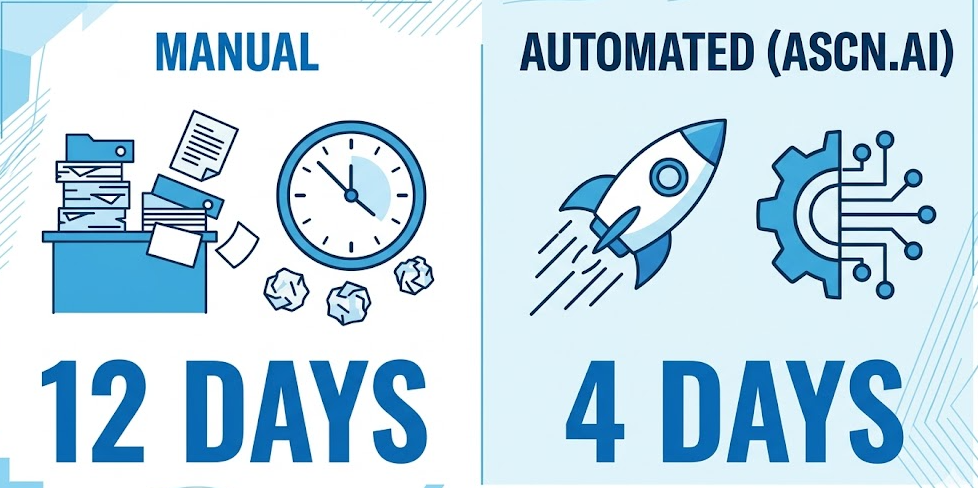
| Metric | Manual | Automated (ASCN.AI) |
|---|---|---|
| Provisioning Time | 12 Days | 4 Days |
| HR Admin Time Per Hire | 3+ Hours | Under 10 Minutes |
| Configuration Errors | Common | Near-Zero |
| New Hire Satisfaction | Baseline | +40% |
| Annual Cost (30 Hires/Year) | $45,000+ (HR Time) | $708 |
How The Five-Step Automation Pipeline Works
A single workflow spanning the entire process from HR Intake to Google Workspace, Jira, and Slack, triggered continuously as the event occurs; total time from starting a new hire in your system to fully provisioned employee: Less than five minutes.
Step 1: New Hire Data Intake
Once a new hire record is created in the HRIS system (e.g. through a BambooHR webhook or a new row in your Google Sheets tracker), ASCN.AI runs the trigger setup against whatever system you already have implemented. The data packet that ASCN.AI sends downstream (Google Workspace Admin SDK, included) carries all the required information for subsequent steps (name, email, job title, department, manager, start date) — one single document to use for provisioning all actions.
Step 2: User Account Provisioning In Google Workspace
Upon receiving the document ASCN.AI performs five actions (via the Google Workspace Admin SDK): create the user account for the new hire, assign the appropriate license tier, add the user account to the correct org unit, add the user account to any required Groups in Google Workspace and configure Shared Drive access based on where the new hire's department will work. When an engineer's email address is created in Google Workspace it is automatically assigned to the Engineering Division's Shared Drive and when a salesperson's email address is created it is automatically assigned to the Sales Division's Shared Drive. Language and calendar sharing and prompting for 2FA are configured before the new hire's first day of service. The SCIM provisioning in Google Workspace is real time via API and does not utilize batch processes with associated delays (Google Workspace Admin Help, 2025).
Step 3: Jira Onboarding Tasks and IT Queue
Laptop set up with configuration; access to their repos; VPN set up; developed environment walkthrough (IT will provide by their due dates, relative to individual new hire start dates). For sales, things belong on managers at: CRM account set up; access to any sales tools; pipeline training.
For IT, New Hires automatically fill their queue! Jira Service Management/Atlassian - delivers 275% ROI over 3 years for enterprise teams (source: Deviniti/Atlassian, 2026).
Step 4: Slack channels; welcome message
New hire is added to relevant channels (e.g., #general; #onboarding; manager-designated channel) through the Slack API. In addition, new hire will receive a DM containing the new 1st-day overview & key contacts; and a link to the employee handbook. The automation also posts to #hr-announcements and will send a provisioning summary to the manager.
Noom automated onboarding for 100+ new hires simultaneously, through Slack, converting hours of weekly orientation into 30-45 automated sequences (see the Slack blog for info from 2025).
Step 5: Welcome email & credential delivery
A personalized HTML welcome email via Gmail or SendGrid that includes: Google Workspace credentials; Jira board link; Slack invite; 1st-week schedule; key contacts. Role based first-week agenda can be generated via the use of AI personalization (by using job title, and department related data). Log completion status back to HR source system automatically. If any step fails, the workflow is designed to notify user of the failure and provide specific error details — any transient API failures are automatically managed via retry logic.
Department Routing: One Workflow, Any Role
The routing layer will read the department field and branch out into their own specific process paths. So, one workflow handles all departments. If a new department is added, this only requires an update to the configuration; a rebuild is not required.
Engineering Pathway
Requesting access to a repository (GitHub or GitLab), setting up development environments, VPN credentials, and obtaining the code review process document occurs in the welcome DM. The IT department has the laptop setup request in the queue and the SLA for processing is 48 hours before starting work.
Sales Pathway
Sales personnel will need CRM access (either Salesforce or HubSpot) and access to all necessary Slack sales channels and will need to submit a Pipeline Training ticket for a Sales Manager. CRM login information will be provided in the welcome email, along with Google account information.
Custom Departments
All custom departments will be identified in the routing layer. Adding a department after deployment will require configuration changes with an average of 1-2 hours for setup time. Adding a new tool to the routing layer will require adding a new routing node while ensuring that the other nodes remain untouched.
Security and Compliance
Many access control gaps occur through manual provisioning processes. For example, an ex-employee retains access to Google Drive for several months after their departure. In some cases, the new employee can receive Admin permission through the wrong template. Automated provisioning will eliminate these gaps structurally.
Role-Based Access Control
Role-based provisioning in the ASCN platform is based on specific groups of access and will be strictly enforced by the Workflow Administrator. Users will not have access to more than what is administratively approved by the Workflow Automation. Role-based provisioning can be completed in minutes with zero permission drift (IBM; 2025). Segregation of Duties processes will demonstrate compliance to SOX, HIPAA and PCI DSS regulations.
Audit Trail
Every provisioning activity will be logged in the system as it relates to the timing and type of activity performed, including the user that initiated the activity, the application in the system, and the final status of the provisioning event. All audit trail data can be exported for use in performing SOC 2, ISO 27001, or any access control audit. Audit retention must be configurable, with the default retention period set at 30 days, and the maximum retention period set at 12 months.
Access Review and Decommissions
Automated integration of Jira and Google Workspace will reduce the access review process time by 90% (Multiplier; 2026). Governance automation demonstrates the extent of over-privileged users, creating an estimated 60-85% over-privileged standing user.
Data Management: ASCN.AI has no capability to store employee personal data after the provisioning is complete. The ASCN Platform is compliant with GDPR, HIPAA, and SOC 2. Deployment of solution can be self-hosted if required to meet strict data residency.
Outcomes Related to Business
HR Administrative Tasks Reduced by 60-80% Per Hire
Manual time needed for one hire was as much as three hours but now can be accomplished in less than ten minutes. Therefore, for an organization that hires thirty new employees each year, annually this represents savings of $45,000 on HR administrative processes. As documented in the Service Fee Analysis, hiring number one’s service fee is recouped in the first month of use.
Day-One Readiness
When new hires come onboard, they will have all necessary equipment and access to all systems. The laptop ticket will be in the IT service queue prior to start date. All accounts such as Google and Slack will be provisioned prior to start date and credentials sent to new hires on day one. The provisioning cycle will go from twelve days prior to new hire coming onboard to four days prior to new hire coming onboard.
Return On Investment: $100,000+ Annual Value for Mid-Sized Companies
For an organization that is hiring thirty new employees every year, there will be savings of $45,000 associated with HR administrative processes and there will be productivity gains of $60,000 from the new hire being fully productive two to three weeks earlier than would have occurred without using the solution. Service fees are $708/year. As documented in the Service Fee Analysis, return on investment realized in year one exceeds 100x. Companies that utilize automated onboarding see new hire satisfaction rates are 40% higher, and new hires reach productivity at a 30% faster pace (Phenom, 2026).
Onboarding Is Done the Same Way Every Time
When hire number 10 comes onboard, his/her onboarding will be identical to that of hire number 1. Therefore, there will not be missed channels, forgotten tasks, provisioning new hire into the wrong organizational unit, etc. Automation does not have ‘bad days’, does not forget steps, and does not rely on a person to be in their place of employment.
ASCN.AI Automated Employee Onboarding Service
ASCN.AI manages to build the pipeline, configure every credential used by all APIs, validate using both real and mock data, document the workflow, and support new employees for 30 days after onboarding. After the new hire has completed onboarding, HR will not change anything.
Delivery Included: Workflow Build in Google Workspace, Jira and Slack. An organization's department structure will determine how they route their workflows via OAuth and API credentials. Testing must be performed using both mock data and at least one actual hire before you can sign off on the project. You will need written documentation (known as runbooks) for HR and IT showing how to use the workflow. You will have 30 days to adjust any issues that arise after the project's completion.
Deploying new workflows can be completed within 48 hours. Discovery calls can take as little as one day; after that, you'll have an approved workflow ready to deploy.
Pricing starts at $59/month and includes hosting the workflow as well as providing support for ongoing support.
Your Stack, Your Rules: All triggers for workflows can be set up between HR systems that support webhooks and APIs. We also have Integrations with Notion, Confluence, Zendesk, AWS and hundreds of other tools, if you want to integrate them into your existing workflows. Offboarding automation options are available through an add-on.
Frequently Asked Questions:
Q. Which HR systems can trigger the workflow?
A. Any HR system that supports webhooks or an API. We can configure triggers for BambooHR, Google Sheets, Typeform, Workday, ADP, Greenhouse and Lever. Google Forms provides a zero-cost option for both small and large teams.
Q. Can departments or tools be added after the initial setup?
A. Yes they can. For example, if you wanted to add an HR department you would just update your routing configuration file, which usually takes only 1-2 hours at the most; and if you want to add a tool you would need to add nodes to your existing workflow(s). Both options are included in your monthly support package.
Q. Does this offboarding automation work as well?
A. Yes, offboarding automation is available; we will suspend Google Workspace Accounts, remove users from all Groups/Shared Drives, close out all Jira tickets, remove them from Slack; and track the entire deprovisioning process.
Q. How are employee data protected?
A. All data is encrypted in transit using TLS v1.2 or higher, at the time of creation using AES-256 encryption while being stored; ASCN.AI will not save the private information of an employee past the provisioning event. All ASCN.AI workflows are GDPR, HIPAA, and SOC-compliant.
Q. What is your actual return on investment?
A. A company that has 30 new hires each year can anticipate saving approximately $45,000 in HR administrative expenses, as well as a productivity gain of approximately $60,000, for a total of approximately $105,000 worth of value. The cost of services is $708 dollars a year, or approximately $59 each month.
Q. How long does it take to set up the workflow?
A. It usually takes between 48 hours; day 1 - you will receive a confirmation email from a member of the ASCN.AI team; and day 2 - you will receive an email stating that the workflow had been created and ready to be deployed.
Q. Do I need to have a technical person to run it?
A. No. You can continue to use the HR system you are using now as usual. ASCN.AI has the responsibility of maintaining all of the technical aspects of this workflow. If there is a failure during any period of time, an alert will be generated in your workflow, with specific information included in the alert.
