



- Русский
- English
- Português
Brand Reputation Monitoring
Learn how to streamline your business operations by using automated agents to track brand mentions across the internet in real-time. This guide explains how to leverage tools like Apify and Claude to save valuable time and protect your reputation effectively.


Automate your brand reputation monitoring with ASCN.Agent. An effective solution for marketers and founders.
General Overview
Using an automated agent for monitoring your brand's reputation can help streamline operations in your business through the use of automated tools by businesses and marketers to track mentions of their brands across the Internet. Because Apify provides web scraping subscriptions that enable marketers and business owners to access and retrieve the latest available information on their brand's reputation, your brand's reputation will also be tracked in real-time with a subscription fee of $49/month.
Once you have gathered this information, you will be able to categorize the information into different categories using Claude, which will allow you to receive a Telegram notification when your brand experiences a decline in popularity. When integrated with other tools, these tools will help increase your productivity by automating most of the routine tasks associated with running your business, such as tracking your brand's reputation, as well as saving you and your employees valuable time and resources for building a successful business strategy instead of doing repetitive tasks, giving you an excellent brand reputation and the ability to establish long-term customer loyalty, while increasing your competitiveness within your industry. In addition, users will be able to focus on other important aspects of running their business, like providing great customer service, due to the benefits of automated solutions.
How the Automation Works
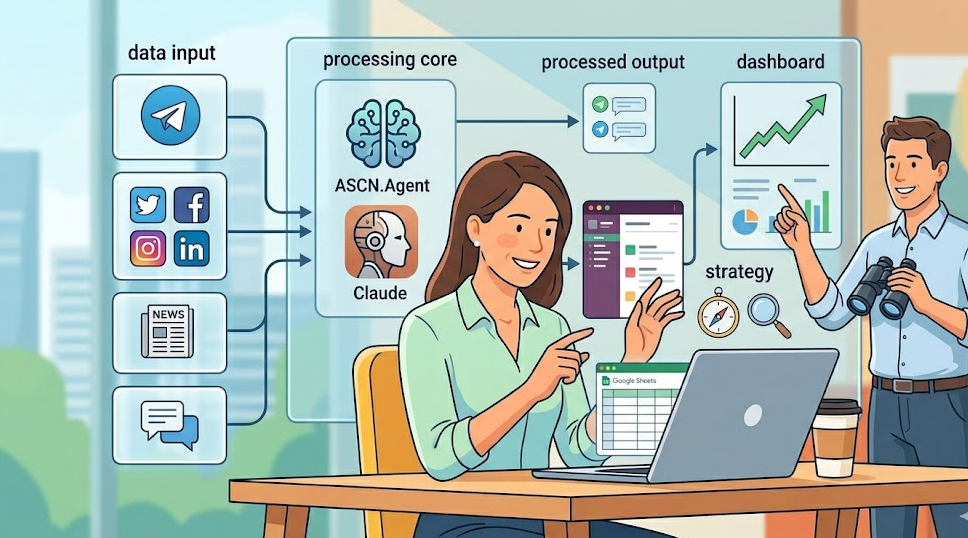
To start automating your brand's reputation, you will need to set up a step-by-step process to track and analyze the data that has been collected regarding your brand's mentions. Brand reputation monitoring is accomplished by utilizing the Apify platform to obtain brand-related data across multiple digital platforms, such as social media sites, news sites, and community forums relating to your business or related products and services.
The information you obtain through the web scraping will be used to classify your brand-related data into different categories via the use of Claude and sent to you as a Telegram notification when any changes occur regarding your brand's reputation in a timely manner. It is possible to create an agent schedule for users so that they receive digests on demand, making sure you do not miss out on mentions that can be crucial to responding quickly to customers' negative reviews.
The platform integrates with other tools, including Google Sheets and Slack, which makes it easy to analyze captured data and collaborate with other members of your team. Automating monitoring allows marketers and founders to concentrate on running their businesses more effectively because it is faster and more accurate than manual methods. For example, users have mentioned using Google Sheets with your platform as a tool to visualize their data and generate more accurate conclusions about their business.
Why It Is More Effective Than Manual Work
Automation of your brand's reputation will always surpass a manual approach by several criteria. Firstly, the system will provide instantaneous information about the status of your reputation, especially in fast-moving markets. You will receive digests via Telegram, and you can react immediately to mentions and negative mentions regardless of whether you are manually monitoring for those things consistently.
Secondly, automating processes saves time. Manual processes require a lot of resources for implementing, while the agent does all of the work for you in the background, leaving marketers and founders free from the routine role to focus on defining their business strategy.
Additionally, automation creates a more economical and comprehensive means of collecting data. The agents are capable of recognizing an array of mentions from different platforms (social media and news publications) where recognition manually would take several times longer than an automated solution. This comprehensive look at your brand will better inform your decision based on current information. For instance, users have asked for help in avoiding lost opportunities due to the delay in getting the information needed through manual monitoring processes.
Results That Users Achieve
Users of the Brand Reputation Monitoring Software have reported an increase in their ability to manage their brand image. By using this software, users can obtain real-time information about their brand reputation in a way that meets their business needs. The software will assist users with the rapid response to mentions of their business and to any negative reviews, which assists in limiting their brand risk.
Sending digests via Telegram allows users to get important information quickly; this is especially beneficial in fast-paced business environments because reaction time is critical. Many users state that automating this process saves them 40–60 minutes each day (more than 15 hours per month) of time that can be redirected to more strategic work.
This same software gathers data from multiple sources — such as social networks and news sources — so that users can see what their brand is perceived as to the public as a whole, giving them the capability to make informed decisions based on the data provided. Many users have commented about how they are now able to improve their brand's reputation, while also building their customers' trust in their business. A number of users have commented about how they have improved their customer engagement as a result of using this software and automating the process.
Implementation Examples
In real-life examples, brand reputation monitoring software has been very beneficial to users in a variety of industries. Marketers and founders who use the brand reputation monitoring software are stating that using this software has made it easier for them to track their brand. The agent implementation provides companies with the ability to quickly react to negative feedback and find ways to highlight the positive to ensure communication with customers.
Companies reported improved reputation management, only as a result of their experience with brand automation, by sending regular digests via Telegram. Companies can now have timely updates of the latest mentions of their brand and be able to make quick decisions based on current results. The automation has also alleviated the burden on employees doing manual tracking. Many users have reported that they were able to use that time now to prioritize their time into more-helpful tasks such as creating new marketing plans.
Many different types of businesses can use this system. By using the agent, these types of businesses will all have an effective way to manage and respond to their brand by having the assistant helping them. The agent implemented shows that automation can create time savings while making their marketing plans more effective. Other users have mentioned they have obtained increased customer engagement and satisfaction after implementing the agent.
What You Get
There are many significant benefits to using an automation solution for brand reputation monitoring to assist marketers and founders. The primary benefit of this solution is that you receive regular digests directly to your Telegram account when there is new information available regarding your brand's reputation. When you are trying to respond quickly to mentions of your brand, this can greatly affect how quickly they recover or if they suffer from the effects of negative press; therefore, this is critical in today's fast-paced environment.
Automating the monitoring process provides significant time savings when doing manual brand reputation monitoring. Users are reporting that they save 40-60 minutes each day as a direct result of using the solution, which is over 15 hours a month from doing manual tracking. The time saved can then be allocated to help with top strategic initiatives that can help grow the business and provide excellent customer service.
Automated brand reputation monitoring also permits users to collect information about their brand from many different sources, i.e., social media and news sources. This allows users to gain a complete view of how others perceive their brand and then make informed decisions based on real-time data. Users have also indicated that they have greatly improved their processes regarding communicating with customers and developing new marketing plans as a result of their ability to automate brand reputation monitoring.
Setup Instructions
To begin using automated brand reputation monitoring, you will need to set a few things in place to help you with the implementation. The first thing that you need to do to get started with the application is to sign up for an account with Apify ($49/month) to gain access to the web scraping capability to help you collect information about your brand from multiple channels throughout the internet.
You will also need to link Apify to the Assistant, so she can help you classify the defined elements of the information that she collects. Once the information is classified, you will have access to Claude and Telegram app integrations to help you quickly process your collected information and to help you receive a status report about your reputation. Next, after you have created your schedule for updated reports about your reputation, you need to set reminders on your calendar to obtain updates at times that are convenient to you so you can capture and respond to valuable mentions in a timely manner.
It is also highly recommended that users set up other tools to be integrated into the automated monitoring system, such as Google Sheets and Slack, to assist them in analyzing collected data in a manner that is both timely and accurate. For example, users have, in many instances, indicated that the integration with Google Sheets allows for a more concise manner for data visualization and data analysis for the future.
