



- Русский
- English
- Português
Automate B2B lead generation & email campaigns with Google Maps, SendGrid & AI
ASCN.AI provides an automated B2B lead generation system that extracts local business contacts from Google Maps and personalizes cold emails using the GPT-4o API. This end-to-end solution can be fully implemented within 48 hours, significantly boosting reply rates through high-quality AI personalization.

By using the Google Maps Places API to extract 100 – 500 local business contacts each day and using the GPT-4o API to personalize each cold email, ASCN.AI has built an automated B2B lead generation system that can be fully implemented within 48 hours.
Studies indicate that cold emails will receive an average reply rate of only 4%. When you use the ASCN.AI system, however, you will receive roughly 20 qualified replies per day from 500 sent emails.
Quick Facts
- Implementation time: 48 hours from requirements call to full operational capabilities.
- Lead capacity: The lead generation system has the capacity to provide 100 – 500+ local business leads per day via Google Maps Places API.
- Reply rates: Cold email reply rates are estimated to be 4% (by the Instantly.ai research team), but if you use AI personalization, cold email reply rates will be around 37%.
- Personalization cost: Using the GPT-4o API for email personalization costs approximately $0.01 - $0.05.
- Compliance: The CAN-SPAM penalty for sending 1 non-compliant email is up to $51,744. ASCN.AI includes built-in compliance to help avoid CAN-SPAM fines.
- Warmup timeline: The time it takes for a new domain to warm up and ramp up to full sending volume is approximately 4 - 6 weeks.
- CRM integrations: All major CRM platforms can integrate with ASCN.AI via Google Sheets, Airtable, HubSpot, or custom webhook.
For the average business, searching for and personalizing 500 local business leads daily will take them 8-12 hours of work daily; while those that do not personalize their emails see low response rates, those that do hire an SDR for $8,000 - $16,000/month.
As such, ASCN.AI provides a third option.
The ASCN.AI cold outreach system is available to businesses that need to automate their outbound lead generation.
Some of the key features of the ASCN.AI solution are:
- Automated extraction of local businesses from Google Maps via the Google Maps Places API.
- Automated generation of personalized emails through the use of GPT-4o API.
- Automated sending and tracking of emails using SendGrid.
With ASCN.AI's cold outreach system, you can eliminate time-consuming manual lead generation and personalized email generation. The entire process is 100% automated and can be implemented in less than 48 hours.
Is This Right for Your Business?
Would this service be of benefit to your organization? Industries with the highest level of performance:
- Dental/Medical Practices: These establishments tend to be owner-operated, have a very high CLV [customer lifetime value] and seldom receive emails from B2B sales leads.
- Contractors (HVAC, Plumbing or Electrical): These types of contractors are also generally owner-operated and have budgeted for the majority of their tools. The consulting industry averages a reply rate of 7.88%.
- Lawyers/Accountants: Lawyers and accountants tend to have very strong businesses with high customer values. Additionally, these business types experience less competition for outreach emails.
- Real Estate Agencies: Real estate agencies are large scale users of lead generation tools and marketing services.
- SaaS Companies: Small to mid-sized SaaS companies targeting the SMB market typically use automated outreach tools to fulfill the initial SDR (sales development representative) function.
Industries with lower performance: Restaurants, Retail, Large Enterprise (500+). Any business can be targeted using Google Maps, providing sufficient geographic and industry data exists for the business.
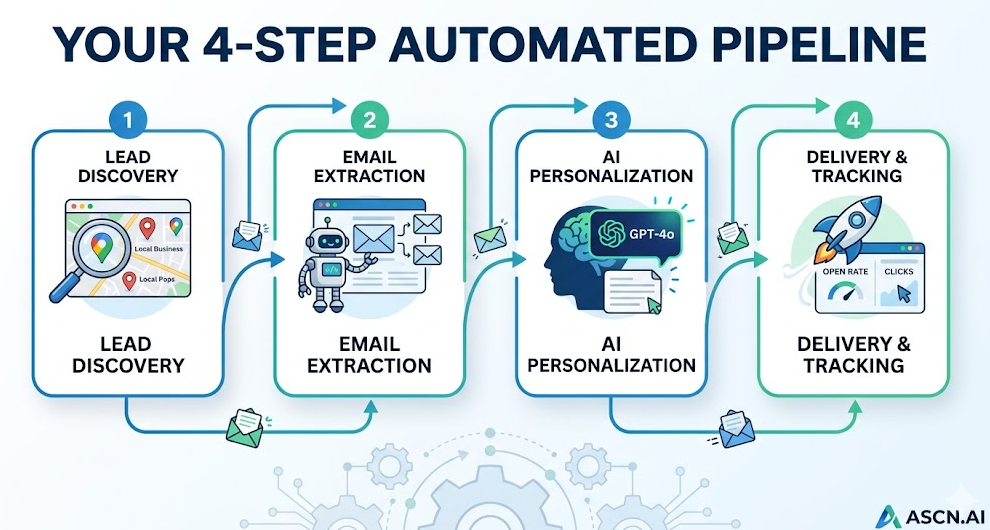
Your 4 Step Automated Pipeline
- Lead Discovery: Utilize the Google Maps Places API to search your desired geography and industry for qualified businesses. You can generate 100-500 new qualified business contacts each day.
- Email Extraction and Enrichment: Automate the email extraction and enrichment processes by having the automation access each business website and extract the email addresses listed in either the footer or a contact page.
- AI Personalization: Use GPT-4o to create a unique and contextually accurate email for each lead based on the lead's industry, location, and business type.
- Delivery and Tracking: Use the SendGrid API to manage the sending, open/click tracking, bounce handling and unsubscribe functions.
Step 1: Conduct Lead Discovery Using Google Maps
With over 200 million businesses listed, Google Maps is currently used by over 2 billion people each month and is considered the best free-source for local B2B lead generation due to the amount and accuracy of the data; each listing is updated, verified, and organized by category and geography based on the listing.
To find businesses using Google Maps, you will need to input a keyword (search term) and a location to retrieve a list of businesses meeting those criteria. The Google Places API will return a maximum of 60 businesses for each search performed. The returned data from Google Places includes: business name, complete physical address, phone number, website URL, business operational status, operational hours, and total number of reviews. In step two of this email process, the email address will be gathered; the chatbot will go to every website and collect information from the site to find the email address.
A Real Campaign Example: HVAC contractors in Austin
For example, HVAC contractors in Austin will be the targeted audience through AI personalization (i.e., gathering the business and industry name, city, and content from their website) so that a message can be tailored specifically to the individual with the new business's name, and that customer's specific business type and city will also be on the mail piece.
Example of a templated cold email: "Hi [first name], I wanted to talk to you about the marketing services we provide" vs. using the new AI-generated cold email: "Hi John, I see that you have had Riverside Dental (business name) in Cedar Park for 12 years, congratulations on your long run. The majority of dental offices we talk with are using a manual way to continue contacting and reaching out to their customers if they miss their 6-month checkups. We can automate this whole process. Would it be worth 15 minutes of your time to set up a time to talk?"
Way to measure improvement: AI-generated emails provide up to 37% higher response rates than generic emails.
Step 2 & 3: AI Personalization, Delivery, and Tracking
In the 3rd step, SendGrid delivers the email through SMTP API, provides results through open rates and click-through rates via the use of a pixel and link reflections, automatically handles hard/soft bounces, and allows removal from the email distribution using one-click unsubscribe from the email header. All CAN-SPAM requirements are included in the workflow, including a physical address in the footer, an unsubscribe link, and performing email sender verification.
Sender reputation and domain warmup
When new domains are used for sending emails, they must go through a warm-up period. The warm-up process will take place over 4 to 6 weeks, depending on whether you use ASCN.AI's warm-up schedule, which automatically sets up your account's warm-up period with SendGrid. The warm-up schedule would look like this:
- 1st Week – 50 emails per day
- 2nd Week – 150 emails per day
- 3rd Week – 500 emails per day
- 4th, 5th and 6th Week – 1,000 to 2,000 emails per day
Step 4: Reply Tracking and CRM Sync
All emails will receive replies and will automatically send notifications to the sender via Slack, email or web hook. The lead record for the recipients will also get automatically updated (to “Replied” from “Sent”) in your Google Sheets, Airtable or HubSpot database. This allows your sales team to see qualified replies without sifting through an inbox looking for leads.
Cost Breakdown
| Item | Cost | Notes |
|---|---|---|
| Google Maps Places API | About $8.50/day (above free tier) | $200/month provided by free credit; $255/month for 500 leads sending emails. |
| GPT-4o (for email personalization) | $0.01-0.05/email sent | 500 sent = $150-750/month. Approximately 1,500 emails can be sent to B2B cold email recipients. |
| SendGrid (ASP) | $19.95-$89.95/month | Your use of SendGrid will be dependent on the volume of emails sent. |
| n8n (ASCN.AI Managed) | Included in Pricing Plan | No licensing for n8n will be required. |
| Total Monthly Costs | $175.00 - $1000+/month | Will scale up based on monthly email volume. |
Compliance: CAN-SPAM and GDPR
Non-compliance fine under CAN-SPAM is $51,744.00 for every email sent to a recipient without being compliant with CAN-SPAM's requirements (your ASCN.AI account automatically includes the following):
- The sender must have a physical business address in the footer of the email
- It must also include a working "one-click" unsubscribe link
- The FROM: name must match your real domain
- It must not use deceptive subject lines
Regarding GDPR: GDPR allows businesses to send cold emails (B2B only) to business email addresses. There are some restrictions on sending cold emails (B2B). Only public-facing business websites are used to identify email addresses.
Deployment of ASCN.AI — 48 Hours to First Email Sent
Here is what you get:
- Integration with the Google Maps Places API for your targeted geography and industry.
- Email addresses sourced from websites, also validated.
- Personalization prompt for GPT-4o to configure your offer and ideal customer profile.
- A scheduling plan and domain setup for SendGrid.
- Integration with Google Sheets or Airtable CRM.
- Tracking of replies and notification in Slack.
- Inbuilt Compliance with CAN-SPAM regulations.
- A test run of up to 50 leads before full deployment.
- 30-day support post-launch.
Frequently Asked Questions
How many leads can my business expect to generate through this process on any given day?
Generally, 100-500 leads will be generated per target geography/category combination each day. The Google Places API will provide you with 60 results for every query you run; running all of the queries you can think of on different zip codes or neighborhoods will yield about 300-500 leads. The rate of success for email address sourcing from businesses with websites varies widely (as a rule of thumb is between 50%-75%).
Is it legal to email businesses sourced from Google Maps without obtaining their consent to email them?
Yes, you can email B2B businesses in the US under the CAN-SPAM Act directly as long as you have a physical address of the business in the body of the email, you have a functioning unsubscribe mechanism, and you do not use any misleading subject lines. ASCN.AI builds these requirements into the design of every marketing campaign we create. For recipients in the EU, the General Data Protection Regulation applies to business email addresses that are publicly available on the internet.
How long will it take to increase the "warm-up" period for my new sending domain to be able to safely send more than 1,000 emails per day to my recipients?
It generally takes four to six weeks for a new sending domain to safely send more than 1,000 emails per day. ASCN.AI will set up your warm-up schedule and track your sender reputation score using Google Postmaster Tools throughout the warm-up period.
Which CRMs can ASCN.AI integrate with?
Standard CRM options include Google Sheets and Airtable, while other systems such as HubSpot, Pipedrive, and Salesforce can be integrated with ASCN.AI using their respective application programming interfaces. In addition, custom webhook delivery is available for any CRM.
What do you think the average reply rate will be for leads generated by ASCN.AI for B2B cold email outreach?
Based on historical data, the average response rate for the industry to cold B2B email marketing campaigns is four percent as of 2026 (as provided by Instantly.ai). However, when personalized AI email campaigns are sent to ideal customer profiles (ICPs) with a compelling offer positioned well, a response rate of between seven percent and 15 percent can be expected depending on offer quality, ICP specificity, and sender domain reputation. Each client is provided with relevant benchmarks based on previous ASCN.AI email campaigns during their onboarding process.
