



- Русский
- English
- Português
Automate LinkedIn comment replies with GPT-3.5 & track in Google Sheets
Learn how to automate LinkedIn comment replies using Astro Tech’s new AI-powered system that integrates with Google Sheets and no-code tools. This guide explains how to boost engagement by responding within the "Golden Hour" while keeping costs low and setup time under thirty minutes.

You can reply to comments on LinkedIn electronically the same day as the post is made through Astro Tech’s new automated comment reply system, which logs replies to a Google Sheet for analysis. The automated so-called "workflow" runs every ten minutes; uses LinkedIn’s API for posting through the automation tool; and allows you to install without any programming knowledge in under thirty minutes using the ASCN.AI no-code tool. At 100 replies/day, you’ll have under $1/month for the AI model.
Interesting Information/Statistics
- Average LinkedIn engagement in 2026: Will be 4.7%, a 22.1% increase since 2025, — Socialinsider Q1 2026
- Golden Hour Response: If a company responds to comments within 60 minutes, they can expect a 7-times increase in profile visitors than if they respond later
- AI Content Penalty: Generic (AI-generated) responses will typically have a 30% reduced reach and a 55% reduction in engagement (AuthoredUp 2026)
- Model Cost Efficiency: The cost of 3,000 replies/month using GPT-4o will be approximately $0.09 compared to approximately $0.30 for GPT-3.5 Turbo
- Safety Limits: Using the LinkedIn API, the safe maximum daily number of automated replies allowed is 20 to 25 total replies/account
- Token Lifespan: LinkedIn’s OAuth token will expire 60 days after being created and cannot be used without renewing it
- No-code Setup: Using ASCN.AI, you can setup the automation process for your comments replies in less than thirty minutes — zero-to-setup
You share a post, and hundreds of comments come in — ask a question(s), make a comment you should respond to. Then you are either in a meeting or sleeping, and just cannot find the time needed to reply to your customers before they go elsewhere.
The truth is you cannot manage reply automation without having a scale management system; automating your processes today is essential for continued growth. With the tremendous increase in engagement rates already hit in 2026, with a historical low of 4.7% for all companies on LinkedIn, you must figure out how to automate your replies to keep businesses ahead of your competitors.
Have trouble setting this up? Let us know how we can help you set this up! You skip the API parts of this entire workflow for ASCN.AI NoCode.
Reasons to Automate LinkedIn Replies in 2026
Speed and relevance are rewarded in LinkedIn’s algorithm. The first reply in an hour of posting has a significant algorithm boost from the organic-growth potential. One B2B team that commented on posts in the first hour saw seven times the profile views compared to other commenters — a coincidence? No and a very large difference.
The Real Problem: You Will Not Keep Up
If you have 40 comments to reply to each day, you will spend between 45 and 90 minutes manually replying; if you have 200 comments, the average amount for an active company page is four to eight hours per week to manage. This time doesn’t include time zones, weekends, or a user commenting and coming back to check for replies once 36 hours has elapsed and then decides to move on.
What Good AI Comment Automation Looks Like
Good LinkedIn comment automation includes the injection of context into each GPT prompt; these contexts include original comment text, a summary of the post, and brand voice parameters so that each response generated is specific to what the commenter wrote. AI-produced content that looks like it has been produced from a generic template has been shown to have a 30% decrease in reach and a 55% decrease in engagement (AuthoredUp 2026 Analysis). The injection of context is the line that separates automation as an aid and automation as a hindrance.
How LinkedIn Comment Automation Works — Five Steps
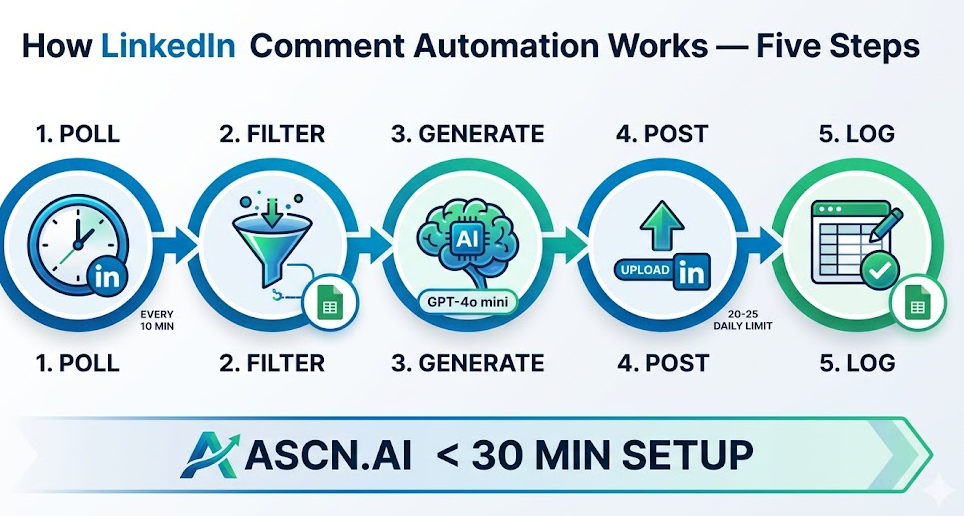
The entire workflow consists of poll LinkedIn for new comments → filter out all comments that have already been processed → generate AI-based reply using GPT → post reply to LinkedIn → log entire process in Google Sheets.
Step 1 — Schedule Trigger: Poll for New Comments
The first step in this process is to schedule a trigger that will poll for new comments on LinkedIn every 10 minutes (using the LinkedIn Comments API). This will require an OAuth 2.0 bearer token with the w_member_social scope. Please note that LinkedIn tokens will expire after 60 days, so it is very important to create a token refresh logic from the start.
Step 2 — Filter New Comments
Second, when you filter new comments to only include those that are greater than a specified timestamp, this is done by reading the last processed timestamp from the config tab in Google Sheets and filtering out any comments less than that timestamp.
Step 3 — Generate AI Reply via GPT-3.5 Turbo
Next, you create a reply for new comments using GPT-3.5 Turbo API. Each comment will receive a 2- to 3-sentence response, based on the text of the comment, the topic summary of the original post, and the brand guidelines. The expected cost will range from $0.0001 to $0.0003 per reply.
Recommendations for 2026: once GPT-4o mini is available, upgrade to the mini version, as it will be less expensive ($0.15 vs. $0.50 per million input tokens) and will provide more accurate context than GPT-3.5 Turbo, which is now considered to be a legacy model.
Step 4 — Post Reply to LinkedIn
In step four, the new comment will be posted back to LinkedIn, with rate limits of 20-25 replies posted each day per account, with random 30-90 second delays between posts.
Step 5 — Log to Google Sheets
Lastly, the reply will be logged to Google Sheets, with a new row being created in the tracking sheet after each posting. Each new row will contain the date/time posted, post URL, comment ID, name of person submitting the comment, original comment, AI-generated reply, success status, reply URL, and total amount of time for processing each posting.
Things You Need To Have Before You Start
| Component | 100 Replies per Day Cost |
|---|---|
| GPT-4o mini | ~ $0.09 monthly |
| LinkedIn API (The Official API) | Free |
| Google Sheets API | Free |
| n8n Cloud (Workflow) | $20 - $50 monthly |
| ASCN.AI NoCode | User Subscription |
LinkedIn API Credentials (OAuth 2.0)
How to Create a Developer App at developers.linkedin.com
Use the following three permissions when creating the app:
r_liteprofilew_member_socialr_organization_social
Write separate code to implement the logic to refresh the tokens. When requesting permissions for company pages, be sure to also ask for w_organization_social.
Summary Of Google Sheets
Contains 2 sheets:
- The first sheet (Config): has only one cell — an ISO date/time stamp in that cell that defines the last processed record.
- The second sheet (Tracking): consists of 9 columns:
- Timestamp
- Post_URL
- Comment_ID
- Commenter_Name
- Original_Comment
- AI_Reply
- Reply_posted
- Reply_URL
- Processing_Time (ms)
Writing GPT Prompts In A Way That Makes It Sound Like Your Brand
The prompt you write will determine whether this approach of automating your work is effective or ineffective.
Template For Base Prompt
You are the community manager for [Company].
The topic of your post is: [POST SUMMARY — one to two sentences]
The comment being made by the author is: “[FULL COMMENT TEXT]”
Write a reply to this post on LinkedIn:
Reply in 2-3 sentences (40-60 words).
Reply directly to what they said and do not open with something generic like, “Great insight!”.
Keep it warm, professional and specific.
Close the reply with either a follow-up question or a useful fact.
Only return the reply text.
Use a temperature of 0.7 and a maximum number of tokens equal to 120.
Difference Between Generic Reply And Contextual Reply — Example
Generic (No Contextual Reference): “Thanks for participating in this post! I appreciate your responses and I look forward to continuing to discuss your thoughts.”
Contextual Reply: “Great question about token limits: the GPT-4o mini can process comments up to a total of 128K tokens, which is plenty long enough to hold an entire comment and potentially have multiple threads of comments after it. One of the key issues for you is to keep your system prompt short. If you find value, I'd be happy to present the exact model we utilize for this.”
3 Comment Types - 3 Prompt Pathways
Add a classification layer: GPT classifies each comment as either Comment Type 1, 2, or 3 and routes it based on the resulting type. A common prompt to 3 types of comments would generate poor quality responses for 2 of those 3 comment types.
Business Outcomes After Going Live
- Response Rate: 90% response rate ~ 5% → 30%+ response rates over time at 30–90 day intervals.
- Analytics: Google Sheets log shows number of comments for each post, and allows the user to identify repeat comment authors (warm leads) and quality metrics on their responses over the life of the post.
LinkedIn's Terms of Service and Safe Thresholds
The method authorized by LinkedIn for using its public API is with OAuth 2.0. This includes following the permitted parameters of activity (i.e., you must, on average, make less than 25 responses per day from an account) and not working too many hours a day (i.e., no activity from 11pm–7am).
Optional gate: copy the response to the Pending column → when posting it gets posted to the Pending Column → notify Slack each day to approve the activity that was to be published and record in the Approved Column. Takes an additional ~10 minutes each day and fully removes any chance of going off-brand.
Build This Without Code: ASCN.AI NoCode
ASCN.AI NoCode provides prebuilt automated workflows for LinkedIn that connect OpenAI and Google Sheets to develop visual user interfaces for creating and deploying AI workflow processes. The building blocks have been established, credentials are added, the GPT prompts can be customized and the frequency of polling can be established. The "AI Agent" runs in the Cloud.
Building blocks include: LinkedIn OAuth with automatic token refresh, GPT prompts with identifying comment type, Google Sheets Schema (headers) deduplication filter, Error handling (when an error occurs an alert is sent out), optional access gate for the posting process. Preparation time for setting everything up (i.e., no developer needed) is typically under 30 minutes.
3 Common Mistakes with LinkedIn Automated Commenting
- No context given in the prompt: Provide context with the entire comment as a prompt variable.
- No deduplication: Prior to launching the process in volume, test the timestamp filter for the comments versus the time of posting.
- Temperature set above 0.85: Recommended temperature setting is between 0.65–0.75 to achieve the expected professional tone for LinkedIn.
FAQ's
Can I utilize automated responses on LinkedIn without violating their terms of service?
Yes, by using the LinkedIn API in development and creating responses within the permitted parameters established by LinkedIn's rate limits.
Are there thresholds for daily LinkedIn automated comment responses?
Daily commenting will not exceed 20–25 responses per linked account (i.e., 1 linked account) and random delays will be observed from 30–90 seconds.
Can this method be established without a developer?
Yes, ASCN.AI NoCode has prebuilt templates for establishing automated comment processing. Preparation time is approximately 30 minutes.
What is the cost of utilizing this process on a per month basis?
Utilizing the AI model (GPT-4o mini) for 100 completed comments produced per day would cost approximately $0.09 monthly and the cost of completing the workflow will vary from $20.00 to $50.00 per month.
If LinkedIn detects automated comment processing what actions will they take against your account?
The most common outcome from using the LinkedIn API within the established limits is reduced visibility of your comments. The second most common would be receiving an account warning and having an account banned are primarily associated with utilizing scraping tools from website requests at very high frequency limits.
