



- Русский
- English
- Português
Automate lead intelligence & outreach with GPT-4o, LinkedIn, HubSpot & Outlook
This article explains how to build a no-code n8n pipeline that connects GPT-4o, HubSpot, and Outlook to automate lead intelligence and outreach. By transforming raw data into personalized, verified drafts in under five minutes, this workflow eliminates manual research and helps B2B teams scale their prospecting efficiently.

Automate lead intelligence & outreach by connecting GPT-4o, LinkedIn-sourced data, HubSpot, and Outlook into a no-code n8n pipeline. Leads go from raw capture to a personalized, verified, ready-to-send Outlook draft in under 5 minutes — with ICP scoring, email verification, CRM sync, and follow-up task creation fully automated. ASCN.AI builds and configures this pipeline for your stack in 1-2 weeks.
Lead generation is broken for most B2B teams. Not because they lack leads. Because the leads they have are messy, unscored, and unverified — and someone is spending 90 minutes per contact doing manually what a workflow can do in under 2 minutes.
Here's what that looks like in practice. A prospect fills out a form. Gets dumped into HubSpot as a half-baked record — wrong company name format, no job title, email that hasn't been verified. An SDR opens the record, starts researching on LinkedIn, cross-checks the domain in Hunter.io, writes a draft that may or may not match any brand template, manually updates HubSpot, and maybe creates a follow-up task if they remember. Multiply by 50 leads a week. You do the math. It's ugly, honestly.
This is exactly the problem lead intelligence automation fixes. In 2026, the stack to do it right: GPT-4o for scoring and email composition, LinkedIn-sourced enrichment data for contact intelligence, HubSpot for CRM sync, Outlook for draft delivery — all orchestrated through n8n, a visual automation platform that runs the whole chain without a line of custom code. ASCN.AI creates this pipeline for B2B teams and lays out how each component works and whether it applies to your team's performance when using ASCN.
What Is Lead Intelligence Automation (And Why Manual SDR Work Doesn't Scale)
Lead intelligence is three operations, done sequentially, that SDRs perform manually and slowly: enrichment (who is this person, what company, what role?), scoring (is this lead actually worth pursuing or are we wasting time?), and verification (does this email exist and will it land in the inbox or bounce?). Manual: 90-155 minutes per lead. Automated: under 2 minutes. That's not a marginal efficiency gain — that's a different category of work entirely.
The 5 Bottlenecks in Traditional Lead Research
1. Data quality. Raw leads from forms, lists, or scraped databases arrive incomplete — missing fields, outdated titles, wrong domains. Someone has to clean this by hand. Usually they don't get to it, or they do it inconsistently.
2. Deliverability risk. Unverified email lists produce 7-8% bounce rates. Cross the 3% threshold and Gmail, Outlook, and Yahoo start routing your domain to spam. Above 5% hard bounce? Systematic spam folder routing begins. According to 2026 cold email benchmarks (Instantly.ai), bounce rates above 12% signal a data problem, not a copy problem. Email verification delivers 10-20x ROI precisely because the alternative — domain blacklisting — costs more than any verification tool subscription.
3. No ICP prioritization. Without automated scoring, SDRs treat every lead the same. The decision-maker at your ideal customer profile company gets the same attention as an intern at an out-of-market organization. Time misallocated at scale, consistently.
4. CRM hygiene failures. Manual data entry means properties get missed, company associations get skipped, follow-up tasks get forgotten. HubSpot becomes a graveyard of partial records. Pipeline reports start lying to you.
5. Copy inconsistency. Multiple SDRs writing outreach independently produces brand voice drift. Some emails are good. Most are mediocre. None are auditable at scale.
How the Full Pipeline Works — Stage by Stage
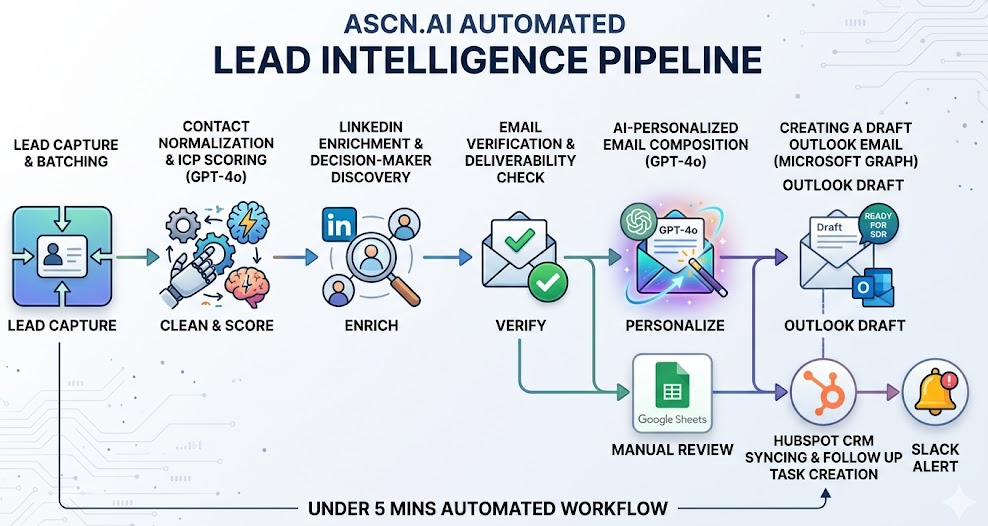
Seven stages. All automated. Each feeds the next. The whole chain runs in under 5 minutes per lead — from capture to a ready-to-send Outlook draft sitting in the rep's Drafts folder. Leads flagged by deduplication or low-confidence verification go to a manual review queue in Google Sheets — visible to the ops team. Nothing silently dropped.
Stage 1 — Lead Capture & Batching
The workflow triggers on: new or updated HubSpot contact, Google Sheets row marked "ready," or a webhook from a form. Leads batch sequentially to stay within API rate limits. Deduplication runs first. Existing contacts get enriched and updated via upsert logic. New contacts get created. No duplicates.
Stage 2 — Contact Normalization & ICP Scoring with GPT-4o
Raw data gets cleaned first: names normalized, company names standardized, email domains corrected. Then GPT-4o applies your ICP scoring rules to the cleaned record. GPT-4o returns structured JSON — ICP score from 0 to 100, plus a reasoning field. The Structured Output Parser validates the format before anything writes to HubSpot. Score and reasoning land in two custom HubSpot properties, usable in lists and workflows.
HubSpot's Breeze AI predictive scoring and this GPT-4o layer work together — Breeze uses historical deal data, GPT-4o applies custom ICP criteria that Breeze doesn't support natively. Leads below your threshold get flagged and skipped.
Stage 3 — LinkedIn Enrichment & Decision-Maker Discovery
For leads that clear the ICP threshold: company details confirmed, right decision-maker found by role. Role caps set at max 2 contacts per company per cycle — prevents over-saturation of any single account. The pipeline uses Apollo.io and Hunter.io instead — purpose-built enrichment tools with 260M+ contact databases. Apollo returns higher volume; Hunter returns fewer but cleaner results. 2026 benchmarks (LaGrowthMachine) show multi-channel sequences combining LinkedIn profile signals with email generate 28-35% response rates versus 8-12% for LinkedIn-only approaches.
Stage 4 — Email Verification & Deliverability Check
Non-negotiable. The enriched email runs through: syntax check, MX record validation, disposable domain filter, SMTP handshake. Confidence score and timestamp log to Google Sheets — full audit trail, per lead. Low-confidence leads go to manual review. High-confidence leads advance. The 10-20x ROI from verification comes from avoiding domain blacklisting — one blacklisted domain costs more than years of verification subscriptions.
Stage 5 — AI-personalized email using the GPT-4o system
GPT-4o loads your approved HTML template and personalizes it: first name, company-specific reference, role-relevant hook from enrichment data. The Structured Output Parser validates structure against your schema — no dynamic generation. The AI fills defined personalization slots; the brand voice and template structure are yours. A/B variants supported natively.
Stage 6 — Creating a draft Outlook email using Microsoft Graph
Personalized HTML email goes to Microsoft Graph API. POST to /me/messages creates a draft in the rep's Outlook Drafts folder. Does not send. Signature fetched from Google Drive, embedded as base64. Human-in-the-loop: automation drafts; sales rep reviews and sends. Prefer Gmail? Swap the mail node. Everything upstream stays identical.
Stage 7 — HubSpot CRM syncing and next day follow up task creation
Contact updated in HubSpot: all enriched data written, company association confirmed, ICP score and reasoning in custom properties, composed email stored for audit. For leads above the priority threshold, Slack fires immediately — so the best opportunities get fast attention.
Who This Is Built For
- SDR and BDR teams. The automation handles enrichment, verification, and drafts. The SDR handles replies and conversations — the part that actually moves deals forward.
- B2B founders doing prospecting without a sales team — the output of a full SDR team at a fraction of the cost.
- RevOps teams with incomplete CRM data and inconsistent outreach who want a systematic fix, not another training session.
- Agencies building repeatable outreach infrastructure for multiple clients. The workflow is modular and client-configurable.
What Changes After Automation — Real Business Impact
The 2026 Enterprise ROI Report documents HubSpot Breeze AI delivering 171% average ROI in the first year. AI automation agents producing 40-70% reduction in operational costs. One implementation saw AI-driven prospecting generate 25% of total pipeline with 200%+ QoQ growth.
| Pipeline Stage | Manual Time (Human Resource) | Automated Time (Machine Resource) |
|---|---|---|
| Lead research & enrichment | 45–90 min/lead | 30 sec/lead |
| Email verification | 10–15 min/lead | Instantaneous |
| CRM data entry | 15–20 min/lead | Instantaneous |
| Draft email composition | 20–30 min/lead | 45 sec/lead |
| Total per lead | 90–155 minutes | ~2 minutes |
Bounce rate drops from 7-8% to under 2%. Outreach runs 100% on-brand. Every HubSpot contact comes out fully enriched, scored, associated, with a follow-up task assigned.
How ASCN.AI Builds This For You
ASCN.AI is a no-code automation platform and service that designs, builds, and deploys AI workflows for business teams. This pipeline is adapted to your specific CRM, ICP criteria, email templates, and tool stack.
Process steps: Discovery call maps your lead sources, CRM configuration, ICP definition, and tool access. We build the workflow, configure ICP scoring to your criteria, integrate your email template, and run a full test with real leads before handoff. The client will receive documentation, a walkthrough, and access to the ASCN.AI platform for ongoing support.
Timeline and deliverables: 1-2 weeks from discovery to production. Fully operational n8n workflow, HubSpot properties mapped, email template integrated, verification service connected, tracking dashboard ready. Runs on your infrastructure. Yours to own.
Customization Options
ICP Scoring: Scoring weights adjustable without rebuilding — industry, company size, region, tech stack, title seniority. A JSON configuration block.
Channel & Tool Switching: Gmail instead of Outlook: swap the mail node. SMS: add Twilio after the draft stage. The pipeline is modular.
Multi-Persona Targeting: CMOs get one template angle; RevOps leads get another. Role-based routing built in.
Compliance Controls: Opt-out suppression before every send. Domain rate limiting. Unsubscribe in every draft. Per-campaign Legitimate Interest Assessment template included.
⚠️ EU AI Act — August 2026: Transparency requirements for AI-generated outreach content take effect August 2026 for EU recipients. The pipeline can be configured to include required disclosure language in every draft automatically.
Technical Integration Requirements
- HubSpot — private app token, contacts/companies/tasks read-write scope
- Microsoft 365 / Outlook — Microsoft Graph OAuth2, Mail.ReadWrite scope (delegated auth)
- Google Sheets + Google Drive — lead tracking and signature image hosting
- Email verification service — Hunter.io or Apollo.io
- OpenAI API key — GPT-4o access
- n8n instance — cloud or self-hosted; ASCN.AI can manage if needed
Frequently Asked Questions
Does this work with Gmail instead of Outlook?
Yes. The Microsoft Graph node swaps for a Gmail API node — enrichment, scoring, verification, and HubSpot sync stay identical.
What LinkedIn API access is needed?
None directly. The pipeline uses Apollo.io and Hunter.io — they've integrated LinkedIn-sourced data already.
How does email verification work?
Syntax check → MX record validation → disposable domain filter → SMTP handshake. Confidence score logged per lead. Low-confidence leads go to manual review queue.
Can I use Salesforce instead of HubSpot?
Yes. Salesforce, Pipedrive, and Airtable are all supported — the HubSpot node replaces with the relevant API connector.
How is GDPR compliance handled?
Opt-out suppression before every step. Domain rate limiting. Unsubscribe in every draft. Per-campaign Legitimate Interest Assessment template. EU AI Act disclosure configurable for August 2026.
What happens to a lead already in HubSpot?
Deduplication detects existing contacts. They get enriched and updated via upsert logic. No duplicate created.
How long does setup take?
1-2 weeks from discovery call to production. Full lead batch test before handoff.
Do I need technical skills to manage this?
No. Visual workflow, JSON config for ICP weights, paste-in HTML for email template. Documentation and walkthrough included.
Get Started with ASCN.AI
If your team is spending more than an hour per lead on research, enrichment, and drafting — that time is gone. Automation doesn't replace the human judgment that closes deals. It removes the mechanical work that's in the way of using that judgment.
Book a discovery call. We'll map your current setup and show you exactly what a fully automated lead intelligence pipeline looks like for your team.
Disclaimer: Compliance with GDPR, CAN-SPAM, and local email marketing laws is the responsibility of the implementing organization. EU AI Act provisions referenced are current as of May 2026.
