



- Русский
- English
- Português
Automate Instagram & Facebook posting with Meta Graph API & System User Tokens
ASCN.AI offers a robust solution for automating Instagram and Facebook postings using non-expiring System User Tokens and n8n workflows. By integrating AI-driven content generation with stable Meta Graph API connections, businesses can ensure consistent social media presence without the common headache of expiring credentials.

ASCN.AI provides businesses with a simple way to automate Instagram Business and Facebook Page postings. The solution uses Meta Graph API via System User Tokens — non-expiring credentials that do not expire regardless of whether employees leave or change their passwords. The setup takes about 48 hours: you will fill out a spreadsheet with topics, and then an AI will generate content for both platforms via an n8n workflow.
Many Meta posting automations create problems after two months; such as when tokens expire, someone changes their password, or permissions are removed. At that point, the automation is broken and no longer posts content. Sound familiar?
At ASCN.AI, we have solved that issue with the proper solution: System User Tokens that never expire, and are not associated with a specific individual. In addition, our n8n workflow reads topics from your spreadsheet, generates the content via AI, and posts the same content to both Instagram and Facebook simultaneously using Meta Graph API.
Once you setup the process, posting is automated and will continue to occur if you do not change the established process.
Automating the Service
You will only need to create a single automation for both Instagram Business Account and Facebook Page posting using a single data set.
Both Instagram Business and Facebook are on the same pipeline
You will maintain a spreadsheet in whichever format you prefer to use. It may be Google Sheets, Airtable, Notion, etc. This spreadsheet will have the following columns: Topic, Image, Date, Status. After entering a new Topic as Pending, the automation will post that content to both Platforms automatically.
The n8n workflow will trigger a schedule or via webhook, will check the Pending rows, generate content using GPT-4o or Claude, fetch the image associated with the Topic (or create an image if there is none), and co-post the content to both Platforms (Instagram and Facebook) using the Meta Graph API. Each post will have the row updated to Published, with links to the respective Posts and the date and time of posting.
You will do zero manual submission on both platforms. After configuration.
We create the entire setup: API calls, tokens, error handling, retries, and notifications, leaving you with only the addition of topics to your table.
System User Tokens mean automation you can count on
Where traditional solutions fail.
A Page Access Token is tied to a real-world user. They go through a password change and the token dies. They lose permission and the token dies; the employee leaves, and the token dies. Every sixty days, you'll have to manually refresh your long-lived token. This is not automation; it is a constant headache every two months!
A System User is different. A System User is your service account within Meta Business Manager. It is not a real-world user. Tokens do not expire, nor are they tied to a user account.
How System User Tokens Outperform Regular Tokens
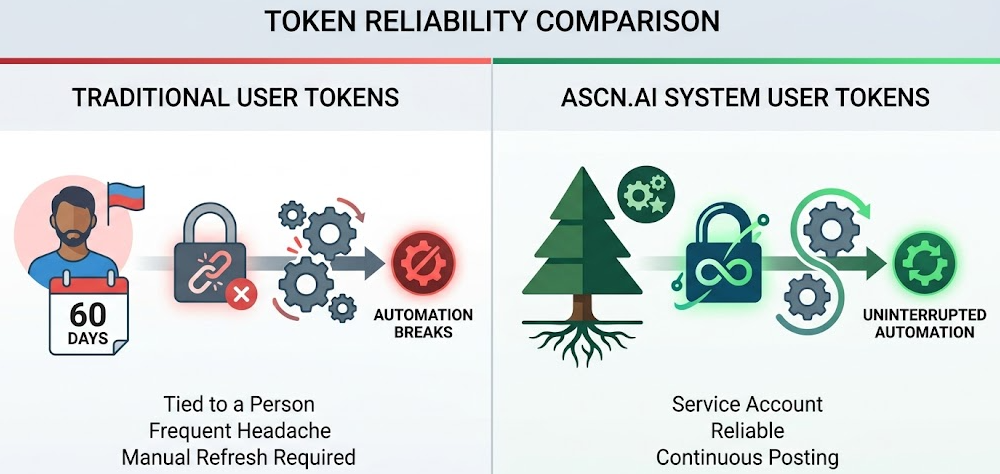
Token Comparison
| Token Class | Length of Use | Belongs to User | Automation Friendly |
|---|---|---|---|
| Short-Lived User Token | 1-2 hours | Yes | No |
| Long-Lived User Token | 60 days | Yes | Manual refresh required |
| Page Access Token | Varies by User | Yes | Breaks when people leave |
| System User Token | Not Applicable | No | Actually performs automation |
Real-life use case of token failure
A company implements auto-posting using a long-lived Page Access Token. The automation runs for one month, two months, and the token expires or the SMM manager leaves.
To establish the system users:
- Select Business Settings, System Users, then Add a System User within the Meta Business Manager.
- Assign the system user an Instagram Business Account and Facebook Page (Admin role).
- Generate a token for the system user and make sure to include the following permissions:
instagram_basic,instagram_content_publish,pages_manage_posts,pages_read_engagement. - Insert the generated token in n8n (Only needs to be done once and will last indefinitely).
Workflow
The direct answer: System checks for "Pending" entries in the table → System generates text using AI → System generates a media container by using POST /{ig-user-id}/media → System publishes image by using POST /{ig-user-id}/media_publish → System publishes image to Facebook by using POST /{page-id}/photos → System updates the row.
Step 1: Content Sources
Google Sheets, Airtable, Notion, Sharepoint, and Hubspot are all native n8n Integrations and will be triggered to execute either hourly (Scheduled Trigger) or every time an entry is added (Webhook).
Step 2: AI Content Creation (Optional)
Input your topic and GPT-4o or Claude will create text in your specified voice-style, and if you do not have any images, then DALL-E 3 will generate one for you. All PNG-s will automatically be converted to JPEG anyway.
Step 3: Posting to Instagram Using /media and /media_publish
// Create media container
POST /v21.0/{ig-user-id}/media → { creation_id }
// Wait for Publish to be Complete (30 seconds for photos, 5 minutes for videos)
GET /v21.0/{creation_id}?fields=status_code
// Publish
POST /v21.0/{ig-user-id}/media_publish → { post_id }
⚠️ Carousels: All carousels will be cropped to the first image's aspect-ratio; therefore, the order of images is very important.
Step 4: Creating and Publishing Photos to Facebook Page /photos
POST /v21.0/{page-id}/photos → { photo_post_id }Posting to Instagram and Facebook both together, with delays from each other as needed.
Step 5: Logging
Each log entry must carry the following information: Published or Failed with a reason, timestamp of entry. If a failure occurs you will also receive a Slack/email message of failure.
Types of Content Supported
- Single Photo Post: JPEG only, 4:5-1.91:1 aspect ratio, max 8MB
- Carousel Posts: 2-10 JPEGs — all must be cropped to the same size as the first photo in the carousel.
- Video Feed Posts: MP4 (H.264 encoding), length of 3-60 sec
- MP4 Reels: up to 15 mins long; 9:16 is ideal
- Stories: BETA in 2026; needs Meta approval
- Photo Post:
/{your facebook page-id}/photosAPI - Text/Link-only Post:
/{your facebook page-id}/feedAPI - Video Post:
/{your facebook page-id}/videosAPI
2026 API Rate Limits and Safety
Instagram: 100 posts/24hr (carousel counts as one post against that limit), 200 requests/hr/token.
Paginated API User Token used for Business Use Case Rate Limits (rate limit = 4800 × engaged users). This is higher than standard Platform Limits for a high volume engaged Page.
Our Defaults: 30+ mins between posts, limit 25 posts/day, exponential backoff for all 429 errors, and alert once you hit 80% of your limits.
Reasons to Use Automation for Your ROI
- Time Savings from Automation: 30-40 hours/month (Templated.io, 2026)
- Increased Engagement Levels When Posting Consistently: 2.3X (GetLate.dev, 2025)
- Return on Investment: For every $1 spent; you'll generate an estimated $5.44 in sales (EntrepreneursHQ, 2026)
- Automating Your Marketing Posting: 83% of All Marketers Have Automated Their Posts
Two hours spent manually posting per day = 40 hours per month = $1,000 at $25/hour rate. Our entry-level plan is priced at $59 each month.
Common Mistakes We Fix
- PNG vs JPEG: if you have a png file we will convert it on the fly.
- Wrong Aspect Ratio: We will validate the image size before submitting the final product.
- Publishing Too Early: We will regularly check the status of your job within the container.
- Expiration Of Token: We will use System User Tokens that do not expire (like long-lived tokens).
- Rate Limiting With 429: We will use exponential backoff and retry once.
- Missing Permission: We will create the appropriate scopes in their entirety from 'scratch'.
The Setup Process & Pricing Plan
What We Require
- Admin access to the Meta Business Manager
- Business account at Instagram with corresponding Facebook page
- Content spreadsheet or we will provide a content spreadsheet template
48 hour Setup Process
Pricing
- Startup Plan — Does not include maintenance.
- Starter Plan — From $59/mth: 1 Instagram business account + 1 Facebook page, up to 30 posts per month, no maintenance.
- Growth Plan — From $99/mth: Up to 3 accounts, up to 100 posts per month, AI content generation included.
- Custom Plan — Price upon request: Unlimited Posts Monthly, Priority Support.
Frequently Asked Questions
Is a Developer Account Required?
No, ASCN.AI handles the technical implementation.
What Happens When Tokens Expire?
Tokens do not expire when issued as System User Token.
Can You Publish To My Personal Instagram Account?
No, you can only publish to a Business Account or Creator Account using the Meta API.
Can You Publish Stories?
Yes, if you have approved permission from Meta.
What Is The Maximum Number Of Monthly Posts?
The maximum number per day from Meta is 100; however, our default is 25-30 posts per 30+ minutes apart.
What If Meta Makes Changes To Their API?
ASCN.AI will make changes to all clients' workflows as part of its service offering.
Do You Have The Capability To Create Images?
Yes; we can produce images for you using DALL-E 3, or you can provide us with an existing image.
What Types Of Content Sources Are Supported?
The sources supported include but are not limited to Google Sheets, Airtable, Notion, SharePoint, and HubSpot. Basically, any data source with a RESTful API will work.
