



- Русский
- English
- Português
Automate Glassdoor Job Search with Bright Data Scraping
ASCN.AI automates searching for jobs on Glassdoor by utilizing the Bright Data Scraper API and n8n workflows to deliver structured data directly to your Google Sheets, Slack, or CRM. This solution eliminates manual tracking and data entry, providing recruiters and analysts with accurate, real-time job listings, salary ranges, and company ratings.

ASCN.AI automates searching for jobs on Glassdoor by utilizing the Scraper API from Bright Data and an n8n workflow. You input keywords for the job and the area where you want to work, and the program will then provide listings and extract information about the listing's title, company name, rating, location, yearly pay range, and job posting link through automatically writing the data into either Google Sheets, Slack, or your CRM. Setup can take up to 48 hours, and starts at $59 per month.
Five Easy Steps to How it Works:
- Submit what job you want and where (by way of web form or webhook).
- The Bright Data Glassdoor Scraper API will collect job postings based on the search criteria and provide a snapshot of the job postings.
- The system will monitor the job listing's delivery and will attempt to deliver it again until it succeeds.
- The system will extract the following data from the job listing: title, company name, rating, location, and job posting link.
- The data will automatically flow to Google Sheets, Notion, or Slack.
Quick Facts on Glassdoor and Bright Data Automated Job Posting Search
- 76.8M+ records of Glassdoor job postings (Bright Data, 2026).
- Search speed: 2-5 minutes for each job posting on a given location.
- Data accuracy: 95%+ accuracy based on each job posting result.
- Success rate: 90%+ success rate based on each job posting result.
- Bright Data Pricing: You can pay $1.50 per 1K records at the pay-as-you-go pricing level or $499 per month for their Scale Plan that would allow you to have 384K records.
- ASCN.AI Pricing: Starting at $59/month for a subscription to use the Bright Data API.
- Time to Setup: 48 hours for ASCN.AI and 20-40 hours if you were going to DIY the whole process.
- Legal Status: As per the court ruling of hiQ v. LinkedIn (9th Circuit, 2022), publicly available job postings will be able to have their data scraped legally.
- Output Formats: Google Sheets, Notion, Slack, CRM webhook, AWS S3, JSON, CSV, and Parquet.
What Glassdoor Job Search Automation Actually Does
ASCN.AI automates the search for jobs on Glassdoor and eliminates the need to manually search through job boards each day and have the jobs you searched for collected, organized, and forwarded, along with any required attributes, to your team — on a scheduled workflow without having to log in each day, filter out duplicates, or manually copy and paste job details.
Manual tracking of job searches is broken. A recruiter spends approximately 2 hours using Glassdoor for the "Senior Engineer" job search in 3 cities, which nets approximately 40 results, of which half are duplicates that were found yesterday. An analyst who monitors hiring patterns across 20 different companies ends up with a gigantic spreadsheet, 6 different browsers open, and copying/pasting to and from various locations that never stay current longer than week 2.
ASCN.AI's Glassdoor automation system will replace all of that with one workflow. You will set your criteria (parameters) only one time. The system will work on your time frame, based on your schedule, and will deliver cleansed, de-duplicated job data to the location you are currently working at.
Input: What You Provide
Three parameters will drive each run: a job keyword (e.g. role title or function): i.e. "Software Engineer", "Marketing Manager", "Data Analyst". A location: city, region or "Remote". A country where the target market is located. Trigger options available are: web form through ASCN.AI, webhook through your internal system or scheduled cron job that runs 1x daily, 1x weekly or once per hour. No coding on your end, none.
Processing: The Background Process
Once the trigger is activated, the automation will perform a 3-step process on the Bright Data Glassdoor dataset. Your trigger request with your parameters will start the data collection process and return a delivery id. Your money, your choice.
Output: What You Receive
| Field | Description | Example |
|---|---|---|
| Job Title | The title of the position listed | Senior Software Engineer |
| Company Name | The name of the employer | |
| Location | A city, state, or remote location | San Francisco, CA |
| Rating | The company score from Glassdoor | 4.5 / 5.0 |
| Job Link | A link to the job listing | glassdoor.com/job/... |
| Salary Range | When disclosed by the employer | $120K - $160K |
| Date Listed | The date the job posting was created | 2026-04-25 |
| Job Type | Full-time, Part-time, or Remote | Full-time |
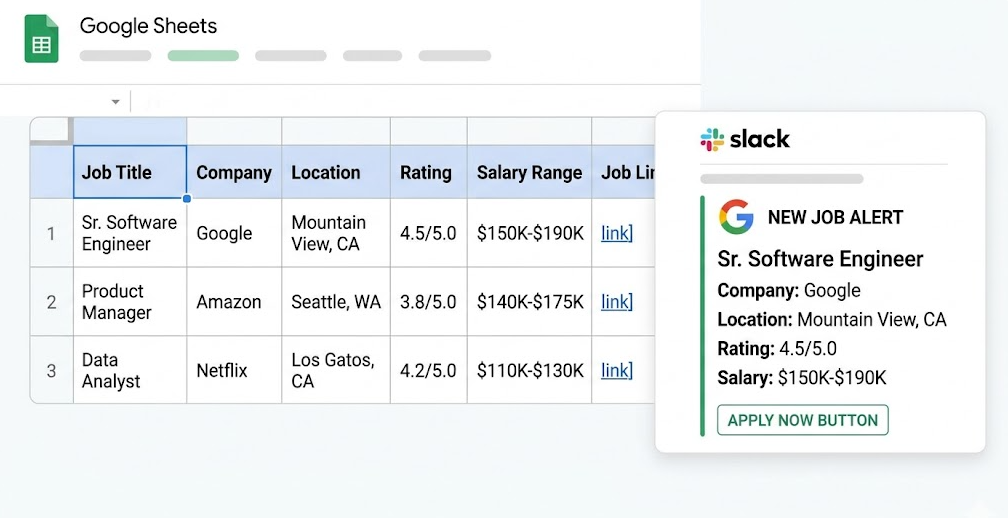
Default results will appear in a Google Sheets file with one row per job and corresponding columns, plus timestamps and status columns. The scraper's output will be sent to: a Notion database, a Slack channel, a CRM using webhooks, AWS S3, Google Cloud, Azure, or SFTP.
What Data You Can Pull from Glassdoor
Bright Data's Glassdoor dataset contains over 76.8M job records and continues being updated regularly. A keyword search will return all relevant publicly available job postings fitting your parameters.
Job Listings Data Fields
The scraper returns: job URL, posting ID, job title, company name, company ID, location, job description/summary, seniority level (Entry/Mid/Senior/Executive), salary range when disclosed by the company, posted date and job type. Salary information will only show when the company has disclosed it; however, with the passage of pay transparency laws in California, New York, Colorado, and other states, there has been a substantial uptick in companies offering salary information.
Company Overview Data
Separate Bright Data scrapers are used to collect company-level fields: size category, headcount estimate, industry, headquarters, year founded, funding stage, and how many followers the company has. Job records are enriched with data on companies that employ between 50 and 500 and have ratings of 4.0+. ASCN.AI can run both scrapers through one workflow if both outputs are needed.
Output Formats and Destinations
ASCN.AI outputs in JSON, NDJSON, CSV, and Parquet based on your desired format. Large output volumes can have .gz formats for compression; ASCN.AI configures your endpoint for output during initial 48 hours after setup - commonly Google Sheets, but when necessary, more endpoints (Slack, CRM webhooks, etc.) will be added to your workflow.
Why Glassdoor Is Hard to Scrape (And How Bright Data Solves It)
Glassdoor uses JavaScript rendering, Cloudflare, IP rate limiting, and CAPTCHAs to block standard HTTP scrapers. Bright Data's Web Unlocker automatically circumvents all of these with a single API call — no management of any proxy services, CAPTCHA, or running headless browsers on your server.
Glassdoor will have medium-difficulty (3/5) for scraping in 2026. The technical issues are layered on top of each other so it will be genuinely difficult to build around them.
The Issue of JavaScript Rendering
JavaScript loads job postings dynamically through the use of JavaScript — meaning that an HTTP request using standard methods will return nearly empty HTML document — so in order to scrape it requires a fully functional browser system including memory management, session handling, and timeout recovery code to run the JavaScript and produce a populated DOM structure. A significant engineering effort.
IP Rate Limiting and CAPTCHA Systems
Glassdoor has deployed Cloudflare as its primary anti-bot system, along with using IP rate limiting to identify and disable IP addresses extremely quickly (less than 10 requests from the same IP could be enough to have that IP blocked). Once they identify an IP address using Cloudflare, customers using Cloudflare's infrastructure will face a CAPTCHA. Residential proxies help by rotating throughout a pool of quality IPs (using smart rotation logic), but still need 20+ quality IPs. Please note additional items running at the same time, including TLS fingerprint checks, browser fingerprint detection and behavioural analysis.
Scrapfly's Technical Guide for 2026 puts the safe minimum at 1 request per 3-5 seconds from residential proxies fully rotated. However, even that is not guaranteed at scale.
Real Time Data Collection with Bright Data Web Unlocker
Bright Data has taken that complexity and created a single API call that will handle the following tasks without intervention: JavaScript rendering, CAPTCHA solving, Cloudflare bypass, rotating proxies from a pool of over 72 Million residential IP addresses, browser fingerprint spoofing and retry logic.
Simply submit 1 request for your search criteria and receive back structured data for the job being sought. This means there is no need for headless browsers, no need for proxy management and no need to set up accounts that deal with CAPTCHAs. The Bright Data dataset API provides 1 additional reliability layer, as Bright Data pre-collects and structures the data.
When your request is made to retrieve data from Glassdoor, Bright Data will retrieve processed snapshots of job postings, rather than access to the Glassdoor servers. Which reduces the risk associated with attempts to identify anti-bot measures and improves the speed and reliability of job posting information.
Is It Legal to Scrape Glassdoor?
Yes. Under U.S. law, scraping job postings that are publicly available on Glassdoor is legally defensible. The 9th Circuit's 2022 hiQ Labs, inc. v. LinkedIn Corp. case has established that there is no violation of the Computer Fraud and Abuse Act (CFAA) when one scrapes "publicly accessible data from public sources."
Furthermore, all job postings on Glassdoor can be viewed by members of the public without needing an account to be logged in. In April of 2022, the Ninth Circuit ruled that 'scraping' data from publicly available data sets does not violate the CFAA. In other words, it is not enough to simply violate a public website's user agreement to create CFAA liability.
For example, although Glassdoor's Terms of Service state that using automated scraping is not allowed and thus makes it a breach of contract, this does not create a criminal violation of the CFAA. ASCN.AI's automated system only scrapes publicly posted job listings, does not create a user account and does not collect any personal information.
Who Uses Glassdoor Job Automation
This is only one example of the many ways recruiters, HR professionals, job market analysts, competitive intelligence teams and sales prospectors utilize job automation with Glassdoor:
- Building recruitment pipelines
- Monitor competitors hires
- Job market trend analysis
Recruiters and HR Professionals
Staffing agencies place approximately 30 candidates per month in technical roles. Without automation, recruiters spend approximately 2 hours each day scanning employers’ job postings from sites like Glassdoor, LinkedIn, and Indeed. By using ASCN.AI overnight along with Google Sheets to sort and filter the new job postings, the recruiter found 200 new job postings with a rating greater than or equal to 3.0 from Google Sheets. By 12:00 PM on that day, the recruiter had sent out 10 new outreach emails. The amount of time saved by the recruiters was approximately 8-10 hours per week.
According to HireTruffle’s 2025 analysis, companies using AI-based recruiting automation can reduce their recruiting costs by an average of 77.9% and save an average of 85.3% of their recruiting efforts. Automated job board scouting is one of the key areas of the technology stack for AI-based recruiting.
Job Market Researchers and Analysts
Hiring volume is a leading indicator of a company’s future growth potential. For example, if a company posts 15 engineering positions in Q1, there is a high probability that the company is scaling its revenue 6-9 months out. Every week companies track the trends related to their organization and every role within that organization using data collected from Glassdoor. The data contains information about organizations, roles, locations and seniorities within organizations and how each of those data points is changing over time. This data can provide a look ahead to what trends may happen next month or a year down the road.
Intelligence About Your Competitors
If a competitor has posted for a VP of Sales and 10 Account Executives to be hired at the same time, that is something to keep an eye on. The company will add to its current numbers in that new city very soon. ASCN.AI alerts clients of any postings by competing firms in their local area via a Slack notification when those firms post positions for competing positions against your organization.
Career Development and Advancement Opportunities for Applicants
Clients can subscribe to an automated service that will send a daily Google Sheet with every new job posting for that day that has an overall rating above 4.0 within their local area. Applicants will not have to continuously check on Glassdoor to stay up-to-date with job openings and there will not be any duplicate job postings in their daily Google Sheet.
DIY vs. ASCN.AI: The Actual Cost of Glassdoor Automation
"The biggest mistake in constructing a system to automate Glassdoor scraping is that teams have an inflated perspective of the amount of time necessary to build that system. It is not a one-time project, it should be an ongoing project that requires a lot of time and resources." — ASCN.AI Team
Building It Yourself: Actual Cost Summary
| Item | Monthly Cost | Initial Set-Up Time |
|---|---|---|
| (DIY) Bright Data Pay-As-You-Go: $1.50 / 1K records | $50-200 | 2 Hours – Create Login Credential |
| n8n Cloud Instance | $20+ | 4-6 hours |
| Developer(s) Hours for Initial Build | $500-2,000 | 20-40 hours |
| Ongoing Maintenance and Bug Fixes/Structure Changes | $200-500/month | 5-10 hours/month |
| Error Monitoring & Alerting | $20-50 | 3-5 Hours Set-Up |
First month total: $790-2,750. Ongoing cost: $290-750. The debugging time associated with Glassdoor changing the layout of its page must also be taken into consideration; this generates a workload for the team every time they make a change.
ASCN.AI Done-for-You Service: What It Involves
Creating Bright Data credentials. Creating your n8n workflows to collect your data and deploy them to your Google Sheet on the schedule that you select. Creating and configuring your Google Sheet to your specifications. Establishing a Slack notification system. Creating error handling, retry policies, and continual monitoring. You provide us with the keywords and the location, and the rest of the task is to be performed by ASCN.AI. Set up time: 48 hours. Cost: Starting at $59 per month. Bright Data API is included in the price.
How to Start with ASCN.AI Glassdoor Automation
Getting started with the automation solution from ASCN.AI takes just one 20-minute consultation appointment. ASCN.AI will configure and deploy the completed workflow within 48 hours and provide you with a Google Sheet and workflow URL that you can use immediately (no technical setup required).
Step 1: Schedule a Free Consultation (20 Minutes)
We will discuss the keywords you want to track, the locations you want to track, how often you would like to track them, what type of output destination you need, and if you want to include company overview information on the jobs you are monitoring. There will not be a sales pitch during this meeting, only a scoping session will be held to outline the configuration to be created for you.
Step 2: We Will Configure Everything For You Within 48 Hours
Within 48 hours following your consultation, ASCN.AI will configure the n8n workflow according to your specifications, link Google Sheets with the exact columns you require, and initiate Slack alerts (if requested). After 48 hours you will have a Google Sheet with the test run for the automation already in it and the n8n workflow URL.
Step 3: Your Data Flows Automatically on Your Desired Schedule
The workflow runs as scheduled, automatically. Each instance of the workflow will generate new records in your Google sheet. Your receiving of a Slack alert will occur for new records if that option was selected at the time of configuration. Once the original tasks have been completed, there are no further actions required by you.
Pricing
| Plan | Price | Searches/Day | Included |
|---|---|---|---|
| Starter | $59/month | 50 | Google Sheets output |
| Growth | $149/month | 200 | Sheets + Slack + Notion |
| Enterprise | Custom | Unlimited | Any destination |
What to Do with Your Glassdoor Data After Collection
You can use the job data obtained from Glassdoor in three workflows that deliver high-value outputs: creating a recruitment tracker in Google Sheets with automated filters and deduplicated listings; sending job results directly to your CRM or ATS using webhooks; or setting up real-time Slack notifications when new jobs are posted that match your search parameters.
Create a Google Sheets Recruitment Tracker
Enhance the default output in Google Sheets using standard formulas. Apply FILTER to choose only job listings whose overall rating is 4.0 or higher; use SORT to arrange by the date they were posted, from most recent to oldest; and make UNIQUE based on job id to eliminate duplicates from your output list. You can also create a pivot table summary of existing job listings by company name so you can see how many positions each company currently has open and create an overview of their hiring activity for each business. This type of summary will be automatically updated in your Google Sheets every night so you will not have to manually update the data in your documents.
Send Job Data to Your CRM or ATS
You can connect the output of your webhooks to your existing CRM or applicant tracking system (e.g., HubSpot, Salesforce, Greenhouse, Lever, etc.). When a company has an open position, the program will create a record/Deal in the appropriate CRM for each company listed, as well as creating a generating sourcing task and updating all custom fields related to the source of that particular company listing. The mapping of both sets of records will be established by ASCN.AI when configuring your account.
Set Up Real-Time Slack Notifications for New Job Postings
Using the Slack integration, your team will receive formatted messages every time that new records are created in your Google Sheets (e.g., Job Title, Company Name, Overall Rating, Location, and direct link to apply to the job). You and your team will receive results that were posted overnight, at a specific time in the morning through Slack. The time it takes to respond to urgent job openings has dropped from several days to just a few hours.
FAQ: Glassdoor Job Search Automation with Bright Data
How long will it take for me to set up Glassdoor automation?
Typically ASCN.AI can be deployed within 48 hours of our first meeting. For those preferring to build from scratch using n8n + Bright Data, this can take an initial 20-40 hours followed by 5-10 hours per month of ongoing maintenance.
Which Bright Data plan will I need for Glassdoor scraping?
With ASCN.AI, you can use the Bright Data API with no additional fees. If you choose to build yourself, paying as you go at $1.50 for each 1,000 records is fine for most situations. For large-scale operations there is a Scale plan available for $499/month that covers up to 384,000 records. Current promotion: receive 25% off your first six months of service from Bright Data by using code APIS25.
Will I be able to extract salary information for positions listed on Glassdoor?
Yes. When an employer has provided this information, you may be able to extract salary ranges from the Bright Data Glassdoor job listing extract(s). As a result of pay transparency legislation enacted in California, New York, Colorado, and other states since January 2023, more employers are providing salary range data than ever before.
How many job postings can I extract from Glassdoor each day?
Using ASCN.AI's Starter tier you will be able to perform 50 searches per day, resulting in between 500 – 5,000 records depending on the number of records returned from each search. The Growth tier allows for up to 200 searches per day; each search will take between 2-5 minutes and return 95%+ accurate data with a 90%+ success rate.
Can I automate extracting jobs that are eligible for remote working with Glassdoor?
Yes. When doing your original ASCN.AI setup, you will define "Remote" and/or "United States" as the location so you can extract remote jobs from Glassdoor.
Will I be able to scrape data from Glassdoor without being blocked?
No, when using Bright Data's infrastructure to scrape Glassdoor, you cannot be blocked from scraping Glassdoor. Bright Data's infrastructure provides a way for you to rotate your IPs, handle CAPTCHA bypass, Cloudflare bypass and automatically rotate browser fingerprints and will automatically retry for delivery failures at each step of your workflow. ASCN.AI monitors every step in the workflow process and addresses all failures.
What will happen if Glassdoor changes its page structure?
Bright Data will maintain the scrapers and will also assume all responsibility for reconfiguring the scrapers due to structural changes on their part. ASCN.AI will have anything required to reconfigure on n8n. You will not need to take any action if the page structure of Glassdoor changes and data will continue through the workflow as usual.
Can I also automate the collection of company reviews from Glassdoor?
Yes. In addition to scrapers for job listings on Glassdoor, Bright Data also has a separate scraper set up specifically for Glassdoor Company Reviews. ASCN.AI can create a workflow to collect only reviews and/or combine job listing and company review collection into a single pipeline on n8n with separate output sheets.
