



- Русский
- English
- Português
Company financial statement tracker
Use the ASCN Agent to automate company earnings report tracking and receive real-time financial data with minimal effort. This solution streamlines financial management for entrepreneurs by providing timely updates via Telegram, allowing you to focus on strategic business growth instead of routine manual tasks.


By using the ASCN Agent, you can automate tracking company earnings reports so that you receive current data without having to put in a lot of extra effort to get it.
General Overview
The tracker for company earnings reports provides a way for entrepreneurs and other founding members of a startup company to successfully manage and operate their finances. Automation of all financial tracking processes means that you do not have to rely on manually finding financial information and keeping track of when companies publish those types of reports on their websites. In addition, through the integration with Telegram, you can receive timely updates on the status of financial reports in a simple and accessible format so you can easily analyze that data.
As there is a set schedule that the agent operates on, you will no longer have to check for changes as they happen. This will free up your time to be able to concentrate on the more important areas of the business that require your attention rather than routine, repetitive tasks. Copying the data is seamless and the ability to use both web and Telegram for searching makes the entire data-transfer process quick and easy on all users.
How Automation Works
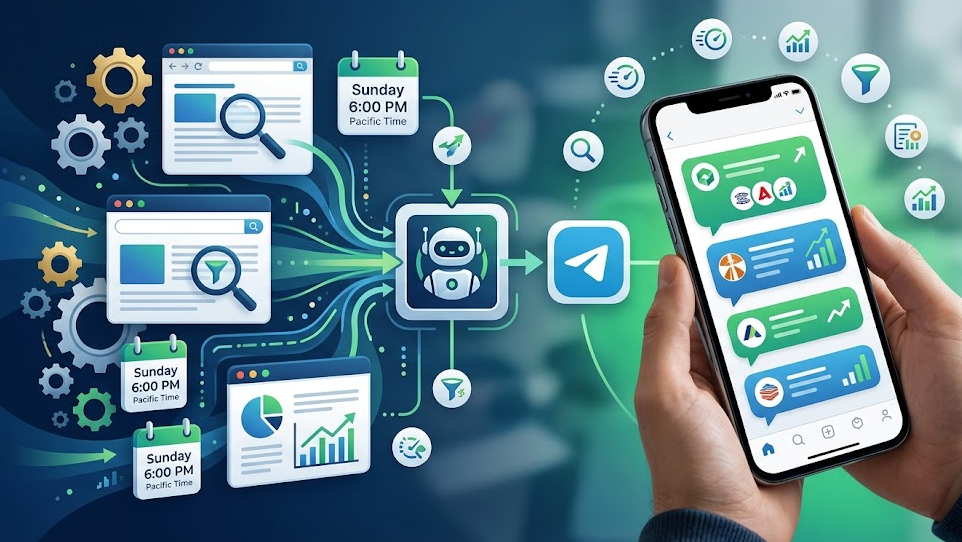
The automation of your tracking of your company's earnings reports is possible by using the agent's scheduling function which will allow you to receive only the most current information without any effort on your part. Every Sunday (6:00 PM Pacific Time), the agent will automatically look for all companies that are going to have earnings reports posted in the upcoming week. This will allow you the ability to be prepared for important events in the business world.
The agent will continually monitor the websites of the companies that you have specified, filter those companies based on your criteria, and send you a list of all of those companies through Telegram. This will allow all of your earnings report information to be located in a single location enabling you to easily track the companies you wish to continue to monitor. When you select the companies for which you want to track earnings reports, the agent will automatically plan the schedule for each report creating a single reference point for tracking all reports of all of your selected companies.
When earnings reports are released, the agent gathers the data and prepares a summary with key metrics and notable items. All updates are sent via Telegram, meaning you receive information quickly and efficiently. Automation reduces your risk of missing critical dates and makes it easier for you to analyze data and make decisions.
Why It’s More Effective Than Manual Work
Automating how to track earnings reports and collect data simplifies the process and data analysis. The system will enable you to eliminate the time it would take you to search for and process report data, allowing you to spend your time focusing on other areas of your business that require your attention and effort, rather than constantly checking up on reports and making sure you don't miss a critical date or piece of data.
The use of an agent eliminates errors that are the result of human error in collecting and processing report data. Since the collection and processing of data is automatic, it provides users with an assurance that the data is both accurate and current. Additionally, the automated delivery of results in an easy-to-use format through Telegram enables users to quickly and easily receive updates.
In addition to saving time, automation improves the quality of analysis that users receive and allows users to be ahead of their competition in terms of financial reporting and analysis. This is especially beneficial to founders and solo entrepreneurs who value every minute of their time and want to operate as efficiently as possible.
Results Users Achieve
It has become a lot easier and faster to track financial reports with the help of updates that come through the integration of automated systems into Telegram, which reduces the amount of time and effort by making it easier to read the data, therefore speeding up the decision-making process as well.
In addition to this, you will be getting:
- Notifications of when financial reports are due, to give you time to schedule the report releases.
- Summaries of the report; including the key metrics and any changes made to the reports since the original report was created, as well as providing you with the opportunity to do a deeper analysis of the reasons for the financial performance results than if all you had were the results of the report.
- Lower risk of making mistakes due to errors made by people because the reports are produced using automated methods for compiling and distributing the data.
Automating routine processes saves time and improves the quality of analysis for the founders and/or solo-preneurs who are looking for ways to take better control of their businesses.
Implementation Examples
Founders and solo-preneurs have found several successful processes to use automated report-monitoring agents to assist them with receiving updated financial reporting data based on their company's earnings reports. Users have reported that they now have much less effort receiving timely and accurate information regarding when they can expect an earnings report to be released due to using the report-monitoring system that provides multiple notifications, allowing users to prepare to act as soon as the report is released.
The implementation experience shows that automation can eliminate the routine activity of regularly looking to see if an earnings report will be released soon and searching for that report after it has been released. Since report-monitoring agents automatically collect, process, and summarize earnings report data, there will be more time for users to spend on other critical aspects of their businesses that do not require immediate action.
Automation also provides users with:
- Timely notifications from the report-monitoring agents of upcoming earnings report releases to ensure that users are ready to take action on the report as soon as it is released.
- Summaries of the content (i.e., key metrics) of the earnings reports and a copy of the actual report, which will help users to do further analysis on the financial standing of the company that is filing the earnings report.
Tremendous is the elimination of human error with a fully automated process. An earnings report tracker is an excellent tool for managing and analyzing data.
What You Get
As a founder or solo entrepreneur, using an earnings report tracker will save you from the time and trouble of tracking these reports manually; thus, this time can be redirected toward more valuable tasks for your business. You will receive regular updates through Telegram so that retrieving this information quickly and conveniently is possible.
Benefits of Using an Earnings Report Tracker:
- Automatically track financial reports, as opposed to manually searching for this information or trying to monitor publication dates.
- Receive regular updates via Telegram, allowing you to remain up to date on all key events without additional effort involved.
- Receive complete detail on the results of financial reports, including key metrics and significant highlights to provide for more detailed analysis and enable you to make more informed decisions.
Users have access to a very powerful financial management tool providing a means of easing the financial analysis process so that they can concentrate on the most strategic aspects of their business.
Getting Started Instructions
To successfully launch your earnings report tracking tool, simply follow the instructions below. The first step is to set up a topic within Telegram, called "earnings", where you will receive information about future financial reports. By doing this, you will have one location where you have access to current information.
Next, use your agent's schedule to have them search for and filter the financial reports. The agent will run a search each Sunday evening at 6:00 PM for upcoming financial reports. This will allow you to stay ahead of key events. Make sure you choose the companies you wish to be informed of to receive only relevant information.
Automating the tracking of earnings reports will become an easy and effective means for managing your financial performance. By following these simple steps, you will reduce the time spent on daily tasks and allow yourself to focus on other more valuable events related to your business.
