



- Русский
- English
- Português
Cross-platform analytics (GA4 + Meta + Google Ads)
Use ASCN.AI to automate the collection and analysis of data from multiple marketing platforms like Google and Meta Ads. This approach simplifies workflows for marketers and operations managers, providing real-time insights to optimize advertising campaigns efficiently.

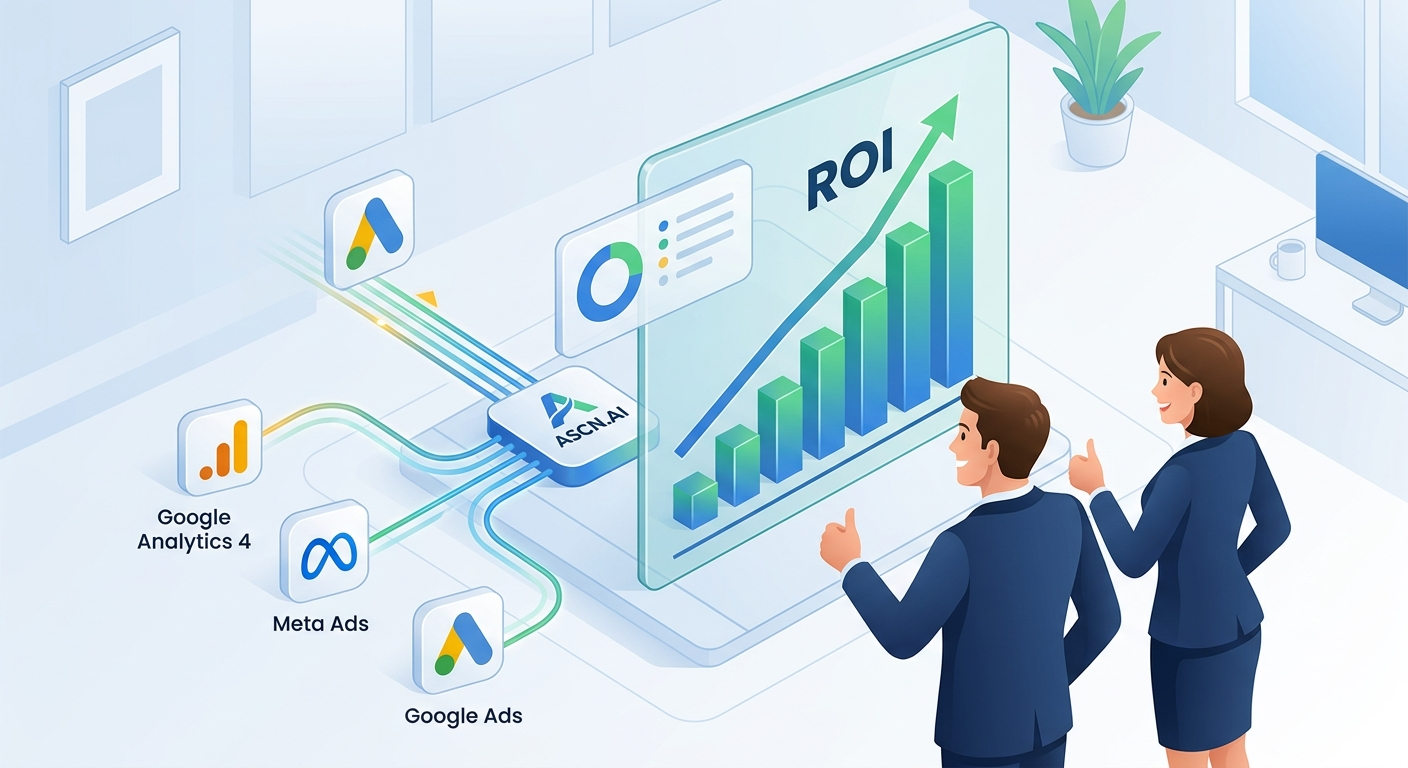
Use ASCN.AI to automate the collection and analysis of data from multiple marketing platforms. Make it easier for marketers and operations managers to have access to current information when making decisions.
Summary
Cross-platform analytics pulls data from Google Analytics 4, Meta Ads, and Google Ads to create a comprehensive view of the effectiveness of marketing campaigns. The purpose of this product is to assist marketers and operations managers in being more efficient by utilizing analytics in their workflow. Automating the collection of data can greatly simplify the entire data collection process, allowing you to spend more time analyzing and making decisions. By integrating popular online platforms with ASCN.AI, you can access real-time data that will help you make decisions related to optimizing your advertising campaigns. Using automated reports eliminates the potential for human error due to having to manually enter data and speeds up how quickly you can generate reports.
How Automation Works
Automation of the data collection and analysis processes happens through the use of an agent that collects data at a set interval. You do not have to go out and manually pull data from different sources, like Google Analytics 4, Meta Ads, and Google Ads; instead, you will have an agent that collects data for you on a regular basis, processes that information, and generates a report that you will be able to analyze and utilize. By automating data collection, you will be able to save significant time on routine tasks and spend that time on the more important job of analyzing and optimizing your advertising campaigns.
The integration of multiple platforms with ASCN.AI allows users to get the most up-to-date data available in one central location, making it easier to make business decisions and respond faster to changes in marketing. With the rise of automation, users can now trust that their data will be accurate because there are no longer any human error factors involved with entering data manually. The agent now serves as a non-biased marketing assistant in managing and executing marketing campaign activities.
Why It Is More Effective Than Manual Work
Automation, therefore, allows marketing professionals to have a more efficient workflow by providing a quick means of gathering and interpreting data. Automating these two functions allows professionals to spend more time on higher-level tasks (such as data analysis), and strategic decision-making. In addition, eliminating human error associated with manual entry of data will enhance the accuracy and reliability of the data.
Additionally, automating these tasks will allow for continual data updates which is extremely important for the rapid response to changes in a marketing environment. The automated system automates the gathering of data from various sources and provides reports in an easily readable format. The ease with which you can review reports reduces the amount of time spent on analyzing reports and making data-driven decisions. These efficiencies will ultimately result in more successful marketing campaigns.
What Results Users Get
System users have found a marked increase in their ability to make timely, data-driven decisions (resulting from automated information collection and interpretation). Automating these two functions has enabled professionals to spend less time completing repetitive tasks, allowing them to respond faster to changes in the marketing environment. By using an automated system to gather and consolidate data from sources like Google Analytics 4, Meta Ads, and Google Ads into one location, marketing professionals can evaluate the performance of their campaigns in one comprehensive report. The benefits that result from the use of automating data collection and analysis include:
- Faster data processing speed, therefore reports are produced much quicker.
- Reduced manual entry error also increases the reliability of the analytics.
- The ability to optimize advertising campaigns based on real-time data, resulting in a greater Return on Investment (ROI).
Furthermore, using the system makes it much easier for marketers and operations managers to complete their responsibilities. Additionally, their performance improves substantially as a result of having the ability to make better-informed decisions based on data that is accurate and up to date.
Examples of Implementation
From implementation experience, companies that have utilized automating data collection and analysis have improved their advertising campaign performance substantially. These companies integrated data from Google Analytics 4, Meta Ads, and Google Ads to get a complete view of the overall effectiveness of their marketing efforts. Thus, increasing ROI and providing a better understanding of the effectiveness of their advertising strategies.
Organizations are saying that automating will not only save time spent performing repetitive tasks, but it also increases the quality of the decision-making process for the user. They are able to respond quickly to changes in their audience's behaviours by having access to up-to-date data and having it integrated in one location. For example, a SaaS team founder who automates his operations reported that he and his team can now change their advertising strategies based on real-time data, which has dramatically improved their results.
Implementing an automated data collection system eliminates the errors caused by manual data entry, thereby improving the reliability of the Analytics. Many companies are finding that they can process large amounts of data at a considerably higher rate and work together far more effectively through the use of automation, which translates into overall successful results.
How You Will Benefit
Marketers and operations managers who use automation to analyze cross-platform data are realizing many benefits. First, when you utilize an integrated solution like this for your cross-platform analytics, you will have access to the integrated data of different sources such as Google Analytics 4, Meta Ads and Google Ads in one central location; making it easier to analyze your marketing efforts across the three platforms and produce actionable results.
Second, the automation system enables you to obtain automated reports and analytics without collecting or processing data yourself resulting in an improved accuracy of the data you produce while allowing you to focus on higher value-added activities like optimizing your ad campaigns and developing your long-term business strategy.
Third, automation enables more time to be utilized for higher value-added tasks than for continually repeating routine processes that are usually automated; time that can now be used to analyze the data you gather and create new marketing strategies. Consequently, by utilizing automation, you will not only have more accurate data but also be more responsive to changes in your targeted audience's needs and the market in general.
How to Setup
Successfully configure and implement your cross-platform analytics system by following the steps below. Clone the repository by executing the command:
- git clone https://github.com/YOUR_USERNAME/mcp-marketing-analytics.git.
- Navigate to the project's directory by executing the command: cd mcp-marketing-analytics.
- Install the necessary dependencies by executing the command: npm install.
- Run the setup process by executing the command: npm run setup.
By following these instructions, you will configure the system components accurately and connect them to the required APIs. When you have completed configuring your cross-platform analytics system, you will be using automated tools to collect data and analytics from Google Analytics 4, Meta Ads and Google Ads; resulting in improved performance efficiencies in your marketing campaigns.
In order to correctly utilize the system's capabilities and produce up-to-date data that enables you to make accurate, timely decisions, ensure each of the required API keys/passwords are configured correctly to avoid errors during the execution of your day-to-day operations.
